


3 Post Moderation Rule for New Boarders (25 Jan 2021)
New boarders will have their posts moderated - Don't worry if you cannot see your post immediately.
10.2.3 (or 10.3) waiting :)
- Tom Wolsky
-

- Offline
- Moderator
-

Please Log in to join the conversation.

Please Log in to join the conversation.

BenB wrote: Why would you stick a multicam inside of another multicam?
That stresses me out even thinking about it.
Please Log in to join the conversation.
- Posts: 971
- Thank you received: 46
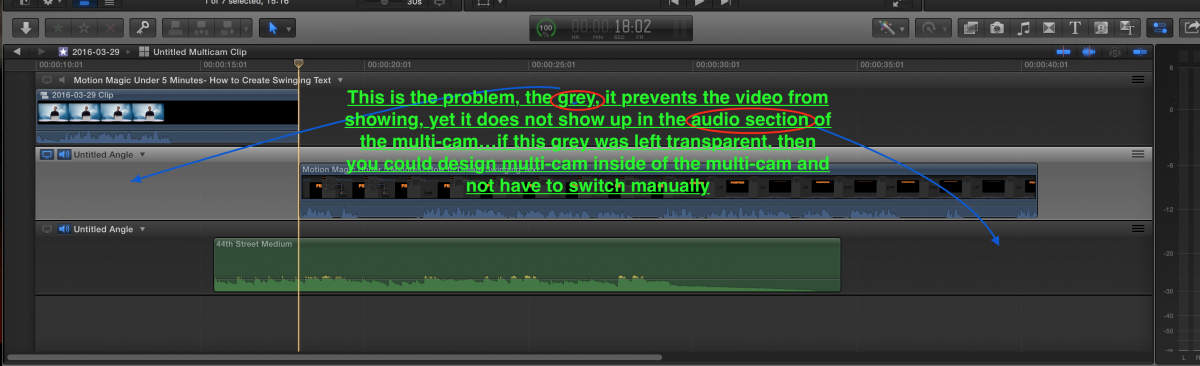
It was a proof of concept thought, what else can we do with multi-cam, yet I have found something strange, I have 2 video angles, set video 1, topmost video as monitor angle, stepped back, closed the multi-cam, layer 2 video, the non monitoring angle plays, yet it is off set 10 seconds, it should be invisible, even rendered, it still plays the non monitor angle instead of respecting the selection of the monitor angle to track 1, it plays track 2!!
Please Log in to join the conversation.
- Kenny_Park
-

- Offline
- New Member
-

- Posts: 10
- Thank you received: 0
Please Log in to join the conversation.

I like your creativity. However, trying to shoehorn not just one, but two features into something they weren't designed to do isn't really making a new feature. In order to do what you want to do, you can easily add all these tracks into a compound clip and your "angles" would be secondary storylines.
It kind of sounds like you're trying really hard to make a FCP7 workflow in FCPX. Stop it. Just stop. You will drive yourself crazy and you won't be happy.
I'd try the secondary storyline method though. You'll get what you want out of that for the most part.
Please Log in to join the conversation.
- Posts: 971
- Thank you received: 46
Please Log in to join the conversation.
Please Log in to join the conversation.
- Posts: 971
- Thank you received: 46
As this is a I wish I could see in 10.2.3, or 10.3, this is that thing, get rid of the damn grey it is not needed, not loved, not desired, hated!!!
Please Log in to join the conversation.
- Posts: 971
- Thank you received: 46
That was just a thought out of my head!
Please Log in to join the conversation.
- Kenny_Park
-
- Offline
- New Member
-
- Posts: 10
- Thank you received: 0
the grey in my graphic highlights the problem
If you edit the multicam inside the angle editor, you're still doing it "manually". In fact, to do so would ignore the benefits of the multiclip, as it'd be like syncing angles in a traditional track-based timeline, cutting out bits of the top track to see the tracks beneath. The whole point of multicam is to preclude that necessity.
Please Log in to join the conversation.
- Tom Wolsky
-
- Offline
- Moderator
-
In the multicam editor single video lanes can be made the monitoring angle. Any lane can be made the monitoring angle. You don't have to cut away or disable lanes to view what's underneath. If I want to see the 14 lane in the multiply clip I just make it the monitoring angle. I don't have to disable everything above. You're want to edit the video in the multicam editor. That's not what it's designed for, and it shouldn't be.
The angle viewer should the angles regardless of the monitoring angle that appears in the viewer.
Please Log in to join the conversation.
- Karsten Schlüter
-

- Offline
- Moderator
-
- Posts: 3790
- Thank you received: 718
(promised: 10.3 comes without tracks...)
ok, in a thread of +17 pages, any moderation is ... late.
apologizes for being an idealist. :blush:
Please Log in to join the conversation.
Karsten Schlüter wrote: .... what about coming back to topic ... ?
(promised: 10.3 comes without tracks...)
ok, in a thread of +17 pages, any moderation is ... late.
apologizes for being an idealist. :blush:
So right!
Maybe we just start a new discussion called "Waiting on 10.2.4 or 10.3"?
Please Log in to join the conversation.
- Posts: 971
- Thank you received: 46
What we have is like planes freedom in the vertical plane, if you could view 2 tracks in 3d it would look like this = an equal sign!!
In order to see the underlying track it is shifted out from the vertical plane to run parallel to the 1st track, but it is still a track, it has all the properties of a track, it is a track!! How can it be anything else???
Please Log in to join the conversation.
- Karsten Schlüter
-
- Offline
- Moderator
-
- Posts: 3790
- Thank you received: 718
davechap wrote: …
Maybe we just start a new discussion called "Waiting on 10.2.4 or 10.3"?
Maybe, if one has the need for a new topic, about tracks or life in general, s/he starts a new one?

Please Log in to join the conversation.
- Tom Wolsky
-
- Offline
- Moderator
-
You can call them tracks if you like, but you are incorrect and you're misleading people when you say that.
Please Log in to join the conversation.
No, it does not have all the properties of a track. In a single LANE of connected clips, I can move one, or a set of those clips out of that lane to another lane, and the rest are unaffected. In a TRACK, they are all locked together, and what I just did would be impossible. Storylines are TRACK-LIKE, but still not tracks. A TRACK can not be moved in a horizontal directly, as Connected Storylines can. As Tom said, in FCPX, everything outside of the Primary Storyline is free floating and can be moved vertically or horizontally anywhere you want, above or below. A track simply can not physically do that.
I think Karsten is correct, someone needs to start a new thread about concepts only they understand.
Please Log in to join the conversation.
- robadamsfilms
-
- Offline
- New Member
-
- Posts: 4
- Thank you received: 0
Please Log in to join the conversation.
- If you purchased FCPX when it was first released, you have now paid about $60 per YEAR for it.
- PPro, at $20 per month, is costing you $240 per year, or $1200 since FCPX was first released.
- Apple has sold AT LEAST 1 million copies of FCPX, at $300 USD, that means Apple has $300 million for an NLE. That's a VERY healthy software development company for just one application. So yes, Apple makes a ton of money off of FCPX.
Please Log in to join the conversation.
