


3 Post Moderation Rule for New Boarders (25 Jan 2021)
New boarders will have their posts moderated - Don't worry if you cannot see your post immediately.
Final Cut Pro X and Yosemite

Please Log in to join the conversation.
10/16/2014
The previously released DiskWarrior 4 version 4.4 is required to run an installed copy of DiskWarrior while started from 10.10 Yosemite. If you haven't already done so, you can use the free updater for existing owners of DiskWarrior 4 versions 4.0-4.3.
Please Log in to join the conversation.

Please Log in to join the conversation.
Please Log in to join the conversation.
- jeff_kirkland
-

- Offline
- Senior Member
-

On newer Macs (2011 onwards) you can boot while holding down command-option-R. That should take you to Internet Recovery Mode. You can erase your drive and your Mac will be restored to the version of OS X it shipped with.
Older versions of OS X may still be available but hidden. Check under the hidden items section of your iTunes account page. Haven't tested this as none of my previous OS downloads have ever disappeared from my list. Everything right back to Lion is still available.
And my advice would be to always do a clean install of a new operating system. Updating over the old one is a sure-fire step down the path to unexplained weirdness. If you're lucky it'll just be small stuff but I'm never that lucky...
Please Log in to join the conversation.
- seantaylor007
-

- Offline
- New Member
-

- Posts: 6
- Thank you received: 0
Quick question about fcp 7 will it still run on yosemite?
Please Log in to join the conversation.
- Tom Wolsky
-

- Offline
- Moderator
-

Please Log in to join the conversation.
- jeff_kirkland
-
- Offline
- Senior Member
-
Please Log in to join the conversation.
- jeff_kirkland
-
- Offline
- Senior Member
-
So far it's working perfectly - in fact I'd go as far as to say it's the best the Mac pro has run in the whole time I've owned it.
Please Log in to join the conversation.
Sean Lander - Editing since 1982 - AVID 1991 - FCP 1999 - FCPX 2011
Please Log in to join the conversation.
- ronny courtens
-

- Offline
- Moderator
-
- Posts: 4455
- Thank you received: 962
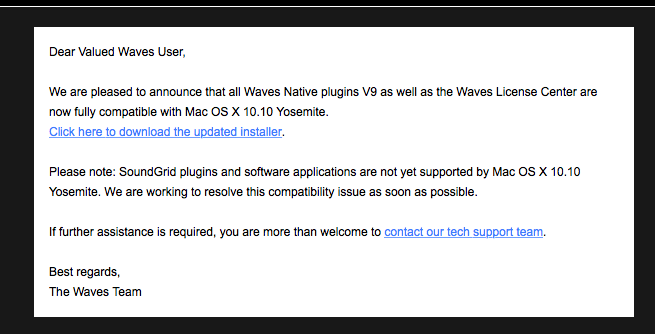
You can download the updated installer here:
email.waves-audio.com/lt.php?s=050fb039b...3c1d9e&i=48A72A6A485
- Ronny
Please Log in to join the conversation.
- Tom Wolsky
-
- Offline
- Moderator
-
P.S. The waveforms are identical. It just looks much darker, with much less shadow detail, in Yosemite than it does booted into Mavericks. If I take a screen shot of the 10.9.5 image that looks better, and bring it into Yosemite it looks as dark as the Yosemite image. There's something going on with the way images are being displayed in Yosemite. The QTX player in Yosemite looks really dark. QT7 in Yosemite looks a bit better than QTX, but still not as good as Mavericks.
Please Log in to join the conversation.


Please Log in to join the conversation.
- Tom Wolsky
-
- Offline
- Moderator
-
Man, signing in every time I come here is getting old.
Please Log in to join the conversation.
- Tom Wolsky
-
- Offline
- Moderator
-
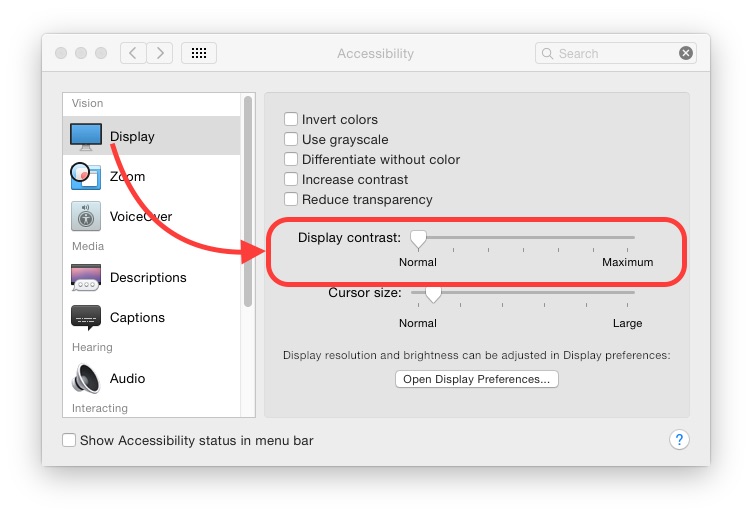
What a horrible control? In what way does the Display contrast slider effect the contrast when all it does is brighten the image. All the pale gray in the OS gets washed out completely. That's not increased contrast.That's really bad.
Please Log in to join the conversation.
Please Log in to join the conversation.
Please Log in to join the conversation.
I can report that FCP7 works slightly better in Yosemite than it did in Mavericks. Video in the Canvas no longer has "screen tearing" or v-sync issues when played back. Now it's nice and solid like it was in pre-Mavericks OSes. The audio still needs immediate rendering when seemingly any filter is applied, however.
Soundtrack Pro works fine.
FCPX is fine, maybe even a touch more responsive. However A/V Output is now greyed out. Blackmagic Intensity Shuttle does not seem to be recognized. System Preferences sees it. So does System Information. Blackmagic Media Express does NOT see it. Unplugging and reinserting the TB cable from the Shuttle itself got Media Express to see and use it, but FCPX still does not. It's important to me that Media Express sees and works with the device, not so much FCPX.
Of course the latest iterations of Compressor 4 and Motion 5 work.
Logic Pro X works.
iZotope RX works.
Photoshop CS6 works after "Initializing Type Tool". Premiere Pro CS6 seems to work. Adobe Audition CS6 works. After Effects CS6 works. Adobe Encore CS6 works.
Screenflow works.
Skype, Twitter and all of that nonsense works.
So far am loving the OS. At 10.10.1 I think I'll put it on my main drive. It really is gorgeous. The EVEN Mac OSes are always really good. Just the opposite of Windows OSes. I give Yosemite a hearty thumbs up!
Please Log in to join the conversation.
- Tom Wolsky
-
- Offline
- Moderator
-
Gorgeous? Turquoise folders? Incredible lack of detail. It's like the sketch pad drawing of an OS. Safari's good, nice improvements. Mail is as horrible and clumsy and ugly as ever. Time Machine is glitchy and still dumb. Handoff is flakey. Bluetooth has connection problems, likes to drop devices. Spotlight and its window is horrible and poorly executed. The only thing gorgeous about the OS is the desktop photos. And dark mode.
Performance though on an SSD is even better than 10.9, and it works well with FCP.
Please Log in to join the conversation.
- Karsten Schlüter
-

- Offline
- Moderator
-
- Posts: 3790
- Thank you received: 718
Tom Wolsky wrote: ... Gorgeous? ... Incredible lack of detail... like the sketch pad drawing of an OS ... horrible ... clumsy ... ugly ... glitchy ... still dumb... flakey .. problems... horrible ...poorly executed. .. .
Reading btw. your lines, I'm under the vague impression, you don't like Yosemite..?

Wasn't there a rule, never use an OS 'til its 3rd incarnation?
Please Log in to join the conversation.
