


- Posts: 4455
- Thank you received: 962
3 Post Moderation Rule for New Boarders (25 Jan 2021)
New boarders will have their posts moderated - Don't worry if you cannot see your post immediately.
Final Cut Pro X and Yosemite
- ronny courtens
-

- Offline
- Moderator
-

Less
More
17 Oct 2014 15:26 #54291
by ronny courtens
Replied by ronny courtens on topic Final Cut Pro X and Yosemite
Thank you for the input. Same here, no issues with Compressor. Clean install on three different machines.
- Ronny
- Ronny
Please Log in to join the conversation.
17 Oct 2014 18:08 - 17 Oct 2014 18:08 #54297
by tpayton
Replied by tpayton on topic Final Cut Pro X and Yosemite
Anybody else seeing interface weirdness in Music and Photos browsers in FCPX:
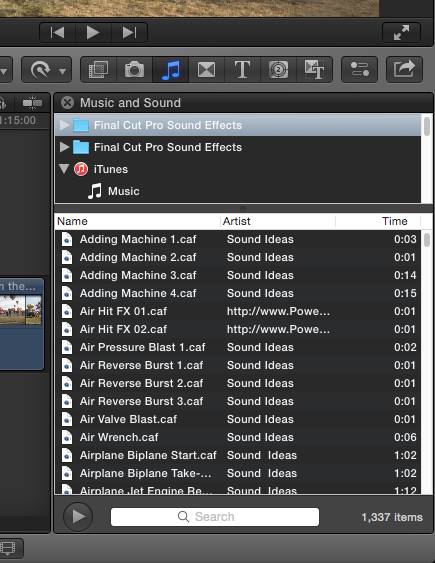
FYI. The white search bar, and white scroll bars.
FYI. The white search bar, and white scroll bars.
Last edit: 17 Oct 2014 18:08 by tpayton.
Please Log in to join the conversation.
- SMKP_Editor
-

- Offline
- New Member
-

Less
More
- Posts: 2
- Thank you received: 1
17 Oct 2014 19:30 #54305
by SMKP_Editor
Replied by SMKP_Editor on topic Final Cut Pro X and Yosemite
Thanks for all the info Ronny! Just updated my MacBook Pro and My MAC Pro, everything seems to be working peachy keen!
Please Log in to join the conversation.
- Tom Wolsky
-

- Offline
- Moderator
-
17 Oct 2014 19:40 - 17 Oct 2014 20:00 #54306
by Tom Wolsky
Replied by Tom Wolsky on topic Final Cut Pro X and Yosemite
Yes. FCP uses some aspects for dark mode in 10.10. I use dark throughout the OS and get dark menus. I like it.
The scroll bar depends on your scroll system prefs.
The scroll bar depends on your scroll system prefs.
Last edit: 17 Oct 2014 20:00 by Tom Wolsky.
Please Log in to join the conversation.
- Scrubelicious
-

- Offline
- Platinum Member
-

Less
More
- Posts: 1228
- Thank you received: 114
17 Oct 2014 20:02 #54307
by Scrubelicious
Yes but give it some time until the update comes Final Cut Pro X haven't been adjusted yet.
Replied by Scrubelicious on topic Final Cut Pro X and Yosemite
tpayton wrote: Anybody else seeing interface weirdness in Music and Photos browsers in FCPX:
FYI. The white search bar, and white scroll bars.
Yes but give it some time until the update comes Final Cut Pro X haven't been adjusted yet.
Please Log in to join the conversation.
- Tom Wolsky
-
- Offline
- Moderator
-
17 Oct 2014 22:49 #54326
by Tom Wolsky
Replied by Tom Wolsky on topic Final Cut Pro X and Yosemite
Compressor problems were in all builds prior to release including 388a. Long test runs on 389 and Compressor seems OK now.
Note of caution for those doing clean installs and migrating apps or reloading them, Prevent App Nap is switched off. It also gets switched off on some updates, so you want to check that it's on for the pro apps after installing.
Note of caution for those doing clean installs and migrating apps or reloading them, Prevent App Nap is switched off. It also gets switched off on some updates, so you want to check that it's on for the pro apps after installing.
Please Log in to join the conversation.
- Tom Wolsky
-
- Offline
- Moderator
-
17 Oct 2014 22:52 #54327
by Tom Wolsky
Replied by Tom Wolsky on topic Final Cut Pro X and Yosemite
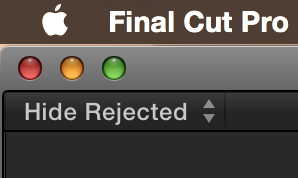
The update will probably have the flat traffic light buttons that disappear unless you hover over them. Wish full screen mode was sticky. Maybe in an update.
Please Log in to join the conversation.
17 Oct 2014 23:47 - 17 Oct 2014 23:48 #54332
by plysat
Can't sleep? Try this: fcpxpert.net ;-)
Replied by plysat on topic Final Cut Pro X and Yosemite
Yeah, there are some UI things that are part of... ProKit I think... that'll likely be in the next update. some menu text, window buttons etc. I've seen no noticeable functional changes though. Andy's 3D and the Hawaiki color effects seem fine for me...
Can't sleep? Try this: fcpxpert.net ;-)
Last edit: 17 Oct 2014 23:48 by plysat.
Please Log in to join the conversation.
17 Oct 2014 23:49 #54333
by plysat
Can't sleep? Try this: fcpxpert.net ;-)
Replied by plysat on topic Final Cut Pro X and Yosemite
BenB Wrote: "That said, I would NEVER IN A MILLION YEARS advise anyone making a living at this, to upgrade for a few weeks, lets see what shakes out with the general population first."
Too late...
Too late...
Can't sleep? Try this: fcpxpert.net ;-)
Please Log in to join the conversation.
- Karsten Schlüter
-

- Offline
- Moderator
-
Less
More
- Posts: 3790
- Thank you received: 718
19 Oct 2014 06:38 #54399
by Karsten Schlüter
Thanks for sharing - Autograde in use here - would be a bummer, if ti doesn't work anymore.
But what really kills me is Ben's observation:
www.fcp.co/forum/6-motion-5/21551-motion...ing-lots-in-yosemite
That is an absolute NoNo! ... so, no Yosemite in the near future here.- :S
offTopic, from the MacMini-Fan-corner: the new Mac has welded-in Ram!! 1k€ for a 16GB Mini.. OMG! I paid almost half for mine.....
Replied by Karsten Schlüter on topic Final Cut Pro X and Yosemite
fb_696650432 wrote: ... currently have problems running under Yosemite.
These are: …
Hawaiki - Autograde and Automatch.
.…
Thanks for sharing - Autograde in use here - would be a bummer, if ti doesn't work anymore.
But what really kills me is Ben's observation:
www.fcp.co/forum/6-motion-5/21551-motion...ing-lots-in-yosemite
That is an absolute NoNo! ... so, no Yosemite in the near future here.- :S
offTopic, from the MacMini-Fan-corner: the new Mac has welded-in Ram!! 1k€ for a 16GB Mini.. OMG! I paid almost half for mine.....
Please Log in to join the conversation.
- fb_696650432
-
- Offline
- New Member
-
Less
More
- Posts: 5
- Thank you received: 1
19 Oct 2014 07:41 - 19 Oct 2014 07:43 #54403
by fb_696650432
Replied by fb_696650432 on topic Final Cut Pro X and Yosemite
My particular issue with certain plugins earlier in this thread was down to automatic graphics switching on my rMBP. Normally i have this permanently switched off but after updating to Yosemite had switched it on while playing around and forgot. It seems that certain plugins won't work with the Intel Iris Pro GPU, but will work with the NVIDIA GT 750M. This may have been the case under Mavericks as well for all i know but tbh i can't remember even bothering to try using the lower performance GPU since i first got that rMBP in 2013. All plugins are now performing fine but haven't checked for the potential full screen or compressor issues mentioned on here yet.
Last edit: 19 Oct 2014 07:43 by fb_696650432.
Please Log in to join the conversation.
- ronny courtens
-
- Offline
- Moderator
-
Less
More
- Posts: 4455
- Thank you received: 962
19 Oct 2014 08:14 #54404
by ronny courtens
Replied by ronny courtens on topic Final Cut Pro X and Yosemite
That's good to know, thank you for clarifying this. Many plugins rely on the GPU for rendering and they won't work well or not at all with lower-end graphics cards.
- Ronny
- Ronny
Please Log in to join the conversation.

19 Oct 2014 08:17 #54405
by FCPGuy
Replied by FCPGuy on topic Final Cut Pro X and Yosemite
Well that clears it up that it ins't a Yosemite problem but more a issue of the Plugin.
Good to know. By the way I have emailed the plugin developers before the release of Yosemite.
From 5 I received that there will be a update or confirmed it will work. the other 3 no support.
Good to know. By the way I have emailed the plugin developers before the release of Yosemite.
From 5 I received that there will be a update or confirmed it will work. the other 3 no support.
Please Log in to join the conversation.
- Karsten Schlüter
-
- Offline
- Moderator
-
Less
More
- Posts: 3790
- Thank you received: 718
19 Oct 2014 08:29 #54406
by Karsten Schlüter
Replied by Karsten Schlüter on topic Final Cut Pro X and Yosemite
thanks (again) fb_696650432 for clarifying .. !
.. but I'm still shy upgrading... Ben's observation about Motion5 issues let me hesitate (and actually no clone at hand of my main-drive for switching back from Yosi to Mav ... ).
Has anybody noticed 'issues' with home-brewn plug-ins?
My projects heavily rely on my own titles, transitions, generators..
.. but I'm still shy upgrading... Ben's observation about Motion5 issues let me hesitate (and actually no clone at hand of my main-drive for switching back from Yosi to Mav ... ).
Has anybody noticed 'issues' with home-brewn plug-ins?
My projects heavily rely on my own titles, transitions, generators..
Please Log in to join the conversation.
19 Oct 2014 08:34 #54407
by FCPGuy
No issues with self-made effects, What issues with Motion 5?
Is there a Motion and Yosemite thread?
Replied by FCPGuy on topic Final Cut Pro X and Yosemite
Karsten Schlüter wrote: thanks (again) fb_696650432 for clarifying .. !
.. but I'm still shy upgrading... Ben's observation about Motion5 issues let me hesitate (and actually no clone at hand of my main-drive for switching back from Yosi to Mav ... ).
Has anybody noticed 'issues' with home-brewn plug-ins?
My projects heavily rely on my own titles, transitions, generators..
No issues with self-made effects, What issues with Motion 5?
Is there a Motion and Yosemite thread?
Please Log in to join the conversation.
- Karsten Schlüter
-
- Offline
- Moderator
-
Less
More
- Posts: 3790
- Thank you received: 718
19 Oct 2014 08:51 - 19 Oct 2014 08:51 #54408
by Karsten Schlüter
5 posts ahead on this page I linked to, honorable forum member BenB posted his issues in the Motion section of this board - and when HE has issues, I take that very seriously ...
Replied by Karsten Schlüter on topic Final Cut Pro X and Yosemite
FCPGuy wrote: ....No issues with self-made effects, What issues with Motion 5?
Is there a Motion and Yosemite thread?
5 posts ahead on this page I linked to, honorable forum member BenB posted his issues in the Motion section of this board - and when HE has issues, I take that very seriously ...
Last edit: 19 Oct 2014 08:51 by Karsten Schlüter.
Please Log in to join the conversation.
- ronny courtens
-
- Offline
- Moderator
-
Less
More
- Posts: 4455
- Thank you received: 962
19 Oct 2014 09:19 #54409
by ronny courtens
Replied by ronny courtens on topic Final Cut Pro X and Yosemite
Hey Karsten,
Even though the first tests seem very positive, the golden rule remains: never update an OS unless you have a safety net.
I see no problems with Motion 5 so far. I just opened a complex project and it runs as expected. But Ben mentioned MObject in his post, so maybe that plugin has some issues with Yosemite. I don't have it on this test machine right now, will install it later this day to try it out. I can confirm that all the custom Motion templates we use in FCP X show no problems. But such templates are usually fairly simple compared with a real Motion project.
- Ronny
Even though the first tests seem very positive, the golden rule remains: never update an OS unless you have a safety net.
I see no problems with Motion 5 so far. I just opened a complex project and it runs as expected. But Ben mentioned MObject in his post, so maybe that plugin has some issues with Yosemite. I don't have it on this test machine right now, will install it later this day to try it out. I can confirm that all the custom Motion templates we use in FCP X show no problems. But such templates are usually fairly simple compared with a real Motion project.
- Ronny
Please Log in to join the conversation.
- Karsten Schlüter
-
- Offline
- Moderator
-
Less
More
- Posts: 3790
- Thank you received: 718
19 Oct 2014 09:34 - 19 Oct 2014 09:34 #54410
by Karsten Schlüter
Good morning, Ronny,
thanks for chiming in ... I have never reinstalled a whole OS via my TimeMachine backup, ... therefor my Plan B to create a clone of my actual main drive, BEFORE 'testing' Yosemite ... very little extras installed here, as mentioned above Hawaiki .. and mObject.-
I'm not surprised, that such a highly complex 'plugin' as mObject has some 'starting problems' ... but the team at motionvfx seem to me really busy. And I'm in no hurry ... hobbyist talking here.
Would be interesting, how other complex tools, as Twixtor or TrackX behave... (?)
Usually, due to NO professional pressure here, I love to be the guinea pig for new versions.. this time, I guess, it needs a lil' shopping first... need a new drive anyhow...
Have a nice weekend!
(was lazy during the week, have to edit TWO games today.. phewww!!)
Replied by Karsten Schlüter on topic Final Cut Pro X and Yosemite
ronny courtens wrote: ... never update an OS unless you have a safety net....
Good morning, Ronny,
thanks for chiming in ... I have never reinstalled a whole OS via my TimeMachine backup, ... therefor my Plan B to create a clone of my actual main drive, BEFORE 'testing' Yosemite ... very little extras installed here, as mentioned above Hawaiki .. and mObject.-
I'm not surprised, that such a highly complex 'plugin' as mObject has some 'starting problems' ... but the team at motionvfx seem to me really busy. And I'm in no hurry ... hobbyist talking here.
Would be interesting, how other complex tools, as Twixtor or TrackX behave... (?)
Usually, due to NO professional pressure here, I love to be the guinea pig for new versions.. this time, I guess, it needs a lil' shopping first... need a new drive anyhow...
Have a nice weekend!
(was lazy during the week, have to edit TWO games today.. phewww!!)
Last edit: 19 Oct 2014 09:34 by Karsten Schlüter.
Please Log in to join the conversation.
19 Oct 2014 12:31 #54411
by BenB
Replied by BenB on topic Final Cut Pro X and Yosemite
Bear in mind that a page one article has the head of MotionVFX stating that mObject's latest update does in fact bring it up to FxPlug3 and Yosemite. And it still has bugs. Even before applying mObject, my screen would go blank for a second, then come back, while working in Motion 5. And I had a second, complex project that gave me similar issues to the one that had mObject in it. The only commonalities between the two, using mRays and mDust clips in both. Both are 1080 format and 30 seconds long. And both are generic Motion projects, not FCPX templates.
FCPX templates are having no issues at all for me.
I can verify that Coremelt is giving me NO issues at all. I use lots of them, quite often, and they're churning away just fine. They will also be getting an update in the not too distant future, from what I understand.
FCPX templates are having no issues at all for me.
I can verify that Coremelt is giving me NO issues at all. I use lots of them, quite often, and they're churning away just fine. They will also be getting an update in the not too distant future, from what I understand.
Please Log in to join the conversation.
19 Oct 2014 12:37 - 19 Oct 2014 12:38 #54413
by BenB
Replied by BenB on topic Final Cut Pro X and Yosemite
For MBP users, I'd highly recommend the app gfxCardStatus. Shows which is active, and lets you manually enable one or the other, overiding the system's auto switching. Free & open source, but donate if you actually use it.
gfx.io
- Growl or Notification Center notifications when the GPU changes.
- The Dependencies list: open the gfxCardStatus menu when your discrete GPU is active to see what is turning it on.
- Manually switch to Integrated Only or Discrete Only mode to force one GPU on or the other.
gfx.io
Last edit: 19 Oct 2014 12:38 by BenB.
Please Log in to join the conversation.
