


- Posts: 971
- Thank you received: 46
3 Post Moderation Rule for New Boarders (25 Jan 2021)
New boarders will have their posts moderated - Don't worry if you cannot see your post immediately.
Final Cut Pro X and Yosemite
Less
More
24 Oct 2014 09:45 #54715
by MsJustine
Replied by MsJustine on topic Final Cut Pro X and Yosemite
Why does the coding of the OS require a dumbing down of the interface? This flat 1 dimensional aspect of the interface is great for a mobile tablet OS, not Mac OSX.
I wonder about the decisions being made in regards design, is this the very very best that the designers of user interfaces at Apple can produce?? If so, wow it is not going to be pretty down the line, are we heading towards command line terminal operations?
I wonder about the decisions being made in regards design, is this the very very best that the designers of user interfaces at Apple can produce?? If so, wow it is not going to be pretty down the line, are we heading towards command line terminal operations?
Please Log in to join the conversation.
- jeff_kirkland
-

- Offline
- Senior Member
-

24 Oct 2014 09:49 #54716
by jeff_kirkland
Replied by jeff_kirkland on topic Final Cut Pro X and Yosemite
The look grows on you. I hated it when I first saw the beta but now I much prefer it to the clunky UI in Mavericks.
Please Log in to join the conversation.
- Tom Wolsky
-

- Offline
- Moderator
-

24 Oct 2014 10:10 #54717
by Tom Wolsky
Replied by Tom Wolsky on topic Final Cut Pro X and Yosemite
You mean until 10.10.3? After hearing Craig Federighi gushing at WWDC and in October about the joys of transparency in the OS and how they love the vibrancy of the new look, I don't think anything's going to change and turquoise folders are here to stay. It's really quite a hard OS to work with in terms of eye strain. There already have been a lot of complaints about it, and trying to fix it in Accessibility led to the problem I had with video file appearance. It is what it is and works better than Mavericks, which is to the good.
Please Log in to join the conversation.

24 Oct 2014 10:28 #54718
by mousefarm
Replied by mousefarm on topic Final Cut Pro X and Yosemite
MsJustine, we have a term here in Denmark that roughly translated says something like this: "Everybody wants development, but nobody wants change".
I would definitely put you in that group
I would definitely put you in that group
Please Log in to join the conversation.
- Karsten Schlüter
-

- Offline
- Moderator
-
Less
More
- Posts: 3790
- Thank you received: 718
24 Oct 2014 10:52 #54719
by Karsten Schlüter
LOL!
I haven't participated in the public-beta, nor have I installed Yosi yet on my active work-set, due to the problems, FCPX & M5 & Compressor obviously have - for some .. but some, I really respect for their profound knowledge ... so, no idea about purple, translucent folders... and basically, I prefer simplicity, taste is a cultural thing, therfor 'local'.-
What really 'shocks' me:
aside a discussion about taste, reg. 'look', flat or not flat, simplified or skeuomorphistic, ... it seems to my simplified observations, how 'complains' drop into several boards, that the UNDER THE HOOD parts need some overhauling. And that's no good - not for pros, who nedd a 100% rock-solid system, nor for us lazy hobbyists, who probably are not so 'organized' with backups & stuff.
Being an Apple-user for +30y, I don't remember such a brought list of trouble with a new MacOS - but that could be my glorified memories... :silly:
I guess, I'll wait for a few weeks, before 'risking' my system.-
Replied by Karsten Schlüter on topic Final Cut Pro X and Yosemite
Tom Wolsky wrote: ... It's really quite a hard OS to work with in terms of eye strain. ...
LOL!
I haven't participated in the public-beta, nor have I installed Yosi yet on my active work-set, due to the problems, FCPX & M5 & Compressor obviously have - for some .. but some, I really respect for their profound knowledge ... so, no idea about purple, translucent folders... and basically, I prefer simplicity, taste is a cultural thing, therfor 'local'.-
What really 'shocks' me:
aside a discussion about taste, reg. 'look', flat or not flat, simplified or skeuomorphistic, ... it seems to my simplified observations, how 'complains' drop into several boards, that the UNDER THE HOOD parts need some overhauling. And that's no good - not for pros, who nedd a 100% rock-solid system, nor for us lazy hobbyists, who probably are not so 'organized' with backups & stuff.
Being an Apple-user for +30y, I don't remember such a brought list of trouble with a new MacOS - but that could be my glorified memories... :silly:
I guess, I'll wait for a few weeks, before 'risking' my system.-
Please Log in to join the conversation.
Less
More
- Posts: 971
- Thank you received: 46
24 Oct 2014 10:55 #54720
by MsJustine
Replied by MsJustine on topic Final Cut Pro X and Yosemite
That was uncalled for and not fair. You do not pick on Tom, you pick on women. I commented on what Tom wrote, about the problems of design. I want development, of course, it has to be the correct development, for example the ipad, a great design ruined by stupid design decisions, no expansion ports, idiotic audio playback system.
The Mac Pro, round tube, looks great, sucks in reality, and this insanity of solder, why is everything have to be hard soldered? Stupid stupid design decisions.. Not needed and not wanted design decisions, makes no sense to solder in the RAM and the Hard drive, this is a decision borne of marketing and not a user functional design
It makes more sense to have the products with replaceable parts, so that we can update as required, instead in 2 weeks we have to buy new laptops. filling up land fills with barely functional obsolete machines that cannot be upgraded or repaired..
My extended Mac keyboard, the left shift key stopped working, so I have to throw it away and buy a new one.. What a waste of 101+ keys..
The Mac Pro, round tube, looks great, sucks in reality, and this insanity of solder, why is everything have to be hard soldered? Stupid stupid design decisions.. Not needed and not wanted design decisions, makes no sense to solder in the RAM and the Hard drive, this is a decision borne of marketing and not a user functional design
It makes more sense to have the products with replaceable parts, so that we can update as required, instead in 2 weeks we have to buy new laptops. filling up land fills with barely functional obsolete machines that cannot be upgraded or repaired..
My extended Mac keyboard, the left shift key stopped working, so I have to throw it away and buy a new one.. What a waste of 101+ keys..
Please Log in to join the conversation.
- peteramwiggins
-

- Offline
- Administrator
-

- The Administrator :)
Less
More
- Posts: 1049
- Thank you received: 404
24 Oct 2014 11:00 #54722
by peteramwiggins
Administrator
Replied by peteramwiggins on topic Final Cut Pro X and Yosemite
Ok let me just jump in here and say that nobody is picking on you because you are a women, lets get that straight.
You posted an opinion and the reply in no way singled you out because of your sex.
Secondly, the MacPro doesn't suck, you can't extrapolate an experience you had with a keyboard to an item that can cost up to £7,000.
You posted an opinion and the reply in no way singled you out because of your sex.
Secondly, the MacPro doesn't suck, you can't extrapolate an experience you had with a keyboard to an item that can cost up to £7,000.
Administrator
Please Log in to join the conversation.
Less
More
- Posts: 971
- Thank you received: 46
24 Oct 2014 11:08 - 24 Oct 2014 11:31 #54726
by MsJustine
Replied by MsJustine on topic Final Cut Pro X and Yosemite
The idea of the Macpro is brilliant, the idea of the fan in the middle brilliant, the problem with a round tower and all the ports on the same vertical plane is a problem, power and inputs and output ports make it silly, unconsidered design flaw maybe, I do not know.
I would never put anyone into any group, that was uncalled for, and has no place on open forum, this is a discussion forum, with open dialogue, at times people will disagree with my views, and that is fine, my views are valid, considered, there are problems at Apple and I am pointing out what I think are well issues of design, when is design the very best it can be, and when is design that of marketing and not true function?
Hard solder in the parts, makes no functional sense, if it was the best, why spare the $5000 MacPro, why was the MacPro not hard soldered?? The Macbook Pro and the mac mini are, and top of the line product is spared this fate... A decision of design or market driven??
I would never put anyone into any group, that was uncalled for, and has no place on open forum, this is a discussion forum, with open dialogue, at times people will disagree with my views, and that is fine, my views are valid, considered, there are problems at Apple and I am pointing out what I think are well issues of design, when is design the very best it can be, and when is design that of marketing and not true function?
Hard solder in the parts, makes no functional sense, if it was the best, why spare the $5000 MacPro, why was the MacPro not hard soldered?? The Macbook Pro and the mac mini are, and top of the line product is spared this fate... A decision of design or market driven??
Last edit: 24 Oct 2014 11:31 by MsJustine.
Please Log in to join the conversation.


24 Oct 2014 20:10 #54759
by Redifer
Replied by Redifer on topic Final Cut Pro X and Yosemite
The minimalism of the design (flattening, less shading, etc) is the style of the day. It's what EVERYTHING is currently doing. It's a fad that will pass in time to something new that you'll also hate.
Please Log in to join the conversation.
- RealPlayer93
-
- Offline
- New Member
-

Less
More
- Posts: 4
- Thank you received: 0
25 Oct 2014 13:19 #54790
by RealPlayer93
Replied by RealPlayer93 on topic Final Cut Pro X and Yosemite
I've got a problem since I've upload my OS.
Unlike all the other users who keep on saying that they can't even lunch FCPX, I can and it all works good, except for the fact than when I close it, it just don't close.
I press cmd+Q but I can still see the dot under the icon on the bar and if I try right clicking on it, it say "The application is not responsive".
I've tried using the Force Quit feature, but it simply does nothing at all.
I've tried shutting the session down, nothing to do either.
The only solution is to press the power button until it the whole system shut down, but it shouldn't be a great solution.
The problem is that if I want to use FCPX again during the same session, I have to force the computer to shut down and it's quite annoying.
Does someone know how to fix it?
Thanks a lot
Unlike all the other users who keep on saying that they can't even lunch FCPX, I can and it all works good, except for the fact than when I close it, it just don't close.
I press cmd+Q but I can still see the dot under the icon on the bar and if I try right clicking on it, it say "The application is not responsive".
I've tried using the Force Quit feature, but it simply does nothing at all.
I've tried shutting the session down, nothing to do either.
The only solution is to press the power button until it the whole system shut down, but it shouldn't be a great solution.
The problem is that if I want to use FCPX again during the same session, I have to force the computer to shut down and it's quite annoying.
Does someone know how to fix it?
Thanks a lot
Please Log in to join the conversation.
- ronny courtens
-

- Offline
- Moderator
-
Less
More
- Posts: 4455
- Thank you received: 962
25 Oct 2014 13:36 #54791
by ronny courtens
Replied by ronny courtens on topic Final Cut Pro X and Yosemite
I haven't read any posts about people not being able to launch FCP X when running the final release version of Yosemite, but I can confirm the issue you are reporting.
I have the same problem on one of our Yosemite test machines. It is the only machine on which we have installed Yosemite over Mavericks. The two other machines had a clean install and do not show this problem. Sometimes we can quit FCP X on the problematic machine, sometimes it indeed stays stuck and there is no way to force-quit it or to open it again unless we do a forced shut-down of the computer.
Please report this to Apple using the Feedback form, Im pretty sure we will see a bug-fix update soon.
- Ronny
I have the same problem on one of our Yosemite test machines. It is the only machine on which we have installed Yosemite over Mavericks. The two other machines had a clean install and do not show this problem. Sometimes we can quit FCP X on the problematic machine, sometimes it indeed stays stuck and there is no way to force-quit it or to open it again unless we do a forced shut-down of the computer.
Please report this to Apple using the Feedback form, Im pretty sure we will see a bug-fix update soon.
- Ronny
Please Log in to join the conversation.
- RealPlayer93
-
- Offline
- New Member
-
Less
More
- Posts: 4
- Thank you received: 0
25 Oct 2014 13:41 #54792
by RealPlayer93
Replied by RealPlayer93 on topic Final Cut Pro X and Yosemite
Thank you so much Ronny!
Do you think that re-installing FCPX could fix this problem or we just have to wait for apple to do that?
Do you think that re-installing FCPX could fix this problem or we just have to wait for apple to do that?
Please Log in to join the conversation.
25 Oct 2014 13:54 #54793
by VidGreg
Replied by VidGreg on topic Final Cut Pro X and Yosemite
Realplayer and Ronny,
Have you tried to use Activity Monitor to "Quit Process?"
Launch Activity Monitor and click on FCP and click on the left stop icon in menu bar. Choose quit/force quit. Does this stop the application?
Does refreshing the "Finder" window allow you to quit?
RealPlayer did you install over Mavericks?
Just curious.
Plug-in maybe??
Hope this helps, Greg
Have you tried to use Activity Monitor to "Quit Process?"
Launch Activity Monitor and click on FCP and click on the left stop icon in menu bar. Choose quit/force quit. Does this stop the application?
Does refreshing the "Finder" window allow you to quit?
RealPlayer did you install over Mavericks?
Just curious.
Plug-in maybe??
Hope this helps, Greg
Please Log in to join the conversation.
- RealPlayer93
-
- Offline
- New Member
-
Less
More
- Posts: 4
- Thank you received: 0
25 Oct 2014 14:03 #54794
by RealPlayer93
Replied by RealPlayer93 on topic Final Cut Pro X and Yosemite
No I've not tried that and yes I've installed Yosemite over Mavericks! I don't think it's a plug-in problem, because usually when it's a plug-in that causes the crash, it just crash. This is something totally different.
And what do you mean for "refreshing the finder"?
And what do you mean for "refreshing the finder"?
Please Log in to join the conversation.
25 Oct 2014 15:17 - 25 Oct 2014 15:18 #54799
by VidGreg
Replied by VidGreg on topic Final Cut Pro X and Yosemite
Hi RealPlayer
I wouldn't rule out a plug-in. If the problem only shows up while using FCPX while in Yosemite after install over Mavericks, there maybe a coding issue. Even if a plug-in is not "active" if may still affect the proper behavior of the program. Both Amoeba Rogue's Audio High-jack and SnapProZ users have reported problems with Yosemite even if you are not activity using the program. Think SnapPro has a Yosemite update.
I have not upgraded to Yosemite yet, and will start with a separate external drive with clean install. So I am just guessing here.
Activity Monitor also allows you to view "sample process" which might show a loop while trying to quit. This could be a good investigative tool and lead to finding the issue. As Ronny said you should report the bug to Apple.
Quitting Finder may or may not release the program, but is easy to try. Click on an area outside of the active FCP window (you may have to shrink the window from a side) click on the background and the menu should change from FCP to Finder, then click on Quit Finder. This will relaunch Finder. You can also launch Terminal and enter "killall Finder" without the quotes and then hit enter. If either of these works then the problem most likely involves some process not properly relinquishing the window. You can also quit FCP from within Terminal using the killall command or Process Identification PID number. This will almost always work.
Assumptions aren't always a good idea, but assume you have tried the keyboard shortcut of option/command/escape key while in FCP to get to the force quit dialogue?? Repaired permissions?
I assume Ronnie has tried to repair permissions without any love.
As with any new version of OS, there are bound to be bugs. Coding is difficult and lots of various computer configurations with lots of different programs interacting so not easy to eliminate all issues at launch. Looking at the log files might also show the problem. If you get an actual crash, send crash report to Apple.
Hope this helps, Greg
I wouldn't rule out a plug-in. If the problem only shows up while using FCPX while in Yosemite after install over Mavericks, there maybe a coding issue. Even if a plug-in is not "active" if may still affect the proper behavior of the program. Both Amoeba Rogue's Audio High-jack and SnapProZ users have reported problems with Yosemite even if you are not activity using the program. Think SnapPro has a Yosemite update.
I have not upgraded to Yosemite yet, and will start with a separate external drive with clean install. So I am just guessing here.
Activity Monitor also allows you to view "sample process" which might show a loop while trying to quit. This could be a good investigative tool and lead to finding the issue. As Ronny said you should report the bug to Apple.
Quitting Finder may or may not release the program, but is easy to try. Click on an area outside of the active FCP window (you may have to shrink the window from a side) click on the background and the menu should change from FCP to Finder, then click on Quit Finder. This will relaunch Finder. You can also launch Terminal and enter "killall Finder" without the quotes and then hit enter. If either of these works then the problem most likely involves some process not properly relinquishing the window. You can also quit FCP from within Terminal using the killall command or Process Identification PID number. This will almost always work.
Assumptions aren't always a good idea, but assume you have tried the keyboard shortcut of option/command/escape key while in FCP to get to the force quit dialogue?? Repaired permissions?
I assume Ronnie has tried to repair permissions without any love.
As with any new version of OS, there are bound to be bugs. Coding is difficult and lots of various computer configurations with lots of different programs interacting so not easy to eliminate all issues at launch. Looking at the log files might also show the problem. If you get an actual crash, send crash report to Apple.
Hope this helps, Greg
Last edit: 25 Oct 2014 15:18 by VidGreg. Reason: word correction
Please Log in to join the conversation.
- RealPlayer93
-
- Offline
- New Member
-
Less
More
- Posts: 4
- Thank you received: 0
25 Oct 2014 15:29 #54800
by RealPlayer93
Replied by RealPlayer93 on topic Final Cut Pro X and Yosemite
Thanks so so so so much Greg, I've been very helpful!!
I'll try these methods, hoping at least one of these works!
Thanks again!
I'll try these methods, hoping at least one of these works!
Thanks again!
Please Log in to join the conversation.
- ronny courtens
-
- Offline
- Moderator
-
Less
More
- Posts: 4455
- Thank you received: 962
25 Oct 2014 15:43 - 25 Oct 2014 15:45 #54801
by ronny courtens
Replied by ronny courtens on topic Final Cut Pro X and Yosemite
Hey Greg,
Thanks for chiming in, much appreciated.
I agree on this system the issue might be related to a plugin as i have many of them installed on this machine for testing purposes. I had already tested relaunching Finder, quitting from Activity Monitor and of course the normal OPT/CMD/ESC and trashing prefs, but to no avail. The only way I can quit FCP X (when it X happens to be stuck, which is not always) is with the killall command line. But that's not something I would do if you are not familiar with Terminal.
- Ronny
Thanks for chiming in, much appreciated.
I agree on this system the issue might be related to a plugin as i have many of them installed on this machine for testing purposes. I had already tested relaunching Finder, quitting from Activity Monitor and of course the normal OPT/CMD/ESC and trashing prefs, but to no avail. The only way I can quit FCP X (when it X happens to be stuck, which is not always) is with the killall command line. But that's not something I would do if you are not familiar with Terminal.
- Ronny
Last edit: 25 Oct 2014 15:45 by ronny courtens.
Please Log in to join the conversation.
25 Oct 2014 16:07 - 25 Oct 2014 16:12 #54804
by bluefonia
Replied by bluefonia on topic Final Cut Pro X and Yosemite
Having third party AU-plugins installed may cause serious troubles in FCPX. In my case - as being a musician/composer besides making films - I have many third party AU´s installed. If these are present in the AU-plugin folder FCPX will not launch at all. I have made a folder called "Disabled plugins" and move all third party AU´s to that folder before launching FCPX.
A thumb of rule in solving problems with DAW¨s is removing all third party plugins. If the problem is still there then the plugins are probably not causing the problem. If on the other hand the problem has gone, you then start to add one plugin at the time back into the plugin folder until you catch the guilty one(s).
I´m not that experienced with FCPX, but you might try launching FCPX without any third party plugins in the AU-folder as well as no third party effects in the Motion Templates folder. Maybe FXPX in its "native" state will run okay.
A thumb of rule in solving problems with DAW¨s is removing all third party plugins. If the problem is still there then the plugins are probably not causing the problem. If on the other hand the problem has gone, you then start to add one plugin at the time back into the plugin folder until you catch the guilty one(s).
I´m not that experienced with FCPX, but you might try launching FCPX without any third party plugins in the AU-folder as well as no third party effects in the Motion Templates folder. Maybe FXPX in its "native" state will run okay.
Last edit: 25 Oct 2014 16:12 by bluefonia.
Please Log in to join the conversation.
25 Oct 2014 16:13 #54805
by VidGreg
Replied by VidGreg on topic Final Cut Pro X and Yosemite
Thanks Ronnie
Thought you would try all the remedies.
Yeah, I am hesitant to advise the use of Terminal, but when all else fails, Terminal is the way to go.
Assume with Terminal you can continue to use Mac without reboot? Are you using killall Finder or killall FCP?
Anything in AM sample processes?
Perhaps RealPlayer could send you a list of all plugins and you could check out/remove any common plug-ins??
Unfortunately, it could be something else.
Itching to upgrade, but now sharing computer with wife. She's less keen on changing workflows. Also have rest of Ranch, 3 generations of users here, that I IT for. Haven't figured out how to deal with things like "Family sharing" as this will change how App store works. So even with a "experimental ext drive" want to resolve AppStore, Photos, and iPhone upgrade path.
Hope this helps, Greg
Thought you would try all the remedies.
Yeah, I am hesitant to advise the use of Terminal, but when all else fails, Terminal is the way to go.
Assume with Terminal you can continue to use Mac without reboot? Are you using killall Finder or killall FCP?
Anything in AM sample processes?
Perhaps RealPlayer could send you a list of all plugins and you could check out/remove any common plug-ins??
Unfortunately, it could be something else.
Itching to upgrade, but now sharing computer with wife. She's less keen on changing workflows. Also have rest of Ranch, 3 generations of users here, that I IT for. Haven't figured out how to deal with things like "Family sharing" as this will change how App store works. So even with a "experimental ext drive" want to resolve AppStore, Photos, and iPhone upgrade path.
Hope this helps, Greg
Please Log in to join the conversation.
- ronny courtens
-
- Offline
- Moderator
-
Less
More
- Posts: 4455
- Thank you received: 962
25 Oct 2014 16:33 #54807
by ronny courtens
Replied by ronny courtens on topic Final Cut Pro X and Yosemite
@Fritz:
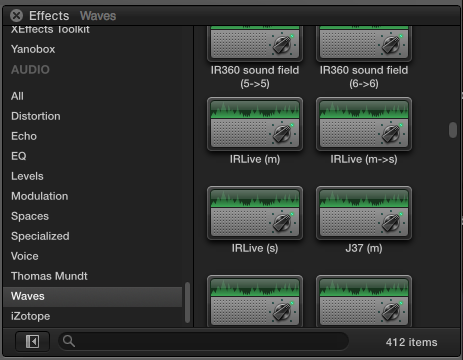
When I first launched FCP X on the official release of Yosemite it took a few minutes to revalidate the AU plugins. But I have some 400 Waves plugins on this test system and all work fine.
@Greg:
I used 'killall FCP' and I didn't have to reboot. Apart from RealPlayer I haven't heard any other reports about this issue, so I think it is very exceptional. I'm not at the studio now, I will reinstall FCP X tomorrow and if I still have the issue I will try a new admin user. If it works with the new user I will erase and reinstall the system drive. That should solve the issue for good.
- Ronny
When I first launched FCP X on the official release of Yosemite it took a few minutes to revalidate the AU plugins. But I have some 400 Waves plugins on this test system and all work fine.
@Greg:
I used 'killall FCP' and I didn't have to reboot. Apart from RealPlayer I haven't heard any other reports about this issue, so I think it is very exceptional. I'm not at the studio now, I will reinstall FCP X tomorrow and if I still have the issue I will try a new admin user. If it works with the new user I will erase and reinstall the system drive. That should solve the issue for good.
- Ronny
Please Log in to join the conversation.
