


- Posts: 483
- Thank you received: 256
3 Post Moderation Rule for New Boarders (25 Jan 2021)
New boarders will have their posts moderated - Don't worry if you cannot see your post immediately.
Only start a new post here if you are uploading a free plugin or direct linking to a plugin or the page that the plugin can be downloaded from.
All other new posts will be deleted.
All other new posts will be deleted.
Free Final Cut Pro 7-style retiming graph control
15 Mar 2012 04:02 - 15 Mar 2012 04:03 #5766
by alex4D
Free Final Cut Pro 7-style retiming graph control was created by alex4D
A set of three generators that allow you to retime 5, 10 or 15 seconds of source footage in the same way as Final Cut Pro 7.

In this case the clip plays slowly until a keyframe, then quickly. It then stays frozen for a while before reversing a little before quickly running forwards to the end.
If you have a very long shot that you would like to speed up and retime in this way, you can use the Final Cut Pro X retime control to speed up a clip first and use that as an input to my generators. All the frames are sent to the generator, so if you speed a clip up 20 times, you can slow part of it down by 20 times and the clip will play normally.
Download it from my blog...
In this case the clip plays slowly until a keyframe, then quickly. It then stays frozen for a while before reversing a little before quickly running forwards to the end.
If you have a very long shot that you would like to speed up and retime in this way, you can use the Final Cut Pro X retime control to speed up a clip first and use that as an input to my generators. All the frames are sent to the generator, so if you speed a clip up 20 times, you can slow part of it down by 20 times and the clip will play normally.
Download it from my blog...
Last edit: 15 Mar 2012 04:03 by alex4D.
Please Log in to join the conversation.

17 Mar 2012 09:53 #5827
by dgwvideo
Creating history....one edit at a time !
Replied by dgwvideo on topic Re: Free Final Cut Pro 7-style retiming graph control
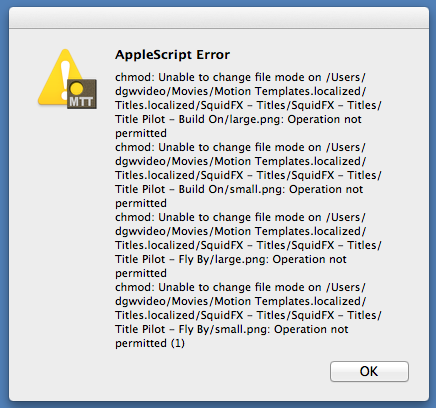
Any idea why I am not able to install this with Motion Template Tool? Actually, I am not able to install anything with MTT...I get this error (see screenshot). Does it appear to be a conflict with the SquidFX Title Pilot plugin? Thanks for any ideas.
Creating history....one edit at a time !
Please Log in to join the conversation.
- Andreas Kiel
-

- Offline
- Platinum Member
-

Less
More
- Posts: 1077
- Thank you received: 189
17 Mar 2012 23:57 #5851
by Andreas Kiel
Replied by Andreas Kiel on topic Re: Free Final Cut Pro 7-style retiming graph control
A what state you get the error?
If it is at launch of the app you might have a bad version of the app which was on my site for a few hours.
Otherwise it's more complicated.
The "chmod" error (which is a system permission error) there might be an error on open/unlock the "SquidFX Title Pilot" for reading by the administrator (which you are obviously).
Delete the application and it's preferences. Try to reinstall the app from the actual installer on my site.
If you still got problems let me know.
Andreas
If it is at launch of the app you might have a bad version of the app which was on my site for a few hours.
Otherwise it's more complicated.
The "chmod" error (which is a system permission error) there might be an error on open/unlock the "SquidFX Title Pilot" for reading by the administrator (which you are obviously).
Delete the application and it's preferences. Try to reinstall the app from the actual installer on my site.
If you still got problems let me know.
Andreas
Please Log in to join the conversation.
18 Mar 2012 05:46 #5855
by dgwvideo
Creating history....one edit at a time !
Replied by dgwvideo on topic Re: Free Final Cut Pro 7-style retiming graph control
The error occurs when I select INSTALL. The app opens fine and if I double click an effect that uses the MTT script, they show up in the apps browser and my admin user is selected on the right side. Everything looks good, but when I try to install, that screenshot is what I get.
I have reinstalled the app but did not delete any preferences. I will take your suggestion and try to reinstall again from your site. Thanks.
I have reinstalled the app but did not delete any preferences. I will take your suggestion and try to reinstall again from your site. Thanks.
Creating history....one edit at a time !
Please Log in to join the conversation.
- youngeddie
-

- Offline
- Premium Member
-

Less
More
- Posts: 136
- Thank you received: 0
18 Mar 2012 10:11 #5858
by youngeddie
Replied by youngeddie on topic Re: Free Final Cut Pro 7-style retiming graph control
This also happens to me every time that I use the Plugin installer.
It still seems to be installing the plugins, so I've just been ignoring it.
It would be nice to know what's happening though...
Thanks,
Eddie
It still seems to be installing the plugins, so I've just been ignoring it.
It would be nice to know what's happening though...
Thanks,
Eddie
Please Log in to join the conversation.
- Andreas Kiel
-
- Offline
- Platinum Member
-
Less
More
- Posts: 1077
- Thank you received: 189
20 Mar 2012 18:10 #5938
by Andreas Kiel
Replied by Andreas Kiel on topic Re: Free Final Cut Pro 7-style retiming graph control
Hopefully there will be a new version (1.1) at the weekend.
This version should have the odd error display fixed.
Official thanks here to Alex - he reviewed the manual and made it much, much better.
Andreas
This version should have the odd error display fixed.
Official thanks here to Alex - he reviewed the manual and made it much, much better.
Andreas
Please Log in to join the conversation.
