


- Posts: 25
- Thank you received: 1
3 Post Moderation Rule for New Boarders (25 Jan 2021)
New boarders will have their posts moderated - Don't worry if you cannot see your post immediately.
Canon MXF import plugin is finally available
20 Feb 2012 01:55 #4596
by macmacmac
Replied by macmacmac on topic Re: Canon MXF import plugin is finally available
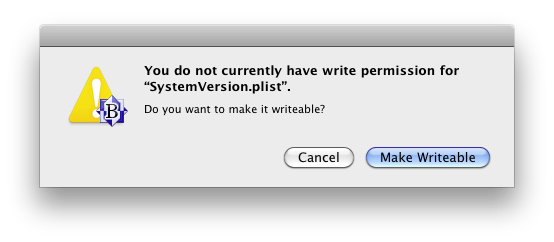
I use BBEdit. Here's what Textedit says if I try to save the file

If you go to the Info panel you can set the permission like so
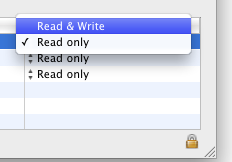
May be you must also click on the lock symbol.
If you go to the Info panel you can set the permission like so
May be you must also click on the lock symbol.
Please Log in to join the conversation.
- jwbrooklyn
-

- Offline
- New Member
-

Less
More
- Posts: 12
- Thank you received: 0
20 Feb 2012 05:02 #4613
by jwbrooklyn
Replied by jwbrooklyn on topic Re: Canon MXF import plugin is finally available
The message I get the last window screen capture you sent. I then went (several times) to the Info panel, unlocked the Sharing & Permissions area, and tried to change System to Read/Write. Wouldn't do it. I then highlighted the entire Core Service folder, unlocked sharing & permissions, dropped the menu (Gear) & highlighted: Apply to enclosed items. Now the System has Read & write as do the two others that I added: janiceweberfink [me] and admin. Redid the text change and it still would not save and displayed the same window. I tuned the computer off as well and rebooted. Still can't do it. I do appreciate all of your help on this. The tech fates are against me.
Please Log in to join the conversation.
- jwbrooklyn
-
- Offline
- New Member
-
Less
More
- Posts: 12
- Thank you received: 0
20 Feb 2012 05:20 #4617
by jwbrooklyn
Replied by jwbrooklyn on topic Re: Canon MXF import plugin is finally available
I meant to say that the TextEdit message is the one I get. Sorry for my poor copyediting; home my video editing is better!
Please Log in to join the conversation.
20 Feb 2012 16:12 #4631
by macmacmac
Replied by macmacmac on topic Re: Canon MXF import plugin is finally available
Can you login as admin instead of janiceweberfink and try again?
Please Log in to join the conversation.
- jwbrooklyn
-
- Offline
- New Member
-
Less
More
- Posts: 12
- Thank you received: 0
20 Feb 2012 21:49 #4640
by jwbrooklyn
Replied by jwbrooklyn on topic Re: Canon MXF import plugin is finally available
I don't log out or in. It's all n "automatic" and I've never actually given it a thought. Now I'm afraid that if I do log out/in, it will ask for a long forgotten password or something. (I've had this Mac since 2007). I could just go to the Apple store, which is easily accessible to me. With all of this, I'm getting skittish.
Please Log in to join the conversation.
- jwbrooklyn
-
- Offline
- New Member
-
Less
More
- Posts: 12
- Thank you received: 0
22 Feb 2012 00:52 #4675
by jwbrooklyn
Replied by jwbrooklyn on topic Re: Canon MXF import plugin is finally available
I took my mac into the apple store to find out how to change permissions so that I could download and INSTALL the plugin without changing my OS to Lion. As it turns out, to change & save a system file like SystemVersion.plist, I need to have root user permission.The Apple people cautioned me that if anything went wrong in this process, I could lose everything. It is a huge risk in their opinion. So I am really caught in conflicting technologies: If I upgrade to Lion, I will not be able to use my FCP 6 (I don't have 7), which is what I use in IMovie when I want to push a quick video to the web.
I have already downloaded FCP X, which is sitting on my computer like a $300 lump. My FCP files were automatically tucked into a separate folder. Is there anyway for me to preserve my FCP 6 in case I want to reinstall it, maybe put it on Dropbox?
I have already downloaded FCP X, which is sitting on my computer like a $300 lump. My FCP files were automatically tucked into a separate folder. Is there anyway for me to preserve my FCP 6 in case I want to reinstall it, maybe put it on Dropbox?
Please Log in to join the conversation.
25 Feb 2012 16:29 #4846
by macmacmac
I recommended using XF Utility to backup the original folder structure with all it's metadata but just found out that you can actually do this within FCP X by creating a camera archive in the import window. I guess that's what you where refering to and I didn't understand. The individual card archives get stored in a folder named "Final Cut Camera Archives" with the file suffix .fcarch.
So yes, you don't need XF Utility anymore.
You can still get to the original files by right-clicking the Final Cut archive and choosing "Show Package Contents". In order to access the backup using XF Utility you must copy the entire CONTENTS folder to a folder within the XF utility backup folder.
It's a bit more complicated but you can work this way, have a card backup and also the ability to use it with XF Utility should there be a need in the future.
Replied by macmacmac on topic Re: Canon MXF import plugin is finally available
fabhoss wrote: Hello All,
With this plugin, do we still need xf utility to backup our medias or can we rely on fcpX to store our medias in the "orginal medias" folder?
Thanks
I recommended using XF Utility to backup the original folder structure with all it's metadata but just found out that you can actually do this within FCP X by creating a camera archive in the import window. I guess that's what you where refering to and I didn't understand. The individual card archives get stored in a folder named "Final Cut Camera Archives" with the file suffix .fcarch.
So yes, you don't need XF Utility anymore.
You can still get to the original files by right-clicking the Final Cut archive and choosing "Show Package Contents". In order to access the backup using XF Utility you must copy the entire CONTENTS folder to a folder within the XF utility backup folder.
It's a bit more complicated but you can work this way, have a card backup and also the ability to use it with XF Utility should there be a need in the future.
Please Log in to join the conversation.
25 Feb 2012 19:18 #4852
by cgbier
Replied by cgbier on topic Re: Canon MXF import plugin is finally available
You won't be able to reinstall in Lion, but you might be able to pull it from a TimeMachine B/U.jwbrooklyn wrote: I have already downloaded FCP X, which is sitting on my computer like a $300 lump. My FCP files were automatically tucked into a separate folder. Is there anyway for me to preserve my FCP 6 in case I want to reinstall it, maybe put it on Dropbox?
Please Log in to join the conversation.
- Marc Lucas
-

- Offline
- Platinum Member
-

Less
More
- Posts: 379
- Thank you received: 6
26 Feb 2012 01:30 #4861
by Marc Lucas
Replied by Marc Lucas on topic Re: Canon MXF import plugin is finally available
Did a shoot and one of the cameras was a XF100 for speed I used XF utility to save the media from the cards into the root folder of the utility by selecting File/backup media
How do I now get the footage into FCPX? Tried going through the import process but FCPX says that none of the selected files can be imported. Should I of imported initially into FCPX with the card in the MBP at the time?
Any workarounds?
How do I now get the footage into FCPX? Tried going through the import process but FCPX says that none of the selected files can be imported. Should I of imported initially into FCPX with the card in the MBP at the time?
Any workarounds?
Please Log in to join the conversation.
26 Feb 2012 01:46 #4863
by macmacmac
XF Utility stores backups in folders named like this: "20111214140700" If you select such a folder all the clips appear in the FCP X import window and can be imported. You must select this top most folder!
Replied by macmacmac on topic Re: Canon MXF import plugin is finally available
Marc Lucas wrote: I used XF utility to save the media from the cards into the root folder of the utility by selecting File/backup media
How do I now get the footage into FCPX?
XF Utility stores backups in folders named like this: "20111214140700" If you select such a folder all the clips appear in the FCP X import window and can be imported. You must select this top most folder!
Please Log in to join the conversation.
- Marc Lucas
-
- Offline
- Platinum Member
-
Less
More
- Posts: 379
- Thank you received: 6
26 Feb 2012 02:01 #4864
by Marc Lucas
Replied by Marc Lucas on topic Re: Canon MXF import plugin is finally available
Yes I have the mentioned folder (four of them from four CF cards with the 567783256453729514 names) I've tried to select every folder and the warning comes up saying can't import.
Please Log in to join the conversation.
26 Feb 2012 16:20 #4890
by macmacmac
Replied by macmacmac on topic Re: Canon MXF import plugin is finally available
But it should work. The specific steps are:
The backup appears in the list of cameras. Select it and all the clips should be ready for importing.
- Import from connected device (cmd-I)
- Open Archive...
- Select backup folder
The backup appears in the list of cameras. Select it and all the clips should be ready for importing.
Please Log in to join the conversation.
- Marc Lucas
-
- Offline
- Platinum Member
-
Less
More
- Posts: 379
- Thank you received: 6
26 Feb 2012 20:53 #4896
by Marc Lucas
Replied by Marc Lucas on topic Re: Canon MXF import plugin is finally available
Hi
I was trying to import file opposed to camera. doh!
All working now.
Many
Thanks!
I was trying to import file opposed to camera. doh!
All working now.
Many
Thanks!
Please Log in to join the conversation.

26 Feb 2012 21:03 #4897
by BenB
Replied by BenB on topic Re: Canon MXF import plugin is finally available
Here's the rule:
If it IS already an QT file import it as a file (Cmd-Shift-i),
and if it is NOT already a QT file import from camera (Cmd-i).
If it IS already an QT file import it as a file (Cmd-Shift-i),
and if it is NOT already a QT file import from camera (Cmd-i).
Please Log in to join the conversation.
- Marc Lucas
-
- Offline
- Platinum Member
-
Less
More
- Posts: 379
- Thank you received: 6
26 Feb 2012 21:26 #4900
by Marc Lucas
Replied by Marc Lucas on topic Re: Canon MXF import plugin is finally available
Yeah I like that!
Many
Thanks!
Many
Thanks!
Please Log in to join the conversation.
27 Feb 2012 04:02 #4923
by BenB
Replied by BenB on topic Re: Canon MXF import plugin is finally available
I stole that from the user manual...
Please Log in to join the conversation.
- Marc Lucas
-
- Offline
- Platinum Member
-
Less
More
- Posts: 379
- Thank you received: 6
11 Mar 2012 02:14 #5604
by Marc Lucas
Replied by Marc Lucas on topic Re: Canon MXF import plugin is finally available
When backing up from a CF card from within the XF utility the files on the card could be seen and then by selecting File/backup media they are easily accessible by FCPX via import.
I have been sent the contents of the another shoot which contains more XF100 footage. I have the media on my desktop and tried to open it with XF utility and I can't select 'backup media'.
The only option I have from the file menu is to create virtual media which doesn't help me. How can I get at the files so that I can import into FCPX?
Thanks
I have been sent the contents of the another shoot which contains more XF100 footage. I have the media on my desktop and tried to open it with XF utility and I can't select 'backup media'.
The only option I have from the file menu is to create virtual media which doesn't help me. How can I get at the files so that I can import into FCPX?
Thanks
Please Log in to join the conversation.
11 Mar 2012 03:19 #5608
by cgbier
Replied by cgbier on topic Re: Canon MXF import plugin is finally available
It looks like that stuff wasn't rewrapped. You still need the whole card structure to backup the footage.
You can try to copy the content of a freshly formatted (empty) card to your desktop then copy your footage into the appropriate folder. Or build a fake card on your desktop. I was told by some AVCHD users that this works.
You can try to copy the content of a freshly formatted (empty) card to your desktop then copy your footage into the appropriate folder. Or build a fake card on your desktop. I was told by some AVCHD users that this works.
Please Log in to join the conversation.
23 Apr 2012 17:23 #7525
by Seanus
Sean Lander - Editing since 1982 - AVID 1991 - FCP 1999 - FCPX 2011
Replied by Seanus on topic Re: Canon MXF import plugin is finally available
I'll be editing a series of short films all shot on the C300.
Just found out that in the field, the cameraman was mounting his cards on his laptop and just backing up the folder called CLIPS then formatting the card and going back to shooting.
Is there anyway I'm going to be able to import the XF footage with FCP X now that the file structure has been broken?
Just found out that in the field, the cameraman was mounting his cards on his laptop and just backing up the folder called CLIPS then formatting the card and going back to shooting.
Is there anyway I'm going to be able to import the XF footage with FCP X now that the file structure has been broken?
Sean Lander - Editing since 1982 - AVID 1991 - FCP 1999 - FCPX 2011
Please Log in to join the conversation.
