


- Posts: 25
- Thank you received: 1
3 Post Moderation Rule for New Boarders (25 Jan 2021)
New boarders will have their posts moderated - Don't worry if you cannot see your post immediately.
Canon MXF import plugin is finally available
15 Feb 2012 03:06 - 15 Feb 2012 03:28 #4380
by macmacmac
Canon MXF import plugin is finally available was created by macmacmac
If you own a Canon XF305/300/105/100 or C300 you'll be pleased. You can finally, after eight looong months import the footage into FCP X.
Download:
usa.canon.com/cusa/professional/products...0#DriversAndSoftware (Select OS X 10.7)
Note the plugin installer requires OS X Lion!
The plugin obviously not! I use it with Snow Leopard using this trick from discussions.apple.com/thread/3131953?start=180&tstart=0
To install the plugin on Snow Leopard OS X 10.6.8 you have to temporarily change your system version number to Lion 10.7.2!
1. Go to HD:/System/Library/CoreServices/SystemVersion.plist
2. Copy the file to the Desktop
3. Open the original with a text editor and change the string value of 'ProductVersion' and 'ProductUserVisibleVersion' to '10.7.2'.
4. Save & Overwrite.
5. Install the plugin
6. Move back the original SystemVersion.plist from the Desktop
I hope Canon will fix this installer issue.
The imported files are in native format as promised by Apple. QuickTime player 7 reports them as Apple XDCAM HD422 format
Download:
usa.canon.com/cusa/professional/products...0#DriversAndSoftware (Select OS X 10.7)
Note the plugin installer requires OS X Lion!
The plugin obviously not! I use it with Snow Leopard using this trick from discussions.apple.com/thread/3131953?start=180&tstart=0
To install the plugin on Snow Leopard OS X 10.6.8 you have to temporarily change your system version number to Lion 10.7.2!
1. Go to HD:/System/Library/CoreServices/SystemVersion.plist
2. Copy the file to the Desktop
3. Open the original with a text editor and change the string value of 'ProductVersion' and 'ProductUserVisibleVersion' to '10.7.2'.
4. Save & Overwrite.
5. Install the plugin
6. Move back the original SystemVersion.plist from the Desktop
I hope Canon will fix this installer issue.
The imported files are in native format as promised by Apple. QuickTime player 7 reports them as Apple XDCAM HD422 format
Last edit: 15 Feb 2012 03:28 by macmacmac.
Please Log in to join the conversation.
15 Feb 2012 03:15 - 15 Feb 2012 03:25 #4381
by macmacmac
Replied by macmacmac on topic Re: Canon MXF import plugin is finally available
Usage:
Backup the card with Canons XF Utility
In FCP X use "Import From Camera" > "Open Archive"...
and navigate to the backup folder
then use "Import All..."
or just selelect the clips you want and use "Import Selected..."
Works fine.
You can't set in and out points and must import the entire clip.
Backup the card with Canons XF Utility
In FCP X use "Import From Camera" > "Open Archive"...
and navigate to the backup folder
then use "Import All..."
or just selelect the clips you want and use "Import Selected..."
Works fine.
You can't set in and out points and must import the entire clip.
Last edit: 15 Feb 2012 03:25 by macmacmac.
Please Log in to join the conversation.
15 Feb 2012 13:51 #4395
by macmacmac
Replied by macmacmac on topic Re: Canon MXF import plugin is finally available
What's the official OS X requirement for FCP X 10.0.3?
The Appstore says 10.6.8
Canon says:
1. Installation Requirements
The following software must be installed on the PC -
Final Cut Pro X 10.0.3
2. Supported OSes
Same as the support conditions of Final Cut Pro X
So if Final Cut Pro X 10.0.3 requires 10.6.8 or higher this plugin installer shouldn't require Lion. What means "support conditions"?
The Appstore says 10.6.8
Canon says:
1. Installation Requirements
The following software must be installed on the PC -
Final Cut Pro X 10.0.3
2. Supported OSes
Same as the support conditions of Final Cut Pro X
So if Final Cut Pro X 10.0.3 requires 10.6.8 or higher this plugin installer shouldn't require Lion. What means "support conditions"?
Please Log in to join the conversation.
15 Feb 2012 21:34 #4412
by fabhoss
Replied by fabhoss on topic Re: Canon MXF import plugin is finally available
Hello Macmacmac,
It doesn't work for me... When I open an archive, I can't browse my backup files (backed up with XF utility)
What I did is : open FCP X, import from camera and all the medias go to an "original medias" file... In that way I don't use anymore XF Utility... But I still wonder... Is that the good way to work? Any advice? Thanks!
It doesn't work for me... When I open an archive, I can't browse my backup files (backed up with XF utility)
What I did is : open FCP X, import from camera and all the medias go to an "original medias" file... In that way I don't use anymore XF Utility... But I still wonder... Is that the good way to work? Any advice? Thanks!
Please Log in to join the conversation.
15 Feb 2012 23:03 - 15 Feb 2012 23:09 #4418
by macmacmac
Replied by macmacmac on topic Re: Canon MXF import plugin is finally available
I'm not sure if I understand your problem but XF Utility stores backups in folders named like this: "20111214140700" If you select such a folder all the clips appear in the FCP X import window and can be imported.
Your second method to import directly from the CF card works but you loose the original files with all the Metadata and there's no backup after you've erased the card. I don't know if this matters to you.
Your second method to import directly from the CF card works but you loose the original files with all the Metadata and there's no backup after you've erased the card. I don't know if this matters to you.
Last edit: 15 Feb 2012 23:09 by macmacmac.
Please Log in to join the conversation.
15 Feb 2012 23:46 #4420
by fabhoss
Replied by fabhoss on topic Re: Canon MXF import plugin is finally available
ok it works today... but it didn't yesterday.... feel better, thanks macmacmac!
Please Log in to join the conversation.
16 Feb 2012 00:16 #4421
by macmacmac
Replied by macmacmac on topic Re: Canon MXF import plugin is finally available
Great!
Can anyone please confirm that the official OS X requirement for FCP X 10.0.3 is 10.6.8? I would like to contact Canon support if this is the case.
Just because the newest Xcode only runs on Lion doesn't mean they can't publish an installer that is compatible to Snow Leopard. This must be an unfortunate oversight by Canon.
Can anyone please confirm that the official OS X requirement for FCP X 10.0.3 is 10.6.8? I would like to contact Canon support if this is the case.
Just because the newest Xcode only runs on Lion doesn't mean they can't publish an installer that is compatible to Snow Leopard. This must be an unfortunate oversight by Canon.
Please Log in to join the conversation.

16 Feb 2012 20:50 #4454
by BenB
Replied by BenB on topic Re: Canon MXF import plugin is finally available
Please Log in to join the conversation.
16 Feb 2012 22:09 #4467
by macmacmac
Replied by macmacmac on topic Re: Canon MXF import plugin is finally available
Thanks a lot. I could have thought of the product page myself but I didn't.
So this post by non092 at discussions.apple.com/thread/3131953?start=180&tstart=0 is wrong.
It's definetely OS X v10.6.8 or OS X v10.7.2 or later (OS X v10.7.2 or later for broadcast monitoring).
Canon must change their installer in order to make the following true:
XF plugin Supported OSes: Same as the support conditions of Final Cut Pro X
So this post by non092 at discussions.apple.com/thread/3131953?start=180&tstart=0 is wrong.
It's definetely OS X v10.6.8 or OS X v10.7.2 or later (OS X v10.7.2 or later for broadcast monitoring).
Canon must change their installer in order to make the following true:
XF plugin Supported OSes: Same as the support conditions of Final Cut Pro X
Please Log in to join the conversation.
16 Feb 2012 23:07 #4469
by BenB
Replied by BenB on topic Re: Canon MXF import plugin is finally available
Seems like I've read you have to trick the installer into thinking you're on Lion, but nowhere does Canon state that it's plugin needs Lion. Nor does Apple state anywhere that 10.0.3 needs Lion.
Please Log in to join the conversation.
16 Feb 2012 23:58 #4473
by macmacmac
Yes this works fine, I've done it and the plugin runs fine under Snow Leopard
It only appears when you select OS X 10.7 at usa.canon.com/cusa/professional/products...0#DriversAndSoftware
It's just the damned installer that requires Lion. An unfortunate oversight and I've already reported this to Canon.
Replied by macmacmac on topic Re: Canon MXF import plugin is finally available
BenB wrote: Seems like I've read you have to trick the installer into thinking you're on Lion
Yes this works fine, I've done it and the plugin runs fine under Snow Leopard
BenB wrote: But nowhere does Canon state that it's plugin needs Lion.
It only appears when you select OS X 10.7 at usa.canon.com/cusa/professional/products...0#DriversAndSoftware
It's just the damned installer that requires Lion. An unfortunate oversight and I've already reported this to Canon.
Please Log in to join the conversation.
17 Feb 2012 00:17 #4477
by fabhoss
Replied by fabhoss on topic Re: Canon MXF import plugin is finally available
Hello All,
With this plugin, do we still need xf utility to backup our medias or can we rely on fcpX to store our medias in the "orginal medias" folder?
Thanks
With this plugin, do we still need xf utility to backup our medias or can we rely on fcpX to store our medias in the "orginal medias" folder?
Thanks
Please Log in to join the conversation.
17 Feb 2012 03:01 - 17 Feb 2012 03:06 #4489
by macmacmac
Replied by macmacmac on topic Re: Canon MXF import plugin is finally available
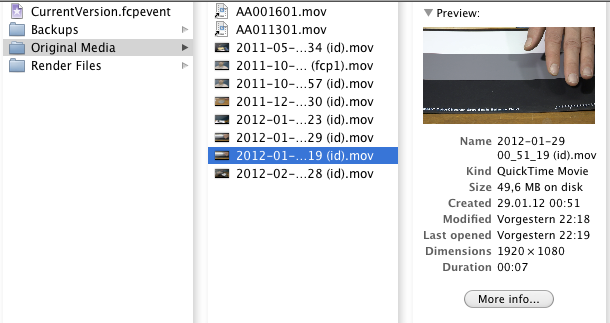
The XF plugin puts QuickTime movies into the Original Media folder as shown in the attachment below. Those files are full quality MPEG2 without any transcoding but if you make a copy of the card either by copying the entire folder structure or using the XF Utility you keep all the MXF format metadata.
Who knows whats possible in future XF utility versions? You can for instance right now remove all picture profiles and reset the footage. Something you can't do with the QuickTime movies. Or you can look up what picture profile settings a certain clip has. Or what the shutter speed, arperture or gain was used.
I will still backup my cards using the XF utility but it's of course no longer neccessary if all you want is cutting your footage.
Who knows whats possible in future XF utility versions? You can for instance right now remove all picture profiles and reset the footage. Something you can't do with the QuickTime movies. Or you can look up what picture profile settings a certain clip has. Or what the shutter speed, arperture or gain was used.
I will still backup my cards using the XF utility but it's of course no longer neccessary if all you want is cutting your footage.
Last edit: 17 Feb 2012 03:06 by macmacmac.
Please Log in to join the conversation.
17 Feb 2012 03:11 #4490
by fabhoss
Replied by fabhoss on topic Re: Canon MXF import plugin is finally available
again, thank you very much for your help!
Please Log in to join the conversation.
18 Feb 2012 03:18 #4518
by macmacmac
Replied by macmacmac on topic Re: Canon MXF import plugin is finally available
I just discovered a manual for the XF plugin for FCP X:
Applications > Canon Utilities > Canon XF Plugin for Final Cut Pro X > Manual
You can import only part of a clip: Click and drag inside the thumbnail of the desired clip to select the portion of the clip you want to import and click the Import Selected button.
The readme file is from May 2011 by the way!
Applications > Canon Utilities > Canon XF Plugin for Final Cut Pro X > Manual
You can import only part of a clip: Click and drag inside the thumbnail of the desired clip to select the portion of the clip you want to import and click the Import Selected button.
The readme file is from May 2011 by the way!
Please Log in to join the conversation.
18 Feb 2012 03:23 - 18 Feb 2012 03:23 #4519
by BenB
Replied by BenB on topic Re: Canon MXF import plugin is finally available
Yes, you can select a range of a clip in the Import From Camera window and only import that section. Works on any format in that window. Has since 10.0.0. And an orange range line shows up showing what section(s) of clips have been imported.
Last edit: 18 Feb 2012 03:23 by BenB.
Please Log in to join the conversation.
18 Feb 2012 03:52 #4521
by macmacmac
Had no chance to discover that earlier with my XF300
Replied by macmacmac on topic Re: Canon MXF import plugin is finally available
BenB wrote: Yes, you can select a range of a clip in the Import From Camera window and only import that section. Works on any format in that window. Has since 10.0.0.
Had no chance to discover that earlier with my XF300
Please Log in to join the conversation.
- jwbrooklyn
-

- Offline
- New Member
-

Less
More
- Posts: 12
- Thank you received: 0
19 Feb 2012 21:04 #4571
by jwbrooklyn
Replied by jwbrooklyn on topic Re: Canon MXF import plugin is finally available
I did as instructed, but no matter what I do to change it, I can not get read/write permission on a system folder/document. Can you suggest a workaround of your excellent work around?
Please Log in to join the conversation.
19 Feb 2012 21:23 #4573
by macmacmac
Replied by macmacmac on topic Re: Canon MXF import plugin is finally available
What's not mentioned in the steps above is that you have to enter your administrator password in order to be able to make changes. I do not remember exactly but in one of the warning dialogs there is a button that allows this.
It's also possible that you have to be logged in as an administrator right away. I was.
It's also possible that you have to be logged in as an administrator right away. I was.
Please Log in to join the conversation.
- jwbrooklyn
-
- Offline
- New Member
-
Less
More
- Posts: 12
- Thank you received: 0
19 Feb 2012 22:18 #4575
by jwbrooklyn
Replied by jwbrooklyn on topic Re: Canon MXF import plugin is finally available
I thought I was the administrator, but have never needed the verification. I have a password, of course, but I don't know where the permissions are located. I guess I'll just have to do some looking around. Unfortunately, I'm not a tech person, so it's hit and miss. I can see the permissions, but I can't change them. Alas. thanks anyway.
Please Log in to join the conversation.
