


- Posts: 3790
- Thank you received: 718
3 Post Moderation Rule for New Boarders (25 Jan 2021)
New boarders will have their posts moderated - Don't worry if you cannot see your post immediately.
Overlooked 10.4 Features
- Karsten Schlüter
-

- Offline
- Moderator
-

Less
More
20 Dec 2017 05:13 #92537
by Karsten Schlüter
Great find!
… oddly enough, when you right-click on it:
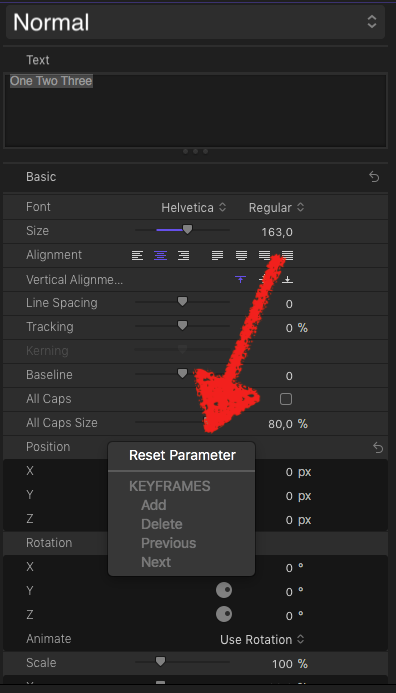
… LOL
Replied by Karsten Schlüter on topic Overlooked 10.4 Features
eugeny.korkhin wrote: Position, Rotation and Scale for titles is new. But you cannot animate them...…
Great find!
… oddly enough, when you right-click on it:
… LOL
Please Log in to join the conversation.

20 Dec 2017 11:43 - 20 Dec 2017 11:44 #92550
by JoeEditor
Replied by JoeEditor on topic Overlooked 10.4 Features
The online user manual doesn't even list these parameters! I hope they update that soon.
But yeah, lack of keyframing makes this of very limited use. But a nice direction to be going in. Why no keyframes? I guess there's good reason to keep my old customized versions of templates to keyframe these parameters...
But yeah, lack of keyframing makes this of very limited use. But a nice direction to be going in. Why no keyframes? I guess there's good reason to keep my old customized versions of templates to keyframe these parameters...
Last edit: 20 Dec 2017 11:44 by JoeEditor.
Please Log in to join the conversation.
- Karsten Schlüter
-
- Offline
- Moderator
-
Less
More
- Posts: 3790
- Thank you received: 718
24 Dec 2017 06:14 #92688
by Karsten Schlüter
Replied by Karsten Schlüter on topic Overlooked 10.4 Features
definitely one for your list, Ben and not mentioned in the Manual:
an attachable ref-line in waveform-monitor:
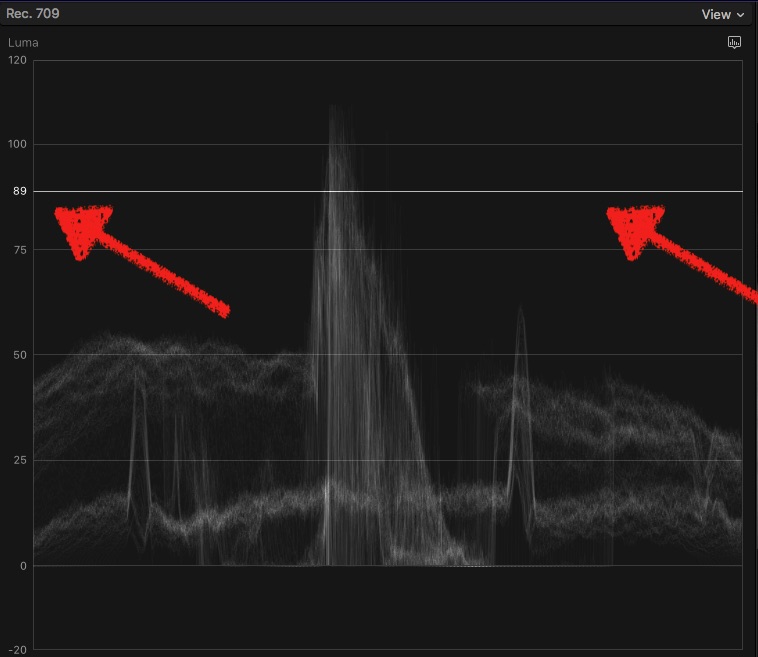
just hover with the mouse over the displays makes it appear, click mouse, and it 'sticks' when moving the mouse out of display …
(found by honorable board-member SquamishEd … blame him if its an old feature )
)
an attachable ref-line in waveform-monitor:
just hover with the mouse over the displays makes it appear, click mouse, and it 'sticks' when moving the mouse out of display …
(found by honorable board-member SquamishEd … blame him if its an old feature
) Please Log in to join the conversation.
- Andreas Kiel
-

- Offline
- Platinum Member
-

Less
More
- Posts: 1077
- Thank you received: 189
25 Dec 2017 11:05 #92708
by Andreas Kiel
I would consider this more adding confusion rather than a nice feature.
Position, scale and rotation had been there - now you got them twice partially .
Would have made sense if that these "new" settings would be per character- they show up in the "Text" tab. But they aren't.
So it's more kind of new bug :evil:
Replied by Andreas Kiel on topic Overlooked 10.4 Features
FCPX.guru wrote: The online user manual doesn't even list these parameters! I hope they update that soon.
But yeah, lack of keyframing makes this of very limited use. But a nice direction to be going in. Why no keyframes? I guess there's good reason to keep my old customized versions of templates to keyframe these parameters...
I would consider this more adding confusion rather than a nice feature.
Position, scale and rotation had been there - now you got them twice partially .
Would have made sense if that these "new" settings would be per character- they show up in the "Text" tab. But they aren't.
So it's more kind of new bug :evil:
Please Log in to join the conversation.
25 Dec 2017 13:14 #92709
by JoeEditor
Replied by JoeEditor on topic Overlooked 10.4 Features
No, this is the only Text Position set of controls in the Text tab. There are similar 2D controls in the Video sections. Why would dI want to jump back and forth between the two while working on text?
Please Log in to join the conversation.
- Fcp my bread and butter
-

- Offline
- Senior Member
-

Less
More
- Posts: 68
- Thank you received: 5
26 Dec 2017 10:38 #92723
by Fcp my bread and butter
Replied by Fcp my bread and butter on topic Overlooked 10.4 Features
this thing is for "360" texts, and then it make sense
Please Log in to join the conversation.
26 Dec 2017 11:50 - 26 Dec 2017 11:52 #92724
by JoeEditor
Replied by JoeEditor on topic Overlooked 10.4 Features
It's for "text" both 2D and 3D, which makes plenty of sense. Hope we get to keyframe it in a future update, soon.
Since when have we been able to widen the Motion 5 inspector so much? Has that ability been there, or is that new?
Since when have we been able to widen the Motion 5 inspector so much? Has that ability been there, or is that new?
Last edit: 26 Dec 2017 11:52 by JoeEditor.
Please Log in to join the conversation.
- Fcp my bread and butter
-
- Offline
- Senior Member
-
Less
More
- Posts: 68
- Thank you received: 5
26 Dec 2017 12:21 - 26 Dec 2017 12:45 #92725
by Fcp my bread and butter
Replied by Fcp my bread and butter on topic Overlooked 10.4 Features
it works for 2D if you want to use it of course holly guru !
but it was implemented for 360, providing you a way to control a text in a equirectangular space
but it was implemented for 360, providing you a way to control a text in a equirectangular space
Last edit: 26 Dec 2017 12:45 by Fcp my bread and butter.
Please Log in to join the conversation.
- Andreas Kiel
-
- Offline
- Platinum Member
-
Less
More
- Posts: 1077
- Thank you received: 189
26 Dec 2017 12:55 #92726
by Andreas Kiel
Replied by Andreas Kiel on topic Overlooked 10.4 Features
I know that it is for 3D.
I finally meant that this is a "half -bake solution."
Why the hell have keyframed 2D but non-keyframed 3D at 2 different places.
It doesn't make sense to me.
A logo in 360 should be "3D transformable" as well. should object should be. So why is this a "Text Parameter"?
I finally meant that this is a "half -bake solution."
Why the hell have keyframed 2D but non-keyframed 3D at 2 different places.
It doesn't make sense to me.
A logo in 360 should be "3D transformable" as well. should object should be. So why is this a "Text Parameter"?
Please Log in to join the conversation.
- Andreas Kiel
-
- Offline
- Platinum Member
-
Less
More
- Posts: 1077
- Thank you received: 189
26 Dec 2017 12:55 #92727
by Andreas Kiel
Replied by Andreas Kiel on topic Overlooked 10.4 Features
I know that it is for 3D.
I finally meant that this is a "half -bake solution."
Why the hell have keyframed 2D but non-keyframed 3D at 2 different places.
It doesn't make sense to me.
A logo in 360 should be "3D transformable" as well. Any object should be. So why is this a "Text Parameter"?
I finally meant that this is a "half -bake solution."
Why the hell have keyframed 2D but non-keyframed 3D at 2 different places.
It doesn't make sense to me.
A logo in 360 should be "3D transformable" as well. Any object should be. So why is this a "Text Parameter"?
Please Log in to join the conversation.
- Fcp my bread and butter
-
- Offline
- Senior Member
-
Less
More
- Posts: 68
- Thank you received: 5
26 Dec 2017 16:25 - 26 Dec 2017 16:27 #92728
by Fcp my bread and butter
Wouldn't It make sense that this "Text inspector" doesn't present keyframes anywhere because they would interfere with Title Inspector tab ? (Just previous) The "in" "out" from there are ... Motion Behaviors, straight from Motion "Sequence Behavior".
In the Motion app there is a way to combine them (like the little gear that pops up over a parameter when a Behavior is applied... and so on. You have the"Parameter Behavior" pretty much overlaping them.
no such thing in Fcp... so Andreas you are the developer here, I guess it could be done
(and yes it is half -bake" )
Replied by Fcp my bread and butter on topic Overlooked 10.4 Features
Andreas Kiel wrote:
Why the hell have keyframed 2D but non-keyframed 3D at 2 different places.
It doesn't make sense to me.
Wouldn't It make sense that this "Text inspector" doesn't present keyframes anywhere because they would interfere with Title Inspector tab ? (Just previous) The "in" "out" from there are ... Motion Behaviors, straight from Motion "Sequence Behavior".
In the Motion app there is a way to combine them (like the little gear that pops up over a parameter when a Behavior is applied... and so on. You have the"Parameter Behavior" pretty much overlaping them.
no such thing in Fcp... so Andreas you are the developer here, I guess it could be done
(and yes it is half -bake" )
Last edit: 26 Dec 2017 16:27 by Fcp my bread and butter.
Please Log in to join the conversation.
26 Dec 2017 16:56 #92729
by JoeEditor
Replied by JoeEditor on topic Overlooked 10.4 Features
Someone write a letter to Apple and ask them "why".
I'm happy to have it for none 360 work.
I'm happy to have it for none 360 work.
Please Log in to join the conversation.
- Andreas Kiel
-
- Offline
- Platinum Member
-
Less
More
- Posts: 1077
- Thank you received: 189
26 Dec 2017 17:01 #92730
by Andreas Kiel
Replied by Andreas Kiel on topic Overlooked 10.4 Features
Finally those settings had been there for a while, but not displayed in Inspector.
In 10.x (since 3d text) click the "3D Text" option set "depth" to 0 -or not.
Do the settings you need (values are displayed in the Viewer).
In 10.x (since 3d text) click the "3D Text" option set "depth" to 0 -or not.
Do the settings you need (values are displayed in the Viewer).
Please Log in to join the conversation.
- Andreas Kiel
-
- Offline
- Platinum Member
-
Less
More
- Posts: 1077
- Thank you received: 189
26 Dec 2017 17:35 - 26 Dec 2017 17:39 #92731
by Andreas Kiel
It could make sense, but probably not with FCP.
Imagine a letter moving up and down (Y-Axes 3D text 'locally) and spin around Y-Axis in a loop.
Then move it the "next transform" moving in X-axes maybe in Y- and Z-axes.
It's kind of nesting animation like you can do in other apps.
Probably yes, but I won't do it - maybe Karsten?
Replied by Andreas Kiel on topic Overlooked 10.4 Features
Xavier Novembre wrote: Wouldn't It make sense that this "Text inspector" doesn't present keyframes anywhere because they would interfere with Title Inspector tab ? (Just previous) The "in" "out" from there are ... Motion Behaviors, straight from Motion "Sequence Behavior".
In the Motion app there is a way to combine them (like the little gear that pops up over a parameter when a Behavior is applied... and so on. You have the"Parameter Behavior" pretty much overlaping them. )
It could make sense, but probably not with FCP.
Imagine a letter moving up and down (Y-Axes 3D text 'locally) and spin around Y-Axis in a loop.
Then move it the "next transform" moving in X-axes maybe in Y- and Z-axes.
It's kind of nesting animation like you can do in other apps.
Xavier Novembre wrote: no such thing in Fcp... so Andreas you are the developer here, I guess it could be done
Probably yes, but I won't do it - maybe Karsten?
ThanksXavier Novembre wrote: (and yes it is half -bake" )
Last edit: 26 Dec 2017 17:39 by Andreas Kiel.
Please Log in to join the conversation.
- Karsten Schlüter
-
- Offline
- Moderator
-
Less
More
- Posts: 3790
- Thank you received: 718
27 Dec 2017 05:08 #92744
by Karsten Schlüter
Wot?? Me?? NO!! Don't drag me into your debate!!
(still waiting for a comment on my/SquamishEd's sensational, breathtaking find in the Waveform Monitor :blush: ) …
plus:
I can not fully follow the debate:
Titles have three tabs:
• Title - offering 'published' parameters, the creator thought to bundle here (e.g. I like to 'double' the input-well here, for connivence, or rigs which affect 'bundles' of parameters, all in one place). Have a look at Basic Title = zero to play with.
• Text - don't kill me for that comparison, the workshop: here, you can tinker with 'the usual suspects' of parameters ANY text can offer. Make it 2D/3D, colors, size, rotation… new in 10_4: x/y
• Video - see the bar representing a Title as a 'clip' - so, only tools avail you can use on clips (why you can rotate a clip along z but not x/y? … dunno, but countless plugins doing so are available).
360°? not my beer.
(in some other thread, 3D wizard Pielle and me agree, 2D and 3D are a bit … wonky implemented (love this word, wonky… sounds like what it says)
… so, my personal verdict: I don't see a 'doubling' nor a wrong place nor 'nesting' probs (= for complex animations use Motion, FCPX is no AfterEffects)
hmm, what was the topic of this thread? … ah, overlooked features … such as an adjustable ref-line in Waveforms
HA!
Replied by Karsten Schlüter on topic Overlooked 10.4 Features
Andreas Kiel wrote: …Probably yes, but I won't do it - maybe Karsten?
…
Wot?? Me?? NO!! Don't drag me into your debate!!
(still waiting for a comment on my/SquamishEd's sensational, breathtaking find in the Waveform Monitor :blush: ) …
plus:
I can not fully follow the debate:
Titles have three tabs:
• Title - offering 'published' parameters, the creator thought to bundle here (e.g. I like to 'double' the input-well here, for connivence, or rigs which affect 'bundles' of parameters, all in one place). Have a look at Basic Title = zero to play with.
• Text - don't kill me for that comparison, the workshop: here, you can tinker with 'the usual suspects' of parameters ANY text can offer. Make it 2D/3D, colors, size, rotation… new in 10_4: x/y
• Video - see the bar representing a Title as a 'clip' - so, only tools avail you can use on clips (why you can rotate a clip along z but not x/y? … dunno, but countless plugins doing so are available).
360°? not my beer.
(in some other thread, 3D wizard Pielle and me agree, 2D and 3D are a bit … wonky implemented (love this word, wonky… sounds like what it says)
… so, my personal verdict: I don't see a 'doubling' nor a wrong place nor 'nesting' probs (= for complex animations use Motion, FCPX is no AfterEffects)
hmm, what was the topic of this thread? … ah, overlooked features … such as an adjustable ref-line in Waveforms
HA!
Please Log in to join the conversation.
