


- Posts: 730
- Thank you received: 26
3 Post Moderation Rule for New Boarders (25 Jan 2021)
New boarders will have their posts moderated - Don't worry if you cannot see your post immediately.
macOS Sierra - What works and what doesn't
- DmitriZigany
-

- Offline
- Platinum Member
-

Less
More
28 Sep 2016 20:23 #80366
by DmitriZigany
Replied by DmitriZigany on topic macOS Sierra - What works and what doesn't
I agree that in general it is... I just think they know about these obvious ones caused by Sierra and have it fixed in the next update... But will send feedback anyway!canelson wrote: Remember that is super important to send feedback to Apple regarding this issues.
Please Log in to join the conversation.
- fb_100003045233641
-
- Offline
- New Member
-

Less
More
- Posts: 10
- Thank you received: 2
29 Sep 2016 13:21 #80374
by fb_100003045233641
Replied by fb_100003045233641 on topic macOS Sierra - What works and what doesn't
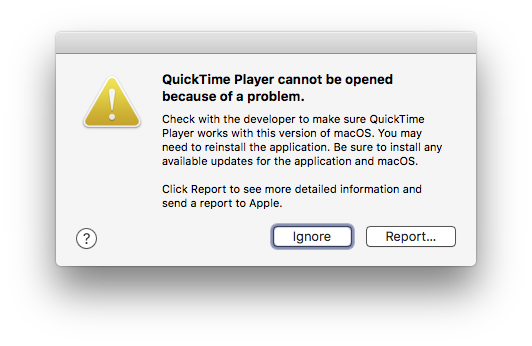
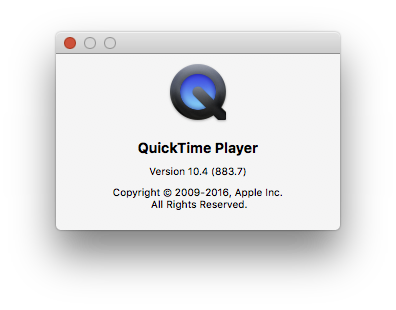
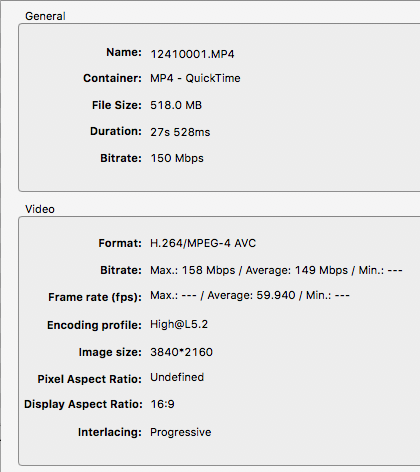
Got this while testing a video. Other videos playback just fine.
Please Log in to join the conversation.
- fb_100003045233641
-
- Offline
- New Member
-
Less
More
- Posts: 10
- Thank you received: 2
29 Sep 2016 13:31 #80375
by fb_100003045233641
Replied by fb_100003045233641 on topic macOS Sierra - What works and what doesn't
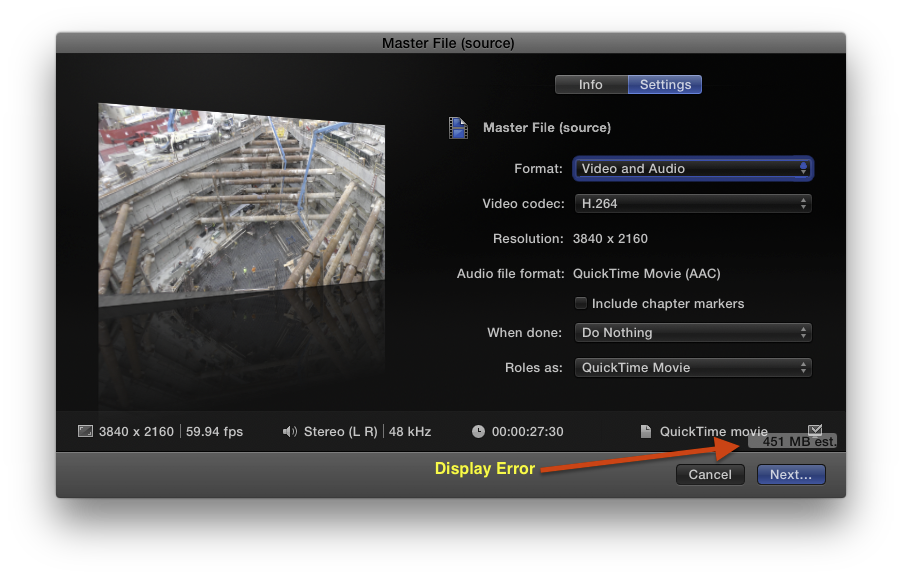
Another display issue
Please Log in to join the conversation.

29 Sep 2016 13:58 - 29 Sep 2016 14:00 #80378
by Schnurr
Replied by Schnurr on topic macOS Sierra - What works and what doesn't
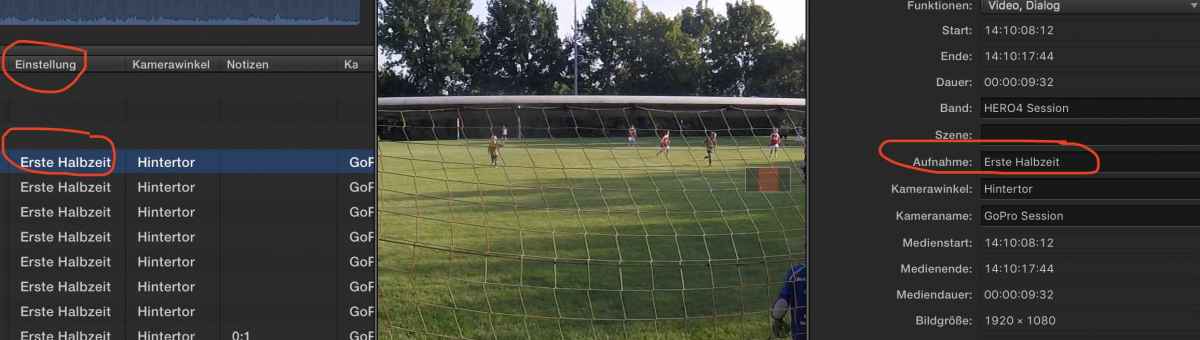
Talking about localization...
seems that "Einstellung" & "Aufnahme" is the same )
)
Don't know why screenshot isn't attached..anyhow
seems that "Einstellung" & "Aufnahme" is the same
)Don't know why screenshot isn't attached..anyhow
Last edit: 29 Sep 2016 14:00 by Schnurr.
Please Log in to join the conversation.
- Karsten Schlüter
-

- Offline
- Moderator
-

Less
More
- Posts: 3790
- Thank you received: 718
29 Sep 2016 14:17 - 29 Sep 2016 14:28 #80380
by Karsten Schlüter
same wot?
stay under 350kB, stay under 1k pix wide
Replied by Karsten Schlüter on topic macOS Sierra - What works and what doesn't
Schnurr wrote: … seems that "Einstellung" & "Aufnahme" is the same
…
same wot?
Schnurr wrote: …Don't know why screenshot isn't attached..anyhow
stay under 350kB, stay under 1k pix wide
Last edit: 29 Sep 2016 14:28 by Karsten Schlüter.
Please Log in to join the conversation.
- Tom Wolsky
-

- Offline
- Moderator
-
29 Sep 2016 14:20 #80381
by Tom Wolsky
Replied by Tom Wolsky on topic macOS Sierra - What works and what doesn't
Do you have two OSs, like El Capitan on a separate partition or drive?
Please Log in to join the conversation.
29 Sep 2016 17:58 #80386
by Schnurr
Replied by Schnurr on topic macOS Sierra - What works and what doesn't
I was referring to that,,,
Please Log in to join the conversation.
- knurrrrrrt
-
- Offline
- Premium Member
-

Less
More
- Posts: 85
- Thank you received: 10
30 Sep 2016 11:20 #80394
by knurrrrrrt
Replied by knurrrrrrt on topic macOS Sierra - What works and what doesn't
Somehow i am not able to move Clip Connections with command + option Click in Sierra. Anyone else experiencing this issue?
Please Log in to join the conversation.
30 Sep 2016 11:24 #80395
by canelson
Have you checked the "Caps Lock" key? If it is acrivated, change clip connection does not work.
--
Matias Canelson
www.canelson.us
Replied by canelson on topic macOS Sierra - What works and what doesn't
knurrrrrrt wrote: Somehow i am not able to move Clip Connections with command + option Click in Sierra. Anyone else experiencing this issue?
Have you checked the "Caps Lock" key? If it is acrivated, change clip connection does not work.
--
Matias Canelson
www.canelson.us
Please Log in to join the conversation.
- knurrrrrrt
-
- Offline
- Premium Member
-
Less
More
- Posts: 85
- Thank you received: 10
30 Sep 2016 11:45 #80396
by knurrrrrrt
Thanks for the hint! I noticed before that something was wrong with caps lock, because it warned me of caps lock being enabled in all password entry fields even though it was not. Resetting parameter ram helped and fixed the issue!
Replied by knurrrrrrt on topic macOS Sierra - What works and what doesn't
canelson wrote:
knurrrrrrt wrote: Somehow i am not able to move Clip Connections with command + option Click in Sierra. Anyone else experiencing this issue?
Have you checked the "Caps Lock" key? If it is acrivated, change clip connection does not work.
Thanks for the hint! I noticed before that something was wrong with caps lock, because it warned me of caps lock being enabled in all password entry fields even though it was not. Resetting parameter ram helped and fixed the issue!
Please Log in to join the conversation.
- Karsten Schlüter
-
- Offline
- Moderator
-
Less
More
- Posts: 3790
- Thank you received: 718
01 Oct 2016 08:04 #80412
by Karsten Schlüter
ahh, that that
Yep,another translation/localization fail…
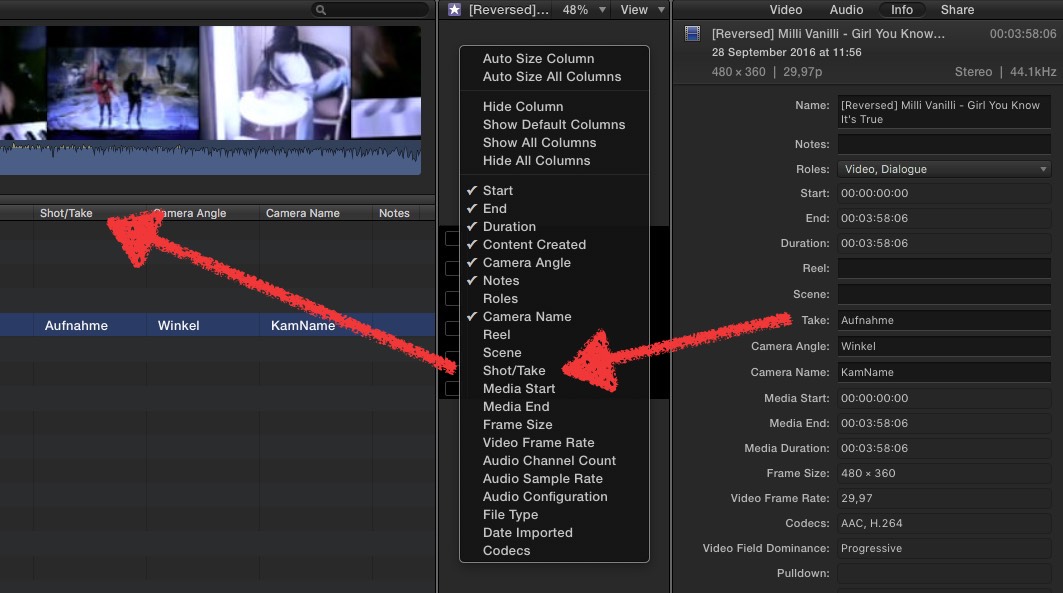
In the English UI, it is shot/take
In the German localisation, you don't find 'Aufnahme' of the Inspector …
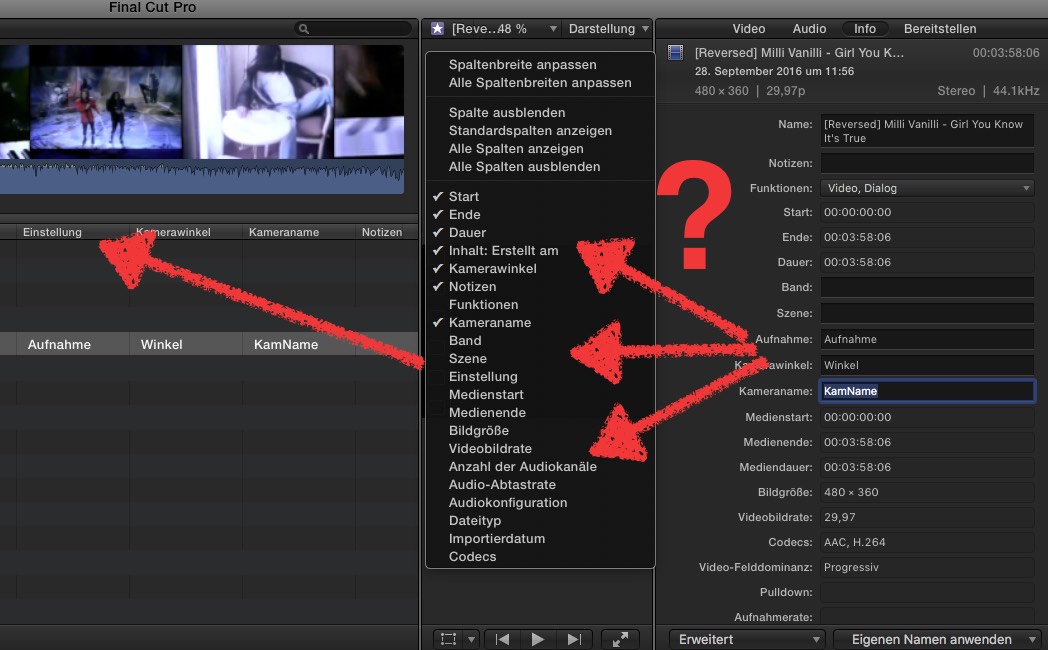
… in the Event tabs, but 'Einstellung'
>> apple.com/feedback :lol:
Replied by Karsten Schlüter on topic macOS Sierra - What works and what doesn't
Schnurr wrote: I was referring to that,,,
ahh, that that
Yep,another translation/localization fail…
In the English UI, it is shot/take
In the German localisation, you don't find 'Aufnahme' of the Inspector …
… in the Event tabs, but 'Einstellung'
>> apple.com/feedback :lol:
Please Log in to join the conversation.
01 Oct 2016 18:25 #80437
by Schnurr
Haha. Apple support is really the worst don't think they will ever look into that but nevertheless raised it. Maybe in version 15.0.1 they will fix it.
Replied by Schnurr on topic macOS Sierra - What works and what doesn't
Karsten Schlüter wrote:
Schnurr wrote: I was referring to that,,,
>> apple.com/feedback :lol:
Haha. Apple support is really the worst don't think they will ever look into that but nevertheless raised it. Maybe in version 15.0.1 they will fix it.
Please Log in to join the conversation.
- Karsten Schlüter
-
- Offline
- Moderator
-
Less
More
- Posts: 3790
- Thank you received: 718
02 Oct 2016 06:18 #80439
by Karsten Schlüter
<yoda voice> mmh, mmh, not premature young padovan be should:
Apple reads, at last in the FCPX/Motion section, every feedback!
That's a first hand info … no further details allowed. :S
ok, every mail gets a filtering process, before it reaches 'the team', but, yes, feedback is wanted & effective.-
ok #2: for sure, not every feedback instantly results into an enhancement/update, e.g. "want tracks back" - nonsense… and the localisation errors are legend (Audition = Hörprobe :silly: ), but … support Apple.
Replied by Karsten Schlüter on topic macOS Sierra - What works and what doesn't
Schnurr wrote: … don't think they will ever look into that …
<yoda voice> mmh, mmh, not premature young padovan be should:
Apple reads, at last in the FCPX/Motion section, every feedback!
That's a first hand info … no further details allowed. :S
ok, every mail gets a filtering process, before it reaches 'the team', but, yes, feedback is wanted & effective.-
ok #2: for sure, not every feedback instantly results into an enhancement/update, e.g. "want tracks back" - nonsense… and the localisation errors are legend (Audition = Hörprobe :silly: ), but … support Apple.
Please Log in to join the conversation.
- knurrrrrrt
-
- Offline
- Premium Member
-
Less
More
- Posts: 85
- Thank you received: 10
02 Oct 2016 06:52 #80442
by knurrrrrrt
Replied by knurrrrrrt on topic macOS Sierra - What works and what doesn't
As with all Pro Software it makes sense to run them in English as all forums ( like this one for example ) or other sources of help or support will be in English. To eliminate misunderstandings it is good to have the proper terminology. Best achieved by working in an english app environment.
My operating system is in german and i use the nice little app " language switcher" to change all pro apps to english.
My operating system is in german and i use the nice little app " language switcher" to change all pro apps to english.
Please Log in to join the conversation.

03 Oct 2016 08:58 #80468
by joenca
Replied by joenca on topic macOS Sierra - What works and what doesn't
This isn't FCP specific, but it may impact editors nonetheless; auto connecting to a network share on boot requires user interaction on Sierra, so in effect, there is no auto connect in Sierra. This can cause major problems for headless servers or other computers that need to connect or reconnect to NAS shares on their own.
Please Log in to join the conversation.
- will.moindrot
-
- Offline
- New Member
-
Less
More
- Posts: 1
- Thank you received: 1
03 Oct 2016 17:27 #80480
by will.moindrot
Replied by will.moindrot on topic macOS Sierra - What works and what doesn't
Still using FCP7 occasionally for work stuff. FCPX for youtube channel. But did some testing and found that Final Cut 7 still works great in Sierra if you ever had to drop to this:
Please Log in to join the conversation.
- arnelephant
-
- Offline
- New Member
-
Less
More
- Posts: 1
- Thank you received: 0
03 Oct 2016 20:47 #80482
by arnelephant
Replied by arnelephant on topic macOS Sierra - What works and what doesn't
Skimming doesn't work on Right most column of clips in media browser. Also, I can't adjust Media Browser window size. Key Frames are also a little messed up (they don't highlight in the Inspector). Tiny changes, but big enough to annoy the hell out of me!
Please Log in to join the conversation.
- fred.light
-
- Offline
- New Member
-
Less
More
- Posts: 1
- Thank you received: 0
04 Oct 2016 00:51 #80487
by fred.light
Replied by fred.light on topic macOS Sierra - What works and what doesn't
Can't change the color (face) of fonts with basic text anymore. No options!
Please Log in to join the conversation.

04 Oct 2016 05:07 #80490
by AppleGuru
I tried but I can not reproduce these issues.
My suggestion is go back El Capitan until FCPX is fixed by Apple.
My money is on the 27 Oct
Replied by AppleGuru on topic macOS Sierra - What works and what doesn't
arnelephant wrote: Skimming doesn't work on Right most column of clips in media browser. Also, I can't adjust Media Browser window size. Key Frames are also a little messed up (they don't highlight in the Inspector). Tiny changes, but big enough to annoy the hell out of me!
I tried but I can not reproduce these issues.
My suggestion is go back El Capitan until FCPX is fixed by Apple.
My money is on the 27 Oct
Please Log in to join the conversation.
04 Oct 2016 08:27 - 04 Oct 2016 10:38 #80494
by AppleGuru
But after reading these Apple Troll remarks you should e professional enough to know not to update a production workstation until the update is guaranteed.
On the other not yeah there are some bugs with it just like every other OS that comes out but I don't have half the issues some of you guys have.... so maybe just maybe you are missing something else then just the combination of FCPX and macOS 10.12
Replied by AppleGuru on topic macOS Sierra - What works and what doesn't
Not sure where you get your info but going back with a backup that Apple provides you the tools with is easy and as fast your bandwidth.MsJustine wrote: // full quote of a now deleted post //
But after reading these Apple Troll remarks you should e professional enough to know not to update a production workstation until the update is guaranteed.
On the other not yeah there are some bugs with it just like every other OS that comes out but I don't have half the issues some of you guys have.... so maybe just maybe you are missing something else then just the combination of FCPX and macOS 10.12
Last edit: 04 Oct 2016 10:38 by Karsten Schlüter. Reason: please avoid FQs, thank you :) The Grumpy Mod
Please Log in to join the conversation.
