


- Posts: 730
- Thank you received: 26
3 Post Moderation Rule for New Boarders (25 Jan 2021)
New boarders will have their posts moderated - Don't worry if you cannot see your post immediately.
macOS Sierra - What works and what doesn't
- DmitriZigany
-

- Offline
- Platinum Member
-

Less
More
21 Sep 2016 18:55 #80154
by DmitriZigany
Replied by DmitriZigany on topic macOS Sierra - What works and what doesn't
Installed macOS Sierra.
I see the expected timecode window graphic glitch.
Had to reinstall LUTx.
Did oper Color Finale from main applications folder before running it as suggested in Denver's mail. And it now seems to work fine.
One other weird thing: I run FCPX on a 2012 Retina MacBook Pro with a second monitor. I have the viewer on the MacBook Pro Retina display and everything else on the second monitor. But everytime I open FCPX now they've flipped so viewer is on second display. Slightly annoying, but can't decide if it's annoying enough to go back.
Logic Pro X re-scanned all the Audio Units (FCPX didn't) but seems to run fine.
I see the expected timecode window graphic glitch.
Had to reinstall LUTx.
Did oper Color Finale from main applications folder before running it as suggested in Denver's mail. And it now seems to work fine.
One other weird thing: I run FCPX on a 2012 Retina MacBook Pro with a second monitor. I have the viewer on the MacBook Pro Retina display and everything else on the second monitor. But everytime I open FCPX now they've flipped so viewer is on second display. Slightly annoying, but can't decide if it's annoying enough to go back.
Logic Pro X re-scanned all the Audio Units (FCPX didn't) but seems to run fine.
Please Log in to join the conversation.


21 Sep 2016 19:11 #80155
by FernKraft
Replied by FernKraft on topic macOS Sierra - What works and what doesn't
Installed FCPX on my home machine. Everything seems to be working fine, aside from the cosmetic glitch of the time code. I'll test my Blackmagic ultra mini monitor sometime later this week.
Otherwise, colour Finale works fine, and so does Photon Pro. No problems yet.
However, the best news is that we can resize the Disk Utility App! YEAH!! I currently have 10 different drives attached to my work machine, so this is super great news for me!!
Otherwise, colour Finale works fine, and so does Photon Pro. No problems yet.
However, the best news is that we can resize the Disk Utility App! YEAH!! I currently have 10 different drives attached to my work machine, so this is super great news for me!!
Please Log in to join the conversation.
21 Sep 2016 19:51 #80157
by robertdee
Replied by robertdee on topic macOS Sierra - What works and what doesn't
I used the Ultra MiniMonitor today and it seemed to be working. It did quit FCPX on me once (I could tell by the plugin alert on quit) To be honest I've found the MiniMonitor caused issues before Sierra - causing FCPX to quit or freeze. Tried reinstalling and didn't make much difference.
Please Log in to join the conversation.
- fernando.quirino
-
- Offline
- New Member
-

Less
More
- Posts: 2
- Thank you received: 0
22 Sep 2016 02:44 #80163
by fernando.quirino
Replied by fernando.quirino on topic macOS Sierra - What works and what doesn't
My FCPX 10.2.3 just crashes  is there a complete plugin removal app os something?
Tried
Remove AU Plugins accordingly to this site
Tried to remove FCPX with a full remove through FCS Remover
Deleting all removed files
Restarting
Reinstalling from scratch
Downgrading to 10.2.2 also
Repeat all of this at least twice
(din't install anything after the sierra update)
is there a complete plugin removal app os something?Tried
Remove AU Plugins accordingly to this site
Tried to remove FCPX with a full remove through FCS Remover
Deleting all removed files
Restarting
Reinstalling from scratch
Downgrading to 10.2.2 also
Repeat all of this at least twice
(din't install anything after the sierra update)
Please Log in to join the conversation.
22 Sep 2016 13:49 #80188
by Costa
Replied by Costa on topic macOS Sierra - What works and what doesn't
I upgraded to sierra amid a huge project at the end cut, and I did not have problems, everything working perfectly.
timecode has not problem.
imac 2013
36 gigas ram
grafica nvidia
timecode has not problem.
imac 2013
36 gigas ram
grafica nvidia
Please Log in to join the conversation.
23 Sep 2016 07:54 #80219
by coldsweat
Replied by coldsweat on topic macOS Sierra - What works and what doesn't
FCPX is crashing on me relatively frequently (about once per hour) with different process problems each time - although the crashing is not enough to be annoying (& no where nearly as often as the first few months with El Cap!), hopefully they'll sort it out soon.
iMac late 2012 24gb ram, 3.4 i7, NVIDIA 680MX
iMac late 2012 24gb ram, 3.4 i7, NVIDIA 680MX
Please Log in to join the conversation.

23 Sep 2016 17:56 #80235
by Emmanuel
Replied by Emmanuel on topic macOS Sierra - What works and what doesn't
I'm having issues with SugarFX subtitles: getting a "failed to render" message.
Please Log in to join the conversation.
- Tom Wolsky
-

- Offline
- Moderator
-

23 Sep 2016 18:01 #80236
by Tom Wolsky
Replied by Tom Wolsky on topic macOS Sierra - What works and what doesn't
Number of reports of problems with SugarFX in Sierra. Probably should contact them.
Please Log in to join the conversation.
23 Sep 2016 18:02 #80237
by rmariga
Replied by rmariga on topic macOS Sierra - What works and what doesn't
Yes manoucho, I contacted support and informed me:
Yes we are aware of this problem, Apple once again comes with a system that breaks other software.
We will release an updated version of LightPack as soon as possible.
Thank you,
The Support Team
Yes we are aware of this problem, Apple once again comes with a system that breaks other software.
We will release an updated version of LightPack as soon as possible.
Thank you,
The Support Team
Please Log in to join the conversation.
24 Sep 2016 01:02 #80243
by Emmanuel
Replied by Emmanuel on topic macOS Sierra - What works and what doesn't
Apparently the trick is to install FX factory 6.0 (which did not pop up as an automatic download for me) from the download page
Please Log in to join the conversation.
24 Sep 2016 10:45 #80246
by Emmanuel
Replied by Emmanuel on topic macOS Sierra - What works and what doesn't
Excuse my naive question, but didn't Apple release beta versions for developers for some time already? Then how come the developers are not prepared?
This is not an accusation, but really a question. I'm sure I'm missing something here.
This is not an accusation, but really a question. I'm sure I'm missing something here.
Please Log in to join the conversation.

24 Sep 2016 11:05 #80250
by AppleGuru
It is pretty cheese to blame Apple! Developers had enough time to update there software before the release of there latest OS.
A good developer would have done this.
Replied by AppleGuru on topic macOS Sierra - What works and what doesn't
rmariga wrote: Yes manoucho, I contacted support and informed me:
Yes we are aware of this problem, Apple once again comes with a system that breaks other software.
We will release an updated version of LightPack as soon as possible.
Thank you,
The Support Team
It is pretty cheese to blame Apple! Developers had enough time to update there software before the release of there latest OS.
A good developer would have done this.
Please Log in to join the conversation.
24 Sep 2016 14:55 #80253
by VidGreg
Replied by VidGreg on topic macOS Sierra - What works and what doesn't
As Peter says, use caution!
Back-up, Clone, run on separate drive/partition if you can.
YM-Will-V. Just the nature of bugs. People have issues because they may have some software/hardware that has a problem, others with same computer w/o that one piece of problematic addition have no issues.
There are various reports about USB issues, so check compatibility for all USB devices.
Logitec is reporting issues with LCC and mice going crazy.
Audio interfaces are showing problems, check manufactures website for compatibility/new drivers/firmware.
There is the monitor issue with 4K and setting resolutions. Dell seems to be affected.
Both Seagate and WD have new drivers/firmware so make sure you are up to date.
Several threads on Apple Support Pages that often are being linked to USB drivers.
Some kext files are breaking.
Siri sometimes needs to have the audio source selected a couple of times to work. Also be aware if using some BT audio devices, Siri lowers the sampling rate so if you have crappy device, you may have issues. She also doesn't like noisy environments so much.
Reports that CS5/6 are breaking and Adobe most likely doesn't care but you are free to sign up for CC.
As noted here on this thread some plug-ins need updating.
Make sure FX Factory is up to date.
There are numerous under the hood OS changes for analyzing and indexing files/data so when you update expect your computer to go into overdrive, be sluggish and maybe run hot for a long time. Plug it in and let run overnight at least.
Photos especially is doing lots of "magic" behind the scenes so if you have very large libraries, expect very long and CPU intensive analyzing to happen. Some reports saying days.
Roaring Apps is showing lots of ?? about compatibility issues, not a bad place to start looking. roaringapps.com
Search is your best friend.
Expect Apple to release several updates to fix bugs so update often.
Hope not too off topic as not just FCPX
Hope this helps, Greg
Back-up, Clone, run on separate drive/partition if you can.
YM-Will-V. Just the nature of bugs. People have issues because they may have some software/hardware that has a problem, others with same computer w/o that one piece of problematic addition have no issues.
There are various reports about USB issues, so check compatibility for all USB devices.
Logitec is reporting issues with LCC and mice going crazy.
Audio interfaces are showing problems, check manufactures website for compatibility/new drivers/firmware.
There is the monitor issue with 4K and setting resolutions. Dell seems to be affected.
Both Seagate and WD have new drivers/firmware so make sure you are up to date.
Several threads on Apple Support Pages that often are being linked to USB drivers.
Some kext files are breaking.
Siri sometimes needs to have the audio source selected a couple of times to work. Also be aware if using some BT audio devices, Siri lowers the sampling rate so if you have crappy device, you may have issues. She also doesn't like noisy environments so much.
Reports that CS5/6 are breaking and Adobe most likely doesn't care but you are free to sign up for CC.
As noted here on this thread some plug-ins need updating.
Make sure FX Factory is up to date.
There are numerous under the hood OS changes for analyzing and indexing files/data so when you update expect your computer to go into overdrive, be sluggish and maybe run hot for a long time. Plug it in and let run overnight at least.
Photos especially is doing lots of "magic" behind the scenes so if you have very large libraries, expect very long and CPU intensive analyzing to happen. Some reports saying days.
Roaring Apps is showing lots of ?? about compatibility issues, not a bad place to start looking. roaringapps.com
Search is your best friend.
Expect Apple to release several updates to fix bugs so update often.
Hope not too off topic as not just FCPX
Hope this helps, Greg
Please Log in to join the conversation.
- Karsten Schlüter
-

- Offline
- Moderator
-
Less
More
- Posts: 3790
- Thank you received: 718
25 Sep 2016 06:13 - 25 Sep 2016 06:36 #80264
by Karsten Schlüter
Replied by Karsten Schlüter on topic macOS Sierra - What works and what doesn't
Motion 5 …
uhm, well, it does work, but …
a clean installed Sierra, a fresh downloaded M5 - and now that:
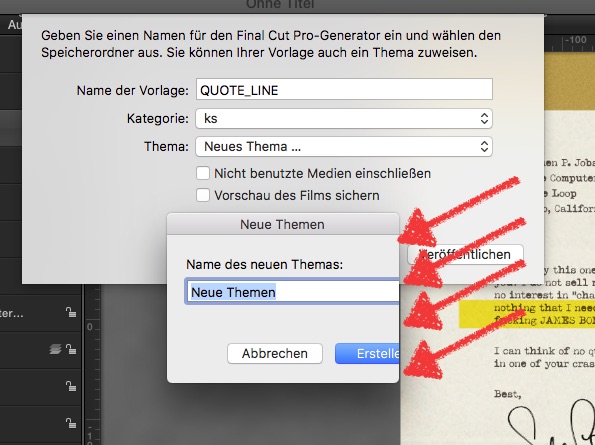
was too lazy to investigate if this is (again…) some localization fail, but as you can see:
saving a built project/generator allows me to create a Theme - but the dialogue is very short!
hmmmm.... not funny!
== double checked ==
localization issue:
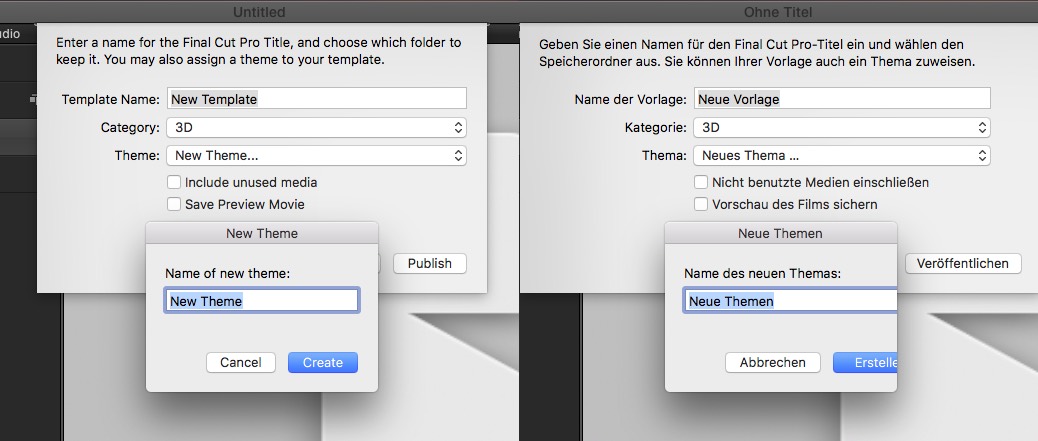
'cancel create' is shorter than 'abbrechen/erstellen' ... grrrrr, calling quality control in aisle #5!!!
And It is nonsense to pre-write "Neue Themen" (plural), could only be a "Neues Thema" (singular)
uhm, well, it does work, but …
a clean installed Sierra, a fresh downloaded M5 - and now that:
was too lazy to investigate if this is (again…) some localization fail, but as you can see:
saving a built project/generator allows me to create a Theme - but the dialogue is very short!
hmmmm.... not funny!
== double checked ==
localization issue:
'cancel create' is shorter than 'abbrechen/erstellen' ... grrrrr, calling quality control in aisle #5!!!
And It is nonsense to pre-write "Neue Themen" (plural), could only be a "Neues Thema" (singular)
Last edit: 25 Sep 2016 06:36 by Karsten Schlüter.
Please Log in to join the conversation.

Less
More
- Posts: 971
- Thank you received: 46
25 Sep 2016 14:18 #80268
by MsJustine
Replied by MsJustine on topic macOS Sierra - What works and what doesn't
Gosh, that is quite bad, not only the cropping, the use of wrong terms, for Apple-bed and no ice cream!!
Please Log in to join the conversation.
- DmitriZigany
-
- Offline
- Platinum Member
-
Less
More
- Posts: 730
- Thank you received: 26
25 Sep 2016 18:55 #80269
by DmitriZigany
Replied by DmitriZigany on topic macOS Sierra - What works and what doesn't
I'm from Sweden, now living in Germany. I have always ordered my Macs with English keyboard and installed ENglish system... Not only do the translations tend to be strange (most of cimputer lingo is english by origin anyway) but also most applications are in English, only the major ones tend to be translated... so key commands / shortcuts tend to be weird or not work at all if you have a non-english keyboard... If one understan english I see no reason to use your Mac in any other language... It's just begging for trouble...
Please Log in to join the conversation.
- Karsten Schlüter
-
- Offline
- Moderator
-
Less
More
- Posts: 3790
- Thank you received: 718
26 Sep 2016 11:11 #80277
by Karsten Schlüter
… if you're using a Mac exclusively for FCPX, why not.
But I learned typing on German layout, in English, the z has to be found where y is well hidden, ü asks for a second key, and I have no clue how to type 'Straße' on an English layout
… ok, localised keyboard-shortcuts are indeed nonsense – cmd-] mutates to cmd-ü, ignoring how wonderful the bracket iconised the end of a clip ... but: no ] or [ on German layouts....... boooohooo :pinch:
Replied by Karsten Schlüter on topic macOS Sierra - What works and what doesn't
DmitriZigany wrote: ... If one understan english I see no reason to use your Mac in any other language... It's just begging for trouble...
… if you're using a Mac exclusively for FCPX, why not.
But I learned typing on German layout, in English, the z has to be found where y is well hidden, ü asks for a second key, and I have no clue how to type 'Straße' on an English layout
… ok, localised keyboard-shortcuts are indeed nonsense – cmd-] mutates to cmd-ü, ignoring how wonderful the bracket iconised the end of a clip ... but: no ] or [ on German layouts....... boooohooo :pinch:
Please Log in to join the conversation.
- DmitriZigany
-
- Offline
- Platinum Member
-
Less
More
- Posts: 730
- Thank you received: 26
26 Sep 2016 13:42 - 26 Sep 2016 13:43 #80284
by DmitriZigany
Replied by DmitriZigany on topic macOS Sierra - What works and what doesn't
It's just a quick learning curve. I write the Swedish å ä ö all the time with no trouble, and Straße is really easy to write (just alt-s to get ß). Ü is also easy once you get used to it (alt-u then u again).
Well worth it not to have to use macOS in Swedish or German or have to use Swedish or German keyboards (especially the German ones, they're bonkers!)
But sorry, we're getting side-tracked.
After some more work in FCPX with Sierra it seems like it's just the issue of it not remembering which monitor the windows were on and the little timecode graphical glitch. Haven't come across any more issues than that so far!
I'm having some issues in Logic Pro were some project can't load some samples, but not sure if that is because Sierra or the new version of the sample playback plug-in, PLAY 5), other than that everything seems hunky dory there as well)
Well worth it not to have to use macOS in Swedish or German or have to use Swedish or German keyboards (especially the German ones, they're bonkers!)
But sorry, we're getting side-tracked.
After some more work in FCPX with Sierra it seems like it's just the issue of it not remembering which monitor the windows were on and the little timecode graphical glitch. Haven't come across any more issues than that so far!
I'm having some issues in Logic Pro were some project can't load some samples, but not sure if that is because Sierra or the new version of the sample playback plug-in, PLAY 5), other than that everything seems hunky dory there as well)
Last edit: 26 Sep 2016 13:43 by DmitriZigany.
Please Log in to join the conversation.
26 Sep 2016 13:56 #80291
by coldsweat
Replied by coldsweat on topic macOS Sierra - What works and what doesn't
The 'keyframe diamonds' aren't showing up for me in the inspector window on mouse rollover.
They appear when I click where they should be & they still work, however they don't display when simply hovering the cursor over them as they did in El Cap.
They appear when I click where they should be & they still work, however they don't display when simply hovering the cursor over them as they did in El Cap.
Please Log in to join the conversation.
- Tom Wolsky
-
- Offline
- Moderator
-
26 Sep 2016 14:00 #80292
by Tom Wolsky
Replied by Tom Wolsky on topic macOS Sierra - What works and what doesn't
Seeing that in transform.
Please Log in to join the conversation.
