


- Posts: 929
- Thank you received: 131
3 Post Moderation Rule for New Boarders (25 Jan 2021)
New boarders will have their posts moderated - Don't worry if you cannot see your post immediately.
Subclipping in FCPX
13 Jun 2014 14:35 #47783
by tpayton
Replied by tpayton on topic Subclipping in FCPX
Apparently I really need to record that tutorial as it covers most all of these questions/misunderstandings. My rough draft was 30 minutes, so it takes a bit of time to get through the material 
If you are reading this thread and haven't read the original response here, you might consider it as it answers many (of course not all) of the questions.
www.fcp.co/forum/4-final-cut-pro-x-fcpx/...ipping-in-fcpx#47127
If you are reading this thread and haven't read the original response here, you might consider it as it answers many (of course not all) of the questions.
www.fcp.co/forum/4-final-cut-pro-x-fcpx/...ipping-in-fcpx#47127
Please Log in to join the conversation.
23 Jun 2014 18:17 - 23 Jun 2014 18:36 #48302
by tpayton
Replied by tpayton on topic Subclipping in FCPX
The subject of subclipping in FCPX is massive. I've been working on a short tutorial for nearly a year, but as Mark Twain said "I would have made a shorter tutorial, but I didn't have time."
So rather than make a refined tutorial here is a run-through I did on sub clipping. The entire thing is over an hour and likely to put you to sleep in it's draft form, with my repeated "ums" and lip smacks. But if you can stand it here is the first few sections in draft. I'll be working on refining this and getting them out in a more respectable form.
1. Subclip Love - Intro
2. Subclip Love - Favorites & Rejects
3. Subclip Love - Keywords
So rather than make a refined tutorial here is a run-through I did on sub clipping. The entire thing is over an hour and likely to put you to sleep in it's draft form, with my repeated "ums" and lip smacks. But if you can stand it here is the first few sections in draft. I'll be working on refining this and getting them out in a more respectable form.
1. Subclip Love - Intro
2. Subclip Love - Favorites & Rejects
3. Subclip Love - Keywords
Last edit: 23 Jun 2014 18:36 by tpayton.
Please Log in to join the conversation.

23 Jun 2014 18:39 #48307
by BenB
Replied by BenB on topic Subclipping in FCPX
We have a whole course for just FCPX media management at macProVideo.com, nothing but, tons of info. Not difficult, just a lot of details, but once you wrap your head around it, not bad.
Please Log in to join the conversation.
23 Jun 2014 20:38 #48310
by tpayton
Replied by tpayton on topic Subclipping in FCPX
Here are three more. Granted these are still a draft, but might be beneficial:
4. Subclip Love - Compund Clips CC
5. Subclip Love - Multicam and Compund CC
6. Subclip Love - Audition CC
4. Subclip Love - Compund Clips CC
5. Subclip Love - Multicam and Compund CC
6. Subclip Love - Audition CC
Please Log in to join the conversation.
22 Jul 2014 21:21 #50336
by tpayton
Replied by tpayton on topic Subclipping in FCPX
As promised here is a PDF of the "subclip love" chart.
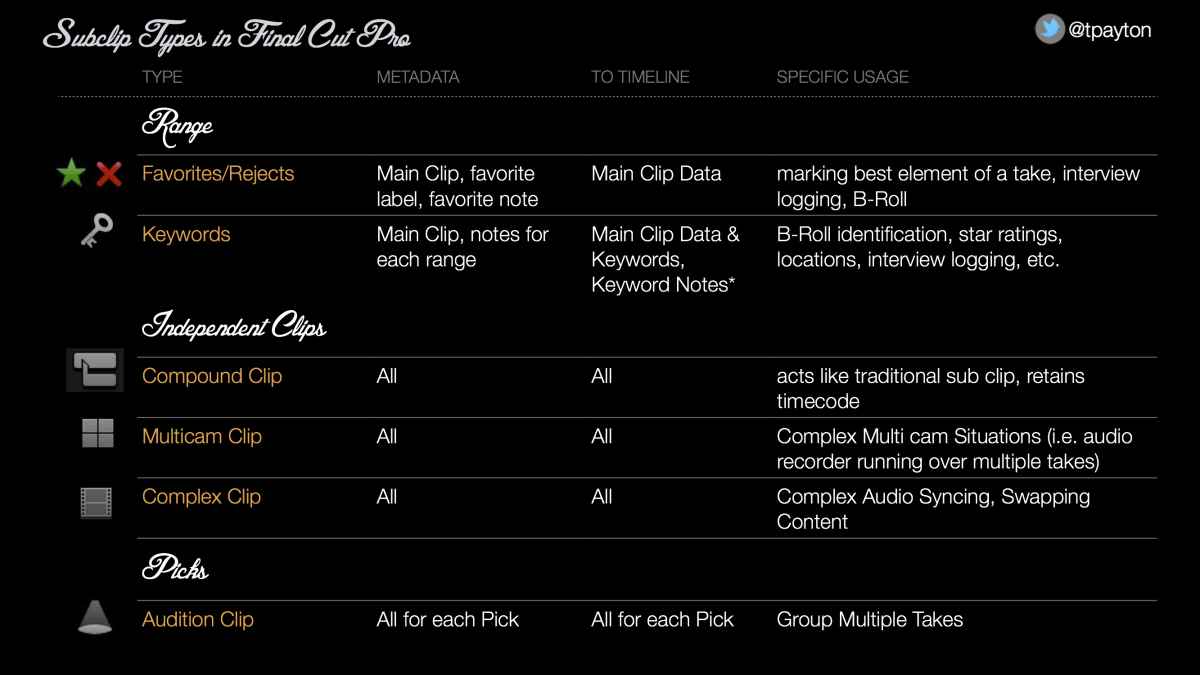
Please Log in to join the conversation.
24 Jul 2014 11:24 #50423
by VidGreg
Replied by VidGreg on topic Subclipping in FCPX
Hey T Payton,
Great big thanks for the videos. I learned and relearned a lot. Really appreciated the effort put into this. Have already referenced the vids in a post here. Sometimes hard to remember how the different tags/keywords/clipping choices all fit together and what limitations go with different metadata choices.
Thanks to Peter for placing them on the home page.
Enjoyed the vids even in "draft form".
Best, Greg
Great big thanks for the videos. I learned and relearned a lot. Really appreciated the effort put into this. Have already referenced the vids in a post here. Sometimes hard to remember how the different tags/keywords/clipping choices all fit together and what limitations go with different metadata choices.
Thanks to Peter for placing them on the home page.
Enjoyed the vids even in "draft form".
Best, Greg
Please Log in to join the conversation.
24 Jul 2014 14:51 #50430
by tpayton
Replied by tpayton on topic Subclipping in FCPX
Happy to do it. I'm glad they are helpful. Please feel free to hit me up with any questions.
Please Log in to join the conversation.
- ronny courtens
-

- Offline
- Moderator
-

Less
More
- Posts: 4455
- Thank you received: 962
24 Jul 2014 17:55 #50431
by ronny courtens
Replied by ronny courtens on topic Subclipping in FCPX
Hey T,
Just wanted to chime in to thank you for these tutorials. They are very thorough and you must have spent quite some time making these. A must-see for anyone who wants to get more familiar with the vast organizing capabilities of FCP X!
- Ronny
Just wanted to chime in to thank you for these tutorials. They are very thorough and you must have spent quite some time making these. A must-see for anyone who wants to get more familiar with the vast organizing capabilities of FCP X!
- Ronny
Please Log in to join the conversation.
24 Jul 2014 18:16 #50434
by tpayton
Replied by tpayton on topic Subclipping in FCPX
Ronny,
Thanks so much. That means alot coming from you. Apparently from the response, I need to make more tutorials to cover all the stuff I had to cut out of "subclip love".
Thanks so much. That means alot coming from you. Apparently from the response, I need to make more tutorials to cover all the stuff I had to cut out of "subclip love".
Please Log in to join the conversation.
- Nervebroke
-

- Offline
- Elite Member
-

Less
More
- Posts: 177
- Thank you received: 12
24 Jul 2014 21:46 #50442
by Nervebroke
Replied by Nervebroke on topic Subclipping in FCPX
I too wanted to chime in and say "Thanks" I would not have even thought of calling your great tutorials as "Drafts"! Please if you have more Post Them.
Thanks Again!
Dave
Thanks Again!
Dave
Please Log in to join the conversation.

11 Aug 2014 00:29 - 11 Aug 2014 13:41 #51156
by mgo
Replied by mgo on topic Subclipping in FCPX
UPDATE lundi 11 aout 2014/// favorites and clip names to keywords, MARKERS and roles
Hi,
first sorry for my bad english
as i said in a comment, i've worked on a small "app" (a applescript) inspired by Mr T.Payton "sub clip love" and any reflexions coming from my editing experience about all it's necessary to do when loggin clips. It's a first idea and hope it can help.
The idea of this app consiste in :
LOG (in FCP X)
1: logging clip with only Favorites, Favorite's Notes an Clip name. And nothing else.
If you log an Interview you put ITW in its name (like 'ITW john part 1'), for a LIVE you put LIVE, an Illustration you put ILL and Ambiance , you put AMB. (all that can be change in a future app)
2 :if you want to sub clip the ITW you can make Favorite (favorite 1: "dancing", favorite 2: "singing"...)
3: you will use Favorite's notes to script what is said AND use * or ** or *** to rate it. So you script and you put *, ** or *** anywhere (before, in or after your script) (note of favorite 1: ** "i like dancing, bla bla bla", note of favorite 2 : "i would like to skate in central park"***)

EXPORT
So you export your EVENT as xlm (myevent.fcpxml)
PROCESS
you put the myevent.fcpxml on the app icon
the app give you back a new fcpxml called myevent_NEW.fcpxml
REIMPORT IN FCP X
you import this new fcpxml

AFTER that you will see that the app has :
-create 3 keyword collections called "*", "**" and "***" in your EVENT (you don't have to create it)
-each time the app have seen a * or a ** or *** in the favorite note, it tag (with KEYWORD) the same range with the good tag and put the same note for the keyword (it's cool when you script ITW with favorite note). Now you can have it in the INSPECTOR when you edit because it's keyword note)
-each time the app have seen a * or a ** or *** in the favorite note, it put a MARKER at the beginning of the favorite and name it with the Favorite's Note.
-each time the app detect "ITW", or "LIVE" or "ILL" or "AMB" in the clip name, it assign a VIDEO ROLE call ITW, LIVE, etc and an AUDIO ROLE call "audioITW", "AudioLIVE" etc...
(so you don't have to create and assign roles to those clips).
I'm working on a menu to ask what the editor want to use instead of ITW or LIVE....
(sorry it's stil in French)

so it's all
PS: i'm not at all an infromaticien so maybe you will have a problem with the app.
If you try it, do it with a test event. I don't think there is problem with security because it's just a script that work on an xml. If it doesn't work... it doesn't work.
I've tested it on different events and it works well for me.
So you can test it if you are interesting in and change what you want if you understand Applescript.
thank and best regards
you can download the "BOOMERANG.app.zip" here:
gossetmartin.free.fr/BOOMERANG
with a right-clic
ciao
Martin Gosset
Hi,
first sorry for my bad english
as i said in a comment, i've worked on a small "app" (a applescript) inspired by Mr T.Payton "sub clip love" and any reflexions coming from my editing experience about all it's necessary to do when loggin clips. It's a first idea and hope it can help.
The idea of this app consiste in :
LOG (in FCP X)
1: logging clip with only Favorites, Favorite's Notes an Clip name. And nothing else.
If you log an Interview you put ITW in its name (like 'ITW john part 1'), for a LIVE you put LIVE, an Illustration you put ILL and Ambiance , you put AMB. (all that can be change in a future app)
2 :if you want to sub clip the ITW you can make Favorite (favorite 1: "dancing", favorite 2: "singing"...)
3: you will use Favorite's notes to script what is said AND use * or ** or *** to rate it. So you script and you put *, ** or *** anywhere (before, in or after your script) (note of favorite 1: ** "i like dancing, bla bla bla", note of favorite 2 : "i would like to skate in central park"***)
EXPORT
So you export your EVENT as xlm (myevent.fcpxml)
PROCESS
you put the myevent.fcpxml on the app icon
the app give you back a new fcpxml called myevent_NEW.fcpxml
REIMPORT IN FCP X
you import this new fcpxml
AFTER that you will see that the app has :
-create 3 keyword collections called "*", "**" and "***" in your EVENT (you don't have to create it)
-each time the app have seen a * or a ** or *** in the favorite note, it tag (with KEYWORD) the same range with the good tag and put the same note for the keyword (it's cool when you script ITW with favorite note). Now you can have it in the INSPECTOR when you edit because it's keyword note)
-each time the app have seen a * or a ** or *** in the favorite note, it put a MARKER at the beginning of the favorite and name it with the Favorite's Note.
-each time the app detect "ITW", or "LIVE" or "ILL" or "AMB" in the clip name, it assign a VIDEO ROLE call ITW, LIVE, etc and an AUDIO ROLE call "audioITW", "AudioLIVE" etc...
(so you don't have to create and assign roles to those clips).
I'm working on a menu to ask what the editor want to use instead of ITW or LIVE....
(sorry it's stil in French)
so it's all
PS: i'm not at all an infromaticien so maybe you will have a problem with the app.
If you try it, do it with a test event. I don't think there is problem with security because it's just a script that work on an xml. If it doesn't work... it doesn't work.
I've tested it on different events and it works well for me.
So you can test it if you are interesting in and change what you want if you understand Applescript.
thank and best regards
you can download the "BOOMERANG.app.zip" here:
gossetmartin.free.fr/BOOMERANG
with a right-clic
ciao
Martin Gosset
Last edit: 11 Aug 2014 13:41 by mgo. Reason: update of this small script
Please Log in to join the conversation.
