


- Posts: 4455
- Thank you received: 962
3 Post Moderation Rule for New Boarders (25 Jan 2021)
New boarders will have their posts moderated - Don't worry if you cannot see your post immediately.
Sharing Projects between Editors in 10.1
- ronny courtens
-
 Topic Author
- Offline
- Moderator
-

Less
More
06 Feb 2014 22:01 - 06 Feb 2014 22:12 #40694
by ronny courtens
Sharing Projects between Editors in 10.1 was created by ronny courtens
In another thread we have been talking about sharing 10.1 Projects and Events between editors in different locations. I wanted to try out the Transfer Library workflow (no XML) on a small test project, and while I did this I made some screenshots. I thought these may be helpful for anyone looking for an easy collaborative workflow, so I'm posting them here.
The idea is that two editors in two different locations collaborate on a production. Each editor has the same media on his own system, including Optimized and Proxy media that were created during the original import. The original media are not managed, they reside in an external media folder.
1. I have created a Master library into which I have imported my clips. The media are not physically imported into the library, they are in an external media folder. I have created Optimized and Proxy media for all imported clips.
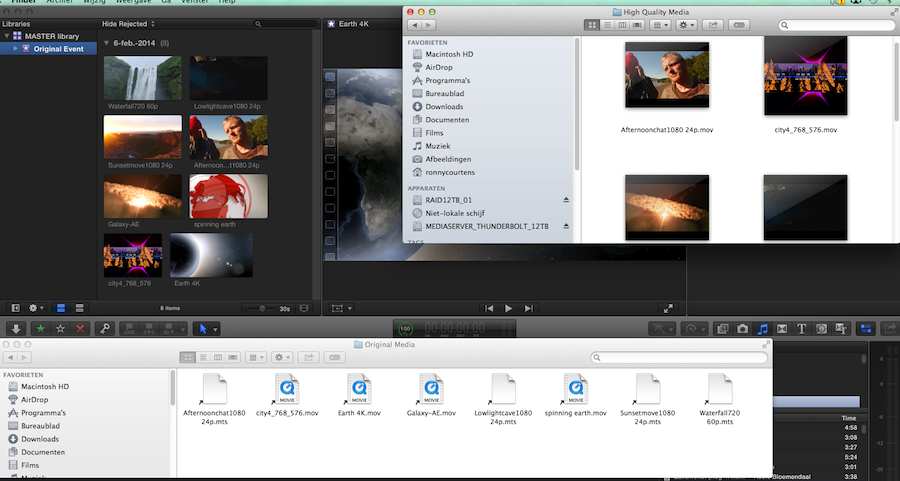
2. I have copied the Library and the external media folder onto a drive and I have sent the drive to my second editor (ED2) who works on a different location. He opens the library on his system and he starts adding keywords and notes to the clips. Then he creates a Project (Project 1) and adds some clips, titles and effects.
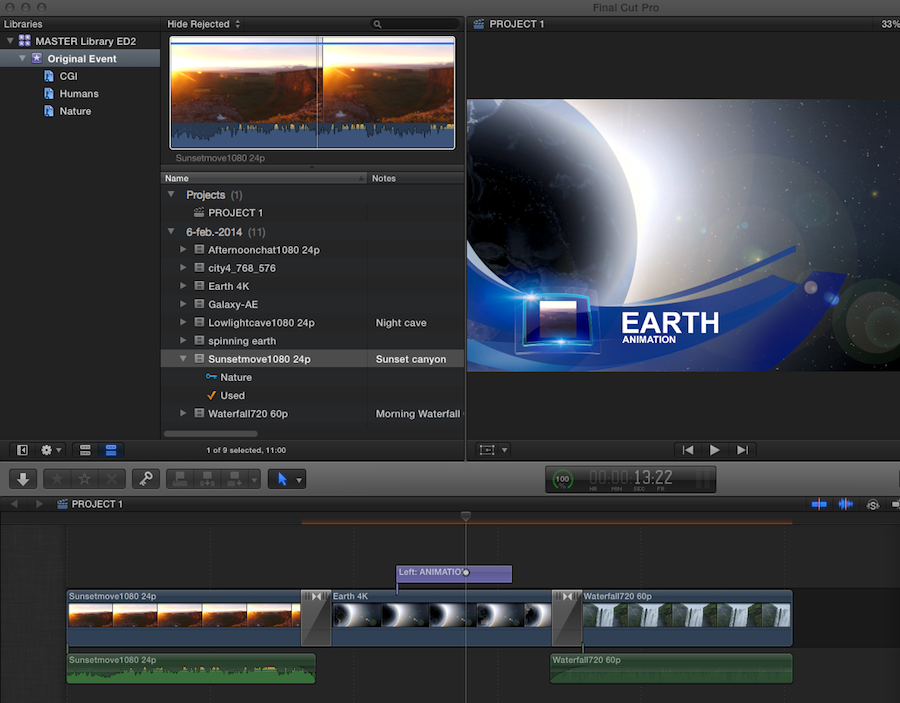
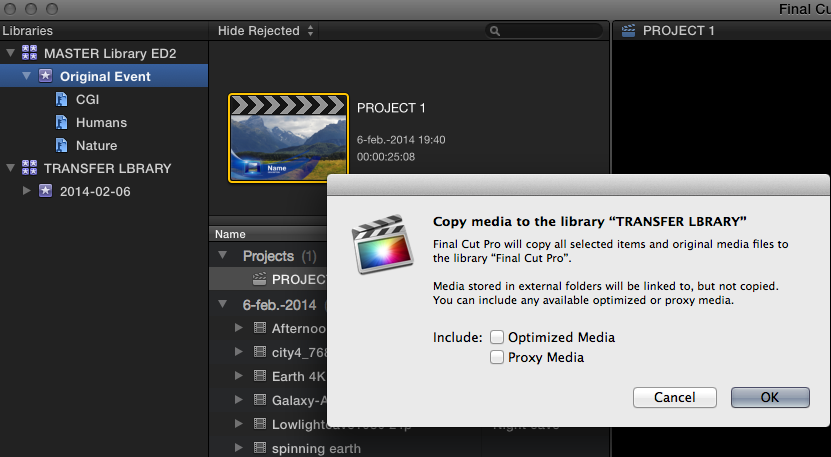
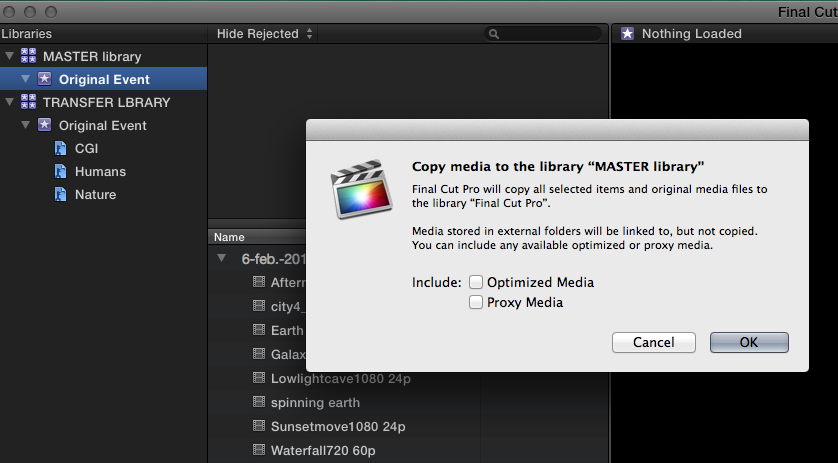
3. When the edit is done he creates a new "Transfer" library and he drags the updated Event onto the Transfer library icon. A window pops up asking if he wants to copy over the Optimized and Proxy files. Of course he does not want to do that. He just presses OK.
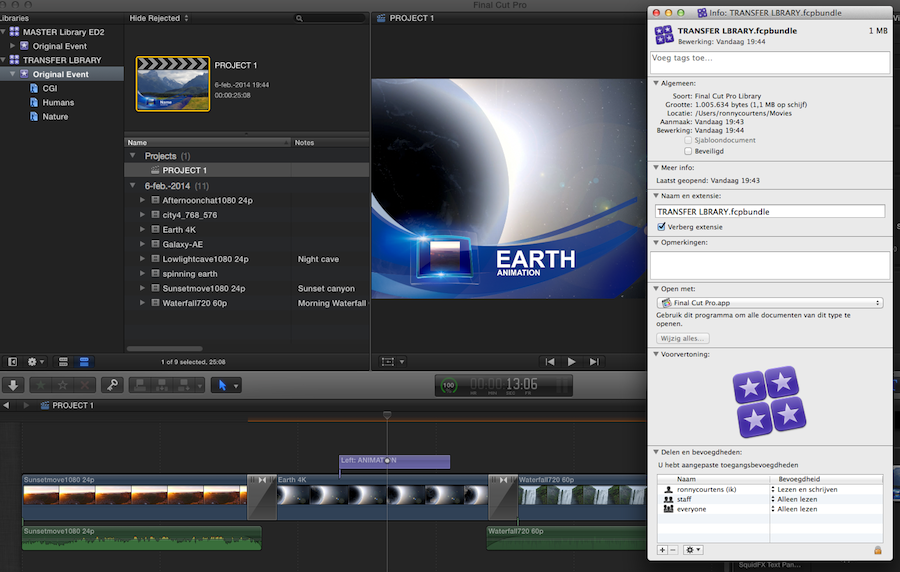
4. The updated Event is copied into the Transfer Library and he deletes the empty event that was automatically created when creating the Transfer library. All clips, keywords and notes are transferred into the Transfer library, as well as the Project 1 he has created. The size of the Transfer library is only 1 MB, while his Master library with the optimized and proxy files is 2 GB.
5. He e-mails the Transfer library file to me, I open the Transfer library and I drag the updated Original event from the Transfer library onto my Master library. When the options window pops up I just press OK.
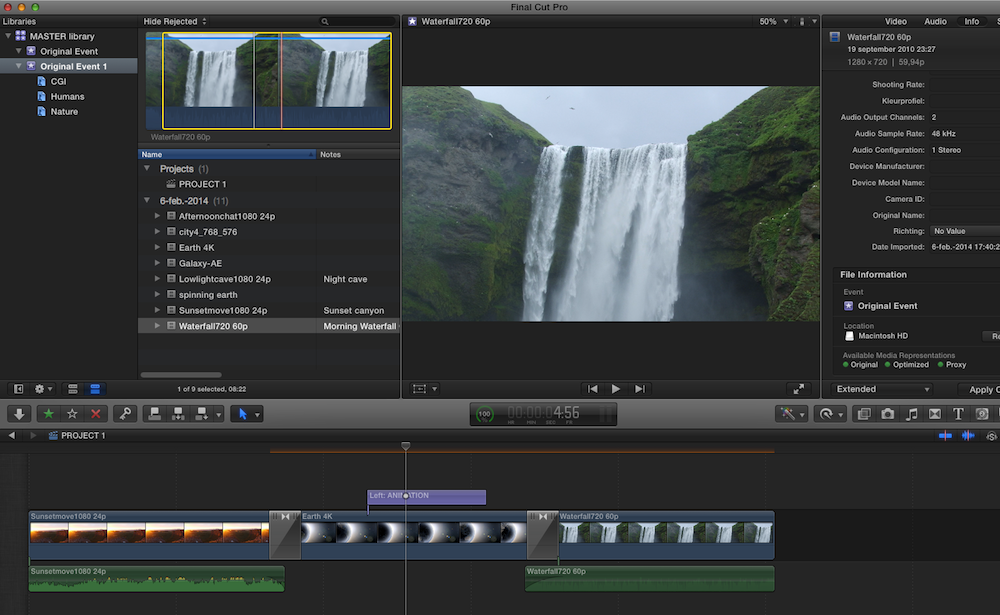
6. I close the Transfer Library. The updated Original event has been added to my Master library and has received the suffix "1". Inside it I have his keywords, his notes and his Project 1. Perfect.
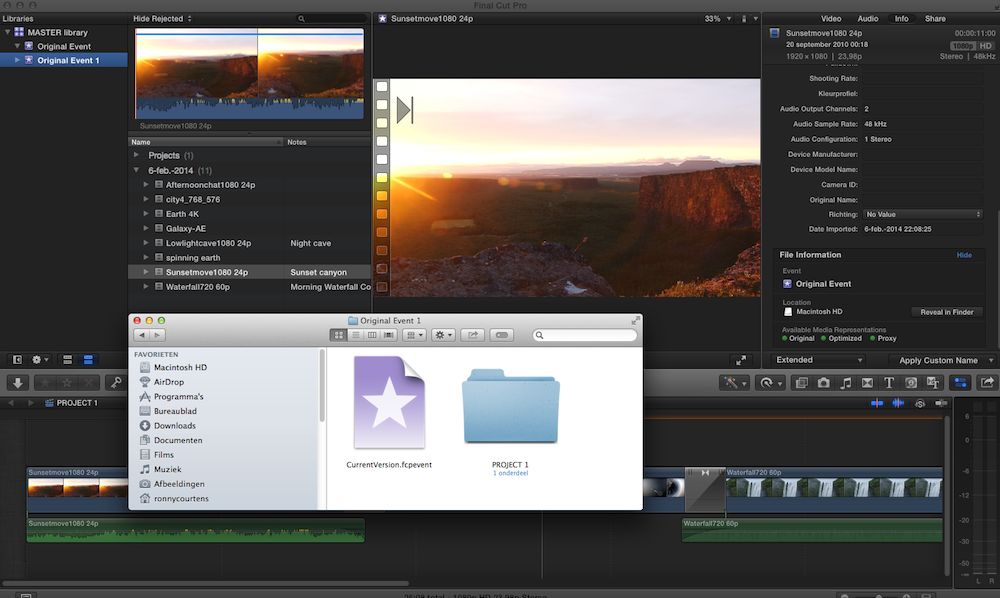
7. One question remains: can I now delete the Original event and just keep the updated ("Original 1") event and rename it?
When I select a clip in the Original 1 event we can see in the Inspector > Info tab that the clip actually refers to the Original event, not to Original 1. When I open the Library package we also can see that the Original 1 event contains no Original Media folder and no Transcoded Media folder. This leads to thinking that when we delete the Original event we would lose any connections to the media or to the transcoded files.
8. Behold. When I delete the Original event FCPX magically transfers the Original Media folder and the Transcoded Media folder into the Original 1 event folder, and everything works perfectly.
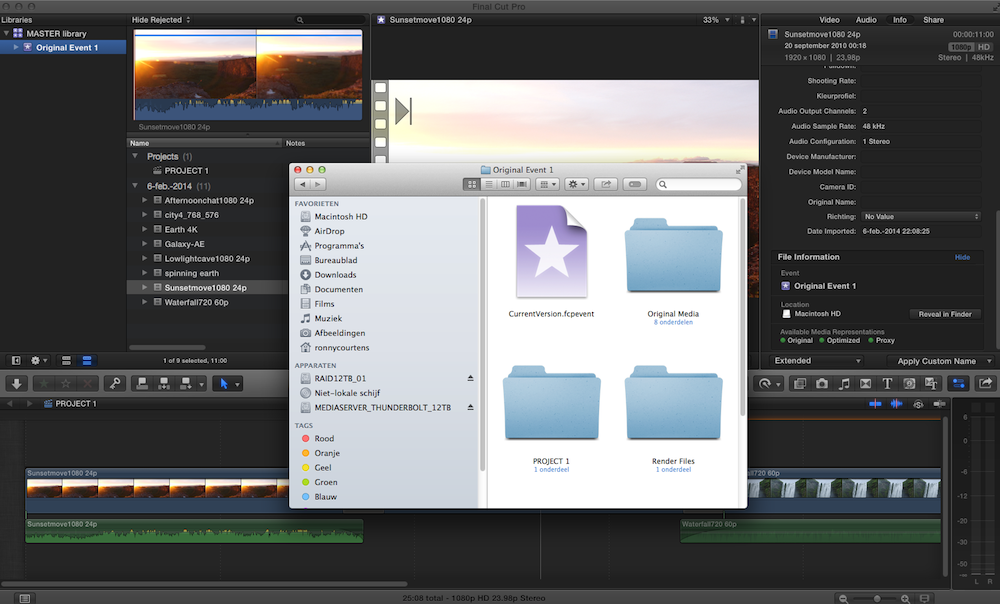
In the Inspector I can see that all clips now refer to the Original 1 event, all clips are linked to my external media, and although we never transferred any Optimized or Proxy media in the transfer process I still have access to both my Optimized and my Proxy even when I delete the Original event. Another example of how FCPX media management shines.
- Ronny
The idea is that two editors in two different locations collaborate on a production. Each editor has the same media on his own system, including Optimized and Proxy media that were created during the original import. The original media are not managed, they reside in an external media folder.
1. I have created a Master library into which I have imported my clips. The media are not physically imported into the library, they are in an external media folder. I have created Optimized and Proxy media for all imported clips.
2. I have copied the Library and the external media folder onto a drive and I have sent the drive to my second editor (ED2) who works on a different location. He opens the library on his system and he starts adding keywords and notes to the clips. Then he creates a Project (Project 1) and adds some clips, titles and effects.
3. When the edit is done he creates a new "Transfer" library and he drags the updated Event onto the Transfer library icon. A window pops up asking if he wants to copy over the Optimized and Proxy files. Of course he does not want to do that. He just presses OK.
4. The updated Event is copied into the Transfer Library and he deletes the empty event that was automatically created when creating the Transfer library. All clips, keywords and notes are transferred into the Transfer library, as well as the Project 1 he has created. The size of the Transfer library is only 1 MB, while his Master library with the optimized and proxy files is 2 GB.
5. He e-mails the Transfer library file to me, I open the Transfer library and I drag the updated Original event from the Transfer library onto my Master library. When the options window pops up I just press OK.
6. I close the Transfer Library. The updated Original event has been added to my Master library and has received the suffix "1". Inside it I have his keywords, his notes and his Project 1. Perfect.
7. One question remains: can I now delete the Original event and just keep the updated ("Original 1") event and rename it?
When I select a clip in the Original 1 event we can see in the Inspector > Info tab that the clip actually refers to the Original event, not to Original 1. When I open the Library package we also can see that the Original 1 event contains no Original Media folder and no Transcoded Media folder. This leads to thinking that when we delete the Original event we would lose any connections to the media or to the transcoded files.
8. Behold. When I delete the Original event FCPX magically transfers the Original Media folder and the Transcoded Media folder into the Original 1 event folder, and everything works perfectly.
In the Inspector I can see that all clips now refer to the Original 1 event, all clips are linked to my external media, and although we never transferred any Optimized or Proxy media in the transfer process I still have access to both my Optimized and my Proxy even when I delete the Original event. Another example of how FCPX media management shines.
- Ronny
Last edit: 06 Feb 2014 22:12 by ronny courtens.
Please Log in to join the conversation.
- MadsLarsenNielsen
-

- Offline
- New Member
-

Less
More
- Posts: 14
- Thank you received: 2
07 Feb 2014 08:53 - 07 Feb 2014 08:57 #40712
by MadsLarsenNielsen
Replied by MadsLarsenNielsen on topic Sharing Projects between Editors in 10.1
Hi Ronny,
I've been using Transfer Libraries ever since 10.1 came out, and before that Transfer Disk Images for sending projects and events between editors. Although the frase we've been using is Share Libraries, I think Transfer is even more accurate.
I just wanted to add the following tip:
Whenever I need to send a Transfer Library containing a project via email or wetransfer to another editor I want the keep the file size as small as possible. My upload speed at home is terrible, 1 mbit/sec. So when I'm home working and need to send the timeline to another editor at work, I do the following:
I open the Transfer Library package content and delete Render Files, Trandcoded Media, Analysis Files and even the Original Media folder. We always work with external media and since all the referenced meta data is preserved within the CurrentVersion.fcpevent file I don't even need the Original Media folder. It will be recreated when the other editor re-link the media to his storage.
And before I send the Library I zip it.
This way a Library containing a half hour timeline is reduced from 400-500 Mb or a lot giga more depending on the amount of Render Files to approx 50 Mb. Which is nice.
I've been using Transfer Libraries ever since 10.1 came out, and before that Transfer Disk Images for sending projects and events between editors. Although the frase we've been using is Share Libraries, I think Transfer is even more accurate.
I just wanted to add the following tip:
Whenever I need to send a Transfer Library containing a project via email or wetransfer to another editor I want the keep the file size as small as possible. My upload speed at home is terrible, 1 mbit/sec. So when I'm home working and need to send the timeline to another editor at work, I do the following:
I open the Transfer Library package content and delete Render Files, Trandcoded Media, Analysis Files and even the Original Media folder. We always work with external media and since all the referenced meta data is preserved within the CurrentVersion.fcpevent file I don't even need the Original Media folder. It will be recreated when the other editor re-link the media to his storage.
And before I send the Library I zip it.
This way a Library containing a half hour timeline is reduced from 400-500 Mb or a lot giga more depending on the amount of Render Files to approx 50 Mb. Which is nice.
Last edit: 07 Feb 2014 08:57 by MadsLarsenNielsen.
Please Log in to join the conversation.
- ronny courtens
-
Topic Author
- Offline
- Moderator
-
Less
More
- Posts: 4455
- Thank you received: 962
07 Feb 2014 09:05 - 07 Feb 2014 09:14 #40714
by ronny courtens
Replied by ronny courtens on topic Sharing Projects between Editors in 10.1
Hi Mads,
When you use the method I have shown above there never are any Render files, Transcoded media, Analysis files or Original Media files in the Transfer Library. There's only a CurrentVersion.fcpevent file and a Project file (as you can see in screenshot 7), which makes the Transfer Library very small (1 MB in the example I have shown in screenshot 4).
And yes it is best to always zip it up before you e-mail it.
CORRECTION: as i said there are no Transcoded media and no Render files in the Transfer Library. But there are Analysis files and an Original Media folder with simlinks. You are correct that you can delete these to further decrease the size of the Library file.
- Ronny
When you use the method I have shown above there never are any Render files, Transcoded media, Analysis files or Original Media files in the Transfer Library. There's only a CurrentVersion.fcpevent file and a Project file (as you can see in screenshot 7), which makes the Transfer Library very small (1 MB in the example I have shown in screenshot 4).
And yes it is best to always zip it up before you e-mail it.
CORRECTION: as i said there are no Transcoded media and no Render files in the Transfer Library. But there are Analysis files and an Original Media folder with simlinks. You are correct that you can delete these to further decrease the size of the Library file.
- Ronny
Last edit: 07 Feb 2014 09:14 by ronny courtens.
Please Log in to join the conversation.
- finalbug.net
-

- Offline
- Platinum Member
-

- Absence of Quality is the essence of squareness.
07 Feb 2014 11:04 #40716
by finalbug.net
Replied by finalbug.net on topic Sharing Projects between Editors in 10.1
Wow, thanks for taking the time to share :woohoo:
best
Paul
best
Paul
Please Log in to join the conversation.
- Andreas Kiel
-
- Offline
- Platinum Member
-
Less
More
- Posts: 1077
- Thank you received: 189
07 Feb 2014 13:44 #40730
by Andreas Kiel
Replied by Andreas Kiel on topic Sharing Projects between Editors in 10.1
Thanks Ronny for this excellent workflow description !!!
Funny thing is that I started the day before yesterday to write something very similar - but was either too busy or too tired to finish. And then you came up and made it.
Here some thoughts of mine:
The original media – dependent on the source media – may not link to an external file - though they keep the metadata links for that.
Setting up a collaborative library in this case would require to consolidate the project(s) to keep a clean structure to "stay managed".
This means the "master creator" can have all backups and only sends the rewrapped files on start of the collaboration. The "slave creator" will still have the option to do once he go the source files.
Once the setup is done the transfer doesn't need the original files folder any more.
In case media are added these media have to be send to the coworker.
For optimized media the same thing may apply with special codecs. But thats something the "slave creator" can do by it's own.
With proxy media its the same as with optimized media. My little X-Proxy app can be helpful there.
Having transcoded media is slightly different from my point of view. While the "slave creator" can create them on the other machine it might be not worth the time. Transcoded Media are used for stabilize etc. These files are small and more or less do not affect the final file size. But they can cost quite a time to re-create them.
Render files are useless in this situation and should be deleted before transfer.
-Andreas
Funny thing is that I started the day before yesterday to write something very similar - but was either too busy or too tired to finish. And then you came up and made it.
Here some thoughts of mine:
The original media – dependent on the source media – may not link to an external file - though they keep the metadata links for that.
Setting up a collaborative library in this case would require to consolidate the project(s) to keep a clean structure to "stay managed".
This means the "master creator" can have all backups and only sends the rewrapped files on start of the collaboration. The "slave creator" will still have the option to do once he go the source files.
Once the setup is done the transfer doesn't need the original files folder any more.
In case media are added these media have to be send to the coworker.
For optimized media the same thing may apply with special codecs. But thats something the "slave creator" can do by it's own.
With proxy media its the same as with optimized media. My little X-Proxy app can be helpful there.
Having transcoded media is slightly different from my point of view. While the "slave creator" can create them on the other machine it might be not worth the time. Transcoded Media are used for stabilize etc. These files are small and more or less do not affect the final file size. But they can cost quite a time to re-create them.
Render files are useless in this situation and should be deleted before transfer.
-Andreas
Please Log in to join the conversation.
- ronny courtens
-
Topic Author
- Offline
- Moderator
-
Less
More
- Posts: 4455
- Thank you received: 962
07 Feb 2014 14:13 - 07 Feb 2014 14:13 #40732
by ronny courtens
Replied by ronny courtens on topic Sharing Projects between Editors in 10.1
Hey Andreas,
Thank you for your comments, very interesting.
At the post house we work in a closed environment on an XSAN, so we never use this workflow. But I thought it would be interesting to try this once (be it on a very small test setup) and I have been amazed at how easily this works.
The funny part was in the last test, when I had received the Transfer Library from the other station. I copied his updated Event into my Master library and I saw in the Inspector that every clip in the updated event was referring to my original event instead. When I opened the updated event in the Transfer Library I saw there was nothing in there except an event file and a project folder with its file inside (see screenshot 7). So this made me think I woud need to keep the original event to make the updated event work.
But not so. I decided to delete the original event from my Master Library anyway, and all of a sudden all folders from the deleted original event folder appeared in my updated event folder (see screenshot 8 ). Also after deleting the original event every clip in the updated event now was pointing to the updated event in the inspector, while before deleting the original event they were pointing to the original event.
I was surprised at how quickly and accurately FCPX restored every single connection.
- Ronny
Thank you for your comments, very interesting.
At the post house we work in a closed environment on an XSAN, so we never use this workflow. But I thought it would be interesting to try this once (be it on a very small test setup) and I have been amazed at how easily this works.
The funny part was in the last test, when I had received the Transfer Library from the other station. I copied his updated Event into my Master library and I saw in the Inspector that every clip in the updated event was referring to my original event instead. When I opened the updated event in the Transfer Library I saw there was nothing in there except an event file and a project folder with its file inside (see screenshot 7). So this made me think I woud need to keep the original event to make the updated event work.
But not so. I decided to delete the original event from my Master Library anyway, and all of a sudden all folders from the deleted original event folder appeared in my updated event folder (see screenshot 8 ). Also after deleting the original event every clip in the updated event now was pointing to the updated event in the inspector, while before deleting the original event they were pointing to the original event.
I was surprised at how quickly and accurately FCPX restored every single connection.
- Ronny
Last edit: 07 Feb 2014 14:13 by ronny courtens.
Please Log in to join the conversation.
07 Feb 2014 17:10 #40744
by elegy2000
Replied by elegy2000 on topic Sharing Projects between Editors in 10.1
tnx for a great share.
i have a workflow questions that has been bugging me for a while and i cant elegantly solve it.
we deal with a large number of audio files when we shoot, because we record audio separately.
in the studio we crate synchronized clips which combine the video and audio. i like creating proxy files of all our clips so i can share a slim event with my off site editor, this way library (or event) are small and manageable.
but when i ask final cut to create proxy (or even optimized) video of these synced clips, the AUDIO is not created, fcpx will only transcode the video and the in camera audio, but not the separately recorded audio file. am i doing something wrong? or is this by design?
i like to keep my originals referenced rather than managed, but with these offsite libraries i found myself manually copying the audio files to the offsite library.
is there any other solution?
again, tnx to this great community
liron
i have a workflow questions that has been bugging me for a while and i cant elegantly solve it.
we deal with a large number of audio files when we shoot, because we record audio separately.
in the studio we crate synchronized clips which combine the video and audio. i like creating proxy files of all our clips so i can share a slim event with my off site editor, this way library (or event) are small and manageable.
but when i ask final cut to create proxy (or even optimized) video of these synced clips, the AUDIO is not created, fcpx will only transcode the video and the in camera audio, but not the separately recorded audio file. am i doing something wrong? or is this by design?
i like to keep my originals referenced rather than managed, but with these offsite libraries i found myself manually copying the audio files to the offsite library.
is there any other solution?
again, tnx to this great community
liron
Please Log in to join the conversation.
- Andreas Kiel
-
- Offline
- Platinum Member
-
Less
More
- Posts: 1077
- Thank you received: 189
08 Feb 2014 12:10 #40765
by Andreas Kiel
Replied by Andreas Kiel on topic Sharing Projects between Editors in 10.1
liron,
How or where do you create the synched clips?
-Andreas
How or where do you create the synched clips?
-Andreas
Please Log in to join the conversation.

08 Feb 2014 12:29 #40766
by BenB
Replied by BenB on topic Sharing Projects between Editors in 10.1
Are you trying to proxy only the video file itself? Or the whole Sync Clip? If it is only the video file, and it is inside of the Sync container, you'd have to enable its audio channels again, I believe.
Please Log in to join the conversation.
- Andreas Kiel
-
- Offline
- Platinum Member
-
Less
More
- Posts: 1077
- Thank you received: 189
08 Feb 2014 12:56 #40771
by Andreas Kiel
Replied by Andreas Kiel on topic Sharing Projects between Editors in 10.1
I made a real bad mistake the other day (was a bad week) and wrote nonsense.
I wrote:
What I meant was:
I wrote:
Having transcoded media is slightly different from my point of view. While the "slave creator" can create them on the other machine it might be not worth the time. Transcoded Media are used for stabilize etc. These files are small and more or less do not affect the final file size. But they can cost quite a time to re-create them.
What I meant was:
-AndreasHaving analysis files is slightly different from my point of view. While the "slave creator" can create them on the other machine it might be not worth the time. Analysis files are used for stabilize etc. These files are small and more or less do not affect the final file size. But they can cost quite a time to re-create them.
Please Log in to join the conversation.
08 Feb 2014 13:01 #40772
by elegy2000
Replied by elegy2000 on topic Sharing Projects between Editors in 10.1
The synced clips are made within fcpx. Fcpx makes a proxy of the video with its original audio, not of the synced clip.
That's what is confusing to me. I can't find a way to include the separately recorded audio in the optimized or proxy media folder, either as a synced clip or independently.
Tnx.
That's what is confusing to me. I can't find a way to include the separately recorded audio in the optimized or proxy media folder, either as a synced clip or independently.
Tnx.
Please Log in to join the conversation.
08 Feb 2014 13:06 #40773
by elegy2000
Replied by elegy2000 on topic Sharing Projects between Editors in 10.1
Ben
I'm trying to proxy the full synced file
Video + the separately recorded audio. I dont care if it is proxied as a single clip or a video and audio clip. But regardless of what I do fcpx only transcodes the video file with its original video, not the separately recorded audio.
My goal is to make a "proxy" library that I can take my off site editors, I just can't find a way to include separately recorded audio.
Tnx for the help guys
I'm trying to proxy the full synced file
Video + the separately recorded audio. I dont care if it is proxied as a single clip or a video and audio clip. But regardless of what I do fcpx only transcodes the video file with its original video, not the separately recorded audio.
My goal is to make a "proxy" library that I can take my off site editors, I just can't find a way to include separately recorded audio.
Tnx for the help guys
Please Log in to join the conversation.
- Andreas Kiel
-
- Offline
- Platinum Member
-
Less
More
- Posts: 1077
- Thank you received: 189
08 Feb 2014 13:30 - 08 Feb 2014 13:37 #40775
by Andreas Kiel
That won't work the way you try it.
Proxy media are made from the source media not from anything connected to the source within FCPX – therefore the external audio is not included with a clip selected.
You have to export (transcode) each single synched clip. Then import those into your library and make proxies from there.
-Andreas
Replied by Andreas Kiel on topic Sharing Projects between Editors in 10.1
elegy2000 wrote: The synced clips are made within fcpx. Fcpx makes a proxy of the video with its original audio, not of the synced clip.
That's what is confusing to me. I can't find a way to include the separately recorded audio in the optimized or proxy media folder, either as a synced clip or independently.
Tnx.
That won't work the way you try it.
Proxy media are made from the source media not from anything connected to the source within FCPX – therefore the external audio is not included with a clip selected.
You have to export (transcode) each single synched clip. Then import those into your library and make proxies from there.
-Andreas
Last edit: 08 Feb 2014 13:37 by Andreas Kiel.
Please Log in to join the conversation.
08 Feb 2014 13:37 #40776
by elegy2000
Replied by elegy2000 on topic Sharing Projects between Editors in 10.1
Andreas
It's what I suspected. I was trying to avoid re transcoding and exporting.
Can the audio files (files) be transcoded to proxy or optimized media to be included in the "optimized" or "proxy" folders?
Tnx!!
It's what I suspected. I was trying to avoid re transcoding and exporting.
Can the audio files (files) be transcoded to proxy or optimized media to be included in the "optimized" or "proxy" folders?
Tnx!!
Please Log in to join the conversation.
- Andreas Kiel
-
- Offline
- Platinum Member
-
Less
More
- Posts: 1077
- Thank you received: 189
08 Feb 2014 13:42 #40777
by Andreas Kiel
Replied by Andreas Kiel on topic Sharing Projects between Editors in 10.1
Probably you can copy the audio to the proxy folder or create sym links there.
But I haven't tried.
-Andreas
But I haven't tried.
-Andreas
Please Log in to join the conversation.
08 Feb 2014 15:14 #40782
by elegy2000
Replied by elegy2000 on topic Sharing Projects between Editors in 10.1
It's kinda what have been doing. I am copying the audio files to the "original media" in the "light" library folder instead of the symlinks. Prob is that when the editor works on the file offsite and I get the XML back the audio files r offline because my original media folder has symlinks.
Anyway... It is what it is. Just wanted to make sure I wasn't missing anything.
Tnx for taking the time to answer.
Liron
Anyway... It is what it is. Just wanted to make sure I wasn't missing anything.
Tnx for taking the time to answer.
Liron
Please Log in to join the conversation.
- Andreas Kiel
-
- Offline
- Platinum Member
-
Less
More
- Posts: 1077
- Thank you received: 189
10 Feb 2014 12:47 #40851
by Andreas Kiel
Replied by Andreas Kiel on topic Sharing Projects between Editors in 10.1
On another thread there had been a question about how to handle templates when moving or sharing libraries or projects.
Following the steps Ronny explained above there might be an issue with templates – everything is totally correct with Ronny's workflow suggestion. But custom templates need to be considered and have to be installed on the other machine(s) in the same way the are installed on the master machine. The reverse route of installation maybe needed as well.
I made some notes on the other thread. There is download link to a little app to double check template paths from XML.
-Andreas
www.fcp.co/forum/4-final-cut-pro-x-fcpx/...ow-with-update#40850
Following the steps Ronny explained above there might be an issue with templates – everything is totally correct with Ronny's workflow suggestion. But custom templates need to be considered and have to be installed on the other machine(s) in the same way the are installed on the master machine. The reverse route of installation maybe needed as well.
I made some notes on the other thread. There is download link to a little app to double check template paths from XML.
-Andreas
www.fcp.co/forum/4-final-cut-pro-x-fcpx/...ow-with-update#40850
Please Log in to join the conversation.
