


- Posts: 3790
- Thank you received: 718
3 Post Moderation Rule for New Boarders (25 Jan 2021)
New boarders will have their posts moderated - Don't worry if you cannot see your post immediately.
Aperture/Shutter Transition
- Karsten Schlüter
-
 Topic Author
- Offline
- Moderator
-

Less
More
26 Aug 2014 17:48 - 26 Aug 2014 18:01 #51818
by Karsten Schlüter
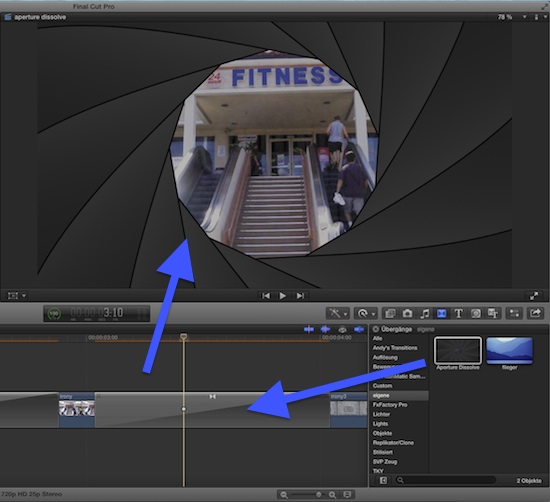
For some 'Slideshow'-Project, I had the idea to use an 'Aperture Shutter'-dissolve - like that effect in iOS.-
No tutorial how to use it needed - unzip, and install in your usual location for 3rd party transitions; in FCPX: just drag it between two clips/photos - done.
__________
In case, you're interested, how it's done:
My first attempt was to import a graphic of the blade, a dozen times and keyframe all that stuff... but, I learned there's a much smarter way, by using Replicators!
I used the Bezier-tool to create that odd, bean… kidney… kidney-bean-shaped blade - beziers are vectors, which allow to resize the graphic without any quality loss (which I had to do, to make it fit the frame).
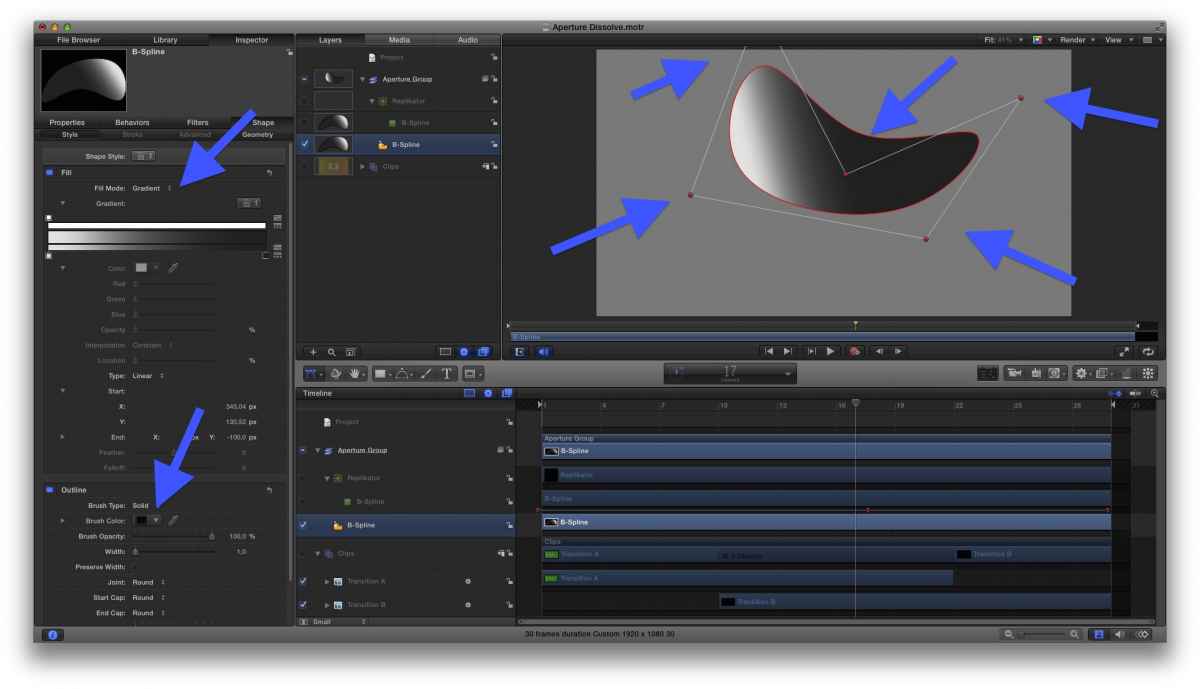
Just 5 points, a thin outline, a grey gradient, some adjustment of the direction of the gradient.
Then, hit L and the magic begins:
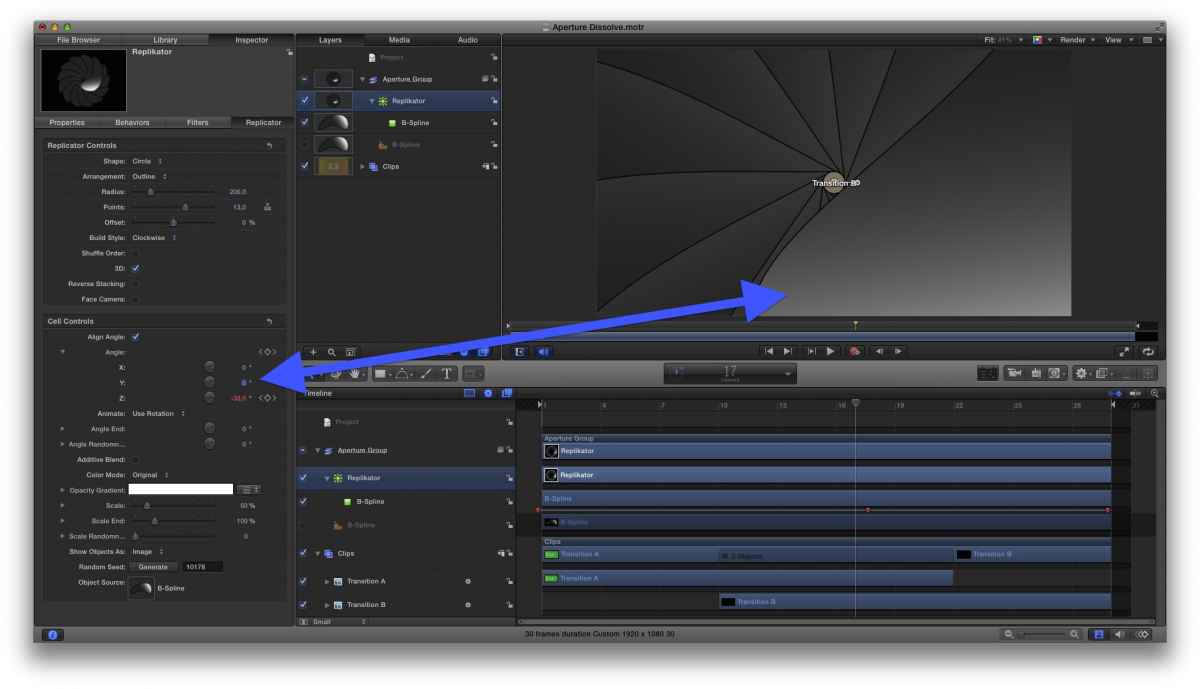
Set Shape to Circle, I set to 13 pieces, and the Cells have to align the Angle - in plain words: follow the circle…
Rotating the cell around the z-axis opens/closes the Aperture; keyframe that - done! … almost:
… the replicants are piled over each other - the last one overlaps the first - which does look very ugly:
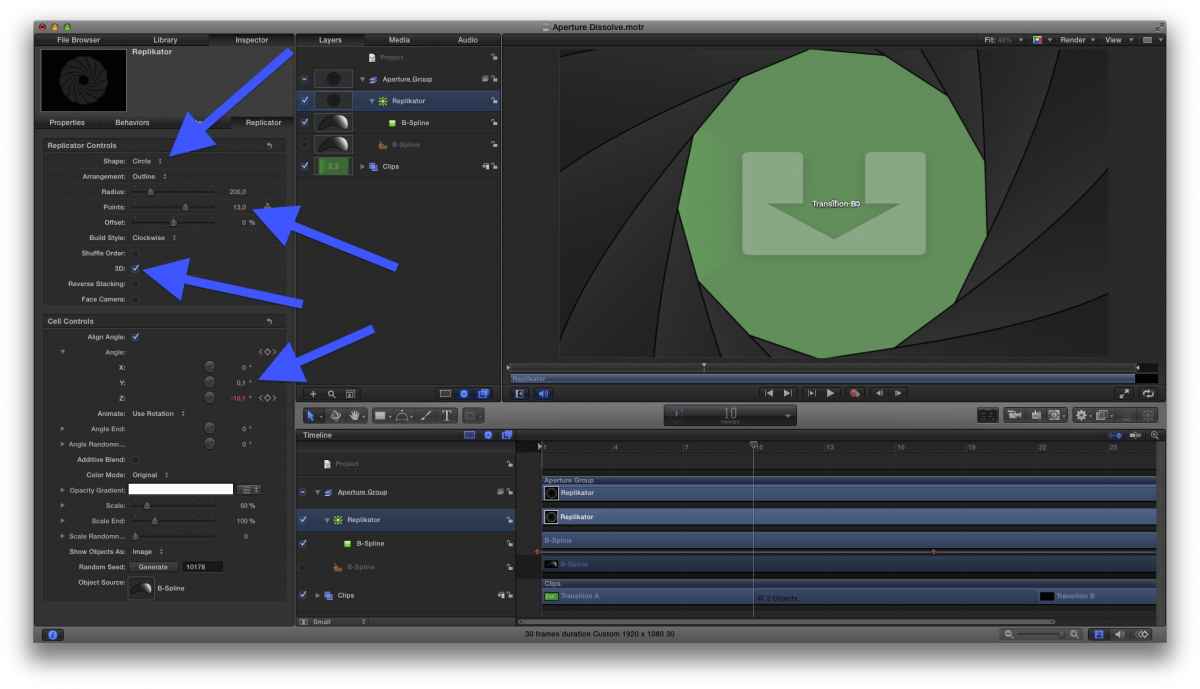
The trick here is: Make it a 3D group! Which allows to 'turn' the blade a tiny bit (see: just 0.1), and make slipping it 'under' the first ones.
When you dig in your System, somewhere in the CoreAudio, you'll find the Grab.aiff, which adds that typical 'Camera shutter motor drive'-sound effect - haven't applied in the published version, I'm not sure about © for s/fx (??).
Feel free to modify it, suggestions: less/more blades (=Replicator Controls/Points), plain color instead gradient to create a more 'flat' look (Fill Mode of the b-spline to Color).
I added a dissolve btw. the two source clips - for my taste, it looks 'smoother' than a hard 'cut' - you can change that either.
To make it slower/faster, just make it longer/shorter in FCPX.
Enjoy Movie Making!
k.
Aperture/Shutter Transition was created by Karsten Schlüter
For some 'Slideshow'-Project, I had the idea to use an 'Aperture Shutter'-dissolve - like that effect in iOS.-
No tutorial how to use it needed - unzip, and install in your usual location for 3rd party transitions; in FCPX: just drag it between two clips/photos - done.
__________
In case, you're interested, how it's done:
My first attempt was to import a graphic of the blade, a dozen times and keyframe all that stuff... but, I learned there's a much smarter way, by using Replicators!
I used the Bezier-tool to create that odd, bean… kidney… kidney-bean-shaped blade - beziers are vectors, which allow to resize the graphic without any quality loss (which I had to do, to make it fit the frame).
Just 5 points, a thin outline, a grey gradient, some adjustment of the direction of the gradient.
Then, hit L and the magic begins:
Set Shape to Circle, I set to 13 pieces, and the Cells have to align the Angle - in plain words: follow the circle…
Rotating the cell around the z-axis opens/closes the Aperture; keyframe that - done! … almost:
… the replicants are piled over each other - the last one overlaps the first - which does look very ugly:
The trick here is: Make it a 3D group! Which allows to 'turn' the blade a tiny bit (see: just 0.1), and make slipping it 'under' the first ones.
When you dig in your System, somewhere in the CoreAudio, you'll find the Grab.aiff, which adds that typical 'Camera shutter motor drive'-sound effect - haven't applied in the published version, I'm not sure about © for s/fx (??).
Feel free to modify it, suggestions: less/more blades (=Replicator Controls/Points), plain color instead gradient to create a more 'flat' look (Fill Mode of the b-spline to Color).
I added a dissolve btw. the two source clips - for my taste, it looks 'smoother' than a hard 'cut' - you can change that either.
To make it slower/faster, just make it longer/shorter in FCPX.
Enjoy Movie Making!
k.
Last edit: 26 Aug 2014 18:01 by Karsten Schlüter.
Please Log in to join the conversation.


