


- Posts: 180
- Thank you received: 52
3 Post Moderation Rule for New Boarders (25 Jan 2021)
New boarders will have their posts moderated - Don't worry if you cannot see your post immediately.
Winding Words: Free 3D Titles plugin
31 Oct 2017 00:49 #91386
by Pielle
Winding Words: Free 3D Titles plugin was created by Pielle
Here it is a free 3D titles plugin.

It consists of seven different words, each with its own path.
In the published parameter window

The first checkbox is used to make the text visible, the second to reverse the path, then there is a slider to adjust the opacity level. Another checkbox allows you to edit the text in FCP and finally the window where you write the text. to edit the text in FCP, after selecting the checkbox, place the cursor in the timeline about halfway through the filter length and then double click on the corresponding word that appears in the middle of the canvas window. Now you can change color, font, size, and so on. At the end of the published parameter window you will find the background settings: a checkbox to make it solid or transparent, an opacity amount slider, and a color adjustment window. You can use all the words at the same time or in the number you think fit right.
Unzip the attachment and put the folder “ Winding Words “ in User/ Your name/ Movies/Motion Templates/Titles/Pielle
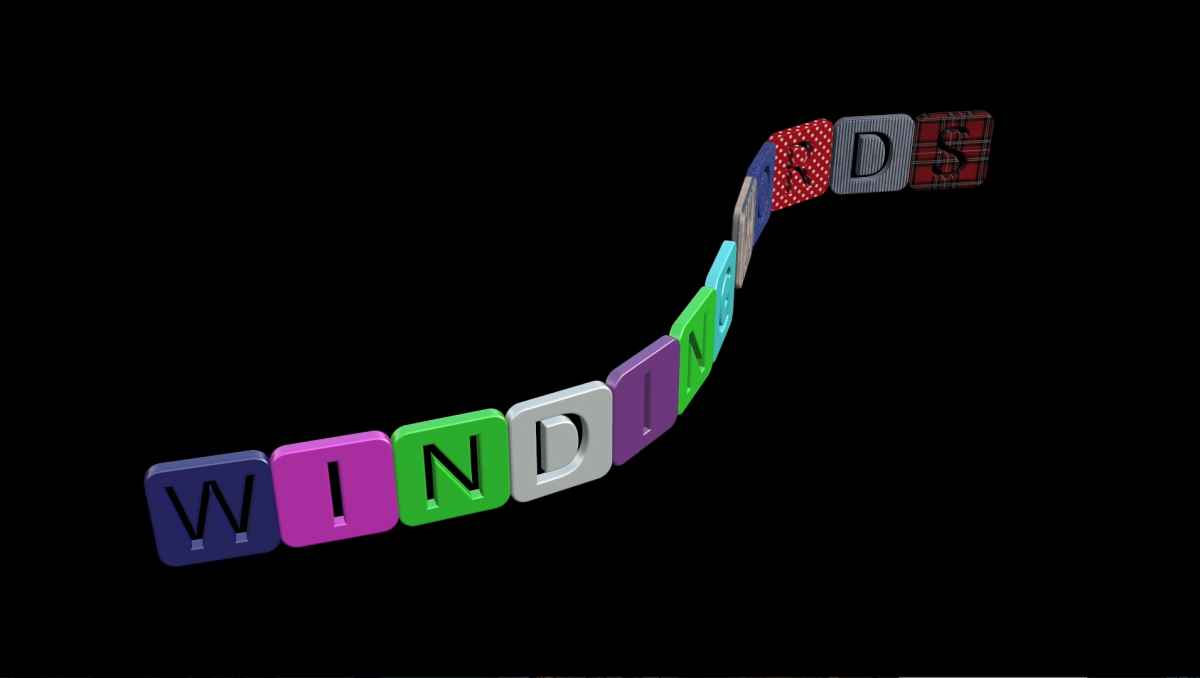
Video link : vimeo.com/240588435
Enjoy Pielle
It consists of seven different words, each with its own path.
In the published parameter window
The first checkbox is used to make the text visible, the second to reverse the path, then there is a slider to adjust the opacity level. Another checkbox allows you to edit the text in FCP and finally the window where you write the text. to edit the text in FCP, after selecting the checkbox, place the cursor in the timeline about halfway through the filter length and then double click on the corresponding word that appears in the middle of the canvas window. Now you can change color, font, size, and so on. At the end of the published parameter window you will find the background settings: a checkbox to make it solid or transparent, an opacity amount slider, and a color adjustment window. You can use all the words at the same time or in the number you think fit right.
Unzip the attachment and put the folder “ Winding Words “ in User/ Your name/ Movies/Motion Templates/Titles/Pielle
Video link : vimeo.com/240588435
Enjoy Pielle
Please Log in to join the conversation.
- graham.easton
-

- Offline
- New Member
-

Less
More
- Posts: 5
- Thank you received: 0
25 May 2018 16:52 #95665
by graham.easton
Replied by graham.easton on topic Winding Words: Free 3D Titles plugin
HI
I am new to FCPX so please forgive me if I appear a little are a lot ignorant.
I have downloaded the zip file and unzipped it then placed it in the folder as indicated.
However Final Cut pro 10.4.2 does not seem to see the file.
can you tell me what I am doing wrong
Thanks
Graham
I am new to FCPX so please forgive me if I appear a little are a lot ignorant.
I have downloaded the zip file and unzipped it then placed it in the folder as indicated.
However Final Cut pro 10.4.2 does not seem to see the file.
can you tell me what I am doing wrong
Thanks
Graham
Please Log in to join the conversation.
30 May 2018 13:34 #95749
by Pielle
Replied by Pielle on topic Winding Words: Free 3D Titles plugin
Hello Graham!
I made a fresh installation of the title plugin and everything is OK.
But if you don’t have Motion installed you have to create the folders
this is a link to a video tutorial: .
I noticed that if you open the plugin in Motion the program will notify you the lack of the "TheRoots” font.

The font is not a system font, I used it (while I was editing the presentation video) but then I chose to use the system font: "Banco" I therefore enclose the correct plugin with the font Banco; however, since the TheRoots font is free if you like it you can download it at this link: it.fontriver.com/font/the_roots/
Have nice day Pielle
I made a fresh installation of the title plugin and everything is OK.
But if you don’t have Motion installed you have to create the folders
this is a link to a video tutorial: .
I noticed that if you open the plugin in Motion the program will notify you the lack of the "TheRoots” font.
The font is not a system font, I used it (while I was editing the presentation video) but then I chose to use the system font: "Banco" I therefore enclose the correct plugin with the font Banco; however, since the TheRoots font is free if you like it you can download it at this link: it.fontriver.com/font/the_roots/
Have nice day Pielle
Please Log in to join the conversation.
- graham.easton
-
- Offline
- New Member
-
Less
More
- Posts: 5
- Thank you received: 0
30 May 2018 14:48 #95751
by graham.easton
Replied by graham.easton on topic Winding Words: Free 3D Titles plugin
Many thanks
installed as per video and works fine
Kind regards
Graham
installed as per video and works fine
Kind regards
Graham
Please Log in to join the conversation.
- Dhruv FCPX
-
- Offline
- New Member
-
Less
More
- Posts: 11
- Thank you received: 0
07 Mar 2019 11:07 #99195
by Dhruv FCPX
Replied by Dhruv FCPX on topic Winding Words: Free 3D Titles plugin
Hi Pielle
Tried installing this in my FCPX 10.4.3...my titles folder has Winding words but does not appear when I open Titles in FCPX.
The unzipped file does not have a dmg file..is this normal? I tried following your installation video but no luck.
Please help
Dhruv
Tried installing this in my FCPX 10.4.3...my titles folder has Winding words but does not appear when I open Titles in FCPX.
The unzipped file does not have a dmg file..is this normal? I tried following your installation video but no luck.
Please help
Dhruv
Please Log in to join the conversation.
- Dhruv FCPX
-
- Offline
- New Member
-
Less
More
- Posts: 11
- Thank you received: 0
07 Mar 2019 11:15 #99196
by Dhruv FCPX
Replied by Dhruv FCPX on topic Winding Words: Free 3D Titles plugin
Sorry Pielle
Found it!! It is in Custom folder inside the Titles !!
Thank you
Dhruv
Found it!! It is in Custom folder inside the Titles !!
Thank you
Dhruv
Please Log in to join the conversation.
- Dhruv FCPX
-
- Offline
- New Member
-
Less
More
- Posts: 11
- Thank you received: 0
07 Mar 2019 11:29 #99197
by Dhruv FCPX
Replied by Dhruv FCPX on topic Winding Words: Free 3D Titles plugin
Sorry again Pielle,
The one is custom folder does not work! When I bring the title on timeline, it has only 1 line.. "Very Hot" with purple background. NO controls..nothing in the inspector..what am I doing wrong?
Please help
Regards
Dhruv
The one is custom folder does not work! When I bring the title on timeline, it has only 1 line.. "Very Hot" with purple background. NO controls..nothing in the inspector..what am I doing wrong?
Please help
Regards
Dhruv
Please Log in to join the conversation.
22 Mar 2019 16:06 #99393
by Pielle
Replied by Pielle on topic Winding Words: Free 3D Titles plugin
Hello! sorry for the delay but lately I am very busy and I haven't frequented the blog much. To make the plugin work you should just read the instructions at the beginning of the topic and click on the various check boxes. Everything works fine. Greetings Pielle
Please Log in to join the conversation.
- youngeddie
-

- Offline
- Premium Member
-

Less
More
- Posts: 136
- Thank you received: 0
29 Aug 2021 22:38 #116027
by youngeddie
Replied by youngeddie on topic Winding Words: Free 3D Titles plugin
I'm so sorry... I can't see how to download this plugin... can you please let me know? Thanks so much!! Eddie
Please Log in to join the conversation.
01 Sep 2021 15:03 #116073
by Pielle
Replied by Pielle on topic Winding Words: Free 3D Titles plugin
Hello Youngeddie ! You can download it at the end of my second post . The plugin is in the first attachment. Greetings Pielle
Please Log in to join the conversation.
- youngeddie
-
- Offline
- Premium Member
-
Less
More
- Posts: 136
- Thank you received: 0
08 Sep 2021 22:50 #116169
by youngeddie
Replied by youngeddie on topic Winding Words: Free 3D Titles plugin
Winding Words is working great! I would like to slow down the text as it comes into frame. Is there a way to do that? I'm looking forward to your reply. Thanks!!!
Please Log in to join the conversation.
- youngeddie
-
- Offline
- Premium Member
-
Less
More
- Posts: 136
- Thank you received: 0
22 Sep 2021 00:34 #116388
by youngeddie
Replied by youngeddie on topic Winding Words: Free 3D Titles plugin
So sorry to bother you... any thoughts on slowing down the text as it comes into frame? I promise not to bug you anymore. Thanks for a great plugin!!
Please Log in to join the conversation.
