


- Posts: 3790
- Thank you received: 718
3 Post Moderation Rule for New Boarders (25 Jan 2021)
New boarders will have their posts moderated - Don't worry if you cannot see your post immediately.
Magnifier
- Karsten Schlüter
-
 Topic Author
- Offline
- Moderator
-

Less
More
17 Mar 2015 22:26 - 13 Oct 2016 09:31 #61495
by Karsten Schlüter
Magnifier was created by Karsten Schlüter
From the football (= the game you play with your feet, not carrying the ball in your hands) corner, a simple effect: The Magnifier

Install it in your Effects collection.
Drop it on a clip to magnify a scene.
Three controls: Size, X-axis, Y-axis.
Sorry, no OSC, 'cause you can not keyframe them (I was told …).
The tricky part: the snippet in the glas has to move to opposite directions, otherwise, you can not magnify the whole frame... When you open it in Motion, you see what I mean.
Feel free to modify it to your needs!
This is the reduced-to-the-max version …
Check out the NEW Magnifier IV !!
Install it in your Effects collection.
Drop it on a clip to magnify a scene.
Three controls: Size, X-axis, Y-axis.
Sorry, no OSC, 'cause you can not keyframe them (I was told …).
The tricky part: the snippet in the glas has to move to opposite directions, otherwise, you can not magnify the whole frame... When you open it in Motion, you see what I mean.
Feel free to modify it to your needs!
This is the reduced-to-the-max version …
Check out the NEW Magnifier IV !!
Last edit: 13 Oct 2016 09:31 by Karsten Schlüter.
Please Log in to join the conversation.



- Karsten Schlüter
-
Topic Author
- Offline
- Moderator
-
Less
More
- Posts: 3790
- Thank you received: 718
20 Mar 2015 09:44 - 13 Oct 2016 09:24 #61613
by Karsten Schlüter
Replied by Karsten Schlüter on topic Magnifier
ALL NEW VERSION AVAIL!!
don't trust cheap imitations, get the all new, ground braking, awesome Magnifier II !

New features:
• On Screen Control
• switchable drop-shadow
• selectable maginfication
• you can magnify all across the frame
• key-frameable
yepp, after digging a little deeper into Motion5, I started from scratch and made Magnifier more customable.
By using a 'nil' object, I'm allowed to move the magnified part of the screen in opposite directions to the 'glas', so you can magnify every part of the frame....
ideas for next update:
• selectable form, circle/rectangle
• some 'design' , a loupe, or some animated graphics
• [strike]slider for zoom factor implemented[/strike] already
Btw, THANKS to Ben, your post encouraged me to try harder …
// yep, this project makes so much fun to realize//
FOR LATEST VERSION GOTO MY NEXT POST!
don't trust cheap imitations, get the all new, ground braking, awesome Magnifier II !
New features:
• On Screen Control
• switchable drop-shadow
• selectable maginfication
• you can magnify all across the frame
• key-frameable
yepp, after digging a little deeper into Motion5, I started from scratch and made Magnifier more customable.
By using a 'nil' object, I'm allowed to move the magnified part of the screen in opposite directions to the 'glas', so you can magnify every part of the frame....
ideas for next update:
• selectable form, circle/rectangle
• some 'design' , a loupe, or some animated graphics
• [strike]slider for zoom factor implemented[/strike] already
Btw, THANKS to Ben, your post encouraged me to try harder
…// yep, this project makes so much fun to realize//
FOR LATEST VERSION GOTO MY NEXT POST!
Last edit: 13 Oct 2016 09:24 by Karsten Schlüter.
Please Log in to join the conversation.

- Karsten Schlüter
-
Topic Author
- Offline
- Moderator
-
Less
More
- Posts: 3790
- Thank you received: 718
20 Mar 2015 18:10 #61623
by Karsten Schlüter
Please try again - uploaded it again ...
Replied by Karsten Schlüter on topic Magnifier
ddixon wrote: Download link doesn't work...gives a 404 Not Found
Please try again - uploaded it again ...
Please Log in to join the conversation.
- Karsten Schlüter
-
Topic Author
- Offline
- Moderator
-
Less
More
- Posts: 3790
- Thank you received: 718
23 Mar 2015 09:55 - 13 Oct 2016 09:24 #61736
by Karsten Schlüter
Replied by Karsten Schlüter on topic Magnifier
...and finally: Version 3, added some gimmicks:

… feel free to customize it further, I gave in the Motion-Project hopefully meaningful English description ..
Glad you like it!
(if someone asks: I 'painted' the loupe myself, public domain, no rights reserved ... )
- Three 'forms' to choose from: Circle, Loupe and Rectangle
- You can switch-on/off a drop-shadow
- You can set the magnifictaion
- and finally, you can set key-frames, in case you want to animate the magnifier
… feel free to customize it further, I gave in the Motion-Project hopefully meaningful English description ..
Glad you like it!
(if someone asks: I 'painted' the loupe myself, public domain, no rights reserved ...
)
Last edit: 13 Oct 2016 09:24 by Karsten Schlüter.
Please Log in to join the conversation.
- Karsten Schlüter
-
Topic Author
- Offline
- Moderator
-
Less
More
- Posts: 3790
- Thank you received: 718
16 Apr 2015 06:09 #62875
by Karsten Schlüter
although meant more funny, but - seriously - tried that :
with another handcrafted effect, sort of 'finger of god' to pick-up a specifc player in the game - but for the tracker you have to swap back'n forth the ciip to/from Motion .... too complicated, I'm a latzy person; perhaps will test with in combo of TrackX, which finally had foundi its way on my hard drive ....
Replied by Karsten Schlüter on topic Magnifier
dgwvideo wrote: Now if it only tracked the ball as it moves throughout the game :evil:
although meant more funny, but - seriously - tried that :
with another handcrafted effect, sort of 'finger of god' to pick-up a specifc player in the game - but for the tracker you have to swap back'n forth the ciip to/from Motion .... too complicated, I'm a latzy person; perhaps will test with in combo of TrackX, which finally had foundi its way on my hard drive ....
Please Log in to join the conversation.
- meljturner
-

- Offline
- New Member
-

Less
More
- Posts: 1
- Thank you received: 0
16 Apr 2015 20:23 #62976
by meljturner
Replied by meljturner on topic Magnifier
if the magnification is other than 200% the centre of the magnifier does not properly track the underlying image (I guess the rig should factor the x and y linkage by the magnification). I hope that is clear! The centre of the magnified image should always correspond with the underlying point in the unmagnified image, irrespective of the magnification factor.
Otherwise, a very smooth implementation.
Otherwise, a very smooth implementation.
Please Log in to join the conversation.
- Karsten Schlüter
-
Topic Author
- Offline
- Moderator
-
Less
More
- Posts: 3790
- Thank you received: 718
17 Apr 2015 05:10 #63010
by Karsten Schlüter
Exactly, that was the tricky part in making it:
It is no just a 'hole' in the pic to watch a magnified version of the frame under/behind the original, but you have to 'counter' the x/y values of the loupe to the position of magnified one; otherwise, you would never reach the boder of the pic ...
Feel free to add a %-slider and the math, to move the magnified, corresponding version of the frame ... me no professional developer, just sharing 'stuff' I need for my hobby projects ....
And thanks for dl and using it! (hey, heyyy, I published a plug-in .... ) :lol:
Replied by Karsten Schlüter on topic Magnifier
meljturner wrote: …I guess the rig should factor the x and y linkage by the magnification)....
Exactly, that was the tricky part in making it:
It is no just a 'hole' in the pic to watch a magnified version of the frame under/behind the original, but you have to 'counter' the x/y values of the loupe to the position of magnified one; otherwise, you would never reach the boder of the pic ...
Feel free to add a %-slider and the math, to move the magnified, corresponding version of the frame ... me no professional developer, just sharing 'stuff' I need for my hobby projects ....
And thanks for dl and using it! (hey, heyyy, I published a plug-in .... ) :lol:
Please Log in to join the conversation.
13 Oct 2016 06:46 #80709
by Schnurr
Yes that is really great!!!! Thanks for sharing. Will try version IV getting closer to
so some rotating elements I know there is a behavior "shape"-"write" own as shown in but misses the fill effect probably there is a something available in the M5 mediathek to avoid key framing that.
Again great work Karsten (like always)
Tobias
Karsten Schlüter wrote: ...and finally: Version 3, added some gimmicks:
[ magnifictaion[/li]
Glad you like it!
(if someone asks: I 'painted' the loupe myself, public domain, no rights reserved ...
Yes that is really great!!!! Thanks for sharing. Will try version IV getting closer to
so some rotating elements I know there is a behavior "shape"-"write" own as shown in but misses the fill effect probably there is a something available in the M5 mediathek to avoid key framing that.
Again great work Karsten (like always)
Tobias
Please Log in to join the conversation.
- Karsten Schlüter
-
Topic Author
- Offline
- Moderator
-
Less
More
- Posts: 3790
- Thank you received: 718
13 Oct 2016 09:29 - 13 Oct 2016 13:46 #80712
by Karsten Schlüter
Replied by Karsten Schlüter on topic Magnifier
… aaand another update, version IV:
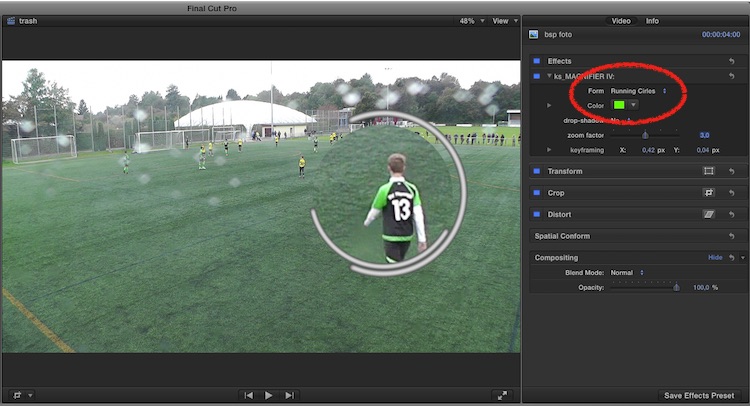
• the loupe is more transparent
• you can adjust the color of circle and rectangle mask
• the zoom-factor 200-400% should now work better
• a NEW, animated frame: RUNNING CIRCLES
For installation, unzip the attached file, double-click the Installer
• the loupe is more transparent
• you can adjust the color of circle and rectangle mask
• the zoom-factor 200-400% should now work better
• a NEW, animated frame: RUNNING CIRCLES
For installation, unzip the attached file, double-click the Installer
Last edit: 13 Oct 2016 13:46 by Karsten Schlüter.
Please Log in to join the conversation.
14 Oct 2016 09:36 #80756
by lichinho
Awesome!
Many thanks from this fellow footballer father
I usually record my son's games in 1080p and deliver in 720p, but
this is particularly great for 4K footage - taking advantage of all those extra pixels, yeah!
That is a good reason to try filming the next game on my <brag>iPhone 7</brag>
Many thanks from this fellow footballer father
I usually record my son's games in 1080p and deliver in 720p, but
this is particularly great for 4K footage - taking advantage of all those extra pixels, yeah!
That is a good reason to try filming the next game on my <brag>iPhone 7</brag>
Please Log in to join the conversation.
- Karsten Schlüter
-
Topic Author
- Offline
- Moderator
-
Less
More
- Posts: 3790
- Thank you received: 718
14 Oct 2016 10:25 #80759
by Karsten Schlüter
You should contact Tobi (Schnurr), that's what he's doing! Plus using a 3axis gimbal…
My boys are meanwhile so fast, that I started to record in 4k, 'cause I'm too lame to follow the action, and reframing in post is a breeze! Not to mention, at the green, you vaguely turn the cam into the right direction… veeeery relaxing LOL
My latest report is done that way… ok, slowmo isn't as nice as done before when done with real 100fps, but I own just one cam doing 4k/25fps or fullHD/100fps…
… hey, more and more football fans here = football: kicking the ball with the foot for 90min, not carrying a plum around in your arm for 5 secs :evil:
Replied by Karsten Schlüter on topic Magnifier
lichinho wrote: … That is a good reason to try filming the next game on my iPhone 7
You should contact Tobi (Schnurr), that's what he's doing! Plus using a 3axis gimbal…
My boys are meanwhile so fast, that I started to record in 4k, 'cause I'm too lame to follow the action, and reframing in post is a breeze! Not to mention, at the green, you vaguely turn the cam into the right direction… veeeery relaxing LOL
My latest report is done that way… ok, slowmo isn't as nice as done before when done with real 100fps, but I own just one cam doing 4k/25fps or fullHD/100fps…
… hey, more and more football fans here = football: kicking the ball with the foot for 90min, not carrying a plum around in your arm for 5 secs :evil:
Please Log in to join the conversation.
