


- Posts: 971
- Thank you received: 46
3 Post Moderation Rule for New Boarders (25 Jan 2021)
New boarders will have their posts moderated - Don't worry if you cannot see your post immediately.
BlackMagic SpeedTest Stats
Less
More
22 Dec 2013 02:30 #36906
by MsJustine
BlackMagic SpeedTest Stats was created by MsJustine
Hi everyone,
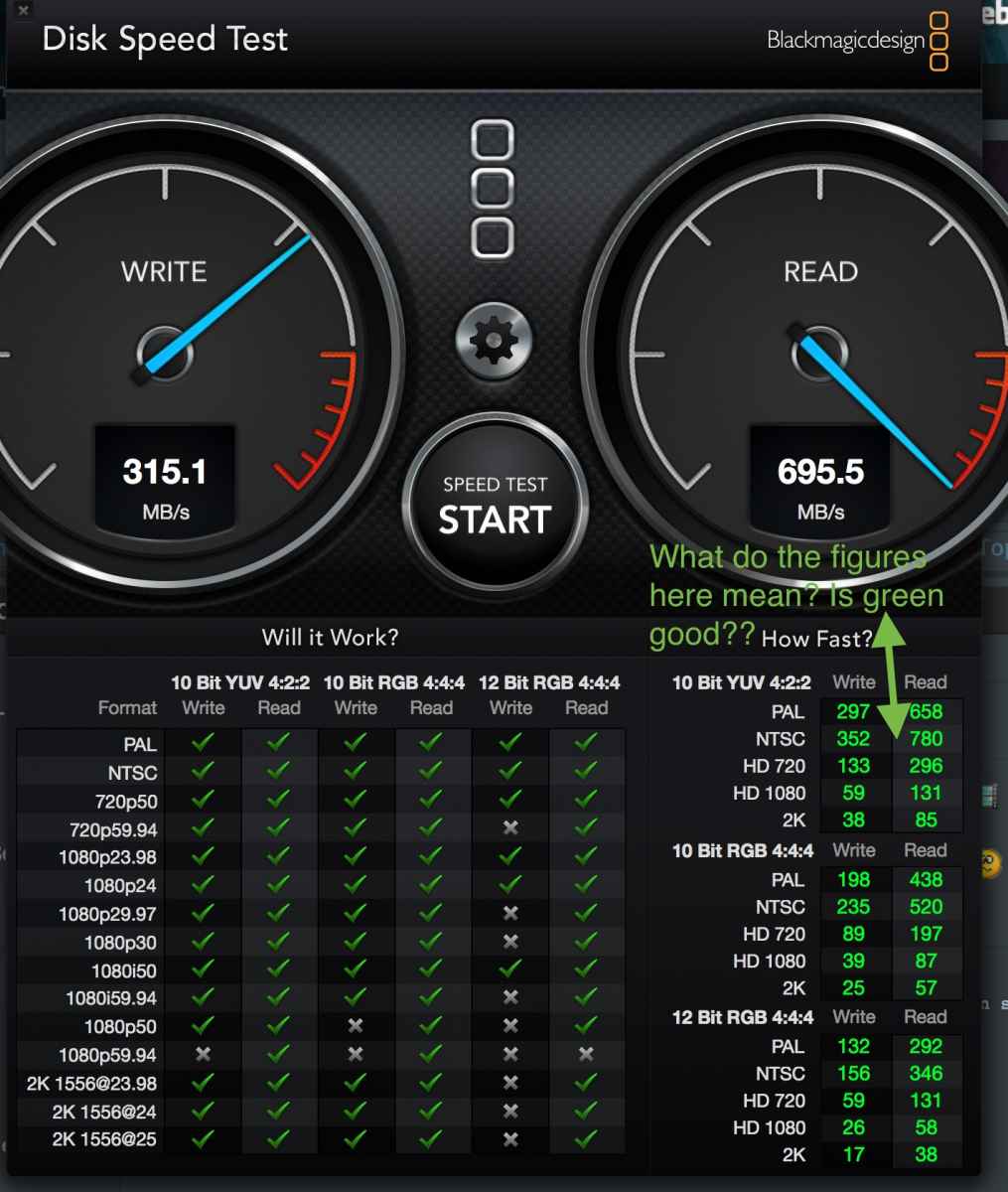
I have run the Blackmagic SpeedTest, I do not however understand the result. Can someone interpret the results?
Justine
I have run the Blackmagic SpeedTest, I do not however understand the result. Can someone interpret the results?
Justine
Please Log in to join the conversation.

22 Dec 2013 05:48 #36911
by marchyman
Replied by marchyman on topic BlackMagic SpeedTest Stats
Frames per second. Notice the X in the write column for 720P 59.94 12 bit RGB 4:4:4 (left side table). Now look at the 12 BIT RGB 4:4:4 section of the table on the right side. HD 720 is listed at 59. 59 is less than 59.94 which is why the left hand table contains an X.
You can match up all the X in the left hand table to speeds that are less than the frame rate in the right hand table. It's the same data in a different form.
You can match up all the X in the left hand table to speeds that are less than the frame rate in the right hand table. It's the same data in a different form.
Please Log in to join the conversation.
Less
More
- Posts: 971
- Thank you received: 46
22 Dec 2013 05:53 #36912
by MsJustine
Replied by MsJustine on topic BlackMagic SpeedTest Stats
Just an observation, would it not make more sense for the table on the right to indicate with red numbers the fail value of that field, in other words right at the bottom, the 2K is 17 and 38 in green, is this a passing value or a failing value? If I can see that 17 is too low then have in brackets the lowest "passing value" for example 17[red] 50[pass] for both read and right values?
Please Log in to join the conversation.


26 Dec 2013 15:09 #37319
by dgwvideo
Creating history....one edit at a time !
Replied by dgwvideo on topic BlackMagic SpeedTest Stats
The 17 and 38 in your example are neither Passing or Failing values. They are the determined Read and Write values according to Blackmagicdesign's speed test application. The chart on the left is the useful portion which tells you which formats your system can efficiently read and write based on those results. The X indicates that a particular format requires faster speeds than the results for optimum editing.
Creating history....one edit at a time !
Please Log in to join the conversation.
Less
More
- Posts: 971
- Thank you received: 46
26 Dec 2013 15:12 #37320
by MsJustine
Replied by MsJustine on topic BlackMagic SpeedTest Stats
Read and write values in what unit of measurement? Does that mean it reads 17 frames a second at the 2K file size and writes 38 frames a second to the disk?
Please Log in to join the conversation.
26 Dec 2013 15:30 #37323
by dgwvideo
Creating history....one edit at a time !
Replied by dgwvideo on topic BlackMagic SpeedTest Stats
Yes. That measurement is Frames per Second. There is a complete instruction guide that identifies what each area of the test is and you can find that under the help menu of the Speed Test application. It is a very detailed pdf document.
Creating history....one edit at a time !
Please Log in to join the conversation.
Less
More
- Posts: 971
- Thank you received: 46
26 Dec 2013 15:33 #37325
by MsJustine
Replied by MsJustine on topic BlackMagic SpeedTest Stats
Thank you, it really helps understand how effective drives will be going forward, thank you.
Please Log in to join the conversation.
