


- Posts: 333
- Thank you received: 40
3 Post Moderation Rule for New Boarders (25 Jan 2021)
New boarders will have their posts moderated - Don't worry if you cannot see your post immediately.
G-Raid failure. I need HELP, PLEASE!
24 Feb 2015 12:25 #60331
by Overturf
G-Raid failure. I need HELP, PLEASE! was created by Overturf
Hi everyone,
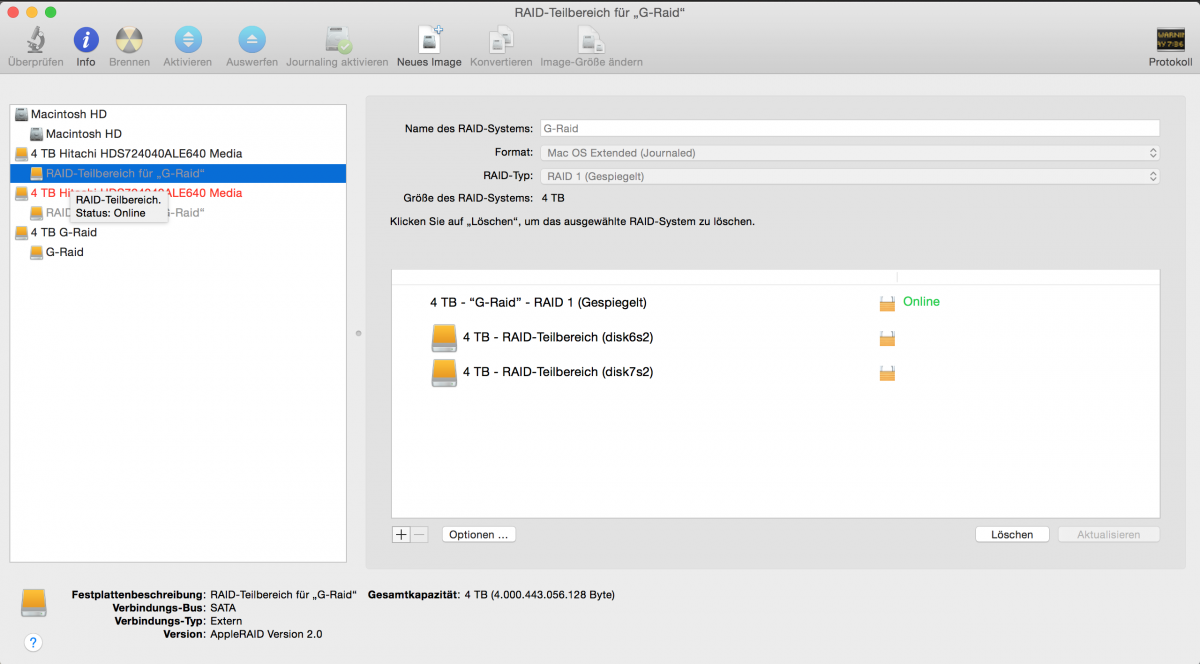
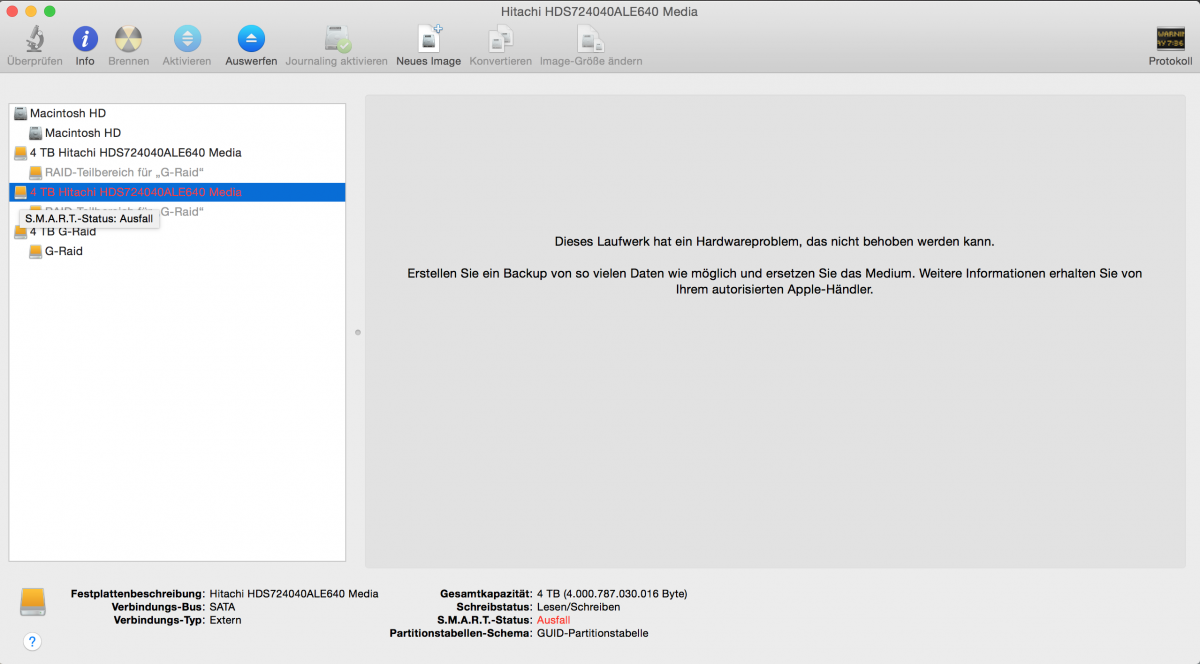
okay, so it has finally happened to us, we have a major issue with our data. Looks like our 8TB G-Raid Thunderbolt lost one drive. Will try to attach some screenshots of the disk-application. It is a mirrored Raid system.
I can still see the data in the finder. Wanted to rescue it by copying to another disk but without success. I tried to move different folders but the problem is that it starts copying quite well but slows down tremendously after roughly 10GB until the process gets completely stuck.
I did not find help on the G-Data site so far but will of course dig deeper.
Normally I'd just remove the broken drive and try to get the data off of the working one or rebuild the broken one. The G-Raid is not meant to be opened, though.
I am really worried. Any advice?
Thanks for your time!
Sebastian
okay, so it has finally happened to us, we have a major issue with our data. Looks like our 8TB G-Raid Thunderbolt lost one drive. Will try to attach some screenshots of the disk-application. It is a mirrored Raid system.
I can still see the data in the finder. Wanted to rescue it by copying to another disk but without success. I tried to move different folders but the problem is that it starts copying quite well but slows down tremendously after roughly 10GB until the process gets completely stuck.
I did not find help on the G-Data site so far but will of course dig deeper.
Normally I'd just remove the broken drive and try to get the data off of the working one or rebuild the broken one. The G-Raid is not meant to be opened, though.
I am really worried. Any advice?
Thanks for your time!
Sebastian



Please Log in to join the conversation.

24 Feb 2015 13:28 #60343
by anickt
Replied by anickt on topic G-Raid failure. I need HELP, PLEASE!
Contact G-Raid directly via email or phone
Please Log in to join the conversation.
24 Feb 2015 13:35 #60344
by Overturf
Replied by Overturf on topic G-Raid failure. I need HELP, PLEASE!
I just did that - the answer was quite sobering. They sent me the link to the DiskWarrior download site. I should try that or send the system in for replacement. They did not offer much help as for data rescue.
What do you think, would it be safe to open the system, take out the working drive, put it into an HDD-bay and start from there? I don't know enough about the technology behind this thing.
Phew. Not a nice feeling.
What do you think, would it be safe to open the system, take out the working drive, put it into an HDD-bay and start from there? I don't know enough about the technology behind this thing.
Phew. Not a nice feeling.
Please Log in to join the conversation.

24 Feb 2015 14:15 #60348
by BenB
Replied by BenB on topic G-Raid failure. I need HELP, PLEASE!
That RAID won't rebuild itself if you simply replace the bad drive in it?
Please Log in to join the conversation.
24 Feb 2015 14:22 #60349
by Overturf
Replied by Overturf on topic G-Raid failure. I need HELP, PLEASE!
Not sure, Ben. From what I understood on the phone it would not work that way. Funny enough the G-Raid is not even built to be opened in the first place.
DiskWarrior also told me that one drive was gone. It is now trying to rebuild the directory but sort of stuck at step 5 (Locating directory data...)
Suggestions?
DiskWarrior also told me that one drive was gone. It is now trying to rebuild the directory but sort of stuck at step 5 (Locating directory data...)
Suggestions?
Please Log in to join the conversation.
24 Feb 2015 16:12 #60358
by anickt
Replied by anickt on topic G-Raid failure. I need HELP, PLEASE!
If DW can rebuild the directory it could take a long time. Is the G-Raid RAID 0 or RAID 1?
Please Log in to join the conversation.
24 Feb 2015 16:33 #60361
by Overturf
Replied by Overturf on topic G-Raid failure. I need HELP, PLEASE!
Rebuilding directory is finished. I now copy the data in small chunks over to a new drive. Hope to get everything right. Th copying takes much longer than it usually would.
I always mix up the raid numbers. It is a mirrored thing. Should be identical data on both drives.
What's a raid you can't open good for?
I always mix up the raid numbers. It is a mirrored thing. Should be identical data on both drives.
What's a raid you can't open good for?
Please Log in to join the conversation.
24 Feb 2015 16:56 #60364
by anickt
Replied by anickt on topic G-Raid failure. I need HELP, PLEASE!
Good luck. You are right, mirrored is RAID 1 which dupes info to both drives in the RAID. RAID 0 essentially sees the drives as 1 big chunk and if one drive goes you're pretty much screwed if you don't have a backup.
Please Log in to join the conversation.
24 Feb 2015 17:48 #60373
by Overturf
Replied by Overturf on topic G-Raid failure. I need HELP, PLEASE!
Copying really takes ages. Might cost me a couple of days. Hope things work out.
Anyway, something went wrong here, this is at least not what I expected to happen on disk failure in a mirrored system. It's my first time to encounter this problem. Wouldn't you expect that one could just swap the broken drive and that's it?
I bought the G-Raid because it had lots of good reviews, also on this forum. Am I missing something? What would be YOUR workflow if this happened? Having to use DiskWarrior seems odd. Plus it seems like a rather unfriendly customer support to me to just send me a download link for a software that costs 129 bucks. What do you guys think?
Anyway, something went wrong here, this is at least not what I expected to happen on disk failure in a mirrored system. It's my first time to encounter this problem. Wouldn't you expect that one could just swap the broken drive and that's it?
I bought the G-Raid because it had lots of good reviews, also on this forum. Am I missing something? What would be YOUR workflow if this happened? Having to use DiskWarrior seems odd. Plus it seems like a rather unfriendly customer support to me to just send me a download link for a software that costs 129 bucks. What do you guys think?
Please Log in to join the conversation.
24 Feb 2015 17:58 - 24 Feb 2015 18:00 #60375
by BenB
Replied by BenB on topic G-Raid failure. I need HELP, PLEASE!
When a drive goes bad on any RAID level 1 and over, performance slows WAY down until that drive is swapped out and rebuilt (in RAID 0 you simply lose all your data, bang). On the small units like yours, you can't swap it out, there's no rebuild, so you have to copy your data to a new drive. Be glad you didn't lose it ALL, PERIOD! The sole purpose of those little drives is performance speed, not data backup.
RAID mirroring is not a substitute for a backup! It is only a speed boost, with a minor tiny safety buffer, and has its pitfalls.
Yes, that drive is going to perform super slow, that's how RAIDs with a bad drive work.
No matter what brand or model of drive you get, they can go bad at any time for a kazillion reasons. Just because 10 people have a G-RAID that never failed, doesn't mean they never will, nor that yours won't on the third day of use.
Backups, backups, backups, no matter if you use a RAID or not.
Disk Warrior is used because most drive failures are simple directory corruption, not physical damage. Problem is, much of the time the directory becomes too corrupted to recover/repair. Then there is no way to find the data sitting on the platters, you're hosed. Disk Warrior will ensure you can get to that data properly without anymore damage or loss. BUT, if DW can't do its job successfully, then you're hosed, you're data is gone.
We use a P2 16TB RAID in our studio. We have an OWC 16TB RAID as our nightly backup for the P2.
Everyone who values the data on their drives, especially if you make a living with that data, should be running Disk Utility once a week to repair all drives. Verifying free space percentage of every drive at that same time. And running Disk Warrior to repair the directories on all drives once a month. And be doing nightly full drive backups.
RAID mirroring is not a substitute for a backup! It is only a speed boost, with a minor tiny safety buffer, and has its pitfalls.
Yes, that drive is going to perform super slow, that's how RAIDs with a bad drive work.
No matter what brand or model of drive you get, they can go bad at any time for a kazillion reasons. Just because 10 people have a G-RAID that never failed, doesn't mean they never will, nor that yours won't on the third day of use.
Backups, backups, backups, no matter if you use a RAID or not.
Disk Warrior is used because most drive failures are simple directory corruption, not physical damage. Problem is, much of the time the directory becomes too corrupted to recover/repair. Then there is no way to find the data sitting on the platters, you're hosed. Disk Warrior will ensure you can get to that data properly without anymore damage or loss. BUT, if DW can't do its job successfully, then you're hosed, you're data is gone.
We use a P2 16TB RAID in our studio. We have an OWC 16TB RAID as our nightly backup for the P2.
Everyone who values the data on their drives, especially if you make a living with that data, should be running Disk Utility once a week to repair all drives. Verifying free space percentage of every drive at that same time. And running Disk Warrior to repair the directories on all drives once a month. And be doing nightly full drive backups.
Last edit: 24 Feb 2015 18:00 by BenB.
Please Log in to join the conversation.
24 Feb 2015 18:05 #60381
by Overturf
Replied by Overturf on topic G-Raid failure. I need HELP, PLEASE!
Hi Ben,
just to make clear - this is not my drive to work off. The drive I work off is backed up regularly. This was meant to be a safe storage and archiving solution. Of course I am glad I did not lose all and hoping for a happy ending here - I just did not expect this long tail. I always imagined a mirrored raid to be just two drives containing similar data - and in that case I do not understand why the system slows down if one drive fails. And why it slows down by like factor 10 or so. I don't get it. Will just hope for the best.
just to make clear - this is not my drive to work off. The drive I work off is backed up regularly. This was meant to be a safe storage and archiving solution. Of course I am glad I did not lose all and hoping for a happy ending here - I just did not expect this long tail. I always imagined a mirrored raid to be just two drives containing similar data - and in that case I do not understand why the system slows down if one drive fails. And why it slows down by like factor 10 or so. I don't get it. Will just hope for the best.
Please Log in to join the conversation.
24 Feb 2015 18:18 #60384
by BenB
Replied by BenB on topic G-Raid failure. I need HELP, PLEASE!
They read/write at the same time, not as separate drives, which is how it has faster throughput than a single drive. It is called mirroring, because in the background, data on one drive that is not on the other is duplicated. But that is a background process. The real-world performance is half your data is being written to one drive, half to the other, you get better performance. All RAIDs do that. When it has to read/write data from only one drive, you actually get worse performance, because half the data is normal data, the other half is redundant, compressed data that has to be processed to be actually used by the RAID system. At least in a nutshell.
No, RAID 1 is not two independent drives with the same data. It is two very interdependent drives that work hand in hand with each other, with data redundancy operating in the background while they're not busy servicing your real-world data. Apples to onions.
No, RAID 1 is not two independent drives with the same data. It is two very interdependent drives that work hand in hand with each other, with data redundancy operating in the background while they're not busy servicing your real-world data. Apples to onions.
Please Log in to join the conversation.
24 Feb 2015 18:26 #60387
by anickt
Replied by anickt on topic G-Raid failure. I need HELP, PLEASE!
This is from Wikipedia:
RAID 1
RAID 1 consists of mirroring, without parity or striping. Data is written identically to two (or more) drives, thereby producing a "mirrored set". Thus, any read request can be serviced by any drive in the set. If a request is broadcast to every drive in the set, it can be serviced by the drive that accesses the data first (depending on its seek time and rotational latency), improving performance. Sustained read throughput, if the controller or software is optimized for it, approaches the sum of throughputs of every drive in the set, just as for RAID 0. Actual read throughput of most RAID 1 implementations is slower than the fastest drive. Write throughput is always slower because every drive must be updated, and the slowest drive limits the write performance. The array continues to operate as long as at least one drive is functioning.[11]
RAID 1
RAID 1 consists of mirroring, without parity or striping. Data is written identically to two (or more) drives, thereby producing a "mirrored set". Thus, any read request can be serviced by any drive in the set. If a request is broadcast to every drive in the set, it can be serviced by the drive that accesses the data first (depending on its seek time and rotational latency), improving performance. Sustained read throughput, if the controller or software is optimized for it, approaches the sum of throughputs of every drive in the set, just as for RAID 0. Actual read throughput of most RAID 1 implementations is slower than the fastest drive. Write throughput is always slower because every drive must be updated, and the slowest drive limits the write performance. The array continues to operate as long as at least one drive is functioning.[11]
Please Log in to join the conversation.
24 Feb 2015 18:36 #60388
by Overturf
Replied by Overturf on topic G-Raid failure. I need HELP, PLEASE!
Hey Ben,
thanks for this explanation, now I at least understand better why it takes so long. Seems that some files take much longer than others (not talking about file size here), why is that? Man, I just hope the healthy drive can take it a little longer
Anickt, thanks for sharing!
thanks for this explanation, now I at least understand better why it takes so long. Seems that some files take much longer than others (not talking about file size here), why is that? Man, I just hope the healthy drive can take it a little longer
Anickt, thanks for sharing!
Please Log in to join the conversation.
24 Feb 2015 20:12 - 24 Feb 2015 20:13 #60399
by BenB
Replied by BenB on topic G-Raid failure. I need HELP, PLEASE!
That Wiki entry is a tad off base. Read functions in RAID 1 are as fast the sum of both drives. Write functions are only as fast as each independently. Never is it slower than either drive. RAID 1 is when read performance is primary concern, over write or capacity. Which makes is nice for video work. But RAID 1 is NOT slower than either single drive by itself. I'll eve quote the almighty Wiki; "...random read performance of a RAID 1 array may equal up to the sum of each member's performance, while the write performance remains at the level of a single disk." Even though folks call them "exact copies" because of the term "mirror", they have the same data, but are not block level exact copies, and not all data is treated equally on each drive.
Anyway, there you have it, now to make coffee while you wait for the data copy to complete. Rent a good movie.
Anyway, there you have it, now to make coffee while you wait for the data copy to complete. Rent a good movie.
Last edit: 24 Feb 2015 20:13 by BenB.
Please Log in to join the conversation.
24 Feb 2015 20:37 #60401
by anickt
Replied by anickt on topic G-Raid failure. I need HELP, PLEASE!
Well it all depends on the controller doesn't it
Please Log in to join the conversation.
24 Feb 2015 21:52 #60406
by BenB
Replied by BenB on topic G-Raid failure. I need HELP, PLEASE!
No
Please Log in to join the conversation.


05 Mar 2015 09:39 #60875
by Jason P
Replied by Jason P on topic G-Raid failure. I need HELP, PLEASE!
I think you're slightly off base here Ben. Raid 0 is the speedy one, Raid 1 has always been slower, and in my experience a Raid 1 drive is usually marginally slower than a single drive of identical capacity/performance. One of the issues with mirrored Raid 1 is that it's possible for both drives to have the same corruption, which may be the case here. Raid5 makes that highly unlikely., albeit at a financial cost.
I favour multiple single drives for backup - I use bare drives and a dock, I tend to think the likelihood of multiple discrete drives having the same failure is far less likely, and has the added bonus of being able to physically separate them.
I hope the OPs data is back safe and sound - there's nothing quite like that sinking felling when you realise it's all gone south.,.
I favour multiple single drives for backup - I use bare drives and a dock, I tend to think the likelihood of multiple discrete drives having the same failure is far less likely, and has the added bonus of being able to physically separate them.
I hope the OPs data is back safe and sound - there's nothing quite like that sinking felling when you realise it's all gone south.,.
Please Log in to join the conversation.
- Scrubelicious
-

- Offline
- Platinum Member
-

Less
More
- Posts: 1228
- Thank you received: 114
05 Mar 2015 11:31 #60880
by Scrubelicious
Replied by Scrubelicious on topic G-Raid failure. I need HELP, PLEASE!
If you are on a RAID 1 and you are having issues with "working" drive as Jason mentioned this could be data/soft corruption.
Performance wise RAID 1 speed should correspond to a single drive since both drive in RAID 1 would write and read the data simultaneously.
On older controllers or controllers that use heavy software processing you might find tad slower. Noticeable? :whistle:
Copying 4GB (RAID 1 = Drive 1) on a thunderbolt connection shouldn't take that long...
Just FYI when purchasing drives at the same time (G-Tech enclosed drives) there is always the chance the other drive(s) might also fail.
Sebastian I hope you can get your data back. Crossing my fingers for you.
Performance wise RAID 1 speed should correspond to a single drive since both drive in RAID 1 would write and read the data simultaneously.
On older controllers or controllers that use heavy software processing you might find tad slower. Noticeable? :whistle:
Copying 4GB (RAID 1 = Drive 1) on a thunderbolt connection shouldn't take that long...
Just FYI when purchasing drives at the same time (G-Tech enclosed drives) there is always the chance the other drive(s) might also fail.
Sebastian I hope you can get your data back. Crossing my fingers for you.
Please Log in to join the conversation.
05 Mar 2015 11:37 #60881
by Jason P
Replied by Jason P on topic G-Raid failure. I need HELP, PLEASE!
That's an interesting point - I've read before about the notion of buying different makes of drives when choosing backup to minimise the idea of batch failure or manufacturing fault. It's an interesting thought and easy to implement if you're using bare drives as backup.
And also - not forgetting to spin those drives up every few weeks/months, nothing kills drives like inactivity over long periods!
And also - not forgetting to spin those drives up every few weeks/months, nothing kills drives like inactivity over long periods!
Please Log in to join the conversation.
