


- Posts: 39
- Thank you received: 18
3 Post Moderation Rule for New Boarders (25 Jan 2021)
New boarders will have their posts moderated - Don't worry if you cannot see your post immediately.
FCP X Color Board Presets
26 Aug 2014 22:56 #51834
by Henry62
FCP X Color Board Presets was created by Henry62
Please Log in to join the conversation.

26 Jan 2015 15:57 #58874
by slfilm
Replied by slfilm on topic FCP X Color Board Presets
the install path is different now! movies/final cut events is not applicable for the latest version of fcpX! the new install path is:
user/library/app support/proapps/
(also any presets do save on your own go there)
user/library/app support/proapps/
(also any presets do save on your own go there)
Please Log in to join the conversation.
- ladycomstock
-

- Offline
- New Member
-

Less
More
- Posts: 1
- Thank you received: 0
30 Jun 2015 10:13 #66028
by ladycomstock
Replied by ladycomstock on topic FCP X Color Board Presets
hello,
i have downloaded the presets and put them in both the first folder ( final cut events) and the second one through the pro apps. but the presets don't show up in fcpx...
do you have any idea how to make them work? my version is 10.2.1.
thanks!
i have downloaded the presets and put them in both the first folder ( final cut events) and the second one through the pro apps. but the presets don't show up in fcpx...
do you have any idea how to make them work? my version is 10.2.1.
thanks!
Please Log in to join the conversation.
29 Sep 2015 10:28 #69057
by Gator
Replied by Gator on topic FCP X Color Board Presets
sorry I can not even to install them can you help?
thank you

thank you
Please Log in to join the conversation.

29 Sep 2015 12:18 #69059
by BenB
Replied by BenB on topic FCP X Color Board Presets
MUST go in:
User Folder / Library / Application Support / ProApps / Color Presets
If you put them there, and have a current version of FCPX, it'll work.
To see the Library folder inside your User folder, go to the Finder, in the Go menu, and hold the Option key down.
User Folder / Library / Application Support / ProApps / Color Presets
If you put them there, and have a current version of FCPX, it'll work.
To see the Library folder inside your User folder, go to the Finder, in the Go menu, and hold the Option key down.
Please Log in to join the conversation.
29 Sep 2015 12:39 - 29 Sep 2015 12:40 #69060
by Gator
Replied by Gator on topic FCP X Color Board Presets
Deve andare in:
User cartella / Library / Application Support / ProApps / colore Presets.
sorry but the last folder "color preset" can not find it
User cartella / Library / Application Support / ProApps / colore Presets.
sorry but the last folder "color preset" can not find it
Last edit: 29 Sep 2015 12:40 by Gator.
Please Log in to join the conversation.

29 Sep 2015 13:17 #69061
by VidGreg
Gator
This is a folder that is automatically generated if you create a color preset inside of FCPX
You can manually create one in the Finder.
Follow BenB's instructions to get to the ProApps folder, highlight it.
Then under the "File" menu, click on "New Folder" (Shift+Cmmd+N)
An untitled folder will be created and highlighted inside the ProApps folder.
Type in "Color Presets" without the quotation marks (" ") Important---This will change if using different language!!!!
It must be exactly this spelling and Capitalization
Hit enter or click outside text entry box to exit folder name
Insert your presets into newly created folder.
Hope this helps, Greg
This is a folder that is automatically generated if you create a color preset inside of FCPX
You can manually create one in the Finder.
Follow BenB's instructions to get to the ProApps folder, highlight it.
Then under the "File" menu, click on "New Folder" (Shift+Cmmd+N)
An untitled folder will be created and highlighted inside the ProApps folder.
Type in "Color Presets" without the quotation marks (" ") Important---This will change if using different language!!!!
It must be exactly this spelling and Capitalization
Hit enter or click outside text entry box to exit folder name
Insert your presets into newly created folder.
Hope this helps, Greg
Please Log in to join the conversation.
29 Sep 2015 17:14 #69072
by Gator
because the information that I run as instructed but on FCPX as I see them these presets under what name?
thanks again for your help
VidGreg wrote: Gator
This is a folder that is automatically generated if you create a color preset inside of FCPX
You can manually create one in the Finder.
Follow BenB's instructions to get to the ProApps folder, highlight it.
Then under the "File" menu, click on "New Folder" (Shift+Cmmd+N)
An untitled folder will be created and highlighted inside the ProApps folder.
Type in "Color Presets" without the quotation marks (" ") Important---This will change if using different language!!!!
It must be exactly this spelling and Capitalization
Hit enter or click outside text entry box to exit folder name
Insert your presets into newly created folder.
Hope this helps, Greg
because the information that I run as instructed but on FCPX as I see them these presets under what name?
thanks again for your help
Please Log in to join the conversation.
29 Sep 2015 19:10 - 29 Sep 2015 19:14 #69075
by Gator
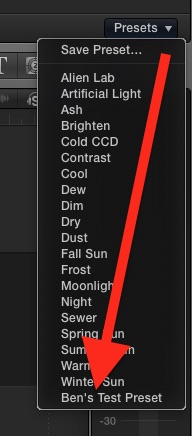
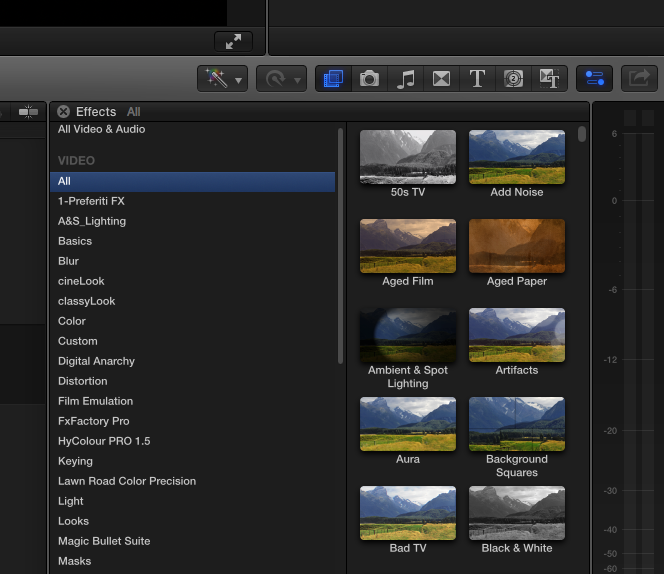
excuse friend I followed all instructions but the effects in FCPX not see this folder that I called color presets do not understand where I'm wrong, but sure it works on FCPX 10.2.2?
thanks again friend
:S
Replied by Gator on topic FCP X Color Board Presets
excuse friend I followed all instructions but the effects in FCPX not see this folder that I called color presets do not understand where I'm wrong, but sure it works on FCPX 10.2.2?
thanks again friend
:S
Last edit: 29 Sep 2015 19:14 by Gator.
Please Log in to join the conversation.
29 Sep 2015 23:06 - 29 Sep 2015 23:11 #69083
by BenB
Replied by BenB on topic FCP X Color Board Presets
You're looking in the wrong place. Go to the Inspector, to the Video section. Command+6 to pull up that clip's color board. At the bottom of the inspector, when looking at the color board, you'll see the color preset menu. Look at the image I posted.
You're looking in the Effects Browser, wrong place, that's not where the color board presets are.
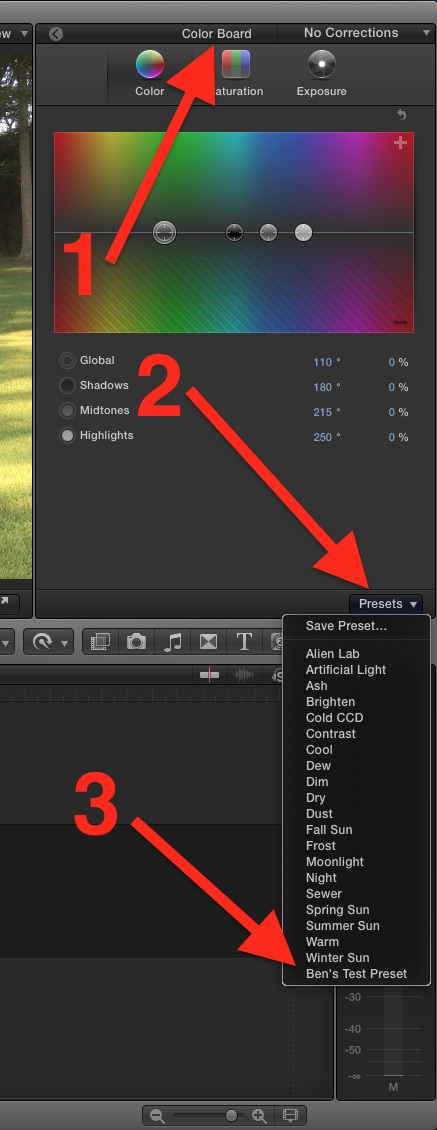
You're looking in the Effects Browser, wrong place, that's not where the color board presets are.
Last edit: 29 Sep 2015 23:11 by BenB.
Please Log in to join the conversation.
30 Sep 2015 06:00 #69088
by Gator
Replied by Gator on topic FCP X Color Board Presets
thanks friend I finally realized, I was looking in the wrong place!
thank you all.
thank you all.
Please Log in to join the conversation.
30 Sep 2015 13:20 #69095
by BenB
Replied by BenB on topic FCP X Color Board Presets
Making life more difficult, no, I mean "easier", is what we're here for! Yeah, "easier", that's what I meant...
Please Log in to join the conversation.
