


- Posts: 48
- Thank you received: 17
3 Post Moderation Rule for New Boarders (25 Jan 2021)
New boarders will have their posts moderated - Don't worry if you cannot see your post immediately.
Cinemascope Toolkit
14 Nov 2012 16:03 - 14 Nov 2012 16:06 #17230
by ptfigg
Cinemascope Toolkit was created by ptfigg
This is a set of tools that I built for myself. I thought others might find it useful.
The package includes a basic 2.35:1 matte ("Cinemascope Crop") wrapped in a FCPX Effect with Scale control and X/Y positioning. I've also included four Compressor Presets that output cropped MPEG-4/H.264 video. So frame things up in FCPX and output using one of the Presets for 2.35:1 aspect ratio videos.
The Effect will be installed in a "Mattes" Category under a "Widescreen" Theme. The Compressor Presets will be located in Custom/"CinemaScope Presets" - Settings Group.
The installer is hard coded. So all the routing, etc. will be handled when you run it. You can trash the installer when you're done.
Keep in mind you can edit most of what the installer defines to suit your needs. For example I did not edit the naming convention that I use for the Compressor Presets. They all begin with the first four letter of my name. So again - edit if needed. The preset specs are listed on the page above. Feel free to edit these as well.
Same holds true for the FCPX Category and Theme. You can use my toMotion application to customize. Just pull the Cinemascope Crop folder out of the Motion Templates/Effects/Mattes folder - and handle it accordingly.
As I said - I built the installer. It's been tested on two machines ... 10.7xx and 10.8xx. Let me know how it goes ...
Download
-paul.
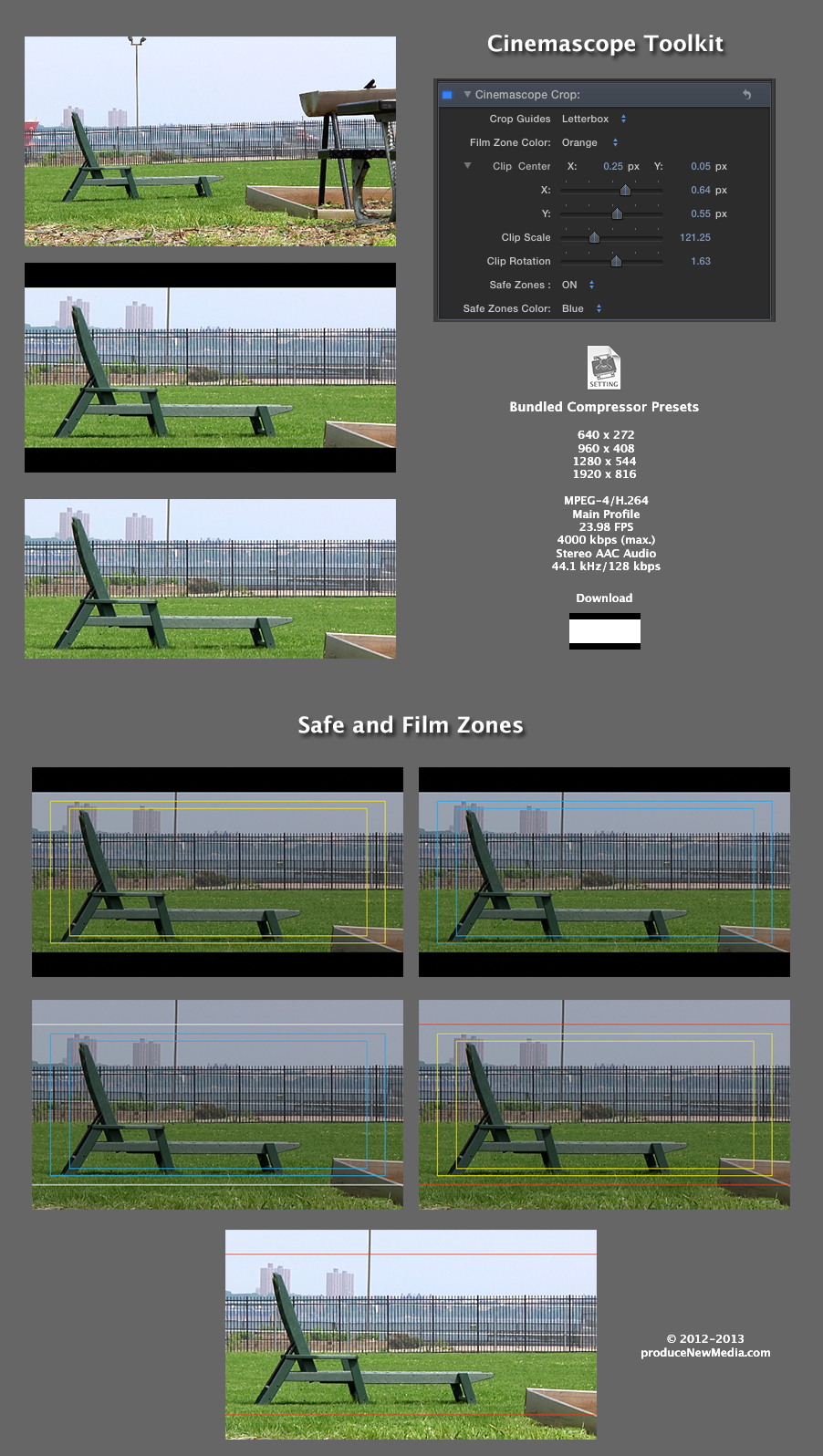
The package includes a basic 2.35:1 matte ("Cinemascope Crop") wrapped in a FCPX Effect with Scale control and X/Y positioning. I've also included four Compressor Presets that output cropped MPEG-4/H.264 video. So frame things up in FCPX and output using one of the Presets for 2.35:1 aspect ratio videos.
The Effect will be installed in a "Mattes" Category under a "Widescreen" Theme. The Compressor Presets will be located in Custom/"CinemaScope Presets" - Settings Group.
The installer is hard coded. So all the routing, etc. will be handled when you run it. You can trash the installer when you're done.
Keep in mind you can edit most of what the installer defines to suit your needs. For example I did not edit the naming convention that I use for the Compressor Presets. They all begin with the first four letter of my name. So again - edit if needed. The preset specs are listed on the page above. Feel free to edit these as well.
Same holds true for the FCPX Category and Theme. You can use my toMotion application to customize. Just pull the Cinemascope Crop folder out of the Motion Templates/Effects/Mattes folder - and handle it accordingly.
As I said - I built the installer. It's been tested on two machines ... 10.7xx and 10.8xx. Let me know how it goes ...
Download
-paul.
Last edit: 14 Nov 2012 16:06 by peteramwiggins. Reason: Fixed image link to embed
Please Log in to join the conversation.

14 Nov 2012 16:14 #17233
by BenB
Replied by BenB on topic Cinemascope Toolkit
Well done!
Please Log in to join the conversation.
15 Nov 2012 11:32 #17282
by Ferrari
Replied by Ferrari on topic Cinemascope Toolkit
Thanks!
Works fine.
Works fine.
Please Log in to join the conversation.
- TrixTrax9000
-

- Offline
- Platinum Member
-

Less
More
- Posts: 1213
- Thank you received: 142
15 Nov 2012 12:56 #17287
by TrixTrax9000
Replied by TrixTrax9000 on topic Cinemascope Toolkit
Nice job, Paul. Much appreciated. Thanks
Please Log in to join the conversation.
18 Nov 2012 03:48 #17429
by ptfigg
Replied by ptfigg on topic Cinemascope Toolkit
I'm looking into adding a Safe Zone(s) display with an on/off flag. In the demo below the opacity of the clip drops down to 50% when you display the zones. Makes it easy to see them. A text prompt appears on the top of the matte reminding you to reset the parameter to restore the opacity.
Safe Zone(s) Test
I can add an independent clip opacity slider for user control. In this case it would not be mapped to the on/off flag ...
-paul.
Safe Zone(s) Test
I can add an independent clip opacity slider for user control. In this case it would not be mapped to the on/off flag ...
-paul.
Please Log in to join the conversation.
- Simon Ubsdell
-
- Offline
- Platinum Member
-
Less
More
- Posts: 350
- Thank you received: 337
18 Nov 2012 15:30 #17455
by Simon Ubsdell
Nice idea to have a visual prompt that an overlay needs turning off.
If you wanted to have both an on/off switch and an opacity slider, you could always use the opacity of the layer for the on/off but also put the layer into a group of which you published the opacity slider. That way you get the best of both worlds.
Replied by Simon Ubsdell on topic Cinemascope Toolkit
ptfigg wrote: I'm looking into adding a Safe Zone(s) display with an on/off flag. In the demo below the opacity of the clip drops down to 50% when you display the zones. Makes it easy to see them. A text prompt appears on the top of the matte reminding you to reset the parameter to restore the opacity.
Safe Zone(s) Test
I can add an independent clip opacity slider for user control. In this case it would not be mapped to the on/off flag ...
Nice idea to have a visual prompt that an overlay needs turning off.
If you wanted to have both an on/off switch and an opacity slider, you could always use the opacity of the layer for the on/off but also put the layer into a group of which you published the opacity slider. That way you get the best of both worlds.
Please Log in to join the conversation.
18 Nov 2012 16:11 #17459
by ptfigg
Thanks, Simon. Good idea. I'll check it out ...
-paul.
Replied by ptfigg on topic Cinemascope Toolkit
Nice idea to have a visual prompt that an overlay needs turning off.
If you wanted to have both an on/off switch and an opacity slider, you could always use the opacity of the layer for the on/off but also put the layer into a group of which you published the opacity slider. That way you get the best of both worlds.
Thanks, Simon. Good idea. I'll check it out ...
-paul.
Please Log in to join the conversation.
23 Nov 2012 01:21 #17674
by ptfigg
Replied by ptfigg on topic Cinemascope Toolkit
I just posted ver. release 1.1.
You can now toggle the visibility of Safe Zones and set color to Yellow or Blue. The setting also pulls the clips opacity down to 30%.
I fixed a problem with the mattes and reworked the values of the Scale and X/Y sliders.
Short Demo
The installer will overwrite preexisting files. If you edited the names of the Compressor Presets they will not be affected.
Download
-paul.
You can now toggle the visibility of Safe Zones and set color to Yellow or Blue. The setting also pulls the clips opacity down to 30%.
I fixed a problem with the mattes and reworked the values of the Scale and X/Y sliders.
Short Demo
The installer will overwrite preexisting files. If you edited the names of the Compressor Presets they will not be affected.
Download
-paul.
Please Log in to join the conversation.

23 Nov 2012 02:05 #17681
by dgwvideo
Creating history....one edit at a time !
Replied by dgwvideo on topic Cinemascope Toolkit
Thanks for the update 
Creating history....one edit at a time !
Please Log in to join the conversation.
24 Nov 2012 05:51 #17737
by ptfigg
Replied by ptfigg on topic Cinemascope Toolkit
Here's a look at the next release. I added a Rotation Parameter that adjusts CW/CCW rotation up to about 20 degrees. The Crop Guides setting defaults to Letterbox. The alternate option is Film Zone. The Film Zone color can be set to orange, black, or white. Lastly I changed the Safe Zones visibility switch to a popup.
Demo Video
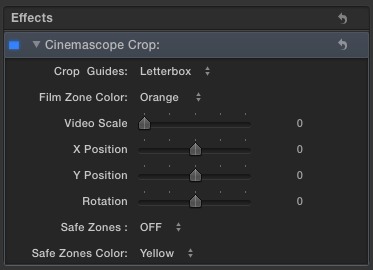
I'll package it up sometime tomorrow.
-paul.
Demo Video
I'll package it up sometime tomorrow.
-paul.
Please Log in to join the conversation.
25 Nov 2012 20:04 #17785
by ptfigg
Replied by ptfigg on topic Cinemascope Toolkit
The update is up
with a few additional enhancements:
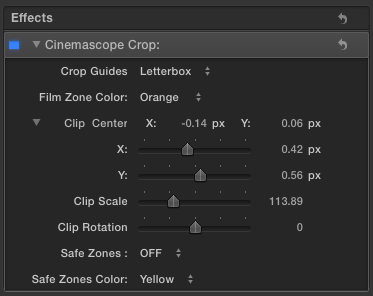
Have a look at it in action:
Demo
The Release Notes are accessible in the custom installer.
I apologize for the multiple posts. I think this should be it for a while. If anything changes I'll post it on my site:
produceNewMedia
-paul.
Have a look at it in action:
Demo
The Release Notes are accessible in the custom installer.
I apologize for the multiple posts. I think this should be it for a while. If anything changes I'll post it on my site:
produceNewMedia
-paul.
Please Log in to join the conversation.
- thefcpxeditor
-
- Offline
- Premium Member
-

- Control+Command+Awesome
01 Dec 2012 11:58 #18059
by thefcpxeditor
Replied by thefcpxeditor on topic Cinemascope Toolkit
Excellent! Thanks for this!
Please Log in to join the conversation.
03 Dec 2012 04:55 #18103
by ptfigg
Replied by ptfigg on topic Cinemascope Toolkit
Glad you guys like it.
I did move ahead with building a "Panavision" (2.4:1) version. Haven't had any calls for it. I guess best case scenario would be to build both aspect ratio options into the same plugin. I'll see.
-paul.
I did move ahead with building a "Panavision" (2.4:1) version. Haven't had any calls for it. I guess best case scenario would be to build both aspect ratio options into the same plugin. I'll see.
-paul.
Please Log in to join the conversation.
