


- Posts: 44
- Thank you received: 0
3 Post Moderation Rule for New Boarders (25 Jan 2021)
New boarders will have their posts moderated - Don't worry if you cannot see your post immediately.
Leaving myself behind to appear in freeze frame and then follow
- kindomalay
-
 Topic Author
- Offline
- Senior Member
-

Less
More
29 May 2018 01:07 - 29 May 2018 05:14 #95715
by kindomalay
Hi fellow Coremelters. 
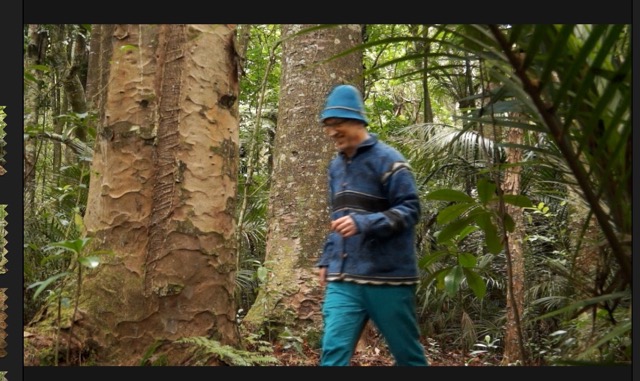
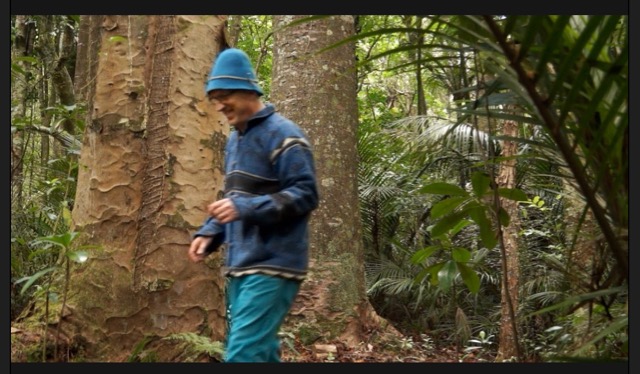
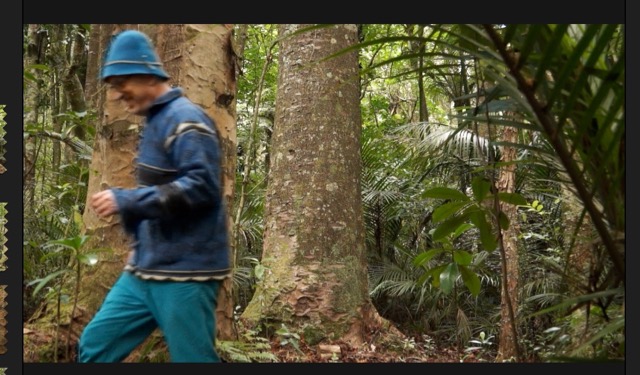
I have a scene where I walk out from between two trees. I stop, turn back, speak to someone off camera and then walk out of frame left, laughing. I've attached three screen shots which I hope to illustrate my intent.
My intent is along the lines of having my shadow be left behind once I move on from the position I appear in Gnome-1 attachment. As I get to the position in Gnome-2 I want the shadow to begin to follow the Gnome. Gnome-3 shows how I move out of left frame.
I plan to represent my shadow by duplicating the original clip and using Colour Correct Mask to lower the Brightness and Saturation, perhaps with some blur or something to represent a somewhat mysterious figure that is the shadow.
I watched this video - which demonstrates the author's son walk into a freeze frame of himself a couple of times. I worked through this example with my footage, but now I want to walk out of a past freeze frame. I think the same technique will work in reverse, but have yet to try it out.
Any thoughts on this venture?
Many thanks
Colin
I have a scene where I walk out from between two trees. I stop, turn back, speak to someone off camera and then walk out of frame left, laughing. I've attached three screen shots which I hope to illustrate my intent.
My intent is along the lines of having my shadow be left behind once I move on from the position I appear in Gnome-1 attachment. As I get to the position in Gnome-2 I want the shadow to begin to follow the Gnome. Gnome-3 shows how I move out of left frame.
I plan to represent my shadow by duplicating the original clip and using Colour Correct Mask to lower the Brightness and Saturation, perhaps with some blur or something to represent a somewhat mysterious figure that is the shadow.
I watched this video - which demonstrates the author's son walk into a freeze frame of himself a couple of times. I worked through this example with my footage, but now I want to walk out of a past freeze frame. I think the same technique will work in reverse, but have yet to try it out.
Any thoughts on this venture?
Many thanks
Colin
Last edit: 29 May 2018 05:14 by kindomalay.
Please Log in to join the conversation.
- Karsten Schlüter
-

- Offline
- Moderator
-

Less
More
- Posts: 3790
- Thank you received: 718
29 May 2018 04:23 - 29 May 2018 04:27 #95717
by Karsten Schlüter
nope, you haven't.
read advice given here
www.fcp.co/forum/4-final-cut-pro-x-fcpx/...-about-pics-in-posts
conc. Future Freeze: it's basically 'cloning' a clip and masking. By your description, your shadow is no freeze, but does 'other things' … that's a very different task, hm?
Maybe your pics will enlighten me …
btw: why posting in sub 'Coremelt'? Demoed Future Freeze long before Ben here , without usage of 3rd party add-ons (??)
Replied by Karsten Schlüter on topic Leaving myself behind to appear in freeze frame and then follow
kindomalay wrote: … attached three screen shots which I hope to illustrate my intent. …
nope, you haven't.
read advice given here
www.fcp.co/forum/4-final-cut-pro-x-fcpx/...-about-pics-in-posts
conc. Future Freeze: it's basically 'cloning' a clip and masking. By your description, your shadow is no freeze, but does 'other things' … that's a very different task, hm?
Maybe your pics will enlighten me …
btw: why posting in sub 'Coremelt'? Demoed Future Freeze long before Ben here , without usage of 3rd party add-ons (??)
Last edit: 29 May 2018 04:27 by Karsten Schlüter.
Please Log in to join the conversation.
- kindomalay
-
Topic Author
- Offline
- Senior Member
-
Less
More
- Posts: 44
- Thank you received: 0
29 May 2018 05:24 #95719
by kindomalay
Hi Karsten,
My apologies, I forgot to click Insert. I believe, given they are above, you'll be able to see them.
The Gnome is walking, he leaves himself frozen for a second or two as a shadow and then the shadow begins to follow the gnome. You are correct, it does do more, but given this was my first attempt at this, the youtube clip I posted seemed a good place to start.
Having attempted to do it using the example, I'm thinking there must be a simpler way, e.g. to follow your suggestion.
Cheers
Colin
Replied by kindomalay on topic Leaving myself behind to appear in freeze frame and then follow
Hi Karsten,
My apologies, I forgot to click Insert. I believe, given they are above, you'll be able to see them.
The Gnome is walking, he leaves himself frozen for a second or two as a shadow and then the shadow begins to follow the gnome. You are correct, it does do more, but given this was my first attempt at this, the youtube clip I posted seemed a good place to start.
Having attempted to do it using the example, I'm thinking there must be a simpler way, e.g. to follow your suggestion.
Cheers
Colin
Please Log in to join the conversation.
- Karsten Schlüter
-
- Offline
- Moderator
-
Less
More
- Posts: 3790
- Thank you received: 718
29 May 2018 10:28 #95724
by Karsten Schlüter
ahh, gotcha, Colin!
kinda sort of …:

For mimicking the outcome I used Pixelmators Magnetic Lasso to mask you out of the first shot - and that is really difficult! The recording is blurry, colors of foreground and background match… I hardly doubt you get a showable result.
In that respect, the usage of coremelts TrackX is correct - it is intended to 'key' (=mask) non-keyable moving objects…
At the school project, I support as a volunteer, we do a lot of 'silly' v/fx too… we won a prize for a 14min Fairy Tale with a magic dwarf, doing all nonsense.
It is essential to 'plan' such v/fx way before production .
As an example: your camera is moving = parts from a different TC will not match! Or, when I do know, I will key some material, the scene has to be made key-able as possible. In your case: two recordings, rock solid fixed cam, gnome running thru scenery; 2nd take: two assistants hold a green blanket into scenery (for same light conditions) , Gnome runs again.
=> you get an easy to key clip, adjust colors/blur/opacity to make it 'ghostly'…
looks simple but not so easy to accomplish
Replied by Karsten Schlüter on topic Leaving myself behind to appear in freeze frame and then follow
kindomalay wrote: … The Gnome is walking, he leaves himself frozen for a second or two as a shadow and then the shadow begins to follow the gnome. You are correct, it does do more, but given this was my first attempt at this, the youtube clip I posted seemed a good place to start.
ahh, gotcha, Colin!
kinda sort of …:
For mimicking the outcome I used Pixelmators Magnetic Lasso to mask you out of the first shot - and that is really difficult! The recording is blurry, colors of foreground and background match… I hardly doubt you get a showable result.
In that respect, the usage of coremelts TrackX is correct - it is intended to 'key' (=mask) non-keyable moving objects…
At the school project, I support as a volunteer, we do a lot of 'silly' v/fx too… we won a prize for a 14min Fairy Tale with a magic dwarf, doing all nonsense.
It is essential to 'plan' such v/fx way before production .
As an example: your camera is moving = parts from a different TC will not match! Or, when I do know, I will key some material, the scene has to be made key-able as possible. In your case: two recordings, rock solid fixed cam, gnome running thru scenery; 2nd take: two assistants hold a green blanket into scenery (for same light conditions) , Gnome runs again.
=> you get an easy to key clip, adjust colors/blur/opacity to make it 'ghostly'…
looks simple but not so easy to accomplish
Please Log in to join the conversation.
Moderators: funwithstuff, CoreMelt
