


- Posts: 56
- Thank you received: 3
3 Post Moderation Rule for New Boarders (25 Jan 2021)
New boarders will have their posts moderated - Don't worry if you cannot see your post immediately.
Conduit by Lacquer & DVGarage
Conduit 2 - free "Poor Mojo", Film Hue, CineShade LUT effects to get started ...
24 Aug 2011 00:54 - 24 Aug 2011 01:31 #973
by goestas
Conduit 2 - free "Poor Mojo", Film Hue, CineShade LUT effects to get started ... was created by goestas
Hi all,
I'm taking on the task to get the ball rolling on interest for and discussion about and experimentation with the new, fully FCP X compatible version of lacquer's fantastic Conduit engine. I've also encouraged our Admin Guru to create a separate thread , since we're dealing with free plug-ins for a (not free - but there's a trial version, see the above link) third-party product. But I feel it might be prudent to see how many of us actually use this tool or are willing to discover it.
The package does come with a few templates that can also be explored, modified etc. There is a learning curve, but once you get into it, it's hard to come up for air.
Conduit is known (if at all) as a nodal compositor, but I've been using it to emulate some of the color grading effects that I've been missing since updating to FCP X.
So here are some humble offers:
1. Technicolor CineShade S-Curve LUT for FCP X, via Conduit's LUT support.
Since I don't want to double-post, this file is attached to this post . It'll only mean something to you if you use the CineShade preset on your Canon DSLR.
2. Film-hue type effect (simple yellow/blue shift plus a slightly unusual grain)
This can probably be improved (a lot! It uses 2 RGB curve nodes, which are powerful -- too powerful for this effect -- but CPU intensive, so don't be put off by the rendering time); it's an old one.
The interface:

example:

3. Poor Man's Mojo
This is a work in progress.
Interface:

Original Image:

Treated (basic):

Compared to Magic Bullet Mojo (I'm not trying to duplicate the effect ...):

Tomorrow I'll add some explanations to the settings and the purpose behind this effect. Basically it's to isolate the skin tones and effect either those or the rest of the image. I'm using a weird kind of selection process for the matte that gives me much better results than anything in my old FCE (never had the chance to work with Color) and complements what FCP X can do with selection masks (which are actually quite amazing). Just wanted to offer an example of a more complex, if not necessarily useful, Conduit effect.
The skin selection is a lot better than in Mojo, though -- just start with the default settings, if you have a decent source, you can ignore anything below the "initial contrast" slider if you just want to get a taste for the effect.
More to come ... please give feedback if you're interested.
I'll also take requests for stuff you might not have been able to figure out with the standard toolset. Would be a challenge! Be aware I'm not an expert grader!
One more example to whet the appetite. Here I've isolated the skin tones (as best as possible, note the fool & liquid ... I didn't apply any region mask), inverted the mask (leaving the original skin, which now looks "wrong" though) and then added some selective grading with FCP X (really easy, since the skin tones were already "prepped"):
Poor Mojo:


Plus FCP X selective color pass:

Of course I could also tint the background another color (so far only from the selection set), such as "skin" or "red" or "yellow", or push it towards b&w.
I'm taking on the task to get the ball rolling on interest for and discussion about and experimentation with the new, fully FCP X compatible version of lacquer's fantastic Conduit engine. I've also encouraged our Admin Guru to create a separate thread , since we're dealing with free plug-ins for a (not free - but there's a trial version, see the above link) third-party product. But I feel it might be prudent to see how many of us actually use this tool or are willing to discover it.
The package does come with a few templates that can also be explored, modified etc. There is a learning curve, but once you get into it, it's hard to come up for air.
Conduit is known (if at all) as a nodal compositor, but I've been using it to emulate some of the color grading effects that I've been missing since updating to FCP X.
So here are some humble offers:
1. Technicolor CineShade S-Curve LUT for FCP X, via Conduit's LUT support.
Since I don't want to double-post, this file is attached to this post . It'll only mean something to you if you use the CineShade preset on your Canon DSLR.
2. Film-hue type effect (simple yellow/blue shift plus a slightly unusual grain)
This can probably be improved (a lot! It uses 2 RGB curve nodes, which are powerful -- too powerful for this effect -- but CPU intensive, so don't be put off by the rendering time); it's an old one.
The interface:
example:
3. Poor Man's Mojo
This is a work in progress.
Interface:
Original Image:
Treated (basic):
Compared to Magic Bullet Mojo (I'm not trying to duplicate the effect ...):
Tomorrow I'll add some explanations to the settings and the purpose behind this effect. Basically it's to isolate the skin tones and effect either those or the rest of the image. I'm using a weird kind of selection process for the matte that gives me much better results than anything in my old FCE (never had the chance to work with Color) and complements what FCP X can do with selection masks (which are actually quite amazing). Just wanted to offer an example of a more complex, if not necessarily useful, Conduit effect.
The skin selection is a lot better than in Mojo, though
-- just start with the default settings, if you have a decent source, you can ignore anything below the "initial contrast" slider if you just want to get a taste for the effect.More to come ... please give feedback if you're interested.
I'll also take requests for stuff you might not have been able to figure out with the standard toolset. Would be a challenge! Be aware I'm not an expert grader!
One more example to whet the appetite. Here I've isolated the skin tones (as best as possible, note the fool & liquid ... I didn't apply any region mask), inverted the mask (leaving the original skin, which now looks "wrong" though) and then added some selective grading with FCP X (really easy, since the skin tones were already "prepped"):
Poor Mojo:
Plus FCP X selective color pass:
Of course I could also tint the background another color (so far only from the selection set), such as "skin" or "red" or "yellow", or push it towards b&w.
Last edit: 24 Aug 2011 01:31 by goestas.
Please Log in to join the conversation.
24 Aug 2011 17:06 #977
by tap5a
Replied by tap5a on topic Re: Conduit 2 - free "Poor Mojo", Film Hue, CineShade LUT effects to get started ...
Wow, thanks for effort. This is great and very vert interesting! I think I've to give another look for Conduit.
I really hope this Motion 5 / FCPX collaboration can breath new life to Conduit!
Best
Tapio Haaja
I really hope this Motion 5 / FCPX collaboration can breath new life to Conduit!
Best
Tapio Haaja
Please Log in to join the conversation.
- Simon Ubsdell
-

- Offline
- Platinum Member
-

Less
More
- Posts: 350
- Thank you received: 337
24 Aug 2011 18:01 #980
by Simon Ubsdell
Replied by Simon Ubsdell on topic Re: Conduit 2 - free "Poor Mojo", Film Hue, CineShade LUT effects to get started ...
Thanks for sending me back to Conduit - or rather to the new Conduit which has really advanced quite a lot since I last used it. The ability to create genuinely sophisticated FCPX plug-ins using Conduit + Motion 5 is a really interesting avenue to explore. Even if only for the ability to work properly with the RGBA channels it's a huge improvement over Motion on its own!
Nice work
Nice work
Please Log in to join the conversation.
26 Aug 2011 01:23 #1007
by goestas
Thanks! I'm cooking up something more, might take a few days though. Just did a shoot using the CineStyle presets, so I for one am veeeery happy I can now just drop the LUTs on the clips, thanks to conduit (even though that's sort of like using a laser gun to open a bottle ...  ). But for me, since I have to this point not been into heavy compositing etc., that's the beauty of Conduit -- when you need some gadget/widget/thingy and everything else fails, pull out the old, what's it over there, Fisher Technic set?
Promise I'll seed some more stuff soon, including updates to these first ones.
Cheers, G.
Replied by goestas on topic Re: Conduit 2 - free "Poor Mojo", Film Hue, CineShade LUT effects to get started ...
Thanks! I'm cooking up something more, might take a few days though. Just did a shoot using the CineStyle presets, so I for one am veeeery happy I can now just drop the LUTs on the clips, thanks to conduit (even though that's sort of like using a laser gun to open a bottle ... ). But for me, since I have to this point not been into heavy compositing etc., that's the beauty of Conduit -- when you need some gadget/widget/thingy and everything else fails, pull out the old, what's it over there, Fisher Technic set?Promise I'll seed some more stuff soon, including updates to these first ones.
Cheers, G.
Please Log in to join the conversation.
11 Sep 2011 03:41 - 11 Sep 2011 03:46 #1167
by goestas
Replied by goestas on topic Conduit 2 for Motion /FCP X template: YCbCr tools
Here's a refined version of the tool I describe
here
. Sorry if this is considered cross-posting, I'm just not sure where to put these at the moment. 
This is a both useful and fun effect, which manipulates 4 chroma components of YCbCr (blue, yellow, green & red) as well as the luma. I like grading in this color space, since it deals with chroma and luminance separately. There are of course many more possibilities one could build on this; the "hard" part was figuring out a reasonably efficient way of separating Cb and Cr into the 4 different chroma elements. Conduit has a "range" tool that made this easy.
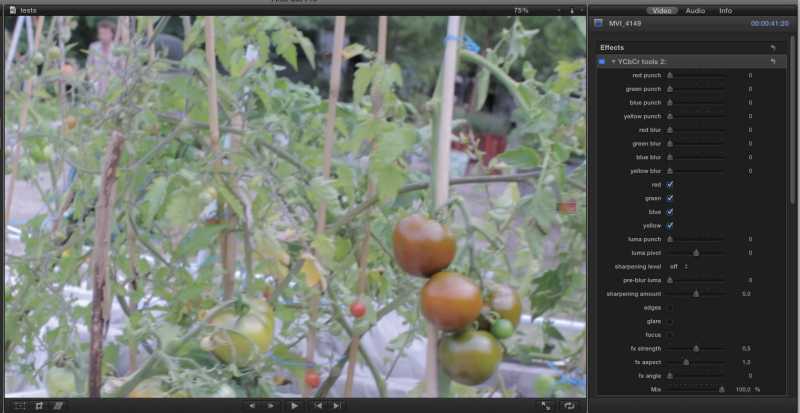
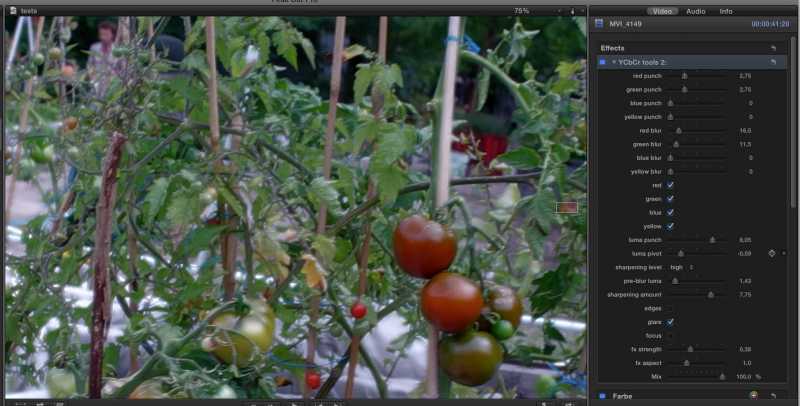
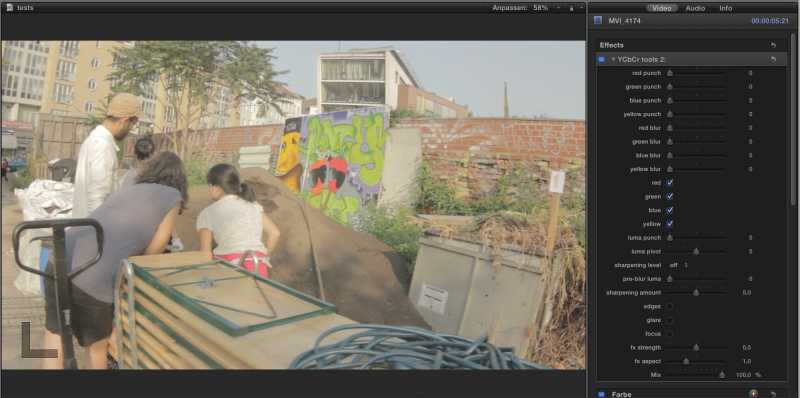
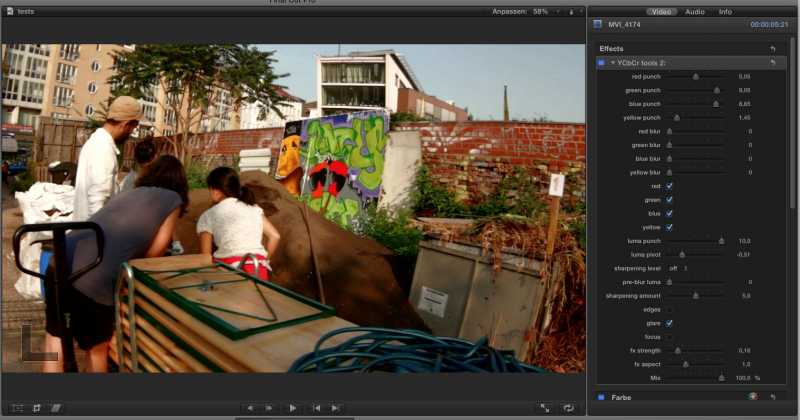
There's basic chroma boosting & blurring, luminance sharpening, and three little "effects" that composite a blurred luma image onto the original using different modes. Some examples:
original, over-exposed, blurry, blah image:
one way to deal with it:
another original:
treated:
you can also do some cartoony looks, this works great with faces, but because I don't want to have to do the "witness protection" thing, here's the tomato again (this works better on higher contrast images though):
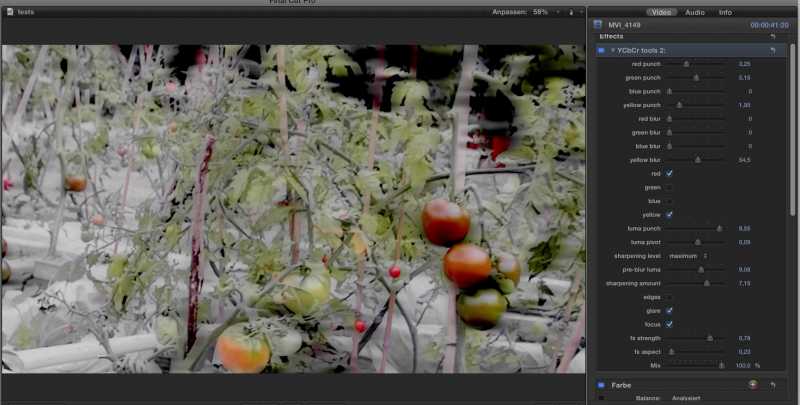
Here's the interface:
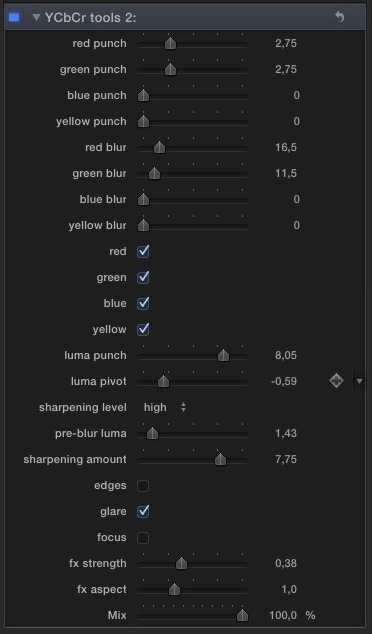
I'll be happy to take suggestions!
This is a both useful and fun effect, which manipulates 4 chroma components of YCbCr (blue, yellow, green & red) as well as the luma. I like grading in this color space, since it deals with chroma and luminance separately. There are of course many more possibilities one could build on this; the "hard" part was figuring out a reasonably efficient way of separating Cb and Cr into the 4 different chroma elements. Conduit has a "range" tool that made this easy.
There's basic chroma boosting & blurring, luminance sharpening, and three little "effects" that composite a blurred luma image onto the original using different modes. Some examples:
original, over-exposed, blurry, blah image:
one way to deal with it:
another original:
treated:
you can also do some cartoony looks, this works great with faces, but because I don't want to have to do the "witness protection" thing, here's the tomato again (this works better on higher contrast images though):
Here's the interface:
I'll be happy to take suggestions!
Last edit: 11 Sep 2011 03:46 by goestas. Reason: added image
Please Log in to join the conversation.
11 Sep 2011 12:50 #1168
by goestas
I think it makes the most sense for this to be the "free Conduit templates for FCP X / Motion" topic and the other one for general questions. Is it possible to change the title of this thread accordingly, so I don't have to start another one (and get even more confused)
Cheers, Goesta
Replied by goestas on topic Re: Conduit 2 for Motion /FCP X template: YCbCr tools
Sorry if this is considered cross-posting, I'm just not sure where to put these at the moment.
I think it makes the most sense for this to be the "free Conduit templates for FCP X / Motion" topic and the other one for general questions. Is it possible to change the title of this thread accordingly, so I don't have to start another one (and get even more confused
)Cheers, Goesta
Please Log in to join the conversation.
14 Nov 2011 01:32 #2154
by goestas
Replied by goestas on topic Re: Conduit 2 for Motion /FCP X template: YCbCr tools
Since the last post, I've tried to refine the YCbCr color tools performance, such as by breaking it down into separate effects layers in Motion that can be turned on only when needed, but the results weren't consistent. So here is the so far best version of the tool, with the main improvement being modified effects, which are now essentially black & white diffusion filters and an "edge enhancement" that adds an extra bit of zing or sharpening (or if desired a sort of Photoshop poster edges look). I find myself using this little tool a lot, for a variety of looks, also in combination with the native color correction in FCP X. It's a little slow, but worth the wait. Enjoy!
Please Log in to join the conversation.

17 Jan 2012 19:48 #3219
by PSH-AV
Replied by PSH-AV on topic Re: Conduit 2 for Motion /FCP X template: YCbCr tools
Hey,
your plugins doesn't work in my FCPX
your plugins doesn't work in my FCPX
Please Log in to join the conversation.
