


- Posts: 350
- Thank you received: 337
3 Post Moderation Rule for New Boarders (25 Jan 2021)
New boarders will have their posts moderated - Don't worry if you cannot see your post immediately.
Only start a new post here if you are uploading a free plugin or direct linking to a plugin or the page that the plugin can be downloaded from.
All other new posts will be deleted.
All other new posts will be deleted.
TKY Free Light Slash Effect (Updated, Improved & Reposted)
- Simon Ubsdell
-
 Topic Author
- Offline
- Platinum Member
-

Less
More
19 Oct 2011 00:13 - 21 Aug 2012 20:08 #1660
by Simon Ubsdell
Here's a simple to use multi-purpose effect with the ability to grade (and add effects) inside and outside a 4-point mask with onscreen controls for mask corners.
There are grading controls*, tint and glow for inside the mask and grading, tint and blur controls for outside mask.
Useful and quick for a variety of vignette effects, light pools/slashes, darkening and/or blurring the edges (or top/bottom) of an image, e.g. for darkening/tinting an over-bright sky, etc.
And here's a video that talks you through the controls and some ways of using the effect:
(Removed due to bad link)
* Note this effect also includes the ability to control black and white levels (as well as gamma) independently (in addition to brightness and saturation) which gives you good control of luminance values.
Obviously this is all stuff you could do by stacking up other effects plus the Color Board but the combination of several processes within the one effect means it gives you much quicker results.
There are grading controls*, tint and glow for inside the mask and grading, tint and blur controls for outside mask.
Useful and quick for a variety of vignette effects, light pools/slashes, darkening and/or blurring the edges (or top/bottom) of an image, e.g. for darkening/tinting an over-bright sky, etc.
And here's a video that talks you through the controls and some ways of using the effect:
(Removed due to bad link)
* Note this effect also includes the ability to control black and white levels (as well as gamma) independently (in addition to brightness and saturation) which gives you good control of luminance values.
Obviously this is all stuff you could do by stacking up other effects plus the Color Board but the combination of several processes within the one effect means it gives you much quicker results.
Last edit: 21 Aug 2012 20:08 by Simon Ubsdell.
Please Log in to join the conversation.
- peteramwiggins
-

- Offline
- Administrator
-

- The Administrator :)
Less
More
- Posts: 1049
- Thank you received: 404
19 Oct 2011 03:39 #1661
by peteramwiggins
Administrator
Replied by peteramwiggins on topic Re: TKY Free Light Slash Effect (Updated & Improved)
The video is private 
Administrator
Please Log in to join the conversation.
- Simon Ubsdell
-
Topic Author
- Offline
- Platinum Member
-
Less
More
- Posts: 350
- Thank you received: 337
19 Oct 2011 11:57 #1672
by Simon Ubsdell
Replied by Simon Ubsdell on topic Re: TKY Free Light Slash Effect (Updated & Improved)
Oops, thanks for pointing that out! It's public now.
Please Log in to join the conversation.

19 Oct 2011 12:57 #1673
by f_wood2
Replied by f_wood2 on topic Re: TKY Free Light Slash Effect (Updated & Improved)
Thanks you for this... it's very nice....
Please Log in to join the conversation.

16 Dec 2011 15:55 #2624
by jweeke
Replied by jweeke on topic Re: TKY Free Light Slash Effect (Updated & Improved)
Having a real tough time keyframing movement. Am I alone on this?
Please Log in to join the conversation.
- Simon Ubsdell
-
Topic Author
- Offline
- Platinum Member
-
Less
More
- Posts: 350
- Thank you received: 337
17 Dec 2011 01:03 #2630
by Simon Ubsdell
Replied by Simon Ubsdell on topic Re: TKY Free Light Slash Effect (Updated & Improved)
If you are trying to animate the mask corners unfortunately this can't be done as then only way I have come across to work with control points is to track them (and link them to the oncsreen controls) - and the tracking won't work with animation.
However you might like to try this effect which is similar but a lot more powerful:
fcp.co/forum/9-free-fcpx-plugins-and-tem...er-grade-lite-effect
It doesn't use the 4-point mask but you have plenty of control over the mask shape to compensate for that.
However you might like to try this effect which is similar but a lot more powerful:
fcp.co/forum/9-free-fcpx-plugins-and-tem...er-grade-lite-effect
It doesn't use the 4-point mask but you have plenty of control over the mask shape to compensate for that.
Please Log in to join the conversation.
17 Dec 2011 02:50 #2631
by f_wood2
Replied by f_wood2 on topic Re: TKY Free Light Slash Effect (Updated & Improved)
Helo Simon, a like a lot your effect, please could you give me the name of the effects that you rename "OSC L bottom" tha,k you very much for your help....
Please Log in to join the conversation.
- Simon Ubsdell
-
Topic Author
- Offline
- Platinum Member
-
Less
More
- Posts: 350
- Thank you received: 337
17 Dec 2011 03:02 #2632
by Simon Ubsdell
Replied by Simon Ubsdell on topic Re: TKY Free Light Slash Effect (Updated & Improved)
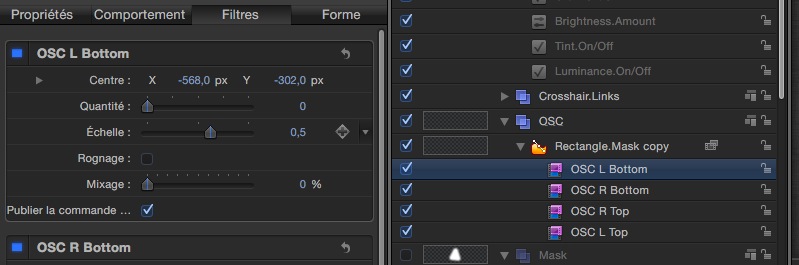
Not quite sure what you're asking but if you are looking inside Motion at how this effect is made then what I have called OSC is the onscreen control. In this case I think it was a Poie filter which is one of the simplest ways of providing an onscreen control for a particular point.
Please Log in to join the conversation.
17 Dec 2011 03:41 #2633
by f_wood2
Replied by f_wood2 on topic Re: TKY Free Light Slash Effect (Updated & Improved)
tx for your fast answer, here you can find a pict about the effects, i don't see the effcet that you call poie filter, could you tell me the way to find it in motion 5 tx a lot
Please Log in to join the conversation.
- Simon Ubsdell
-
Topic Author
- Offline
- Platinum Member
-
Less
More
- Posts: 350
- Thank you received: 337
17 Dec 2011 04:06 #2634
by Simon Ubsdell
Replied by Simon Ubsdell on topic Re: TKY Free Light Slash Effect (Updated & Improved)
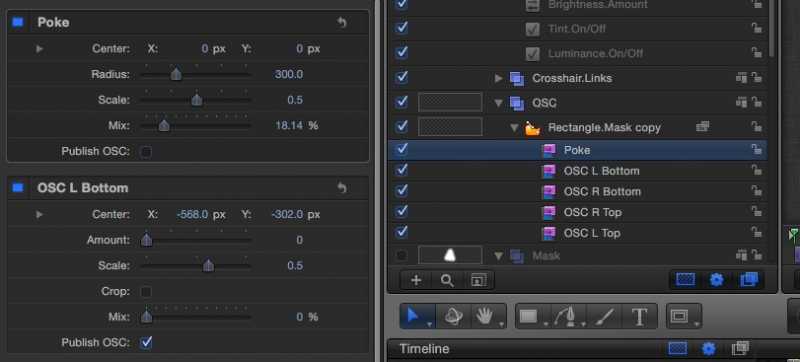
Sorry, I mistyped - I meant to say "Poke" filter, not sure what that would be in French. I have renamed it because of the function it is performing in the overall effect. It's not actually doing anything except providing the onscreen control to publish to FCPX. Hard to explain without going into a lot more detail ...
Please Log in to join the conversation.
17 Dec 2011 04:41 #2635
by f_wood2
Replied by f_wood2 on topic Re: TKY Free Light Slash Effect (Updated & Improved)
I find it but it's not the same, are you that's a good filter ? look the picture that i did it....
Please Log in to join the conversation.
17 Dec 2011 11:07 #2639
by Krzysztof
Replied by Krzysztof on topic Re: TKY Free Light Slash Effect (Updated & Improved)
Hello
Nice work, a very useful tool. Thank you for your efforts.
Regards
Krzysztof Szychowski
Nice work, a very useful tool. Thank you for your efforts.
Regards
Krzysztof Szychowski
Please Log in to join the conversation.
18 Dec 2011 11:41 #2653
by RO
Replied by RO on topic Re: TKY Free Light Slash Effect (Updated & Improved)
can you please help im clicking on the zip file to download but once its uncompressed what am i sposed to do i mean all the folder has an image and a document!!!
pleeasee help ASAP :ohmy:
regards,
ro.
pleeasee help ASAP :ohmy:
regards,
ro.
Please Log in to join the conversation.
- Simon Ubsdell
-
Topic Author
- Offline
- Platinum Member
-
Less
More
- Posts: 350
- Thank you received: 337
18 Dec 2011 15:42 #2657
by Simon Ubsdell
Replied by Simon Ubsdell on topic Re: TKY Free Light Slash Effect (Updated & Improved)
Please see here for installation instructions:
fcp.co/forum/7-how-to-tutorials/2323-faq...nstall-fcpx-plug-ins
fcp.co/forum/7-how-to-tutorials/2323-faq...nstall-fcpx-plug-ins
Please Log in to join the conversation.
- Simon Ubsdell
-
Topic Author
- Offline
- Platinum Member
-
Less
More
- Posts: 350
- Thank you received: 337
19 Dec 2011 16:24 #2665
by Simon Ubsdell
Replied by Simon Ubsdell on topic Re: TKY Free Light Slash Effect (Updated & Improved)
To clarify:
Yes, the filter that you are showing in your screen grab and which is called OSC L Bottom is a filter that I have retitled with this name, it is not a filter that exists with this name in Motion 5. The filter that I have renamed it from is called Poke - not sure what the Frecnh equivalent would be, but you can find it in the Filters/Distortion menu.
As I explained before, the filter has no function at all besides providing the publishable onscreen control - in this case a simple position control with nothing else. All the filters in the Distortion menu can be used this way and different ones enable you to publish different types of control, including scale and rotation. Again I would stress that the filter itself is doing absolutely nothing to the final image.
The way it is all made to work in this case is that the control points of the 4-point mask are made to track the position of 4 individual crosshairs (using the Track Points Behaviour), and these crosshairs are in turn Linked to the Poke filter Centre position in both X and Y separately. The Poke filter onscreen control is then set to publish and that's how you are able to control the mask corners from within FCPX.
Hope that makes sense.
Yes, the filter that you are showing in your screen grab and which is called OSC L Bottom is a filter that I have retitled with this name, it is not a filter that exists with this name in Motion 5. The filter that I have renamed it from is called Poke - not sure what the Frecnh equivalent would be, but you can find it in the Filters/Distortion menu.
As I explained before, the filter has no function at all besides providing the publishable onscreen control - in this case a simple position control with nothing else. All the filters in the Distortion menu can be used this way and different ones enable you to publish different types of control, including scale and rotation. Again I would stress that the filter itself is doing absolutely nothing to the final image.
The way it is all made to work in this case is that the control points of the 4-point mask are made to track the position of 4 individual crosshairs (using the Track Points Behaviour), and these crosshairs are in turn Linked to the Poke filter Centre position in both X and Y separately. The Poke filter onscreen control is then set to publish and that's how you are able to control the mask corners from within FCPX.
Hope that makes sense.
Please Log in to join the conversation.
20 Dec 2011 16:58 #2675
by f_wood2
Replied by f_wood2 on topic Re: TKY Free Light Slash Effect (Updated & Improved)
Simon thanks a lot to explain us all of this... You are very great...
I understand everye thinks but when i put the tracks on mask i lost my mask and after impossible to see it in my effects in fcp x (you're effects works well, i try to do iy myself... oupsss but I learn a lot ....
I will try to explain my method
- I import my footage
- I make a rectangle mask
- I make a Poke effects to obtain OSC, I make crosshairs linked to Poke filter, everything are ok, but when I put the track at final to follow the crosshair, impossible after to see the mask....
- I don't now if you can to see the problem but I try to explain you, just in case you can help me to understand your effect.
I understand everye thinks but when i put the tracks on mask i lost my mask and after impossible to see it in my effects in fcp x (you're effects works well, i try to do iy myself... oupsss but I learn a lot ....
I will try to explain my method
- I import my footage
- I make a rectangle mask
- I make a Poke effects to obtain OSC, I make crosshairs linked to Poke filter, everything are ok, but when I put the track at final to follow the crosshair, impossible after to see the mask....
- I don't now if you can to see the problem but I try to explain you, just in case you can help me to understand your effect.
Please Log in to join the conversation.
- Simon Ubsdell
-
Topic Author
- Offline
- Platinum Member
-
Less
More
- Posts: 350
- Thank you received: 337
20 Dec 2011 23:53 - 21 Dec 2011 00:00 #2683
by Simon Ubsdell
Replied by Simon Ubsdell on topic Re: TKY Free Light Slash Effect (Updated & Improved)
Actually there are lots of things that can cause problems. Here are some things to check:
Add the filters to a control object (not just an empty group - this can be either a generator solid or a shape, it doesn't matter which.
Position the crosshairs close to each control point.
Identify the relevant control points of your shape to track and make sure that each of your Track Point trackers is lookiing at only that control point - uncheck the track numbers that don't apply.
Zero out the X/Y values of each tracker.
Set all the trackers to Attach to Source rather than the default of Mimic Source.
In the link behaviours, add an offset of -.5 (minus point 5) to each of the X and Y offset values.
Hope that helps.
FXMahoney did a tutorial on this a while back that shows how to do this very well:
fcp.co/forum/6-motion-5/688-tutorial-con...al-cut-pro-x-effects
Add the filters to a control object (not just an empty group - this can be either a generator solid or a shape, it doesn't matter which.
Position the crosshairs close to each control point.
Identify the relevant control points of your shape to track and make sure that each of your Track Point trackers is lookiing at only that control point - uncheck the track numbers that don't apply.
Zero out the X/Y values of each tracker.
Set all the trackers to Attach to Source rather than the default of Mimic Source.
In the link behaviours, add an offset of -.5 (minus point 5) to each of the X and Y offset values.
Hope that helps.
FXMahoney did a tutorial on this a while back that shows how to do this very well:
fcp.co/forum/6-motion-5/688-tutorial-con...al-cut-pro-x-effects
Last edit: 21 Dec 2011 00:00 by Simon Ubsdell.
Please Log in to join the conversation.
21 Dec 2011 14:47 #2705
by f_wood2
Replied by f_wood2 on topic Re: TKY Free Light Slash Effect (Updated & Improved)
Thank you very much I am going to watch all of these.... and Merry Christmas and Happy new year... and I hope to read you next year.....
Please Log in to join the conversation.
- peteramwiggins
-
- Offline
- Administrator
-
- The Administrator :)
Less
More
- Posts: 1049
- Thank you received: 404
14 Aug 2012 12:45 - 14 Aug 2012 12:45 #13017
by peteramwiggins
Administrator
Replied by peteramwiggins on topic Re: TKY Free Light Slash Effect (Updated & Improved)
Now it has gone completely! Removed to avoid bad link.
Administrator
Last edit: 14 Aug 2012 12:45 by peteramwiggins.
Please Log in to join the conversation.
- Simon Ubsdell
-
Topic Author
- Offline
- Platinum Member
-
Less
More
- Posts: 350
- Thank you received: 337
21 Aug 2012 19:44 #13309
by Simon Ubsdell
Replied by Simon Ubsdell on topic Re: TKY Free Light Slash Effect (Updated & Improved)
In response to Peter's comment about this having gone missing, the link appears to still be working fine at this end. But if anyone i8s having problems here it is again:
Please Log in to join the conversation.
