


- Posts: 483
- Thank you received: 256
3 Post Moderation Rule for New Boarders (25 Jan 2021)
New boarders will have their posts moderated - Don't worry if you cannot see your post immediately.
Only start a new post here if you are uploading a free plugin or direct linking to a plugin or the page that the plugin can be downloaded from.
All other new posts will be deleted.
All other new posts will be deleted.
Alex4D Grow-Shrink: Change scale over the lifetime of a clip
06 Sep 2012 18:18 - 22 Oct 2012 19:19 #13792
by alex4D
Animation in Apple Motion is based on applying behaviours to make clips scale, move and interact. A popular behaviour is 'Grow/Shrink.'
Here is a filter than changes scale over the lifetime of a clip. This means the same settings applied to a longer clip will result in slower animation.
A popular effect in may productions is the slow creep into a shot, a subliminal scale up of a clip. If you scale up a very small amount over a reasonable time, a locked off shot, a still or a title, you add subliminal interest. The viewers know something is going on, but they don't know what.
As well as scale controls, there is an on-screen control that allows you to choose a point around which the scale happens.
For more information and download link, please visit my blog:
alex4d.wordpress.com/2012/09/06/alex-4d-grow-shrink-effect
Here is a filter than changes scale over the lifetime of a clip. This means the same settings applied to a longer clip will result in slower animation.
A popular effect in may productions is the slow creep into a shot, a subliminal scale up of a clip. If you scale up a very small amount over a reasonable time, a locked off shot, a still or a title, you add subliminal interest. The viewers know something is going on, but they don't know what.
As well as scale controls, there is an on-screen control that allows you to choose a point around which the scale happens.
For more information and download link, please visit my blog:
alex4d.wordpress.com/2012/09/06/alex-4d-grow-shrink-effect
Last edit: 22 Oct 2012 19:19 by alex4D.
Please Log in to join the conversation.
06 Sep 2012 21:11 - 06 Sep 2012 21:18 #13795
by bendermac
Replied by bendermac on topic Re: Alex4D Grow-Shrink: Change scale over the lifetime of a clip
cool plugin and this could be used like the screenflow zoom feature. though, when i zoom in, the picture gets very soft compared to the same zoom option from fcpx itself
#update#
when i first applied the effect, i did it on an adjustment layer and got the very soft picture
then i applied the effect on the clip itself and voila, no extreme soft picture.
looks like the effect should not be applied on an adjustment layer. any idea why it gets soft on it?
#update#
when i first applied the effect, i did it on an adjustment layer and got the very soft picture
then i applied the effect on the clip itself and voila, no extreme soft picture.
looks like the effect should not be applied on an adjustment layer. any idea why it gets soft on it?
Last edit: 06 Sep 2012 21:18 by bendermac.
Please Log in to join the conversation.
- TrixTrax9000
-

- Offline
- Platinum Member
-

Less
More
- Posts: 1213
- Thank you received: 142
06 Sep 2012 22:34 - 07 Sep 2012 12:24 #13797
by TrixTrax9000
Replied by TrixTrax9000 on topic Re: Alex4D Grow-Shrink: Change scale over the lifetime of a clip
Love it, thanks Alex.
This works well even on short clips, I just raised the scale a bit & it adds another dimension. That being if you are filming yourself, it adds the illusion of a professional slow zoom cameraman, considerably upping your budget appearance.
I have a feeling, I'm going to be utilizing this little baby a lot!
Thanks Alex
This works well even on short clips, I just raised the scale a bit & it adds another dimension. That being if you are filming yourself, it adds the illusion of a professional slow zoom cameraman, considerably upping your budget appearance.
I have a feeling, I'm going to be utilizing this little baby a lot!
Thanks Alex
Last edit: 07 Sep 2012 12:24 by TrixTrax9000 .
Please Log in to join the conversation.
- jdm4given1
-
- Offline
- Premium Member
-

Less
More
- Posts: 121
- Thank you received: 20
07 Sep 2012 02:20 #13806
by jdm4given1
Replied by jdm4given1 on topic Re: Alex4D Grow-Shrink: Change scale over the lifetime of a clip
great, thanks alex!
Please Log in to join the conversation.
- simonpwood
-
- Offline
- Platinum Member
-
Less
More
- Posts: 654
- Thank you received: 42
09 Nov 2012 13:20 #16929
by simonpwood
Replied by simonpwood on topic Re: Alex4D Grow-Shrink: Change scale over the lifetime of a clip
I like this. A lot!
Please Log in to join the conversation.

11 Nov 2012 02:56 #17023
by windsong
Replied by windsong on topic Alex4D Grow-Shrink: Change scale over the lifetime of a clip
This looks terrific! However, I am having trouble downloading it. I click on "download this disk image" and gobbledygook script shows up. I see others have downloaded it successfully so I will keep trying. I have restarted my computer and tried four times.
Please Log in to join the conversation.
- TrixTrax9000
-
- Offline
- Platinum Member
-
Less
More
- Posts: 1213
- Thank you received: 142
11 Nov 2012 07:23 #17027
by TrixTrax9000
Replied by TrixTrax9000 on topic Alex4D Grow-Shrink: Change scale over the lifetime of a clip
Sounds to me like a browser issue.
Maybe try a different one.
FireFox or iCab
the Download link should just immediately activate the download, are you sure you're clicking on the correct thing? Just single click, not control or command click?
here's the dmg link again
but if you go to Alex's page he provides more info...
www.alex4d.com/plugins/fcpX/Alex4D_Grow-Shrink_1.0.dmg
Maybe try a different one.
FireFox or iCab
the Download link should just immediately activate the download, are you sure you're clicking on the correct thing? Just single click, not control or command click?
here's the dmg link again
but if you go to Alex's page he provides more info...
www.alex4d.com/plugins/fcpX/Alex4D_Grow-Shrink_1.0.dmg
Please Log in to join the conversation.
11 Nov 2012 18:55 #17054
by windsong
Replied by windsong on topic Alex4D Grow-Shrink: Change scale over the lifetime of a clip
Thank you TrixTrax, but when I click on the link you gave me I get the same gobbledygook I get when I went to Alex's blog to get the download link. I tried some other effects downloads and managed to get them with no issue. I will post an image here to show you what I get but I am not sure it will show up.

Please Log in to join the conversation.

11 Nov 2012 19:27 #17058
by BenB
Replied by BenB on topic Alex4D Grow-Shrink: Change scale over the lifetime of a clip
Exactly click by click, what are you doing to download these files?
Looks like you're set for them to open in an app, rather than just download to your hard drive. What browser and version of it are you using?
Looks like you're set for them to open in an app, rather than just download to your hard drive. What browser and version of it are you using?
Please Log in to join the conversation.
11 Nov 2012 20:30 - 11 Nov 2012 20:32 #17066
by windsong
Replied by windsong on topic Alex4D Grow-Shrink: Change scale over the lifetime of a clip
Well . . . I went to Alex's blog at the link he gave above which is:
alex4d.wordpress.com/2012/09/06/alex-4d-grow-shrink-effect
Then I scrolled down that page until I came to "Download 'this disk image'" (see attached file)
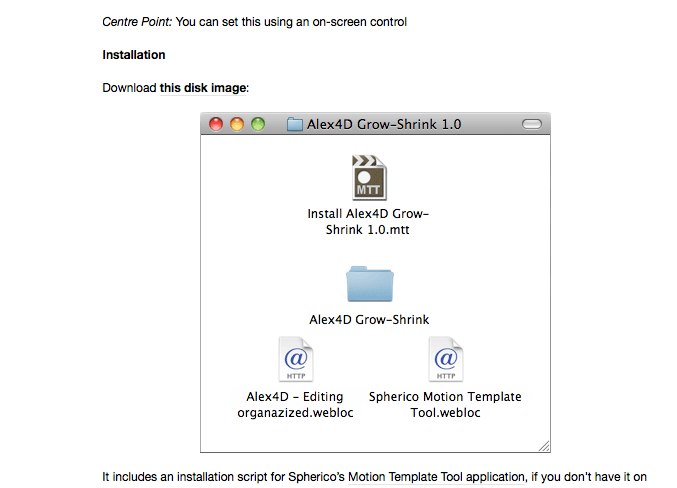
. I clicked on "this disk image" and got the gobbledygook.
Browser is Firefox 16.0.2
alex4d.wordpress.com/2012/09/06/alex-4d-grow-shrink-effect
Then I scrolled down that page until I came to "Download 'this disk image'" (see attached file)
. I clicked on "this disk image" and got the gobbledygook.
Browser is Firefox 16.0.2
Last edit: 11 Nov 2012 20:32 by windsong.
Please Log in to join the conversation.
11 Nov 2012 20:39 - 11 Nov 2012 20:43 #17068
by BenB
Replied by BenB on topic Alex4D Grow-Shrink: Change scale over the lifetime of a clip
You've got something messed up in Firefox's settings, then. I'm using the same version and I get this.
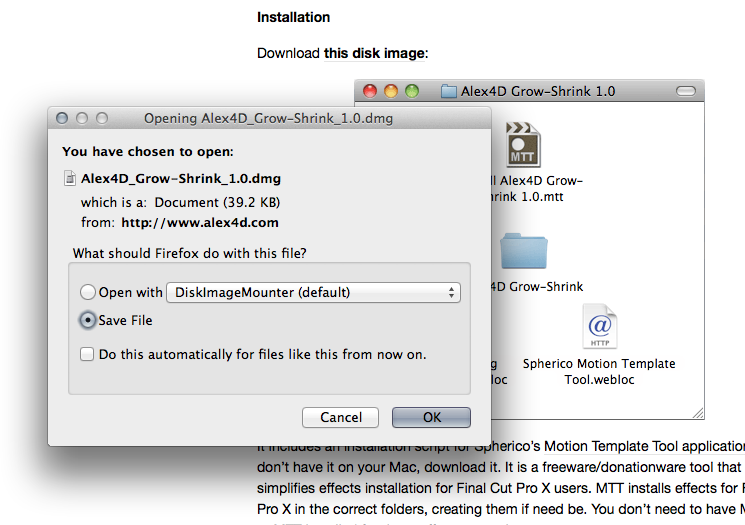
Quick fix, right-click the link.
From the pop-up menu chose "Save Link As.."
You some how have Firefox "opening" that file.
Quick fix, right-click the link.
From the pop-up menu chose "Save Link As.."
You some how have Firefox "opening" that file.
Last edit: 11 Nov 2012 20:43 by BenB.
Please Log in to join the conversation.
11 Nov 2012 22:17 #17074
by windsong
Replied by windsong on topic Alex4D Grow-Shrink: Change scale over the lifetime of a clip
Thank you very much. That worked. I might end up switching to Chrome. I loved Firefox for years but recently it's been giving me problems.
Please Log in to join the conversation.
12 Nov 2012 00:15 #17078
by BenB
Replied by BenB on topic Alex4D Grow-Shrink: Change scale over the lifetime of a clip
Really? I'm finding the latest few versions of Firefox to be amazingly trouble free. May want to review what's set up in your preferences. Could be some thing else, too.
Please Log in to join the conversation.

13 Nov 2012 15:31 #17130
by dgwvideo
Creating history....one edit at a time !
Replied by dgwvideo on topic Alex4D Grow-Shrink: Change scale over the lifetime of a clip
I guess a lot of you don't like it, but I have only used Safari since 2004 and have no problems with it. It seems to load most everything from any page I connect to.
Creating history....one edit at a time !
Please Log in to join the conversation.
