


- Posts: 350
- Thank you received: 337
3 Post Moderation Rule for New Boarders (25 Jan 2021)
New boarders will have their posts moderated - Don't worry if you cannot see your post immediately.
Only start a new post here if you are uploading a free plugin or direct linking to a plugin or the page that the plugin can be downloaded from.
All other new posts will be deleted.
All other new posts will be deleted.
Free FCP X Effect - TKY Cut and Shut
- Simon Ubsdell
-
 Topic Author
- Offline
- Platinum Member
-

Less
More
23 Jul 2012 20:15 - 23 Jul 2012 20:58 #11953
by Simon Ubsdell
Free FCP X Effect - TKY Cut and Shut was created by Simon Ubsdell
Almost certainly not as snazzy as what Ben B. has promised, but here's an interpretation of the Split and Colorize effect that was quite a popular subject last week.
You can choose the angle of the cut, from horizontal or vertical to two types of angled cut. Sliders control the amount of separation of the cut and can of course be animated. And the center of the split can be offset as desired either horizontally or vertically.
There's a drop zone for the center panel and various filters including a colorize and directional blur for the border (as well as a negative option) and saturation and contrast controls for the center panel, plus Blend mode control.
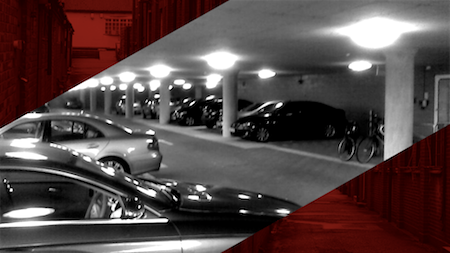
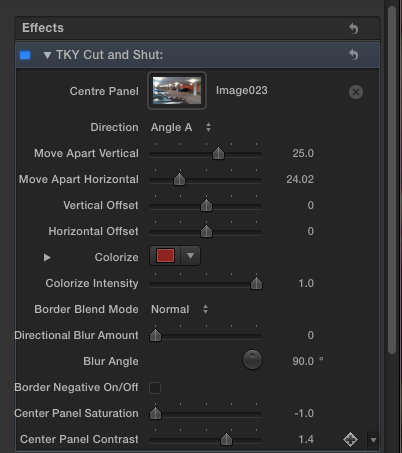
You can choose the angle of the cut, from horizontal or vertical to two types of angled cut. Sliders control the amount of separation of the cut and can of course be animated. And the center of the split can be offset as desired either horizontally or vertically.
There's a drop zone for the center panel and various filters including a colorize and directional blur for the border (as well as a negative option) and saturation and contrast controls for the center panel, plus Blend mode control.
Last edit: 23 Jul 2012 20:58 by Simon Ubsdell.
Please Log in to join the conversation.
- TrixTrax9000
-
- Offline
- Platinum Member
-
Less
More
- Posts: 1213
- Thank you received: 142
24 Jul 2012 00:42 #11962
by TrixTrax9000
Replied by TrixTrax9000 on topic Re: Free FCP X Effect - TKY Cut and Shut
Looks great, can't wait to try it.
Thanks Simon.
Thanks Simon.
Please Log in to join the conversation.

24 Jul 2012 16:39 #11985
by BenB
Replied by BenB on topic Re: Free FCP X Effect - TKY Cut and Shut
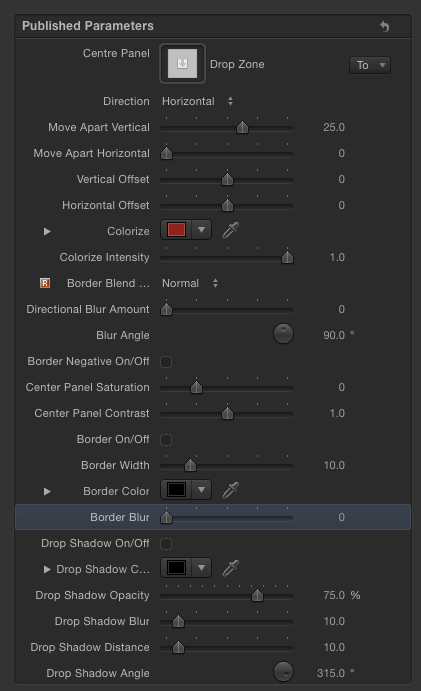
That's pretty much it. I'd only add a drop shadow, and a solid line boarder with blur adjustment and color adjustment. But that's about it.
Please Log in to join the conversation.
- Simon Ubsdell
-
Topic Author
- Offline
- Platinum Member
-
Less
More
- Posts: 350
- Thank you received: 337
24 Jul 2012 18:16 #11989
by Simon Ubsdell
Replied by Simon Ubsdell on topic Re: Free FCP X Effect - TKY Cut and Shut 1.0.1
And now with Border and Drop Shadow controls:
Please Log in to join the conversation.
24 Jul 2012 18:31 #11990
by BenB
Replied by BenB on topic Re: Free FCP X Effect - TKY Cut and Shut
Rock on!
Please Log in to join the conversation.

25 Jul 2012 10:38 #12043
by labalbi
Replied by labalbi on topic Re: Free FCP X Effect - TKY Cut and Shut
Thanks again...this one is a .iso . How do I install it ? Thanks
Please Log in to join the conversation.
- Simon Ubsdell
-
Topic Author
- Offline
- Platinum Member
-
Less
More
- Posts: 350
- Thank you received: 337
25 Jul 2012 10:44 #12044
by Simon Ubsdell
Replied by Simon Ubsdell on topic Re: Free FCP X Effect - TKY Cut and Shut
Double click to open and then either use the enlosed MTT (Motion Template Tool) installer (highly recommended that you get into the habit of using this!) or drag the "TKY Cut and Shut 1.0.1" folder to your Motion Templates/Effects folder in the usual way.
See the installation FAQ here for more details:
fcp.co/forum/7-fcpx-how-to-tutorials/232...nstall-fcpx-plug-ins
See the installation FAQ here for more details:
fcp.co/forum/7-fcpx-how-to-tutorials/232...nstall-fcpx-plug-ins
Please Log in to join the conversation.
- peteramwiggins
-

- Offline
- Administrator
-

- The Administrator :)
Less
More
- Posts: 1049
- Thank you received: 404
25 Jul 2012 10:46 #12045
by peteramwiggins
Administrator
Replied by peteramwiggins on topic Re: Free FCP X Effect - TKY Cut and Shut
Do we know if this will be trickier in Mountain Lion without a developers certificate?
Administrator
Please Log in to join the conversation.
25 Jul 2012 12:11 - 25 Jul 2012 12:56 #12049
by BenB
Replied by BenB on topic Re: Free FCP X Effect - TKY Cut and Shut
That only effects App Store apps. Even so, you will be given an option when the sandbox is not happy, allowing you to bypass it. It's not anything locked in.
Although it would be nice to see that template installer to be polished up and submitted to the App store. I'd pay $10 for it (or whatever one thinks it's worth).
Although it would be nice to see that template installer to be polished up and submitted to the App store. I'd pay $10 for it (or whatever one thinks it's worth).
Last edit: 25 Jul 2012 12:56 by BenB.
Please Log in to join the conversation.
25 Jul 2012 17:55 #12089
by labalbi
Replied by labalbi on topic Re: Free FCP X Effect - TKY Cut and Shut
when I unzip it , it creates a .iso file . Nothing more. not a file . Unlike all your others effects .
Could not install yet .
thanks for any input
Could not install yet .
thanks for any input
Please Log in to join the conversation.
- Simon Ubsdell
-
Topic Author
- Offline
- Platinum Member
-
Less
More
- Posts: 350
- Thank you received: 337
25 Jul 2012 18:05 - 25 Jul 2012 18:05 #12090
by Simon Ubsdell
Replied by Simon Ubsdell on topic Re: Free FCP X Effect - TKY Cut and Shut
You need to double click the zip to unzip it, which is what you have done, but you also need to double-click the iso to open up the disk image and then you will see everything you need to see.
Last edit: 25 Jul 2012 18:05 by Simon Ubsdell.
Please Log in to join the conversation.
