


- Posts: 239
- Thank you received: 20
3 Post Moderation Rule for New Boarders (25 Jan 2021)
New boarders will have their posts moderated - Don't worry if you cannot see your post immediately.
RG Mojo in FCPX and Motion5
- Lee Patterson
-
 Topic Author
- Offline
- Elite Member
-

Less
More
19 Aug 2011 19:12 #915
by Lee Patterson
RG Mojo in FCPX and Motion5 was created by Lee Patterson
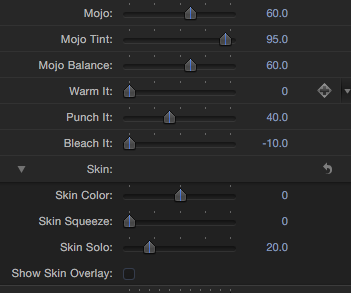
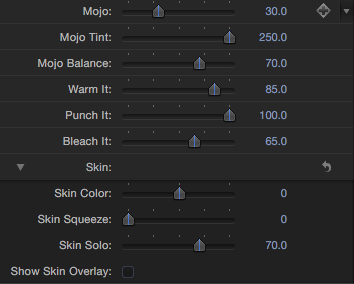
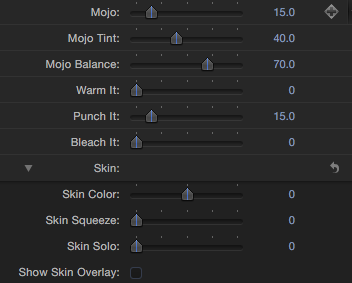
Hi, upgraded my Mojo this morning and saw the presets are gone. To get round it I opened up in FCP7 and applied them one by one and took screen grabs of the settings.
Open Mojo in Motion 5, update the defaults via the inspector >Save as>rename and create a new folder for them all to live in. When done navigate down (in the finder) to the effects folders and shove them all into the 'locked' Mojo folder. Voila:)
Hope this helps someone
Cheers
Lee
Open Mojo in Motion 5, update the defaults via the inspector >Save as>rename and create a new folder for them all to live in. When done navigate down (in the finder) to the effects folders and shove them all into the 'locked' Mojo folder. Voila:)
Hope this helps someone
Cheers
Lee
Please Log in to join the conversation.

20 Aug 2011 20:31 #919
by izash
Replied by izash on topic Re: RG Mojo in FCPX and Motion5
Hi Lee,
I've just bought Mojo for FCPX and was disappointed not to find the presets.
I know you've put in some work into it, but would you be so kind as to post those converted presets?
I don't own FPC7, so I can't do it myself.
Izhar
I've just bought Mojo for FCPX and was disappointed not to find the presets.
I know you've put in some work into it, but would you be so kind as to post those converted presets?
I don't own FPC7, so I can't do it myself.
Izhar
Lee Patterson wrote: Hi, upgraded my Mojo this morning and saw the presets are gone. To get round it I opened up in FCP7 and applied them one by one and took screen grabs of the settings.
Open Mojo in Motion 5, update the defaults via the inspector >Save as>rename and create a new folder for them all to live in. When done navigate down (in the finder) to the effects folders and shove them all into the 'locked' Mojo folder. Voila:)
Hope this helps someone
Cheers
Lee
Please Log in to join the conversation.
- Lee Patterson
-
Topic Author
- Offline
- Elite Member
-
Less
More
- Posts: 239
- Thank you received: 20
20 Aug 2011 21:41 #922
by Lee Patterson
Replied by Lee Patterson on topic Re: RG Mojo in FCPX and Motion5
Don't know if I'd be allowed to do that, but I can post up the screen grabs later. It only takes 5 minutes to rebuild Stu m's preset settings. Cheers:)
Lee
Lee
Please Log in to join the conversation.
21 Aug 2011 00:32 #925
by izash
Replied by izash on topic Re: RG Mojo in FCPX and Motion5
Hi Lee,
Please post up the screen grabs and some instructions on how to create the presets.
I'm fluent with FCPX but have virtually no experience with Motion.
Thank you!
Izhar
Please post up the screen grabs and some instructions on how to create the presets.
I'm fluent with FCPX but have virtually no experience with Motion.
Thank you!
Izhar
Lee Patterson wrote: Don't know if I'd be allowed to do that, but I can post up the screen grabs later. It only takes 5 minutes to rebuild Stu m's preset settings. Cheers:)
Lee
Please Log in to join the conversation.
- Lee Patterson
-
Topic Author
- Offline
- Elite Member
-
Less
More
- Posts: 239
- Thank you received: 20
21 Aug 2011 04:20 #927
by Lee Patterson
Replied by Lee Patterson on topic Re: RG Mojo in FCPX and Motion5
here are the screen grabs. The changes are made in the inspector within Motion, then hit save as, then yadda yadda:)
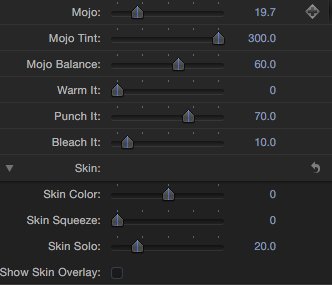
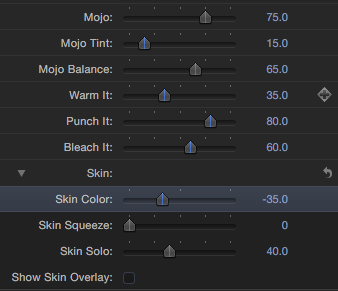
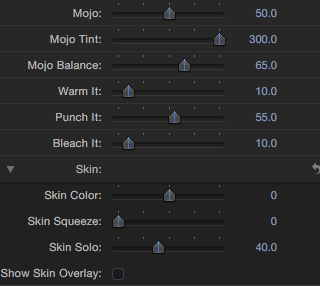
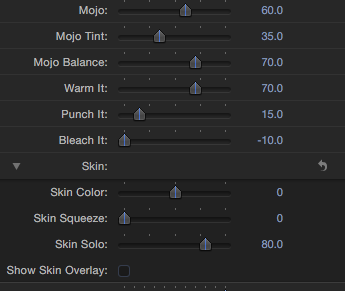
Please Log in to join the conversation.
21 Aug 2011 17:18 #928
by izash
Replied by izash on topic Re: RG Mojo in FCPX and Motion5
Thank you Lee!
I'll let you know how it goes.
Izhar
I'll let you know how it goes.
Izhar
Please Log in to join the conversation.
- CBlakeston
-
- Offline
- Elite Member
-
Less
More
- Posts: 175
- Thank you received: 5
22 Aug 2011 13:51 #947
by CBlakeston
Can you go into a little more detail about how to access the 'locked' folder? I wondered myself where Mojo put the files because it doesn't appear to install anything in the movies/motion templates/effects folder - i'm guessing it's a hidden folder or something?
Thanks for all your great work btw
Replied by CBlakeston on topic Re: RG Mojo in FCPX and Motion5
Lee Patterson wrote: When done navigate down (in the finder) to the effects folders and shove them all into the 'locked' Mojo folder.
Can you go into a little more detail about how to access the 'locked' folder? I wondered myself where Mojo put the files because it doesn't appear to install anything in the movies/motion templates/effects folder - i'm guessing it's a hidden folder or something?
Thanks for all your great work btw
Please Log in to join the conversation.
- Lee Patterson
-
Topic Author
- Offline
- Elite Member
-
Less
More
- Posts: 239
- Thank you received: 20
22 Aug 2011 20:10 #954
by Lee Patterson
Replied by Lee Patterson on topic Re: RG Mojo in FCPX and Motion5
Hi, once in motion 5, open the Magic Bullet Mojo from the Project Browser>Navigate to the Inspector, make the changes>then, File>Save as>Give the template a name that makes sense, in the Category field create a new one called 'my mojo' or something else sensible>then hit Publish.
Once you have done them all in this way (saving them all into the new Category folder you created),>quit Motion 5 and in the Finder go to Motion Templates>Effects>open the Category folder you created and simply drag the folders inside that new category folder, into the Main Magic Bullet Mojo folder. You can do a simple drag and drop within the finder but from within Motion itself the folder is flagged as locked.
Thats about it:)
Tara
Once you have done them all in this way (saving them all into the new Category folder you created),>quit Motion 5 and in the Finder go to Motion Templates>Effects>open the Category folder you created and simply drag the folders inside that new category folder, into the Main Magic Bullet Mojo folder. You can do a simple drag and drop within the finder but from within Motion itself the folder is flagged as locked.
Thats about it:)
Tara
Please Log in to join the conversation.
