


- Posts: 139
- Thank you received: 24
3 Post Moderation Rule for New Boarders (25 Jan 2021)
New boarders will have their posts moderated - Don't worry if you cannot see your post immediately.
Move Forwards or Backwards Exactly 1 Second [+EDIT ACCURATELY IN FCP]
- benhalsall
-
 Topic Author
- Offline
- Premium Member
-

Less
More


23 Mar 2022 08:45 #119592
by Stu Wart
Replied by Stu Wart on topic Move Forwards or Backwards Exactly 1 Second [+EDIT ACCURATELY IN FCP]
shift = is nice for moving , does the same than : ctrl P
fot the trim you don't need it ! select and + or - (and figures) 3:00 etc directly
fot the trim you don't need it ! select and + or - (and figures) 3:00 etc directly
Please Log in to join the conversation.
- benhalsall
-
Topic Author
- Offline
- Premium Member
-
Less
More
- Posts: 139
- Thank you received: 24
23 Mar 2022 17:05 #119605
by benhalsall
Replied by benhalsall on topic Move Forwards or Backwards Exactly 1 Second [+EDIT ACCURATELY IN FCP]
Indeed I was corrected by someone else too! I'd been tapping SHIFT all these years out of habit (maybe because SHIFT & = is +)!!
There are occasions I kick out a video that in the end teaches me something! 🤷🏼♂️
There are occasions I kick out a video that in the end teaches me something! 🤷🏼♂️
Please Log in to join the conversation.


24 Mar 2022 00:07 #119612
by VTC
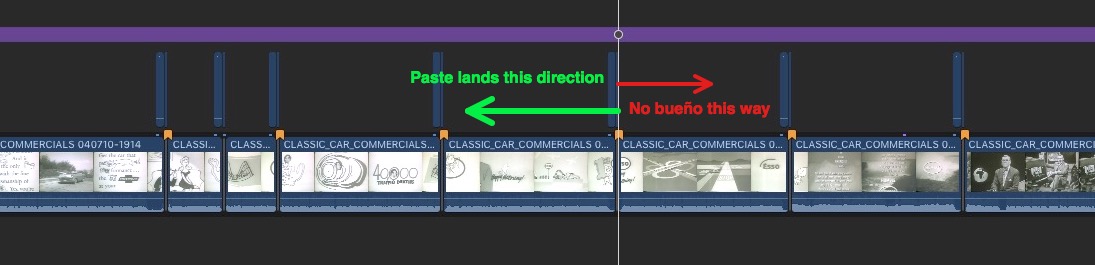
How 'bout learning me this... Any way to paste something BEHIND the playhead? Back paste is what I'd call it and I do it tons. The way I'm forced to do it now is to paste the clip at playhead then group select this repeated graphic and march them all backwards at the same time as a group. As the clip is but four frames it's easy to loose track of them zoomed out and a back paste would eliminate the hassle and occasional misses.
Replied by VTC on topic Move Forwards or Backwards Exactly 1 Second [+EDIT ACCURATELY IN FCP]
There are occasions I kick out a video that in the end teaches me something! 🤷🏼♂️
How 'bout learning me this... Any way to paste something BEHIND the playhead? Back paste is what I'd call it and I do it tons. The way I'm forced to do it now is to paste the clip at playhead then group select this repeated graphic and march them all backwards at the same time as a group. As the clip is but four frames it's easy to loose track of them zoomed out and a back paste would eliminate the hassle and occasional misses.
Please Log in to join the conversation.

24 Mar 2022 04:15 - 24 Mar 2022 04:36 #119614
by anickt
Off the top of my head it might be shift Q (not near a system to check). You can do almost anything you want through keyboard commands. Use the Command Editor if something is not a default keyboard command.
Old video but gets the concept across:
Also:
support.apple.com/guide/final-cut-pro/in...tor-ver8a33d500d/mac
Replied by anickt on topic Move Forwards or Backwards Exactly 1 Second [+EDIT ACCURATELY IN FCP]
There are occasions I kick out a video that in the end teaches me something! 🤷🏼♂️
How 'bout learning me this... Any way to paste something BEHIND the playhead? Back paste is what I'd call it and I do it tons. The way I'm forced to do it now is to paste the clip at playhead then group select this repeated graphic and march them all backwards at the same time as a group. As the clip is but four frames it's easy to loose track of them zoomed out and a back paste would eliminate the hassle and occasional misses.
Off the top of my head it might be shift Q (not near a system to check). You can do almost anything you want through keyboard commands. Use the Command Editor if something is not a default keyboard command.
Old video but gets the concept across:
Also:
support.apple.com/guide/final-cut-pro/in...tor-ver8a33d500d/mac
Last edit: 24 Mar 2022 04:36 by anickt.
Please Log in to join the conversation.
24 Mar 2022 14:20 #119619
by VTC
Replied by VTC on topic Move Forwards or Backwards Exactly 1 Second [+EDIT ACCURATELY IN FCP]
Being more illustrative here it's a kind of back pasting to the secondary storyline I'm trying to do. As it is now it's a pain to jump to marker/clip, paste, drag asset pasted to right of playhead so that its' tail is left of playhead. There's GOT to be a key command I'm missing out on here.
Please Log in to join the conversation.
