



- Posts: 4
- Thank you received: 0
3 Post Moderation Rule for New Boarders (25 Jan 2021)
New boarders will have their posts moderated - Don't worry if you cannot see your post immediately.
Key a foreground AND a background
19 Jan 2021 14:43 #112199
by plem
Key a foreground AND a background was created by plem
What I would like to do:
I have an image with a green screen. Now I want to change the greenscreen to something else, but also the image. And of cause Then I would like to play, fade, etc with the two element.
But unfortunately, I cannot get it to work.
Any ideas? Thanks, Peter.
I have an image with a green screen. Now I want to change the greenscreen to something else, but also the image. And of cause Then I would like to play, fade, etc with the two element.
But unfortunately, I cannot get it to work.
Any ideas? Thanks, Peter.
Please Log in to join the conversation.
- peteramwiggins
-

- Offline
- Administrator
-

- The Administrator :)
Less
More
- Posts: 1049
- Thank you received: 404
19 Jan 2021 18:01 #112200
by peteramwiggins
Administrator
Replied by peteramwiggins on topic Key a foreground AND a background
This is easy - just invert the key and you'll end up with a hole that you can fill with whatever you wish
Peter
Peter
Administrator
Please Log in to join the conversation.


19 Jan 2021 18:27 #112204
by JoeEditor
Replied by JoeEditor on topic Key a foreground AND a background
You could go hog wild, too.
Please Log in to join the conversation.
19 Jan 2021 18:50 #112205
by plem
Replied by plem on topic Key a foreground AND a background
Of cause that is part of the story. But now comes the problem that arises as you want to do this inverted keying together (!) with normal keying. So use the key mask twice, One for replacing the surrounding, one for replacing the mask it self. I cannot get that to work...
Please Log in to join the conversation.
- peteramwiggins
-
- Offline
- Administrator
-
- The Administrator :)
Less
More
- Posts: 1049
- Thank you received: 404
19 Jan 2021 19:43 #112207
by peteramwiggins
Administrator
Replied by peteramwiggins on topic Key a foreground AND a background
Duplicate the source - and sick on on top of the other. Maybe put then in compound clips to make life easier
Administrator
Please Log in to join the conversation.
21 Jan 2021 11:15 - 21 Jan 2021 11:24 #112233
by plem
Replied by plem on topic Key a foreground AND a background
Great! That worked! But...
Look at the screenshot. You'll notice that the image mask only takes the middle part of the desired image.
All scales are 100%. (Unless the 37% one I made smaller show the fit, but also the missing). What do I do wrong?
Thanks for the assistance!
Peter
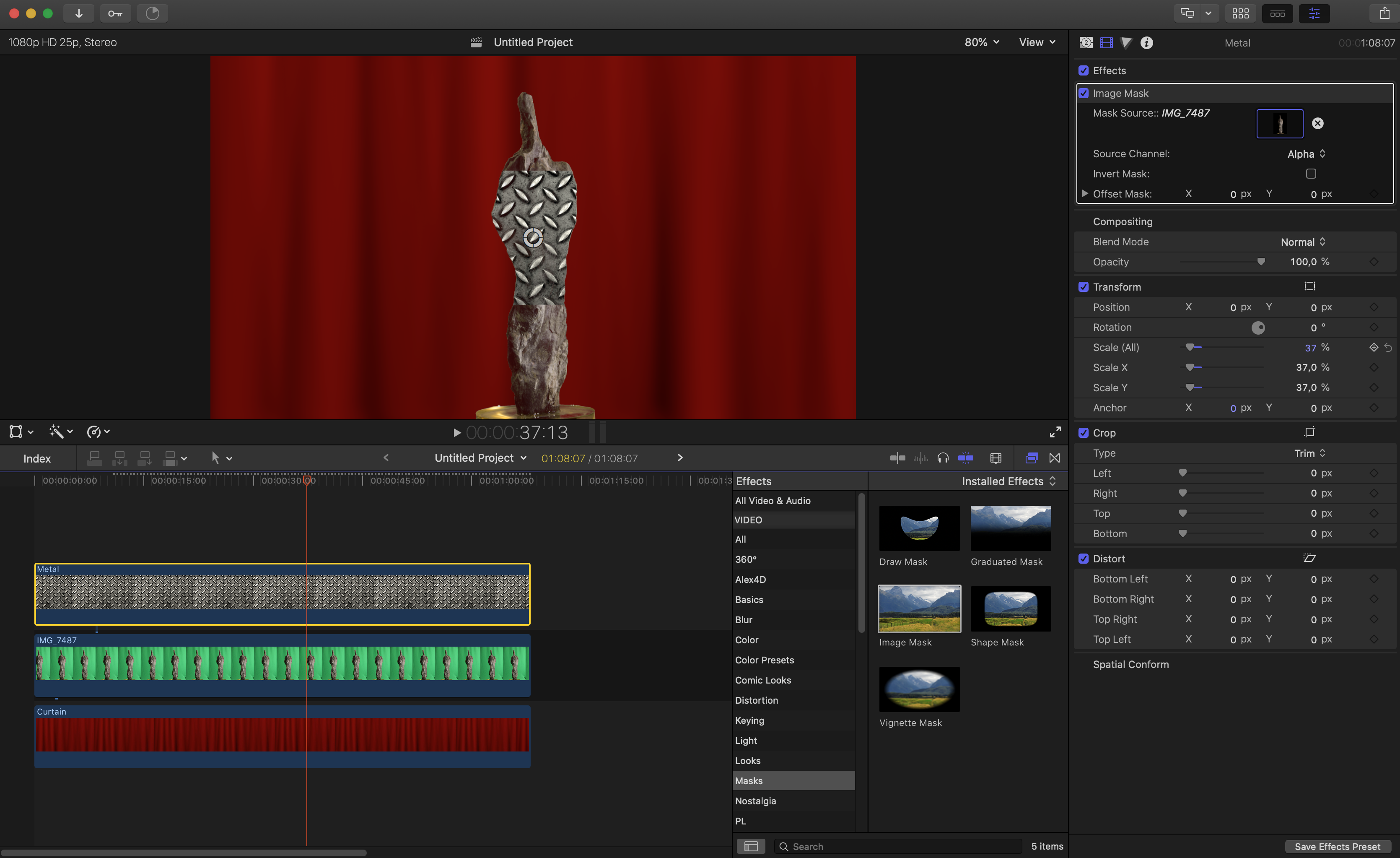
Look at the screenshot. You'll notice that the image mask only takes the middle part of the desired image.
All scales are 100%. (Unless the 37% one I made smaller show the fit, but also the missing). What do I do wrong?
Thanks for the assistance!
Peter
Last edit: 21 Jan 2021 11:24 by peteramwiggins.
Please Log in to join the conversation.
- peteramwiggins
-
- Offline
- Administrator
-
- The Administrator :)
Less
More
- Posts: 1049
- Thank you received: 404
21 Jan 2021 11:28 #112234
by peteramwiggins
Administrator
Replied by peteramwiggins on topic Key a foreground AND a background
Hard to tell from the grab, but I think you have an image size/scale mismatch
Administrator
Please Log in to join the conversation.
21 Jan 2021 14:02 - 21 Jan 2021 14:04 #112235
by JoeEditor
Replied by JoeEditor on topic Key a foreground AND a background
From zooming in on the Inspector, it shows the bottom of your image source missing. I'd have to see this with the top and bottom layers disabled. Something is off about your key.
To add to what Peter said, don't resize in the image mask. Simply place the green screen shot and Image Mask'ed layers into a compound clip, resize that.
I'd also disable the green screen shot once it's used as a source in the Image Mask.
To add to what Peter said, don't resize in the image mask. Simply place the green screen shot and Image Mask'ed layers into a compound clip, resize that.
I'd also disable the green screen shot once it's used as a source in the Image Mask.
Last edit: 21 Jan 2021 14:04 by JoeEditor.
Please Log in to join the conversation.
21 Jan 2021 14:58 #112240
by plem
Replied by plem on topic Key a foreground AND a background
Figured it out, indeed. I used the original image for the mask. But in the edit it was rotated 90 degrees. After turning it into a compoundclip and using that for the mask all is well.
Although... the right way for the choice of the image mask is still a mystery. How to choose what part of the clip you like to use? From the beginning? Or a freezeframe from somewhere else? All seems possible but I cannot find a nice overview for that.
But the good thing is: I’m in business again. Thanks.
peter
Although... the right way for the choice of the image mask is still a mystery. How to choose what part of the clip you like to use? From the beginning? Or a freezeframe from somewhere else? All seems possible but I cannot find a nice overview for that.
But the good thing is: I’m in business again. Thanks.
peter
Please Log in to join the conversation.
