


- Posts: 3790
- Thank you received: 718
3 Post Moderation Rule for New Boarders (25 Jan 2021)
New boarders will have their posts moderated - Don't worry if you cannot see your post immediately.
How to get a 'message' on your phone when export is done…
- Karsten Schlüter
-
 Topic Author
- Offline
- Moderator
-

Less
More
03 Jul 2018 13:11 - 03 Jul 2018 13:18 #96203
by Karsten Schlüter
For whatever reason, you are not in front of your Mac, but you need a message (technically: a mail), when FCPX is done with export.
Easy…
Launch from your Apps/Utilities folder AUTOMATOR
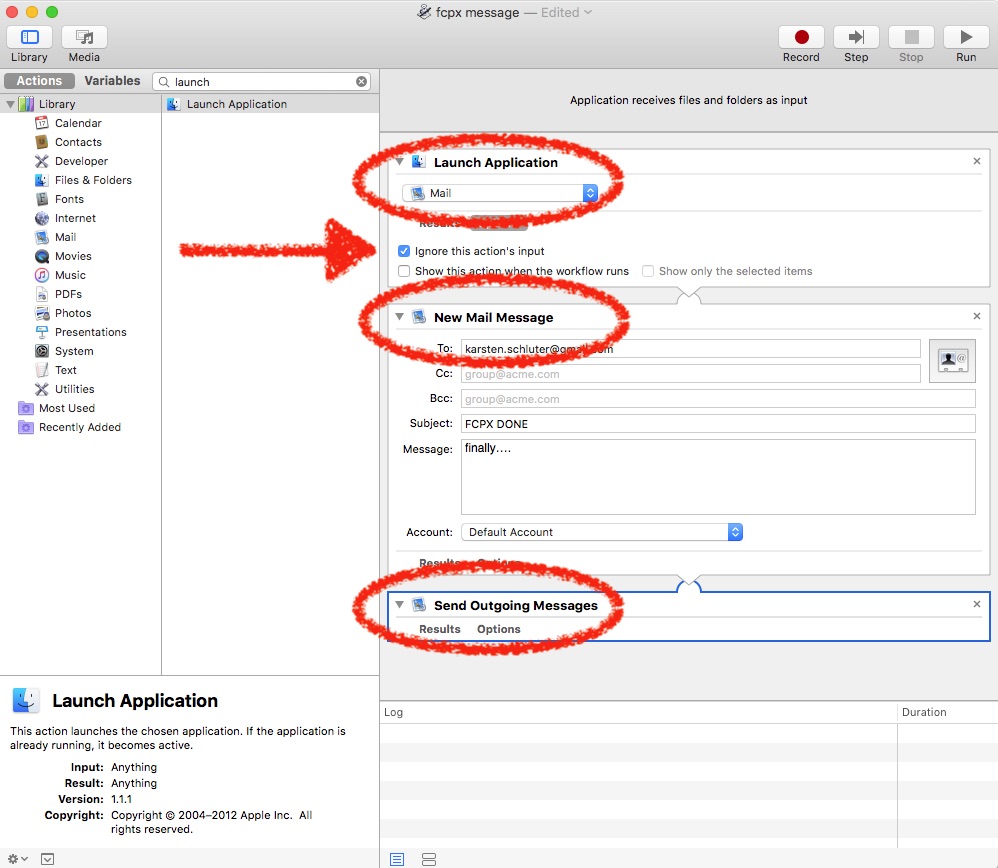
Choose 'New Application'
In the Search field, look for 'LAUNCH APPLIKATION
Drag that action into the script.
Select MAIL as app.
Check 'Ignore this actions input' (important! Otherwise, you sent your project.mov by mail!)
In the Search field, look for 'NEW MAIL MESSAGE'
Type in 'To' your mail-address (or wherever this message should go)
Type a Subject and Message (here: FCPX DONE)
In the Search field, look for 'SEND OUTGOING MESSAGE'
Drag that action into the script.
…save script as Application, e.g. onto your Desktop/'fcpx message '
Now, use this script:
In FCPX, Share your project
Select OPEN WITH and select your Automator Script from the Desktop…

… set the other parameters of your export, hit Save…
When FCPX is done with the export, for a second the Mail.app will flash up and send you instantly the 'done' message…

… done
Easy…
Launch from your Apps/Utilities folder AUTOMATOR
Choose 'New Application'
In the Search field, look for 'LAUNCH APPLIKATION
Drag that action into the script.
Select MAIL as app.
Check 'Ignore this actions input' (important! Otherwise, you sent your project.mov by mail!)
In the Search field, look for 'NEW MAIL MESSAGE'
Type in 'To' your mail-address (or wherever this message should go)
Type a Subject and Message (here: FCPX DONE)
In the Search field, look for 'SEND OUTGOING MESSAGE'
Drag that action into the script.
…save script as Application, e.g. onto your Desktop/'fcpx message '
Now, use this script:
In FCPX, Share your project
Select OPEN WITH and select your Automator Script from the Desktop…
… set the other parameters of your export, hit Save…
When FCPX is done with the export, for a second the Mail.app will flash up and send you instantly the 'done' message…
… done
Last edit: 03 Jul 2018 13:18 by Karsten Schlüter.
Please Log in to join the conversation.


03 Jul 2018 14:42 #96205
by thinkfilm
Replied by thinkfilm on topic How to get a 'message' on your phone when export is done…
Neat tip, Karsten. Thanks.
Please Log in to join the conversation.


11 Jul 2018 16:52 #96291
by degeneric
Replied by degeneric on topic How to get a 'message' on your phone when export is done…
Really cool. I often start multiple export job and go home, wait for the export to finish before I can upload it to an ftp from remote access to my work iMac.
On my test run, it gave me the "not from a trusted developper" message.
Just had to right click on the app and tell it to open it even if not from a trusted developper and then it's working.
On my test run, it gave me the "not from a trusted developper" message.
Just had to right click on the app and tell it to open it even if not from a trusted developper and then it's working.
Please Log in to join the conversation.
- Karsten Schlüter
-
Topic Author
- Offline
- Moderator
-
Less
More
- Posts: 3790
- Thank you received: 718
12 Jul 2018 03:20 #96295
by Karsten Schlüter
Impressive.
Automator(and 'Mail' in this script) is an Apple.app, delivered with any installation of macOS.
So, Apple doesn't trust Apple… ? Consider a from-the-ground-update. Or, perhaps, do you run Mojave_beta?
Replied by Karsten Schlüter on topic How to get a 'message' on your phone when export is done…
degeneric wrote: …On my test run, it gave me the "not from a trusted developper" message.….
Impressive.
Automator(and 'Mail' in this script) is an Apple.app, delivered with any installation of macOS.
So, Apple doesn't trust Apple… ? Consider a from-the-ground-update. Or, perhaps, do you run Mojave_beta?
Please Log in to join the conversation.
12 Jul 2018 14:21 - 12 Jul 2018 14:23 #96309
by degeneric
Replied by degeneric on topic How to get a 'message' on your phone when export is done…
Running HighSierra
It first gave me an error message about: something.something.icloud.something
Then after that it gave me the developper message.
Maybe it as something to do with the fact that is was the first time I used Automator since Lion and Automator is in my application folder and not in the utilities folder?
Anyway, It's working fine.
Thanks for the tip
It first gave me an error message about: something.something.icloud.something
Then after that it gave me the developper message.
Maybe it as something to do with the fact that is was the first time I used Automator since Lion and Automator is in my application folder and not in the utilities folder?
Anyway, It's working fine.
Thanks for the tip
Last edit: 12 Jul 2018 14:23 by degeneric.
Please Log in to join the conversation.

04 May 2021 15:06 #114312
by kabas
Replied by kabas on topic How to get a 'message' on your phone when export is done…
I did this account just for thank you.
By the way, I can't do that script with any compressor presets, because there is no field "open with" then I can't select that script on fcpx settings, only the built in "master file" fcpx preset has that option, anyway its helpful. thanks again!
By the way, I can't do that script with any compressor presets, because there is no field "open with" then I can't select that script on fcpx settings, only the built in "master file" fcpx preset has that option, anyway its helpful. thanks again!
Please Log in to join the conversation.
- Tom Wolsky
-

- Offline
- Moderator
-
04 May 2021 15:53 #114313
by Tom Wolsky
Replied by Tom Wolsky on topic How to get a 'message' on your phone when export is done…
Compressor has that function at the bottom of the job inspector. It has to be included in the preset.
Please Log in to join the conversation.


04 May 2021 22:30 #114316
by JoeEditor
Replied by JoeEditor on topic How to get a 'message' on your phone when export is done…
Then you can use that custom Preset created in Compressor to create a custom Destination in FCP.
Please Log in to join the conversation.
