


- Posts: 2
- Thank you received: 0
3 Post Moderation Rule for New Boarders (25 Jan 2021)
New boarders will have their posts moderated - Don't worry if you cannot see your post immediately.
Need help! What is this effect?
- Genkiboi8o8
-
 Topic Author
- Offline
- New Member
-

Less
More
08 May 2016 01:22 #76480
by Genkiboi8o8
Need help! What is this effect? was created by Genkiboi8o8
Hey guys, just joined the forums to learn more about editing on FCPX... but i'm dying to know how and what this effect is called...
If you view the video, I'm referring to the text effects at about 0:58ish. I want to be able to do that in my videos (I mainly do automotive), but I have no idea what its called so I can't even search for it.
Please help me out if you can, I would love to learn how.
If you view the video, I'm referring to the text effects at about 0:58ish. I want to be able to do that in my videos (I mainly do automotive), but I have no idea what its called so I can't even search for it.
Please help me out if you can, I would love to learn how.
Please Log in to join the conversation.
- venkarnafel
-
- Offline
- New Member
-
Less
More
- Posts: 10
- Thank you received: 1
11 May 2016 07:48 #76553
by venkarnafel
Replied by venkarnafel on topic Need help! What is this effect?
I don't know what it is but it mite be that the guys made it him self.
Ask the person that posted that video
Ask the person that posted that video
Please Log in to join the conversation.
- MarkNelsonMovies
-
- Offline
- Elite Member
-

Less
More
- Posts: 256
- Thank you received: 48
11 May 2016 19:33 #76600
by MarkNelsonMovies
Replied by MarkNelsonMovies on topic Need help! What is this effect?
I don't know if there is a name for it, but it's simply stylized text tracked into the video with some graphics an lines added for looks. Unless you want to manually keyframe everything, You would need Motion 5, or a third party plugin to do the same in FCPX.
Please Log in to join the conversation.

11 May 2016 21:33 #76607
by BenB
Replied by BenB on topic Need help! What is this effect?
Yep, build it in Motion yourself, or start teaching. Check MotionVFX.com because I think they have some templates similar to this.
Please Log in to join the conversation.
- Karsten Schlüter
-

- Offline
- Moderator
-

Less
More
- Posts: 3790
- Thank you received: 718
12 May 2016 04:58 - 12 May 2016 05:00 #76613
by Karsten Schlüter
Replied by Karsten Schlüter on topic Need help! What is this effect?
... that could be done with a layered -psd file and a simple wipe, look:
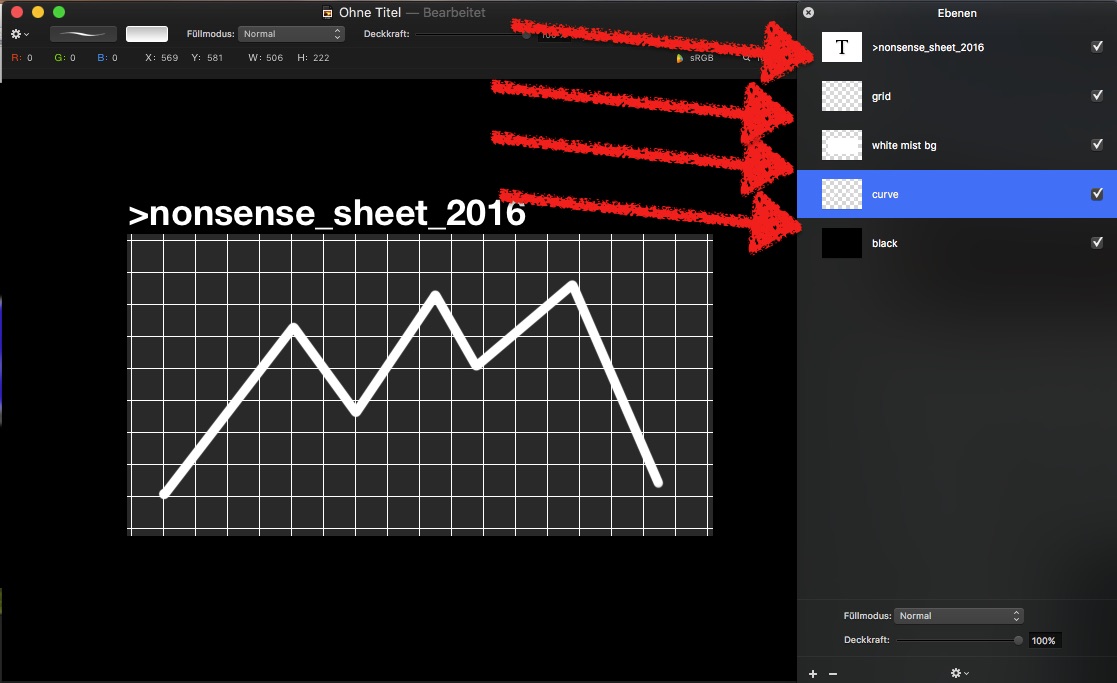
that's Pixelmator, a 29$ paint.app you need anyhow :lol:
I made me that chart:
down low a black background I need only to make the rest better visible in this demo
then, there is a grid, a line of text, a curve
Trick #1
save that in psd=Photoshop format => keeps the layers!
apply to your project:
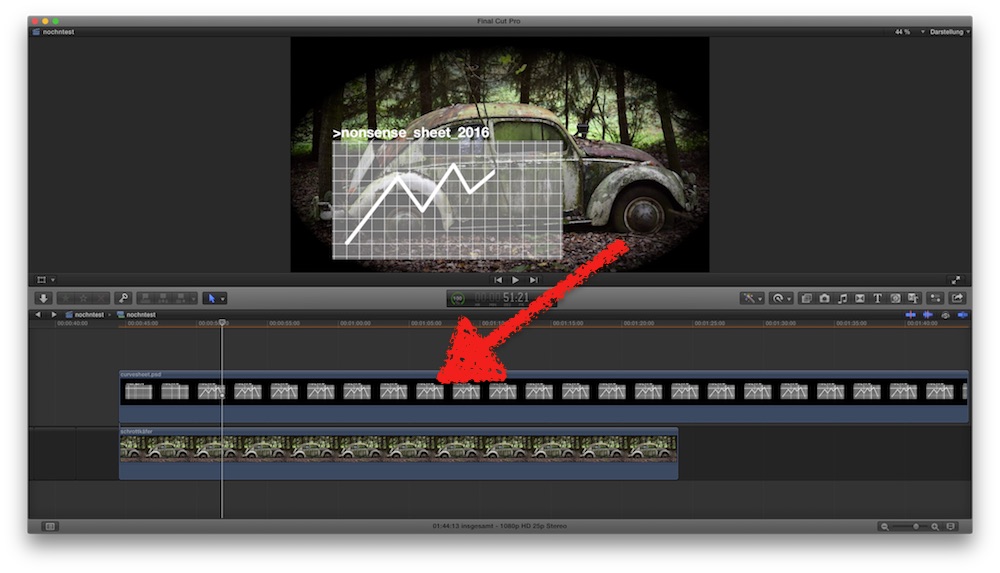
now, double click the chart.psd in your Project/open in timeline:
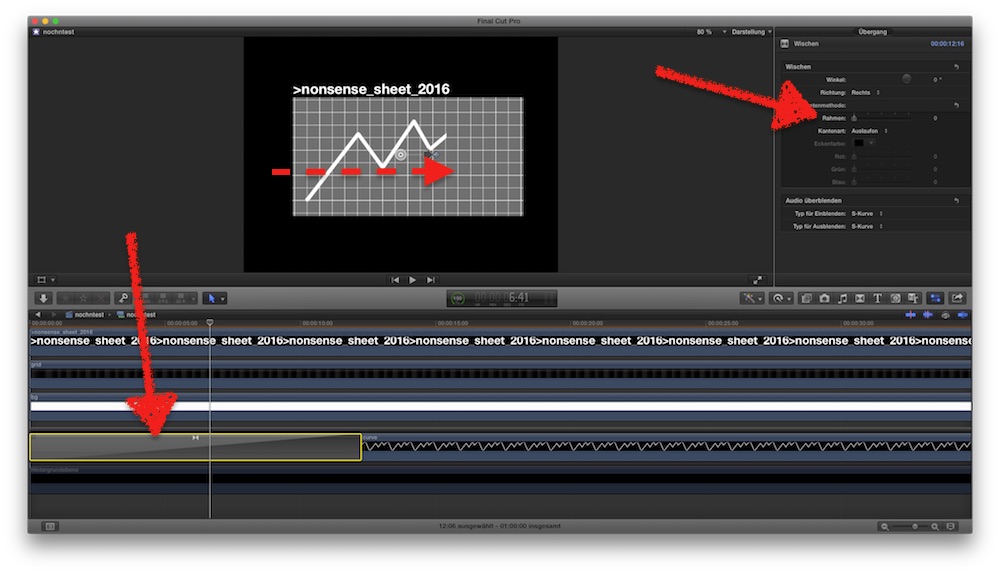
here we see the layers!
I switch-off the black bg (hit V) aaand ..
Trick #2
add a WIPE dissolve to the curve-layer, from left to right, hard border
I can do here other things, animate each layer or adjust opacity of that white rectangle or ....
back in the project, the curve builts up!
keyframe the position of that clip to make it move right to left ....
that's Pixelmator, a 29$ paint.app you need anyhow :lol:
I made me that chart:
down low a black background I need only to make the rest better visible in this demo
then, there is a grid, a line of text, a curve
Trick #1
save that in psd=Photoshop format => keeps the layers!
apply to your project:
now, double click the chart.psd in your Project/open in timeline:
here we see the layers!
I switch-off the black bg (hit V) aaand ..
Trick #2
add a WIPE dissolve to the curve-layer, from left to right, hard border
I can do here other things, animate each layer or adjust opacity of that white rectangle or ....
back in the project, the curve builts up!
keyframe the position of that clip to make it move right to left ....
Last edit: 12 May 2016 05:00 by Karsten Schlüter.
Please Log in to join the conversation.
