


- Posts: 25
- Thank you received: 0
3 Post Moderation Rule for New Boarders (25 Jan 2021)
New boarders will have their posts moderated - Don't worry if you cannot see your post immediately.
How to Export HD Timeline to an SD File
14 Nov 2014 17:08 #56050
by expander
How to Export HD Timeline to an SD File was created by expander
I'm working with a tv network. They use Premiere in their workflow (i've had been using it)
But i just feel more comfortable in FCPX.
So in premiere i have an HD Timeline, when i'm ready to export i just adjust the settings to DV NTSC, and then Premiere gives me an option to Scale the video in order to fill all the frame with the video. So the final file doesn't get black spaces. I really don't know how to do this FCPX. My first thoughts was to create a setting with Compressor to achieve this, but still, i need a little bit of help creating it.
Meanwhile my workaround is to create a project with the SD resolution (720x480) and then with the transform option i scaled the HD clips. But that slow me down a bit.
Hope some of you can help me with this!
Greetings from México
But i just feel more comfortable in FCPX.
So in premiere i have an HD Timeline, when i'm ready to export i just adjust the settings to DV NTSC, and then Premiere gives me an option to Scale the video in order to fill all the frame with the video. So the final file doesn't get black spaces. I really don't know how to do this FCPX. My first thoughts was to create a setting with Compressor to achieve this, but still, i need a little bit of help creating it.
Meanwhile my workaround is to create a project with the SD resolution (720x480) and then with the transform option i scaled the HD clips. But that slow me down a bit.
Hope some of you can help me with this!
Greetings from México
Please Log in to join the conversation.

15 Nov 2014 03:49 #56066
by BenB
Replied by BenB on topic How to Export HD Timeline to an SD File
A Compressor preset would be quick and easy.
Please Log in to join the conversation.
- desilva_oz
-

- Offline
- Senior Member
-

Less
More
- Posts: 78
- Thank you received: 6
26 Feb 2015 13:34 #60527
by desilva_oz
Replied by desilva_oz on topic How to Export HD Timeline to an SD File
Any ideas on this BB? I have 25 ads to push out to PAL DV Wide, but get the black bars on the left / right..
Please Log in to join the conversation.
- desilva_oz
-
- Offline
- Senior Member
-
Less
More
- Posts: 78
- Thank you received: 6
26 Feb 2015 13:35 #60528
by desilva_oz
Replied by desilva_oz on topic How to Export HD Timeline to an SD File
Did you find a solution via compressor preset.? I have the exact same scenario.. And broad cast want MOV not MP4..
Please Log in to join the conversation.
05 Mar 2015 00:26 #60863
by expander
Replied by expander on topic How to Export HD Timeline to an SD File
Sorry for the late response.
Yes desilva_oz. I have to made a preset in Compressor in order to do it. Take a loot at this screenshoot. Just create a new preset in Compressor using the same specs and you are ready to go.
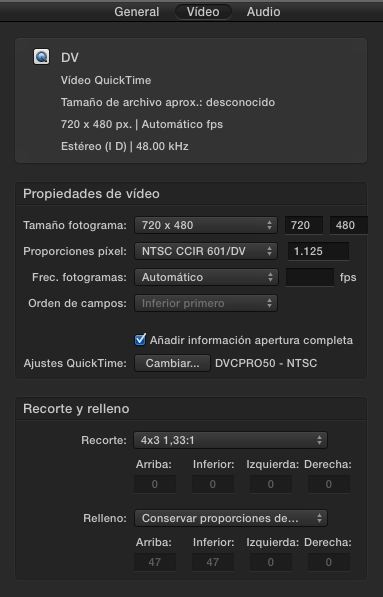
Yes desilva_oz. I have to made a preset in Compressor in order to do it. Take a loot at this screenshoot. Just create a new preset in Compressor using the same specs and you are ready to go.
Please Log in to join the conversation.
05 Mar 2015 12:49 - 05 Mar 2015 12:50 #60891
by BenB
Replied by BenB on topic How to Export HD Timeline to an SD File
You do know you can share presets between users, right?
They are stored in:
[User Folder] > Library > Application Support > Compressor > Settings
Right-click one, "Compress" it to create a .zip file, email it or post it online for download.
Just FYI. Easier than re-building things from scratch.
They are stored in:
[User Folder] > Library > Application Support > Compressor > Settings
Right-click one, "Compress" it to create a .zip file, email it or post it online for download.
Just FYI. Easier than re-building things from scratch.
Last edit: 05 Mar 2015 12:50 by BenB.
Please Log in to join the conversation.
