


- Posts: 164
- Thank you received: 0
3 Post Moderation Rule for New Boarders (25 Jan 2021)
New boarders will have their posts moderated - Don't worry if you cannot see your post immediately.
Slow motion
08 Mar 2014 20:08 #42298
by Neil P
Slow motion was created by Neil P
Hi gang
I shot some basketball set ups today at 60 fps so that I can get some decent slow motion footage (in FCPX). Can anybody point me in the direction of any good tutorials/tips/instructions on achieving this.
Any help is gratefully reveived
Neil
I shot some basketball set ups today at 60 fps so that I can get some decent slow motion footage (in FCPX). Can anybody point me in the direction of any good tutorials/tips/instructions on achieving this.
Any help is gratefully reveived
Neil
Please Log in to join the conversation.

18 Mar 2014 19:52 - 18 Mar 2014 19:55 #42933
by BenB
Replied by BenB on topic Slow motion
Here is what you need.
www.macprovideo.com/hub/final-cut/slow-m...nforming-frame-rates
The Conform Speed option has changed names, forget what it's called now, not at my edit bay.
www.macprovideo.com/hub/final-cut/slow-m...nforming-frame-rates
The Conform Speed option has changed names, forget what it's called now, not at my edit bay.
Last edit: 18 Mar 2014 19:55 by BenB.
Please Log in to join the conversation.

18 Mar 2014 20:12 #42936
by plysat
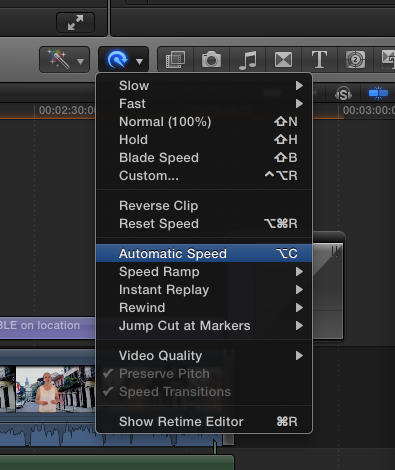
Automatic Speed
Can't sleep? Try this: fcpxpert.net ;-)
Replied by plysat on topic Slow motion
BenB wrote: Here is what you need.
www.macprovideo.com/hub/final-cut/slow-m...nforming-frame-rates
The Conform Speed option has changed names, forget what it's called now, not at my edit bay.
Automatic Speed
Can't sleep? Try this: fcpxpert.net ;-)
Please Log in to join the conversation.
18 Mar 2014 22:44 #42945
by BenB
Replied by BenB on topic Slow motion
Yes, thank you.
Please Log in to join the conversation.

03 Nov 2015 05:11 #70174
by jrie182
Replied by jrie182 on topic Slow motion
I have been problem editing slow motion clip and would like to seek pointers and advice.
I've recorded a 1080p 60fps video and tried to conform it into a 24p timeline for a smooth slow motion effect (40% of original speed).
The slow motion is smooth but it results in a blurry image.
Is it because of the slow shutter speed of the camera or because I missed something.
I am using a Xiaoyi Action Cam. Tried the 120fps mode also same result.
I tried using a Nikon 1 J1, in 720p 60fps recording mode, also same frustrating result. Motion blur in slow motion edit.
Kindly advice. Thank you.
I've recorded a 1080p 60fps video and tried to conform it into a 24p timeline for a smooth slow motion effect (40% of original speed).
The slow motion is smooth but it results in a blurry image.
Is it because of the slow shutter speed of the camera or because I missed something.
I am using a Xiaoyi Action Cam. Tried the 120fps mode also same result.
I tried using a Nikon 1 J1, in 720p 60fps recording mode, also same frustrating result. Motion blur in slow motion edit.
Kindly advice. Thank you.
Please Log in to join the conversation.
03 Nov 2015 13:56 #70190
by BenB
Replied by BenB on topic Slow motion
That probably means you had a slow shutter speed and got motion blur in the original frames. Just because you video something, doesn't mean it is automatically perfectly clear without motion blur. You may have recorded it blurry. Motion blur can be slight and not show up in normal speed playback, but show up in slow motion playback. Slow motion will make the imperfections of your video stand out a great deal.
If your playhead is parked, standing still, on a single frame, is it clear, or is there blur?
If your playhead is parked, standing still, on a single frame, is it clear, or is there blur?
Please Log in to join the conversation.

03 Nov 2015 15:12 #70191
by dgwvideo
Creating history....one edit at a time !
Replied by dgwvideo on topic Slow motion
I think Ben is trying to get at whether your timeline is set for "better performance" or "better quality". Check this setting in the drop down menu at the upper right of the viewer. Better performance will cause some blurring when the project is played back. If this isn't the issue - how does the footage look played back normally without slowing? A shutter speed of 1/60 or 1/120 should retain enough sharpness for most retimed video.
Creating history....one edit at a time !
Please Log in to join the conversation.
- Karsten Schlüter
-

- Offline
- Moderator
-

Less
More
- Posts: 3790
- Thank you received: 718
04 Nov 2015 03:50 #70199
by Karsten Schlüter
means indoor, means low light conditions, means long shutter speeds, means 'natural' blur
export and post a single frame here .....
btw: you have exported your Project to judge final delivery pic quality?
when using short shutter speeds, 1/1000th and up, FCPX delivers superb slowmo, can not stop to share my one-thousand-fps (!!!) example :silly:
that's recorded with 100fps, in a 25fps project, than retimed to 5% and utilizing the new Optical Flow in FCPX 10.2.x (yeah, new or not new was discussed before - imho, it IS improved....)
Replied by Karsten Schlüter on topic Slow motion
Neil P wrote: ...
I shot some basketball set ups ....
means indoor, means low light conditions, means long shutter speeds, means 'natural' blur
export and post a single frame here .....
btw: you have exported your Project to judge final delivery pic quality?
when using short shutter speeds, 1/1000th and up, FCPX delivers superb slowmo, can not stop to share my one-thousand-fps (!!!) example :silly:
that's recorded with 100fps, in a 25fps project, than retimed to 5% and utilizing the new Optical Flow in FCPX 10.2.x (yeah, new or not new was discussed before - imho, it IS improved....)
Please Log in to join the conversation.
04 Nov 2015 05:54 #70201
by jrie182
It is blur. I guess it must have been the shutter speed you mentioned.
Replied by jrie182 on topic Slow motion
BenB wrote: That probably means you had a slow shutter speed and got motion blur in the original frames. Just because you video something, doesn't mean it is automatically perfectly clear without motion blur. You may have recorded it blurry. Motion blur can be slight and not show up in normal speed playback, but show up in slow motion playback. Slow motion will make the imperfections of your video stand out a great deal.
If your playhead is parked, standing still, on a single frame, is it clear, or is there blur?
It is blur. I guess it must have been the shutter speed you mentioned.
Please Log in to join the conversation.
04 Nov 2015 05:55 #70202
by jrie182
I guess it must the case with the shutter speed. The shutter speed of my xiaoyi action cam is known to be at 1/30. I'm not sure about my nikon 1, i think it'll be at least 1/60 with sufficient light.
Replied by jrie182 on topic Slow motion
dgwvideo wrote: I think Ben is trying to get at whether your timeline is set for "better performance" or "better quality". Check this setting in the drop down menu at the upper right of the viewer. Better performance will cause some blurring when the project is played back. If this isn't the issue - how does the footage look played back normally without slowing? A shutter speed of 1/60 or 1/120 should retain enough sharpness for most retimed video.
I guess it must the case with the shutter speed. The shutter speed of my xiaoyi action cam is known to be at 1/30. I'm not sure about my nikon 1, i think it'll be at least 1/60 with sufficient light.
Please Log in to join the conversation.
04 Nov 2015 05:59 #70203
by jrie182
Yup your are right. I've been testing it indoor with low light conditions.
Will try to get more daylight shots to see the differences.
Replied by jrie182 on topic Slow motion
Karsten Schlüter wrote:
Neil P wrote: ...
I shot some basketball set ups ....
means indoor, means low light conditions, means long shutter speeds, means 'natural' blur
export and post a single frame here .....
btw: you have exported your Project to judge final delivery pic quality?
when using short shutter speeds, 1/1000th and up, FCPX delivers superb slowmo, can not stop to share my one-thousand-fps (!!!) example :silly:
that's recorded with 100fps, in a 25fps project, than retimed to 5% and utilizing the new Optical Flow in FCPX 10.2.x (yeah, new or not new was discussed before - imho, it IS improved....)
Yup your are right. I've been testing it indoor with low light conditions.
Will try to get more daylight shots to see the differences.
Please Log in to join the conversation.
- Karsten Schlüter
-
- Offline
- Moderator
-
Less
More
- Posts: 3790
- Thank you received: 718
04 Nov 2015 10:22 #70206
by Karsten Schlüter
The more light the better :lol:
too much gain/high ISO creates noise, artefacts - which looks ugly and/or 'confuses' tools like Optical Flow. You get the best results with high shutter speeds, static cam (my example was hand held, booo ...), static background, or solid colors as bg, and not too much lateral speed .....
SlowMo is a lot of experimenting ....
... if you don't have a 10k fps Phantom or similiar at hand. :woohoo:
PS: avoid full quotes ....
Replied by Karsten Schlüter on topic Slow motion
jrie182 wrote: ... Will try to get more daylight shots to see the differences.
The more light the better :lol:
too much gain/high ISO creates noise, artefacts - which looks ugly and/or 'confuses' tools like Optical Flow. You get the best results with high shutter speeds, static cam (my example was hand held, booo ...), static background, or solid colors as bg, and not too much lateral speed .....
SlowMo is a lot of experimenting ....
... if you don't have a 10k fps Phantom or similiar at hand. :woohoo:
PS: avoid full quotes ....
Please Log in to join the conversation.
04 Nov 2015 12:04 - 06 Nov 2015 13:09 #70212
by BenB
Replied by BenB on topic Slow motion
Yes, great example Karten. Thanks.
- I think Ben is trying to get at whether your timeline is set for "better performance" or "better quality".
No, I was talking about "shutter speed". BUT, that is also something important to verify.
- I think Ben is trying to get at whether your timeline is set for "better performance" or "better quality".
No, I was talking about "shutter speed". BUT, that is also something important to verify.
Last edit: 06 Nov 2015 13:09 by BenB.
Please Log in to join the conversation.

