


- Posts: 213
- Thank you received: 19
3 Post Moderation Rule for New Boarders (25 Jan 2021)
New boarders will have their posts moderated - Don't worry if you cannot see your post immediately.
Changing color of a shirt with figure in front of green screen
27 Aug 2013 20:16 #30486
by bobmax48
I have been asked to change the color of a shirt someone is wearing. I know that I could key it and pick the color of the shirt but when I try this the key to knock out the green screen then isn't working right. Is there another way of doing this?
Please Log in to join the conversation.

27 Aug 2013 20:41 #30487
by Overturf
Replied by Overturf on topic Changing color of a shirt with figure in front of green screen
Bob,
I think it should work to first key the subject and then change the color of the shirt by using a color mask color correction.
If this does not work, you might try to first key the subject and place it in front of the desired background and then create a compound clip on which you do the color mask color correction.
Final try would be to key the subject, place the desired background and then export the clip. Re-import it and do the color mask correction on the newly imported clip.
I'm writing this without trying but I guess one of those ways should fit your needs. Just report back if it doesn't work for you and I'll do some testing to find a better solution.
Sebastian
I think it should work to first key the subject and then change the color of the shirt by using a color mask color correction.
If this does not work, you might try to first key the subject and place it in front of the desired background and then create a compound clip on which you do the color mask color correction.
Final try would be to key the subject, place the desired background and then export the clip. Re-import it and do the color mask correction on the newly imported clip.
I'm writing this without trying but I guess one of those ways should fit your needs. Just report back if it doesn't work for you and I'll do some testing to find a better solution.
Sebastian
Please Log in to join the conversation.
28 Aug 2013 13:42 #30512
by bobmax48
Replied by bobmax48 on topic Changing color of a shirt with figure in front of green screen
I tried all of your suggestions and none of them gave a satisfactory result. I was thinking I might be able to do it in Motion but had not much success there either. I read somewhere this week that someone has created all of the Motion Effects for FCPX but I am unable to find that posting again.
Please Log in to join the conversation.

28 Aug 2013 15:05 #30517
by BenB
Replied by BenB on topic Changing color of a shirt with figure in front of green screen
I'd do it all in Motion:
Key the green screen first.
Export it as ProRes 4x4, Color+Alpha.
Use that new clip to change the shirt color.
Key the green screen first.
Export it as ProRes 4x4, Color+Alpha.
Use that new clip to change the shirt color.
Please Log in to join the conversation.
28 Aug 2013 18:09 #30524
by bobmax48
Replied by bobmax48 on topic Changing color of a shirt with figure in front of green screen
Thanks for all of the suggestions. I have not been able to make any of these work well enough to be usable. I did play with SliceX with Mocha. It works great but I know that I am not going to get my department to buy the plugin. I guess the shirt will have to stay the ugly color.
Please Log in to join the conversation.
29 Aug 2013 05:53 #30542
by Overturf
Replied by Overturf on topic Changing color of a shirt with figure in front of green screen
For 99 bucks SliceX is pretty much a no-brainer. They should buy it!
What you read about motion effects brought to FCPX was probably the news that someone brought all motion GENERATORS to FCPX. Not the effects! That was some news just recently for free effects friday, I think.
Strange things don't work for you. Could you post a screenshot of that take?
What you read about motion effects brought to FCPX was probably the news that someone brought all motion GENERATORS to FCPX. Not the effects! That was some news just recently for free effects friday, I think.
Strange things don't work for you. Could you post a screenshot of that take?
Please Log in to join the conversation.
29 Aug 2013 13:22 #30547
by BenB
Replied by BenB on topic Changing color of a shirt with figure in front of green screen
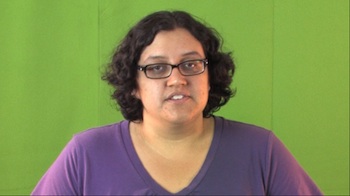
I'm going to guess that this shirt has lots of very bright highlights and very dark shadows in it due to lighting and the material. That could give the color mask problems. Can we see a screen shot of the original clip?
Please Log in to join the conversation.
29 Aug 2013 21:14 - 29 Aug 2013 21:15 #30567
by tpayton
Replied by tpayton on topic Changing color of a shirt with figure in front of green screen
Just using a key and then a secondary color corrector with the eye dropper in combination with a couple of shape masks (she has some purple in her face) works just dandy. What trouble were you having?

Last edit: 29 Aug 2013 21:15 by tpayton.
Please Log in to join the conversation.
30 Aug 2013 00:26 #30568
by bobmax48
Replied by bobmax48 on topic Changing color of a shirt with figure in front of green screen
That looks great. I was not using the shape masks. The shape mask are what applied the blue color or were they just used to add blue to the areas that didn't go blue? In other words the lighter and darker parts of the shirt were changed blue using the shape mask? Sorry I am being dense, this is only the second project I have worked with a green screen and the first time I have had to change the color of a piece of clothing. Thank you for your help.
Please Log in to join the conversation.
30 Aug 2013 03:00 #30571
by tpayton
Replied by tpayton on topic Changing color of a shirt with figure in front of green screen
Welcome to FCPX in that case!
I would strongly encourage you to get some training, Lynda.com, RippleTraining.com, or LarryJordan.biz or if you are book person like me read the FCPX Manual here manuals.info.apple.com/en_US/final_cut_pro_x_user_guide.pdf if you read it you will know more than 90% of users! (I'm only slightly exaggerating;) )
To get going quickly for this specific task, check out the online help:
Target a specific color using a color mask:
help.apple.com/finalcutpro/mac/10.0.6/#ver40b008a7
Add shape masks to a color mask:
help.apple.com/finalcutpro/mac/10.0.6/#verfc8a54d6
Apply multiple color corrections:
help.apple.com/finalcutpro/mac/10.0.6/#ver40b00a9e
I would strongly encourage you to get some training, Lynda.com, RippleTraining.com, or LarryJordan.biz or if you are book person like me read the FCPX Manual here manuals.info.apple.com/en_US/final_cut_pro_x_user_guide.pdf if you read it you will know more than 90% of users! (I'm only slightly exaggerating;) )
To get going quickly for this specific task, check out the online help:
Target a specific color using a color mask:
help.apple.com/finalcutpro/mac/10.0.6/#ver40b008a7
Add shape masks to a color mask:
help.apple.com/finalcutpro/mac/10.0.6/#verfc8a54d6
Apply multiple color corrections:
help.apple.com/finalcutpro/mac/10.0.6/#ver40b00a9e
Please Log in to join the conversation.
30 Aug 2013 12:39 #30581
by bobmax48
Replied by bobmax48 on topic Changing color of a shirt with figure in front of green screen
Thank you for clarifying how this works. Funny thing is I have been self training with books, tutorials and reading this site many times daily. I have been using FCP for many years but all of my video work until recently were talking heads and their power points. Not much color correcting or any other techniques needed. Just recently I was asked to videotape and edit a few marketing videos for my college. So I have been double timing to catch up on my skills. Skills not used are lost and have to be relearned. Once again thank all of you for your help. This is the best site for help in FCPX. In all of my years in technology and self training in many different fields this site is the friendliest without any judgment.
Please Log in to join the conversation.
