




- Posts: 215
- Thank you received: 2
3 Post Moderation Rule for New Boarders (25 Jan 2021)
New boarders will have their posts moderated - Don't worry if you cannot see your post immediately.
Text Reveal From Behind Tree
18 Apr 2012 01:00 #7199
by Shane M
Text Reveal From Behind Tree was created by Shane M
here is the clip I'm working with...
basically i want the text/logo to reveal from behind the tree as the camera slides to the left.
Can anyone explain how to do this? Im sure it has to do with doubling up the video layer and masking, but i don't really know how.
Any help would be hugely appreciated.
basically i want the text/logo to reveal from behind the tree as the camera slides to the left.
Can anyone explain how to do this? Im sure it has to do with doubling up the video layer and masking, but i don't really know how.
Any help would be hugely appreciated.
Please Log in to join the conversation.
- Scrubelicious
-

- Offline
- Platinum Member
-

Less
More
- Posts: 1228
- Thank you received: 114
18 Apr 2012 01:15 #7200
by Scrubelicious
Replied by Scrubelicious on topic Re: Text Reveal From Behind Tree
Drop in your text and or graphic into the project in one group. We will call this group TITLE GROUP for id purposes.
Now you need to create a BEZIER MASK on the TITLE GROUP (you can have the group hidden if that helps you draw the make) and create your mask in shape of the tree and animate the mask.
Tweak for your needs.
Now you need to create a BEZIER MASK on the TITLE GROUP (you can have the group hidden if that helps you draw the make) and create your mask in shape of the tree and animate the mask.
Tweak for your needs.
Please Log in to join the conversation.

18 Apr 2012 01:23 #7201
by tpayton
Replied by tpayton on topic Re: Text Reveal From Behind Tree
Your thinking is exactly right. For this you can just use a key to get rid of the green on the top layer and just have the tree. Then put your text in between and you are good to go:
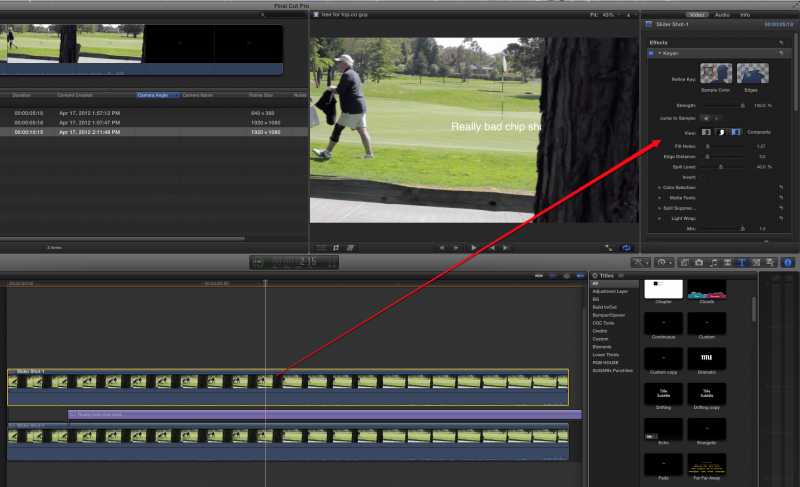
I assume this is what you are shooting for:
I assume this is what you are shooting for:
Please Log in to join the conversation.
18 Apr 2012 01:23 #7202
by Shane M
I know this probably sound stupid but how do i make the mask not a white box once i draw it on there?
Replied by Shane M on topic Re: Text Reveal From Behind Tree
Scrubelicious wrote: Drop in your text and or graphic into the project in one group. We will call this group TITLE GROUP for id purposes.
Now you need to create a BEZIER MASK on the TITLE GROUP (you can have the group hidden if that helps you draw the make) and create your mask in shape of the tree and animate the mask.
Tweak for your needs.
I know this probably sound stupid but how do i make the mask not a white box once i draw it on there?
Please Log in to join the conversation.
18 Apr 2012 01:24 #7203
by Shane M
THATS IT! Ill give that a try and get back with my results, thanks
Replied by Shane M on topic Re: Text Reveal From Behind Tree
tpayton wrote: Your thinking is exactly right. For this you can just use a key to get rid of the green on the top layer and just have the tree. Then put your text in between and you are good to go:
I assume this is what you are shooting for:
THATS IT! Ill give that a try and get back with my results, thanks
Please Log in to join the conversation.
- Scrubelicious
-
- Offline
- Platinum Member
-
Less
More
- Posts: 1228
- Thank you received: 114
18 Apr 2012 02:22 - 18 Apr 2012 02:23 #7206
by Scrubelicious
Replied by Scrubelicious on topic Re: Text Reveal From Behind Tree
Yeah you could stay in FCPX and use the Keyer if you don't need to track and add 3D shadows to the composite.
Make sure you are using the BEZIER MASK tool
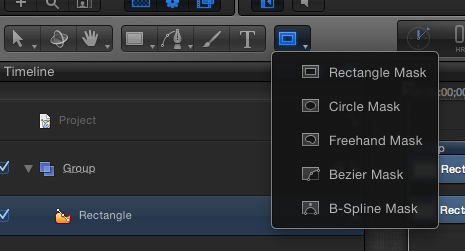
For using a static text that would be the faster result.
Make sure you are using the BEZIER MASK tool
For using a static text that would be the faster result.
Last edit: 18 Apr 2012 02:23 by Scrubelicious. Reason: image
Please Log in to join the conversation.
18 Apr 2012 02:29 #7207
by tpayton
Replied by tpayton on topic Re: Text Reveal From Behind Tree
So sorry. I thought this was in the FCP X forum. Doh. But I would do it the same in Motion or AE.
Please Log in to join the conversation.
18 Apr 2012 03:52 #7217
by Shane M
Replied by Shane M on topic Re: Text Reveal From Behind Tree
tpayton,
did you keyframe the text to move at all? I want it sort of to follow right behind the guy as he walks out of the frame and creates a gap between him and the tree...basically to be an opening shot with a logo...
did you keyframe the text to move at all? I want it sort of to follow right behind the guy as he walks out of the frame and creates a gap between him and the tree...basically to be an opening shot with a logo...
Please Log in to join the conversation.
18 Apr 2012 04:19 #7220
by tpayton
Replied by tpayton on topic Re: Text Reveal From Behind Tree
If you want to have the text move, it depends on the look you are going for.
1) You could have the text stick to the guy and track with him (currently a popular effect) or
2) have the text track with the scene, for example look like it suspended on the green. Half way between the fringe and the pin.
For #1 you definitely want to use a tracker. Motion's tracker will work. I typically use Mocha for AE for this type of track. However, I don't this type of tracked shot will work because the fellow is moving very quickly and the viewer will not be able to move the fast moving text.
For #2 you can go with manual key framing or a tracker. I think you can get a decent move without a tracker. Just set a start and stop point and then add keyframes in the middle to tweak.
I hope this helps.
1) You could have the text stick to the guy and track with him (currently a popular effect) or
2) have the text track with the scene, for example look like it suspended on the green. Half way between the fringe and the pin.
For #1 you definitely want to use a tracker. Motion's tracker will work. I typically use Mocha for AE for this type of track. However, I don't this type of tracked shot will work because the fellow is moving very quickly and the viewer will not be able to move the fast moving text.
For #2 you can go with manual key framing or a tracker. I think you can get a decent move without a tracker. Just set a start and stop point and then add keyframes in the middle to tweak.
I hope this helps.
Please Log in to join the conversation.

18 Apr 2012 04:38 #7223
by BenB
Replied by BenB on topic Re: Text Reveal From Behind Tree
Or use the Throw Behavior and just tweak it in the HUD while the video is looping in the timeline. Lots of ways to do that.
Please Log in to join the conversation.
18 Apr 2012 05:03 #7224
by Shane M
I think i want to get just the text between the guy/tree and the green sorta just floating there revealing from the tree...
so basically the guy and tree in the foreground, the logo in the middle, and the green in the background...
I almost have it but i can't seem to get the guy to key through the logo...the logo shows through his pants, etc...
any tips?
Replied by Shane M on topic Re: Text Reveal From Behind Tree
tpayton wrote: If you want to have the text move, it depends on the look you are going for.
1) You could have the text stick to the guy and track with him (currently a popular effect) or
2) have the text track with the scene, for example look like it suspended on the green. Half way between the fringe and the pin.
For #1 you definitely want to use a tracker. Motion's tracker will work. I typically use Mocha for AE for this type of track. However, I don't this type of tracked shot will work because the fellow is moving very quickly and the viewer will not be able to move the fast moving text.
For #2 you can go with manual key framing or a tracker. I think you can get a decent move without a tracker. Just set a start and stop point and then add keyframes in the middle to tweak.
I hope this helps.
I think i want to get just the text between the guy/tree and the green sorta just floating there revealing from the tree...
so basically the guy and tree in the foreground, the logo in the middle, and the green in the background...
I almost have it but i can't seem to get the guy to key through the logo...the logo shows through his pants, etc...
any tips?
Please Log in to join the conversation.
- Scrubelicious
-
- Offline
- Platinum Member
-
Less
More
- Posts: 1228
- Thank you received: 114
18 Apr 2012 13:20 #7238
by Scrubelicious
Replied by Scrubelicious on topic Re: Text Reveal From Behind Tree
You want the guy be in front of the Logo? Adjust your Keyer or see
2nd post
.
Could you post a screen shot?
Could you post a screen shot?
Please Log in to join the conversation.
