


- Posts: 33
- Thank you received: 0
3 Post Moderation Rule for New Boarders (25 Jan 2021)
New boarders will have their posts moderated - Don't worry if you cannot see your post immediately.
Broadcast safe filter
11 Mar 2012 00:17 #5599
by picture
Replied by picture on topic Re: Broadcast safe filter
“incomplete” - Yes, and thanks for that, I needed an over-simplified explanation.
“Further study would do you great” - In everything always.
And I will look into it further, but I’m trying to re-structure my professional life so I do more camera work and less desk-work.
I’m happy now, I have a quick and simple workflow that can output
short ProRes broadcast safe clips, neutral and flat, so your fellow Postprocessors can fiddle about with them till their hearts are content.
I don’t need to know how or why, I just need to do it.
My FCPX trial ran out before I could get into it, so I’m OK using iMovie (HD!) for my small personal projects, for now.
www.vimeo.com/picture - to satisfy any curiosity only, no comments good or bad please. I find compliments uncomfortable and embarrassing, and I don’t need to be reminded of the numerous flaws they contain - it’s a no win situation :-)
Ben, you were right of course, I never doubted that, the problem was I didn’t understand WHY you were right, it a bit clearer now, thanks for your input - it wasn’t my intension stretch your synapses.
One last question (for now): In the BS filter which “Fix Method” do I choose for maximum safety, “Reduce Luminance” or “Reduce Saturation”.
“Further study would do you great” - In everything always.
And I will look into it further, but I’m trying to re-structure my professional life so I do more camera work and less desk-work.
I’m happy now, I have a quick and simple workflow that can output
short ProRes broadcast safe clips, neutral and flat, so your fellow Postprocessors can fiddle about with them till their hearts are content.
I don’t need to know how or why, I just need to do it.
My FCPX trial ran out before I could get into it, so I’m OK using iMovie (HD!) for my small personal projects, for now.
www.vimeo.com/picture - to satisfy any curiosity only, no comments good or bad please. I find compliments uncomfortable and embarrassing, and I don’t need to be reminded of the numerous flaws they contain - it’s a no win situation :-)
Ben, you were right of course, I never doubted that, the problem was I didn’t understand WHY you were right, it a bit clearer now, thanks for your input - it wasn’t my intension stretch your synapses.
One last question (for now): In the BS filter which “Fix Method” do I choose for maximum safety, “Reduce Luminance” or “Reduce Saturation”.
Please Log in to join the conversation.

11 Mar 2012 00:26 #5600
by NocoDave
Replied by NocoDave on topic Re: Broadcast safe filter
If you really want to be sure stick the filter on twice and set one to each.
But if someones going to be doing further colour work on this after you pass it on they would be far better with the original untouched footage. I know I would't be happy with footage being passed to me with this done if further colour work was expected.
If you make manual adjustments you keep the detail in the lows and the highlights which they can then work with and if you leave it untouched it's flat ready for working on, but if you stick a broadcast safe filter on there your losing that info and they won't be able to bring it back.
If you've been asked specifically for that then ok, but maybe it's not what they expect.
But if someones going to be doing further colour work on this after you pass it on they would be far better with the original untouched footage. I know I would't be happy with footage being passed to me with this done if further colour work was expected.
If you make manual adjustments you keep the detail in the lows and the highlights which they can then work with and if you leave it untouched it's flat ready for working on, but if you stick a broadcast safe filter on there your losing that info and they won't be able to bring it back.
If you've been asked specifically for that then ok, but maybe it's not what they expect.
Please Log in to join the conversation.
11 Mar 2012 01:23 #5602
by picture
Replied by picture on topic Re: Broadcast safe filter
“original untouched footage” - I thought so too, but the 5 sec test clip I FTP’d to “Technical Checks” was rejected, “Not Broadcast Safe”.
So I’ll just follow the instructions for now.
So I’ll just follow the instructions for now.
Please Log in to join the conversation.
11 Mar 2012 01:41 #5603
by NocoDave
Replied by NocoDave on topic Re: Broadcast safe filter
Ok, and I just re-read your posts too. It's starting to make more sense.
I can sum it up quite simply for you.
When you read previously to set the In's and Outs to 16 and 235 this doesn't mean there's a slider that has a scale on it where 16 and 235 are always at the same place, am I right in thinking you were thinking this? It means you use a monitor that shows the scale, and has the trace showing where your particular video signal sits on that scale. You then adjust the sliders until the trace on the monitor sits in the range. But it's an art, it's not necessarily stretched/compressed across the full range.
So to bring video into the broadcast safe range you manually adjust the luma bringing the shadows and highlights that are outside the range inside. It should really also be checked on the RGB parade too as it may need some fine tuning back and forward, the saturation should be checked on the vector scope too.
A broadcast safe filter doesn't make any adjustments to how the the video looks, or the ideal broadcast safe filter would't but they aren't perfect. They're supposed to just cut off anything that sits outside the safe range and changes those values to the max and minimum 235 and 16 bits, then they can never be recovered after export.
This is what the filter is supposed to do, you only ever use at the very end of the workflow, if you look at the video and your eyes tell you that is what you want it to look like but the waveforms say otherwise, then you stick it on.
You can try and it may be ok, but I don't think it's what they want and Motion isn't really the correct tool for this job.
I can sum it up quite simply for you.
When you read previously to set the In's and Outs to 16 and 235 this doesn't mean there's a slider that has a scale on it where 16 and 235 are always at the same place, am I right in thinking you were thinking this? It means you use a monitor that shows the scale, and has the trace showing where your particular video signal sits on that scale. You then adjust the sliders until the trace on the monitor sits in the range. But it's an art, it's not necessarily stretched/compressed across the full range.
So to bring video into the broadcast safe range you manually adjust the luma bringing the shadows and highlights that are outside the range inside. It should really also be checked on the RGB parade too as it may need some fine tuning back and forward, the saturation should be checked on the vector scope too.
A broadcast safe filter doesn't make any adjustments to how the the video looks, or the ideal broadcast safe filter would't but they aren't perfect. They're supposed to just cut off anything that sits outside the safe range and changes those values to the max and minimum 235 and 16 bits, then they can never be recovered after export.
This is what the filter is supposed to do, you only ever use at the very end of the workflow, if you look at the video and your eyes tell you that is what you want it to look like but the waveforms say otherwise, then you stick it on.
You can try and it may be ok, but I don't think it's what they want and Motion isn't really the correct tool for this job.
Please Log in to join the conversation.
11 Mar 2012 02:38 #5605
by picture
Replied by picture on topic Re: Broadcast safe filter
Ha-ha! for a whole hour I thought I wasn’t confused! It was a nice feeling.
I’ll be back for some clarification later, thanks.
I’ll be back for some clarification later, thanks.
Please Log in to join the conversation.

11 Mar 2012 03:09 #5607
by dgwvideo
Creating history....one edit at a time !
Replied by dgwvideo on topic Re: Broadcast safe filter
Check the links below when you have some spare time.
support.apple.com/kb/TA24160?viewlocale=en_US
en.wikipedia.org/wiki/Broadcast-safe
documentation.apple.com/en/finalcutpro/u...ction=6%26tasks=true
www.geniusdv.com/news_and_tutorials/2009...in_final_cut_pro.php
www.march21.nl/learningzone/files/bf24ec...86ad94b7b960-33.html
support.apple.com/kb/TA24160?viewlocale=en_US
en.wikipedia.org/wiki/Broadcast-safe
documentation.apple.com/en/finalcutpro/u...ction=6%26tasks=true
www.geniusdv.com/news_and_tutorials/2009...in_final_cut_pro.php
www.march21.nl/learningzone/files/bf24ec...86ad94b7b960-33.html
Creating history....one edit at a time !
Please Log in to join the conversation.
11 Mar 2012 03:27 #5609
by NocoDave
Replied by NocoDave on topic Re: Broadcast safe filter
Here’s something else that might help.
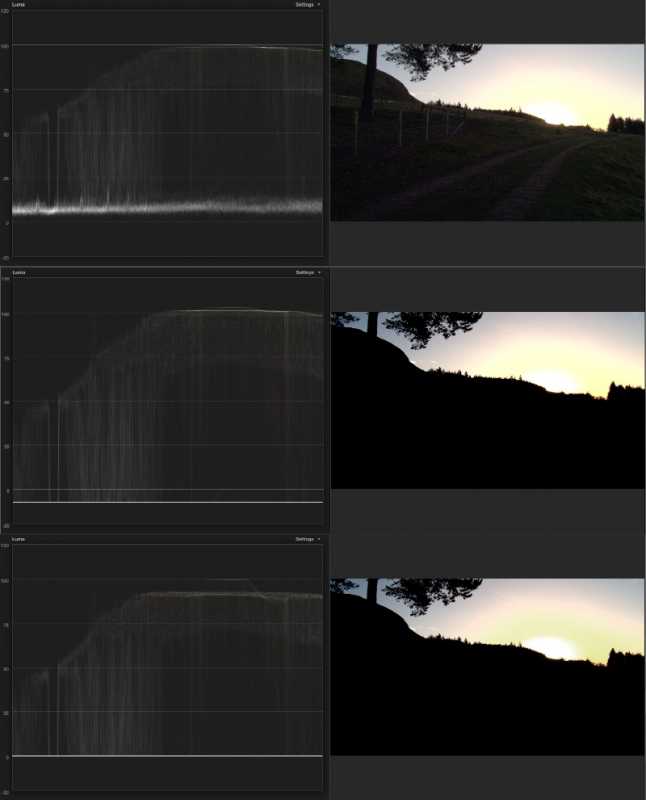
The top image is as shot in camera. The waveform shows the luma trace that lies within broadcast safe of 0-100 IRE.
The second image shows the luma range expanded to go outside the broadcast safe area but give a more pleasing result in the video. The foreground has been brought into silhouette by lowering the shadows well below 0 IRE and the highlights have been blown out just a little above 100 IRE.
This looks better but isn’t broadcast safe and the information outside the safe area takes up unnecessary transmission bandwidth anyway.
So the bottom image has the FCPX broadcast safe filter applied, It does a pretty decent job of clipping the shadows but not so great with the highlights. Ideally the trace should look identical, other than being flattened out at 0 and 100 IRE, and as a result the image should look the same too.
The reality is that it has been compressed a little and the gradient around the sunrise doesn’t look so good, but it’s ok.
The top image is as shot in camera. The waveform shows the luma trace that lies within broadcast safe of 0-100 IRE.
The second image shows the luma range expanded to go outside the broadcast safe area but give a more pleasing result in the video. The foreground has been brought into silhouette by lowering the shadows well below 0 IRE and the highlights have been blown out just a little above 100 IRE.
This looks better but isn’t broadcast safe and the information outside the safe area takes up unnecessary transmission bandwidth anyway.
So the bottom image has the FCPX broadcast safe filter applied, It does a pretty decent job of clipping the shadows but not so great with the highlights. Ideally the trace should look identical, other than being flattened out at 0 and 100 IRE, and as a result the image should look the same too.
The reality is that it has been compressed a little and the gradient around the sunrise doesn’t look so good, but it’s ok.
Please Log in to join the conversation.
11 Mar 2012 21:12 #5643
by picture
Replied by picture on topic Re: Broadcast safe filter
dgwvideo - Thanks for the links, I’ve bookmarked them, and I’ll check them out when I have some spare time.
“Motion isn't really the correct tool for this job” - Damn! not the conclusion I was hoping for, I’ve just started to enjoy Motion, and even on my under-spec’d laptop it’s quick and efficient, my workflow flows.
I still think the Motion “Broadcast safe” filter will pass the Gty tech check, but I don’t want to risk it with a first submission.
Back to the mud hut - what a drag.
“Motion isn't really the correct tool for this job” - Damn! not the conclusion I was hoping for, I’ve just started to enjoy Motion, and even on my under-spec’d laptop it’s quick and efficient, my workflow flows.
I still think the Motion “Broadcast safe” filter will pass the Gty tech check, but I don’t want to risk it with a first submission.
Back to the mud hut - what a drag.
Please Log in to join the conversation.
11 Mar 2012 21:23 - 11 Mar 2012 21:24 #5644
by NocoDave
Technically there's no reason why it shouldn't. If all desired colour work has been done on a edit that wants a partially artistic film style look it is then applied to prepare it for broadcast.
It's their motive that has me baffled. There's absolutely no reason they should want any footage as broadcast safe if they are going to grade it. The only reason anyone would want it so is if they are just going to broadcast it.
It gives the impression they want you to grade it.
Motion isn't really the right tool for this right enough, but if it had scopes, or if you could find a plug in that has scopes then you could work with it. "SA Color Finesse" made it possible with After effects. Or even better, if there is a way to get an external waveform monitor to work with motion there's no reason why you couldn't be using it if it turns out they just want a simple grade.
Replied by NocoDave on topic Re: Broadcast safe filter
I still think the Motion “Broadcast safe” filter will pass the Gty tech check, but I don’t want to risk it with a first submission.
Technically there's no reason why it shouldn't. If all desired colour work has been done on a edit that wants a partially artistic film style look it is then applied to prepare it for broadcast.
It's their motive that has me baffled. There's absolutely no reason they should want any footage as broadcast safe if they are going to grade it. The only reason anyone would want it so is if they are just going to broadcast it.
It gives the impression they want you to grade it.
Motion isn't really the right tool for this right enough, but if it had scopes, or if you could find a plug in that has scopes then you could work with it. "SA Color Finesse" made it possible with After effects. Or even better, if there is a way to get an external waveform monitor to work with motion there's no reason why you couldn't be using it if it turns out they just want a simple grade.
Last edit: 11 Mar 2012 21:24 by NocoDave. Reason: typo
Please Log in to join the conversation.
12 Mar 2012 07:28 #5662
by picture
Replied by picture on topic Re: Broadcast safe filter
I’m speculating, but I think it’s more to do with what their buyers want, something relatively neutral so they can match it to whatever the project look is, and they’re edging their bets by providing a clip that’s ready to go, for those who just want to slot it in somewhere “as is”.
I’m going to be over-cautious for the first submission - Rec709 and no grading (Maybe a subtle S curve to give it a bit more thumb-appeal, or colour balance where it’s essential).
If I get as far as a second submission, I’ll definitely include some Motion processed clips with optical flow, and I do like the look of “Tonalizer”, maybe because it’s more familiar for photographers.
I used to think vector-scopes were there so you could pretend you were in a submarine while editing.
“external waveform monitor” - ALL my kit has to fit into a “Hand-luggage” bag, I don’t even have room for extra RAM!
I’ve never seen an external waveform monitor, but I imagine it wouldn’t fit in a side pocket.
I think Motion will be fine for my purposes, I just panicked when I saw the numbers in “DigitalColor Meter”.
I’m going to be over-cautious for the first submission - Rec709 and no grading (Maybe a subtle S curve to give it a bit more thumb-appeal, or colour balance where it’s essential).
If I get as far as a second submission, I’ll definitely include some Motion processed clips with optical flow, and I do like the look of “Tonalizer”, maybe because it’s more familiar for photographers.
I used to think vector-scopes were there so you could pretend you were in a submarine while editing.
“external waveform monitor” - ALL my kit has to fit into a “Hand-luggage” bag, I don’t even have room for extra RAM!
I’ve never seen an external waveform monitor, but I imagine it wouldn’t fit in a side pocket.
I think Motion will be fine for my purposes, I just panicked when I saw the numbers in “DigitalColor Meter”.
Please Log in to join the conversation.
12 Mar 2012 13:08 #5667
by NocoDave
Their selling stock footage, or some similar set up?
If so then it now makes sense. As you say, the buyer has the opportunity to use as is or grade if desired. Then you'll just want to balance the colours, and make sure the luma and saturation is broadcast safe. Sticking a broadcast safe filter on there should pass their tech checks but won't give the end user the best quality product possible.
If this works out for you, and you'd like to pass that side of the work on, maybe we could talk.
Replied by NocoDave on topic Re: Broadcast safe filter
I’m speculating, but I think it’s more to do with what their buyers want, something relatively neutral so they can match it to whatever the project look is, and they’re edging their bets by providing a clip that’s ready to go, for those who just want to slot it in somewhere “as is”.
Their selling stock footage, or some similar set up?
If so then it now makes sense. As you say, the buyer has the opportunity to use as is or grade if desired. Then you'll just want to balance the colours, and make sure the luma and saturation is broadcast safe. Sticking a broadcast safe filter on there should pass their tech checks but won't give the end user the best quality product possible.
If this works out for you, and you'd like to pass that side of the work on, maybe we could talk.
Please Log in to join the conversation.
12 Mar 2012 20:13 #5679
by picture
Replied by picture on topic Re: Broadcast safe filter
Yes, rights managed stock footage. It’s a tough market, and getting accepted doesn’t mean I’ll get any sales - and it can be glacially slow, could easily be 12 months before I have my first sale.
But I’m going to give it shot and see what happens.
“If this works out…” Definitely.
But I’m going to give it shot and see what happens.
“If this works out…” Definitely.
Please Log in to join the conversation.
