- Posts: 2
- Thank you received: 0
3 Post Moderation Rule for New Boarders (25 Jan 2021)
New boarders will have their posts moderated - Don't worry if you cannot see your post immediately.
Motion FCP Generator "Set Speed" Drop Zone Retime Issue when in FCP
- Maxkearney114
-
 Topic Author
- Offline
- New Member
-

Less
More
08 May 2023 22:59 #125325
by Maxkearney114
The Goal:
Drop a clip into a FCP Generators Drop Zone that is automatically adjusted to 50% Speed
What I've Done:
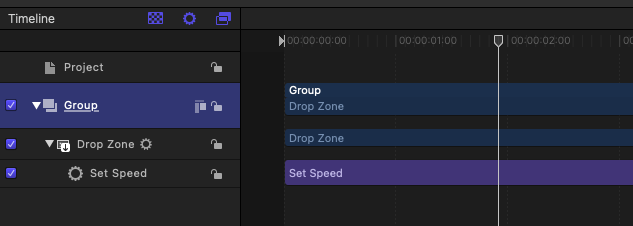
Create a FCP Generator Project in Motion -> Add a Drop Zone -> Add Media to the Drop Zone -> Add Retime "Set Speed" behavior -> "Clear" the media from the Drop Zone. (See Image)
The Issue:
When in FCP the media I drop into the Drop Zone is not effected by the Retime. Even when utilizing the published parameters for the generators retime attribute.
Drop a clip into a FCP Generators Drop Zone that is automatically adjusted to 50% Speed
What I've Done:
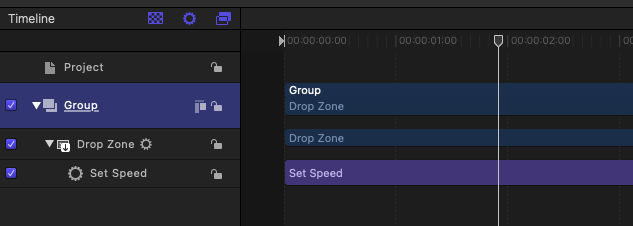
Create a FCP Generator Project in Motion -> Add a Drop Zone -> Add Media to the Drop Zone -> Add Retime "Set Speed" behavior -> "Clear" the media from the Drop Zone. (See Image)
The Issue:
When in FCP the media I drop into the Drop Zone is not effected by the Retime. Even when utilizing the published parameters for the generators retime attribute.
Please Log in to join the conversation.

12 May 2023 15:24 #125436
by marlon
Replied by marlon on topic Motion FCP Generator "Set Speed" Drop Zone Retime Issue when in FCP
Wow. I've got the same issue. I'd like to add a Freeze Frame behavior to an Effect Source layer or Drop Zone. But Motion won't let me?
Di you find any solution?
Di you find any solution?
Please Log in to join the conversation.
- Maxkearney114
-
Topic Author
- Offline
- New Member
-
Less
More
- Posts: 2
- Thank you received: 0
12 May 2023 16:14 #125438
by Maxkearney114
Replied by Maxkearney114 on topic Motion FCP Generator "Set Speed" Drop Zone Retime Issue when in FCP
I've talked directly with 2 members of Apples Creative Media team & consulted a few FCP/Motion Expert YouTubers...the general consensus is that this is one of the few things that does not work.
Best work around:
To get past this I've been dropping the clip into the FCP timeline -> retiming it -> saving as a compound clip -> then dropping that into the drop zone.
Best work around:
To get past this I've been dropping the clip into the FCP timeline -> retiming it -> saving as a compound clip -> then dropping that into the drop zone.
Please Log in to join the conversation.