


- Posts: 145
- Thank you received: 1
3 Post Moderation Rule for New Boarders (25 Jan 2021)
New boarders will have their posts moderated - Don't worry if you cannot see your post immediately.
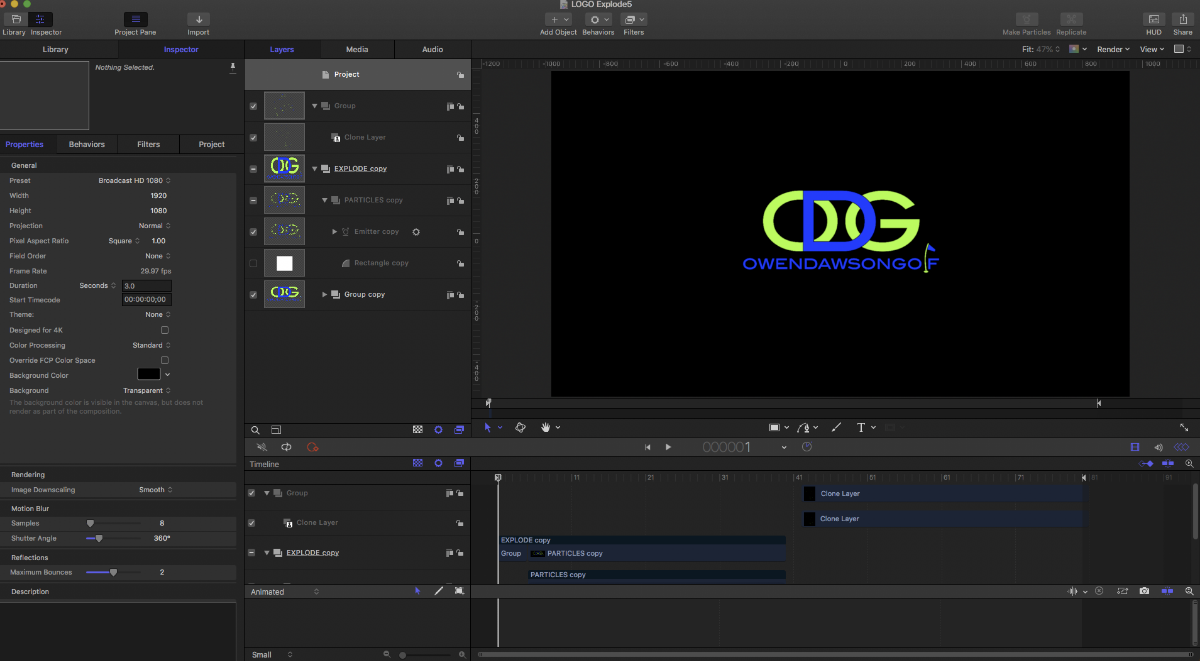
how to separate motion timeline into 2 sepatate motion generators


27 Jul 2020 12:53 #108960
by JoeEditor
Replied by JoeEditor on topic how to separate motion timeline into 2 sepatate motion generators
In your example video, it looks like they exported the Motion project as a video clip. Then play it in reverse after it played normally.
Please Log in to join the conversation.
27 Jul 2020 14:30 #108961
by owenpga
Replied by owenpga on topic how to separate motion timeline into 2 sepatate motion generators
the ODG logo is the one i made. I found a youtube video that showed how to reverse the video by creating a clone of the original and checking the reverse button under the timing section.
my issue now is how do i just export the reversed section? I don't want the forward and reverse in the same timeline. Make sense?
my issue now is how do i just export the reversed section? I don't want the forward and reverse in the same timeline. Make sense?
Please Log in to join the conversation.
