


- Posts: 3790
- Thank you received: 718
3 Post Moderation Rule for New Boarders (25 Jan 2021)
New boarders will have their posts moderated - Don't worry if you cannot see your post immediately.
Does my plugin crash your computer too?
- Karsten Schlüter
-
 Topic Author
- Offline
- Moderator
-

Less
More
30 May 2018 10:03 - 01 Jun 2018 05:33 #95742
by Karsten Schlüter
Does my plugin crash your computer too? was created by Karsten Schlüter
Just for the brave hearted… :
Tried to create a new Title generator, called Voute - because, it IS in an infinite cave… = no such thing in Motion, so I'm abusing a gigantic three-dimensional 'G' as my studio…
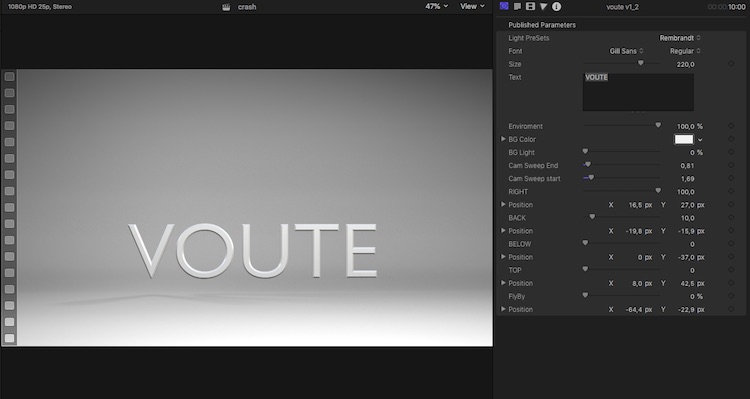
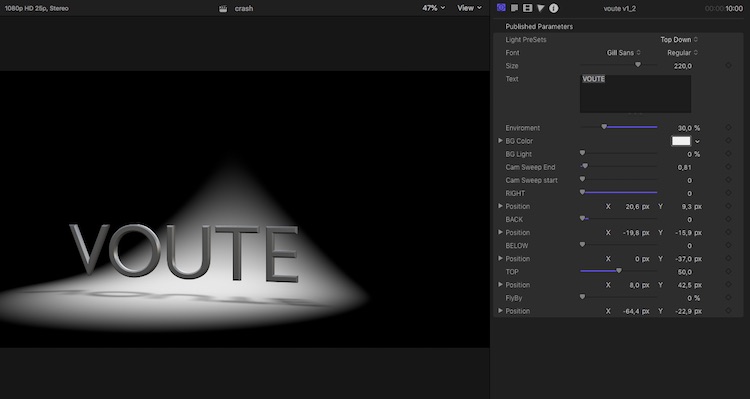
In the Inspector are a few ready-made lighting options, yadayada…
BUT!
When installed in FCPX (demands v10_4_2) as a GENERATOR, it not only overwhelms my tiny MacMini , but after playing with some settings my Mac frequently 'dies a hero's death'… = re-launches. Not just FCPX, no, the whole Mac restarts , white on black screen.
… I narrowed it down: that insane 3D glyph is the culprit .
On my machine.
Question: Do you dare to install my plugin AT YOUR OWN RISK! and give it a test drive/apply it to some New Projects timeline? Please post results mentioning your hardware-specs…
… guess, I was a bit too over ambitious LOL
If it crashes, delete the plugin from the Motion Templates folder, and in FCPX delete the test project.
"… we need a bigger boat…!" LOL :woohoo:
Attachment pulled…
Tried to create a new Title generator, called Voute - because, it IS in an infinite cave… = no such thing in Motion, so I'm abusing a gigantic three-dimensional 'G' as my studio…
In the Inspector are a few ready-made lighting options, yadayada…
BUT!
When installed in FCPX (demands v10_4_2) as a GENERATOR, it not only overwhelms my tiny MacMini , but after playing with some settings my Mac frequently 'dies a hero's death'… = re-launches. Not just FCPX, no, the whole Mac restarts , white on black screen.
… I narrowed it down: that insane 3D glyph is the culprit .
On my machine.
Question: Do you dare to install my plugin AT YOUR OWN RISK! and give it a test drive/apply it to some New Projects timeline? Please post results mentioning your hardware-specs…
… guess, I was a bit too over ambitious LOL
If it crashes, delete the plugin from the Motion Templates folder, and in FCPX delete the test project.
"… we need a bigger boat…!" LOL :woohoo:
Attachment pulled…
Last edit: 01 Jun 2018 05:33 by Karsten Schlüter.
Please Log in to join the conversation.


31 May 2018 16:30 - 31 May 2018 23:01 #95781
by JoeEditor
Replied by JoeEditor on topic Does my plugin crash your computer too?
iMac Pro, hesitates to play back, some minor skipping, doesn't crash anything. Rendering the timeline slows the whole system down a lot, BUT I can render it in a Project timeline in a decent amount of time.
Last edit: 31 May 2018 23:01 by JoeEditor.
Please Log in to join the conversation.


31 May 2018 19:25 #95783
by deweyt44
Replied by deweyt44 on topic Does my plugin crash your computer too?
Applied it as a generator on a 2 minutes project. It doesn't crash my 2016 MacBook Pro with Radeon 460, but it slows it down to a complete crawl. My MacBook Pro can take a few bullets, surviving long enough to delete the generator in the timeline. Rendering is also a no go, my MacBook Pro is having none of it.
Afterwards, everything goes back to normal once deleted from timeline.
Afterwards, everything goes back to normal once deleted from timeline.
Please Log in to join the conversation.
- Karsten Schlüter
-
Topic Author
- Offline
- Moderator
-
Less
More
- Posts: 3790
- Thank you received: 718
01 Jun 2018 05:32 #95788
by Karsten Schlüter
Replied by Karsten Schlüter on topic Does my plugin crash your computer too?
THANKS everyone daring :woohoo:
… don't forget to de-install it (delete in the Motion Templates), 'cause alone incidentally hovering over it with the mouse makes my Mac … hesitate.
lesson learned: creeping with the cam and a few lights INSIDE a 3D glyph of absurd proportions … basically an idea, but no good one. LOL
I pull it from here … waiting for an update of Motion, which allows to 'bend' lines&planes…
… don't forget to de-install it (delete in the Motion Templates), 'cause alone incidentally hovering over it with the mouse makes my Mac … hesitate.
lesson learned: creeping with the cam and a few lights INSIDE a 3D glyph of absurd proportions … basically an idea, but no good one. LOL
I pull it from here … waiting for an update of Motion, which allows to 'bend' lines&planes…
Please Log in to join the conversation.
