


- Posts: 3790
- Thank you received: 718
3 Post Moderation Rule for New Boarders (25 Jan 2021)
New boarders will have their posts moderated - Don't worry if you cannot see your post immediately.
DoF/out of focus = effects opacity??
- Karsten Schlüter
-
 Topic Author
- Offline
- Moderator
-

Less
More
19 Aug 2015 11:49 - 19 Aug 2015 12:23 #67579
by Karsten Schlüter
DoF/out of focus = effects opacity?? was created by Karsten Schlüter
For a little semi-commercial project, I thankfully was invited to, I'm actually editing a short "making of/outtakes/ooops"-tape (host is a well-known comedian, never had so much laughter on a set = hours of material).
Had the idea, to create my own transition, a film-clapper. it zooms in, hides the cut, zooms out. Easy done in Motion.
I add motion blur and DoF... but look:
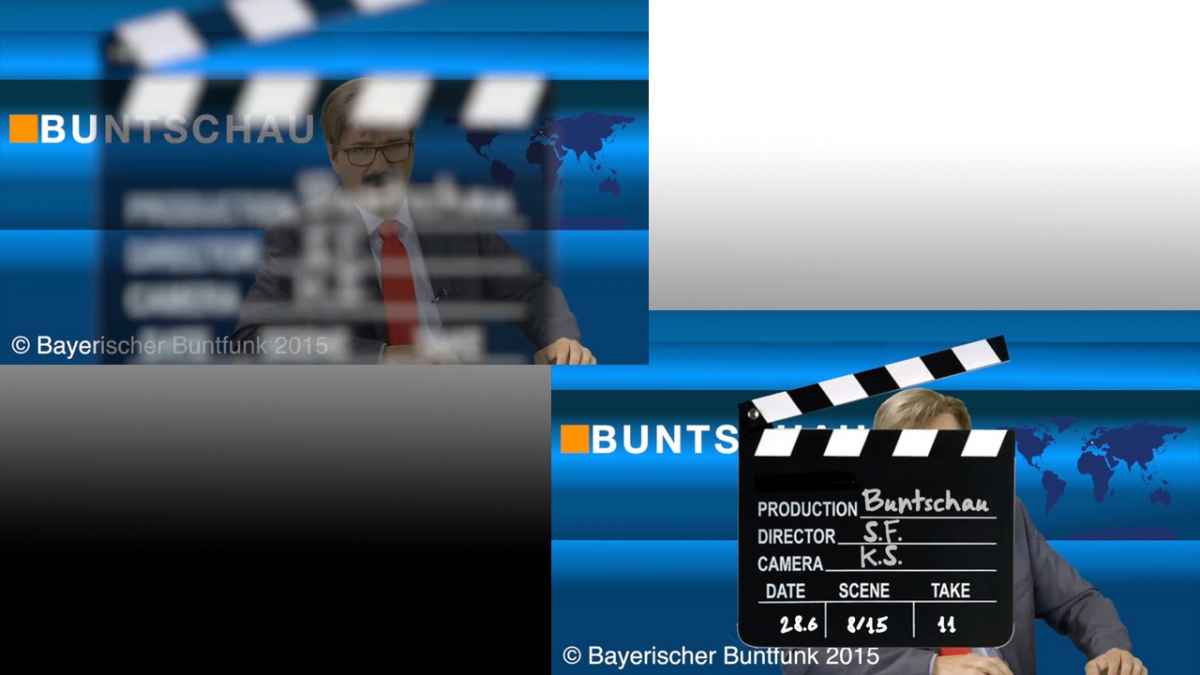
yes, DoF is intentionally maxxed - but then the clapper gets translucent!
On both ends of its movement to and from camera, I applied lots of blurr... and, see the screen grab, the clapper isn't solid anymore...
hum, well, in my real life, when I set my camera out of focus, the objects keeps their opaqueness (<< English??)
checked all layers settings -...
cgi ≠ real life?
Or did I miss anything?
Had the idea, to create my own transition, a film-clapper. it zooms in, hides the cut, zooms out. Easy done in Motion.
I add motion blur and DoF... but look:
yes, DoF is intentionally maxxed - but then the clapper gets translucent!
On both ends of its movement to and from camera, I applied lots of blurr... and, see the screen grab, the clapper isn't solid anymore...
hum, well, in my real life, when I set my camera out of focus, the objects keeps their opaqueness (<< English??)
checked all layers settings -...
cgi ≠ real life?
Or did I miss anything?
Last edit: 19 Aug 2015 12:23 by Karsten Schlüter.
Please Log in to join the conversation.


19 Aug 2015 12:01 #67580
by Deyson
Replied by Deyson on topic DoF/out of focus = effects opacity??
Hello Karsten and good day.
Adding a focus behavior the clapper helps with the focus. The trick it to keep it farther away from the background to adjust the blur. Another trick is to just add a blur to the background video and increase the blur as the clapper comes in. The Motion Blur settings I use are: Samples 16 and Shutter angle 180 and I get great results.
_Deyson
Adding a focus behavior the clapper helps with the focus. The trick it to keep it farther away from the background to adjust the blur. Another trick is to just add a blur to the background video and increase the blur as the clapper comes in. The Motion Blur settings I use are: Samples 16 and Shutter angle 180 and I get great results.
_Deyson
Please Log in to join the conversation.
- Karsten Schlüter
-
Topic Author
- Offline
- Moderator
-
Less
More
- Posts: 3790
- Thank you received: 718
19 Aug 2015 12:13 - 19 Aug 2015 12:24 #67581
by Karsten Schlüter
Replied by Karsten Schlüter on topic DoF/out of focus = effects opacity??
Hi D,
thanks for chiming in.
blurryness is fine and not my problem. But the blurred the object is, all the more it gets transparent - what I NOT want (the clapper should 'cover' the cut A to .
.
attached the project
//grr I'm too dumb to attach a file, let#s try it wih drive.google >> click for dl //
thanks for chiming in.
blurryness is fine and not my problem. But the blurred the object is, all the more it gets transparent - what I NOT want (the clapper should 'cover' the cut A to
.attached the project
//grr I'm too dumb to attach a file, let#s try it wih drive.google >> click for dl //
Last edit: 19 Aug 2015 12:24 by Karsten Schlüter.
Please Log in to join the conversation.
19 Aug 2015 12:28 #67582
by Deyson
Replied by Deyson on topic DoF/out of focus = effects opacity??
Hello.
It seems the issue occurs with the Camera Controls ( the top controls in the Camera tab ). What I would do it either play with them or rest them and just add a fade in and fade out parameter to the clapper.
When I reset the camera controls the transparency issue went away. Which makes sense sine some of the controls are for when objects appear or disappear based on distance from camera.
Here is a quick video explanation: quick.as/mjdt1eOz
Please let me know if that helps and have an amazing day!
It seems the issue occurs with the Camera Controls ( the top controls in the Camera tab ). What I would do it either play with them or rest them and just add a fade in and fade out parameter to the clapper.
When I reset the camera controls the transparency issue went away. Which makes sense sine some of the controls are for when objects appear or disappear based on distance from camera.
Here is a quick video explanation: quick.as/mjdt1eOz
Please let me know if that helps and have an amazing day!
Please Log in to join the conversation.
- Karsten Schlüter
-
Topic Author
- Offline
- Moderator
-
Less
More
- Posts: 3790
- Thank you received: 718
19 Aug 2015 13:01 - 19 Aug 2015 13:02 #67583
by Karsten Schlüter
Replied by Karsten Schlüter on topic DoF/out of focus = effects opacity??
Hi D,
I'm such an idiot!!
'Einblenden' (=German interface) means for sure blending in/out the OBJECT, not the EFFECT itself!!
Just both controllers to the left - me happy bunny!
btw:
Pictures (with red arrows) are my domain, but a video tutorial as an answer - that tops it all! AWESOME, Dyson - grrrreat! :lol:
I'm such an idiot!!
'Einblenden' (=German interface) means for sure blending in/out the OBJECT, not the EFFECT itself!!
Just both controllers to the left - me happy bunny!
btw:
Pictures (with red arrows) are my domain, but a video tutorial as an answer - that tops it all! AWESOME, Dyson - grrrreat! :lol:
Last edit: 19 Aug 2015 13:02 by Karsten Schlüter.
Please Log in to join the conversation.
19 Aug 2015 13:17 #67584
by Deyson
Replied by Deyson on topic DoF/out of focus = effects opacity??
Hello.
I am glad it is working out. I am happy you like the video. I find it makes it easier to explain things
Also, great work on the transition it looks great! Keep up the great work!
Thank you for the kind words and have an amazing day!
I am glad it is working out. I am happy you like the video. I find it makes it easier to explain things
Also, great work on the transition it looks great! Keep up the great work!
Thank you for the kind words and have an amazing day!
Please Log in to join the conversation.
- Karsten Schlüter
-
Topic Author
- Offline
- Moderator
-
Less
More
- Posts: 3790
- Thank you received: 718
19 Aug 2015 13:24 #67585
by Karsten Schlüter
I'll check a few things, and put it then in the fcp.co depository ...
And, glad you like it !!
Actually, only date/scene,/take are 'published' ...considered a switchable 'look', nowadays they do use digital clapperboards, with shiny, animated timecode etc .. and different moves, from left or right etc ... since I found out 'rigging', I'm a fan of 'swicthable designs...
see you later, real life asks for my assistence ...
Replied by Karsten Schlüter on topic DoF/out of focus = effects opacity??
Also, great work on the transition it looks great! Keep up the great work!
I'll check a few things, and put it then in the fcp.co depository ...
And, glad you like it !!
Actually, only date/scene,/take are 'published' ...considered a switchable 'look', nowadays they do use digital clapperboards, with shiny, animated timecode etc .. and different moves, from left or right etc ... since I found out 'rigging', I'm a fan of 'swicthable designs...
see you later, real life asks for my assistence ...
Please Log in to join the conversation.
19 Aug 2015 13:29 #67586
by Deyson
Replied by Deyson on topic DoF/out of focus = effects opacity??
Great I look forward to seeing it. I can see people wanting to use the classic clapper for a classic feel
Best of luck and keep rocking!
Best of luck and keep rocking!
Please Log in to join the conversation.
