


- Posts: 3790
- Thank you received: 718
3 Post Moderation Rule for New Boarders (25 Jan 2021)
New boarders will have their posts moderated - Don't worry if you cannot see your post immediately.
Get no shadows /weird idea: my studio is a J
- Karsten Schlüter
-
 Topic Author
- Offline
- Moderator
-

Less
More
15 Aug 2015 13:50 - 15 Aug 2015 13:58 #67465
by Karsten Schlüter
Get no shadows /weird idea: my studio is a J was created by Karsten Schlüter
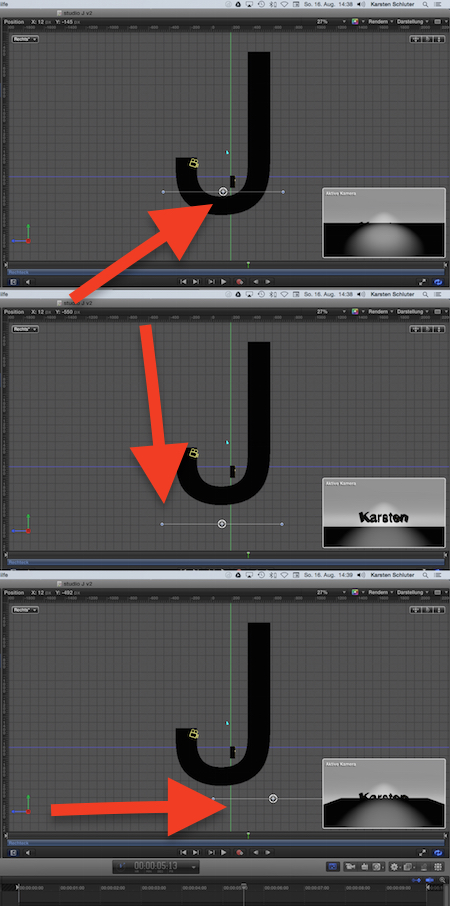
Guess, the screenshot needs some explanation, what you see is my silly idea to create a 3D-studio-set
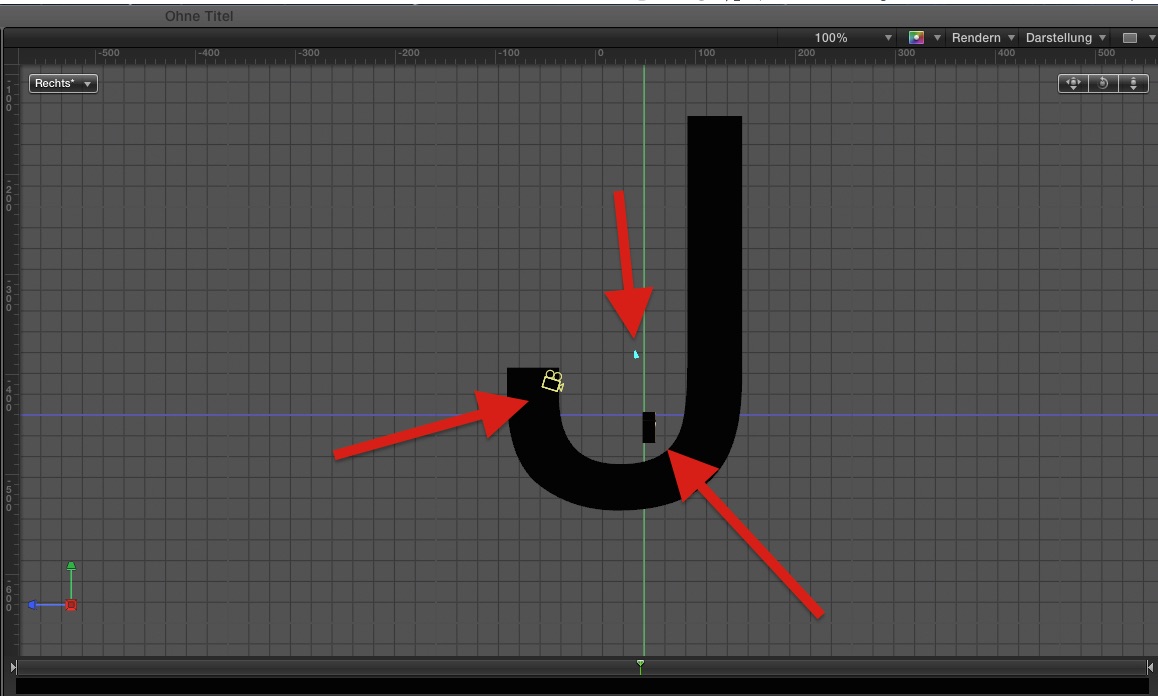
I want kind of an endless set; over here this is called a 'vouté', not sure if this is international lingo too, the floor raises in a smooth curve to the background.
"You can not create 3D curves in Motion 5!"
Me not, but Cupertino has: I resized a 'J' bei some thousand percent; then I put camera, light and subject into it.
which results in this:
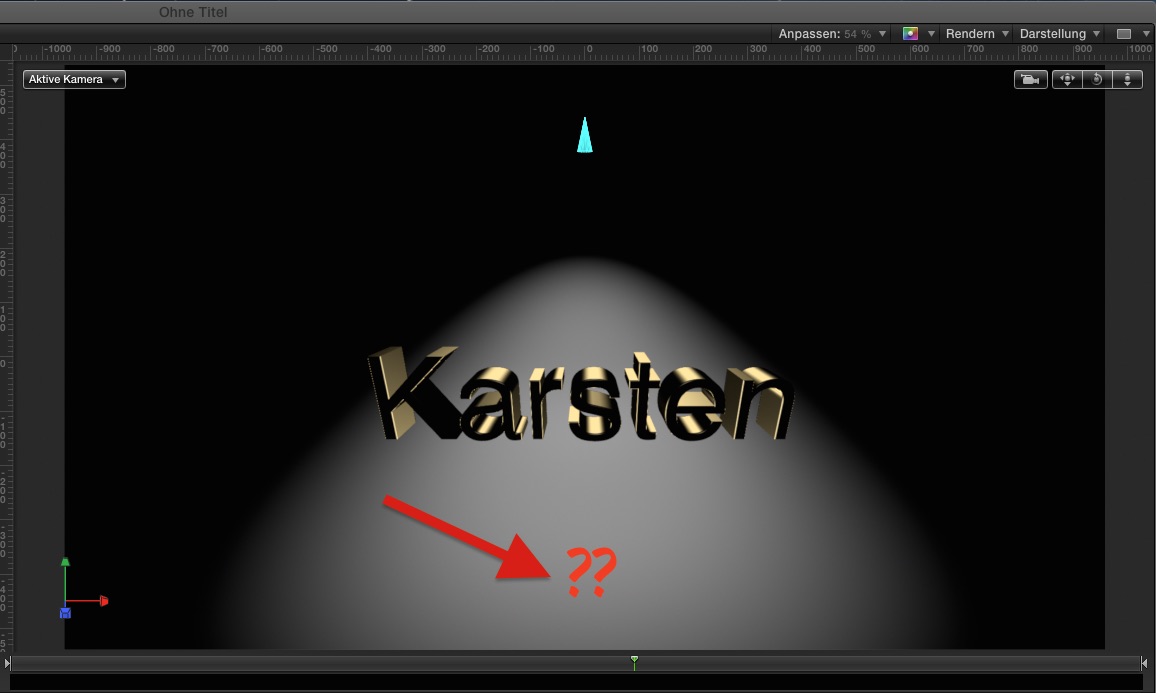
The light/spot is exactly over the word; shadows IN the letters, but no shadow on the 'floor'; switched any 'shadow' checkbox I can find - no shadow.
What am I missing here?
I want kind of an endless set; over here this is called a 'vouté', not sure if this is international lingo too, the floor raises in a smooth curve to the background.
"You can not create 3D curves in Motion 5!"
Me not, but Cupertino has: I resized a 'J' bei some thousand percent; then I put camera, light and subject into it.
which results in this:
The light/spot is exactly over the word; shadows IN the letters, but no shadow on the 'floor'; switched any 'shadow' checkbox I can find - no shadow.
What am I missing here?
Last edit: 15 Aug 2015 13:58 by Karsten Schlüter.
Please Log in to join the conversation.


15 Aug 2015 17:51 - 15 Aug 2015 17:52 #67472
by BenB
Replied by BenB on topic Get no shadows /weird idea: my studio is a J
If the light and/or the object being lit is too far away from the background surface, there will be no shadow. Or, the light is not shining directly through the object, but from the side of the object being lit. Also, be sure you're using a spot light to get the best shadows.
Can I get a copy of this Motion project from you? I'd like to play around with this.
Can I get a copy of this Motion project from you? I'd like to play around with this.
Last edit: 15 Aug 2015 17:52 by BenB.
Please Log in to join the conversation.
- Karsten Schlüter
-
Topic Author
- Offline
- Moderator
-
Less
More
- Posts: 3790
- Thank you received: 718
16 Aug 2015 07:32 - 16 Aug 2015 07:35 #67479
by Karsten Schlüter
Replied by Karsten Schlüter on topic Get no shadows /weird idea: my studio is a J
Good morning America,
sorry for answering late, but your timezone, my timezone ....
for sure, attached to this post, tiny file:
And I tried your suggestions about adjusting the light ... doesn't work yet ... maybe you can enlighten me <pun intended> ....
hmm sttaching doesn't work ... ??
use my google.drive to dl, click this link
sorry for answering late, but your timezone, my timezone ....
BenB wrote: …Can I get a copy of this Motion project from you? I'd like to play around with this.
for sure, attached to this post, tiny file:
And I tried your suggestions about adjusting the light ... doesn't work yet ... maybe you can enlighten me <pun intended> ....
hmm sttaching doesn't work ... ??
use my google.drive to dl, click this link
Last edit: 16 Aug 2015 07:35 by Karsten Schlüter.
Please Log in to join the conversation.
16 Aug 2015 11:50 #67483
by BenB
Replied by BenB on topic Get no shadows /weird idea: my studio is a J
I don't seem to have "permission" to access Goggle drive. Zip it up and email it to me. benb at bbalser dot com.
Please Log in to join the conversation.
- Karsten Schlüter
-
Topic Author
- Offline
- Moderator
-
Less
More
- Posts: 3790
- Thank you received: 718
16 Aug 2015 11:57 #67485
by Karsten Schlüter
Replied by Karsten Schlüter on topic Get no shadows /weird idea: my studio is a J
sorry for any inconvience ...
signed, sealed, delivered .. no, wrong song, zipped and mailed to your adress!
signed, sealed, delivered .. no, wrong song, zipped and mailed to your adress!
Please Log in to join the conversation.
16 Aug 2015 12:38 - 16 Aug 2015 14:35 #67488
by BenB
Replied by BenB on topic Get no shadows /weird idea: my studio is a J
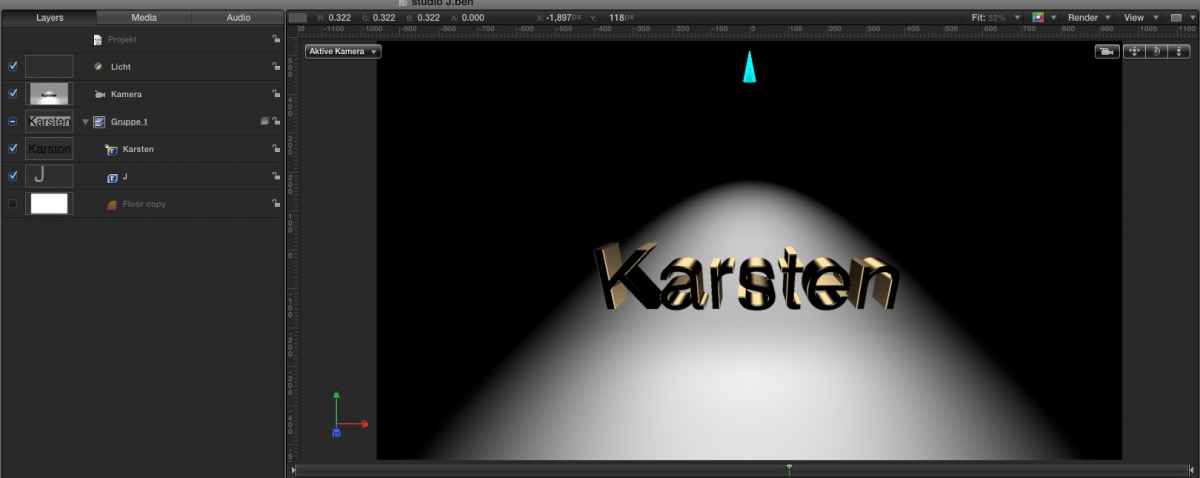
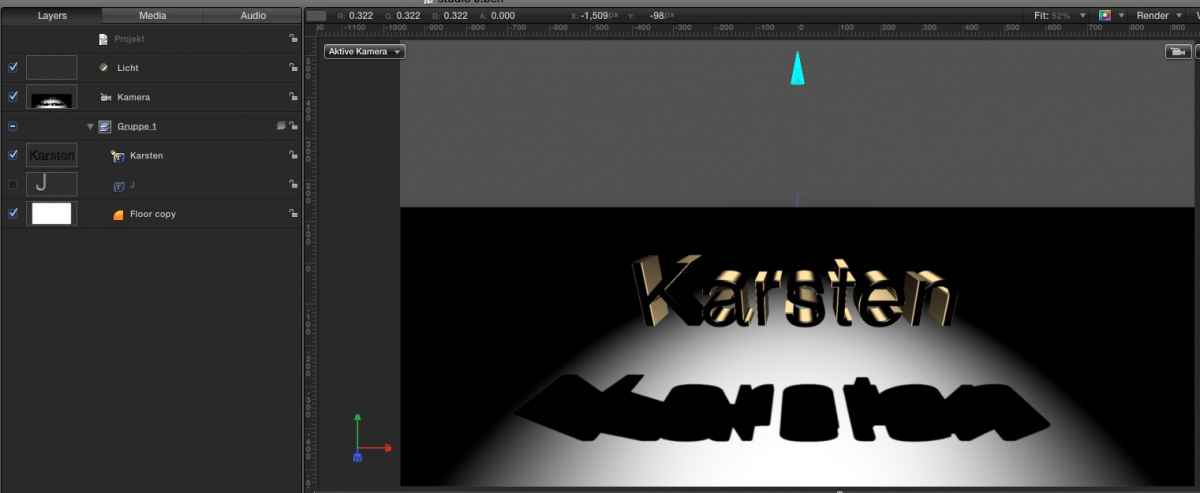
OK, just emailed back an alteration. I made a solid floor (rectangle) which receives the shadow well. But the J still doesn't seem to receive the shadow. After playing with 3D text lighting modes, light adjustments, placement of objects, my conclusion is that the built-in 3D text does not receive shadows from Motion's lights, only from its own built-in sources.
Now, doing this with mObject, it works fine, text in that will cast/receive shadows. This is one of many reasons why I preach owning mObject, even with the built-in 3D titles. The built-ins have severe limitations that mObject doesn't.
Here it is with a 3D letter J being the background (curved floor).
Here it is with a regular rectangle shape as the background (flat floor).
Now, doing this with mObject, it works fine, text in that will cast/receive shadows. This is one of many reasons why I preach owning mObject, even with the built-in 3D titles. The built-ins have severe limitations that mObject doesn't.
Here it is with a 3D letter J being the background (curved floor).
Here it is with a regular rectangle shape as the background (flat floor).
Last edit: 16 Aug 2015 14:35 by BenB.
Please Log in to join the conversation.
16 Aug 2015 12:55 #67491
by BenB
Replied by BenB on topic Get no shadows /weird idea: my studio is a J
I am experimenting with creating a curved L shape as a bezier shape layer, smoothing it, and then making it a replicator. Except you get the jaggy-type artifacts of a replicator when the shape is lit, no matter how many points I create. But the shadow is there.
This gives me an idea. I'm going into Modo to create this shape as a true 3D object. Maybe create it 4K size. Then with mObject folks could bring it into Motion/FCPX and use it for the vouté background. Wife and kids going fishing for the day, I may take some time to play around with this. Only thing is you'd need mObject to use it.
If only Motion would handle 3D curves for shapes... feedback form... again...
This gives me an idea. I'm going into Modo to create this shape as a true 3D object. Maybe create it 4K size. Then with mObject folks could bring it into Motion/FCPX and use it for the vouté background. Wife and kids going fishing for the day, I may take some time to play around with this. Only thing is you'd need mObject to use it.
If only Motion would handle 3D curves for shapes... feedback form... again...
Please Log in to join the conversation.
- Karsten Schlüter
-
Topic Author
- Offline
- Moderator
-
Less
More
- Posts: 3790
- Thank you received: 718
16 Aug 2015 13:30 #67494
by Karsten Schlüter
Replied by Karsten Schlüter on topic Get no shadows /weird idea: my studio is a J
thanks for your interest in this tiny ... 'DIY' set
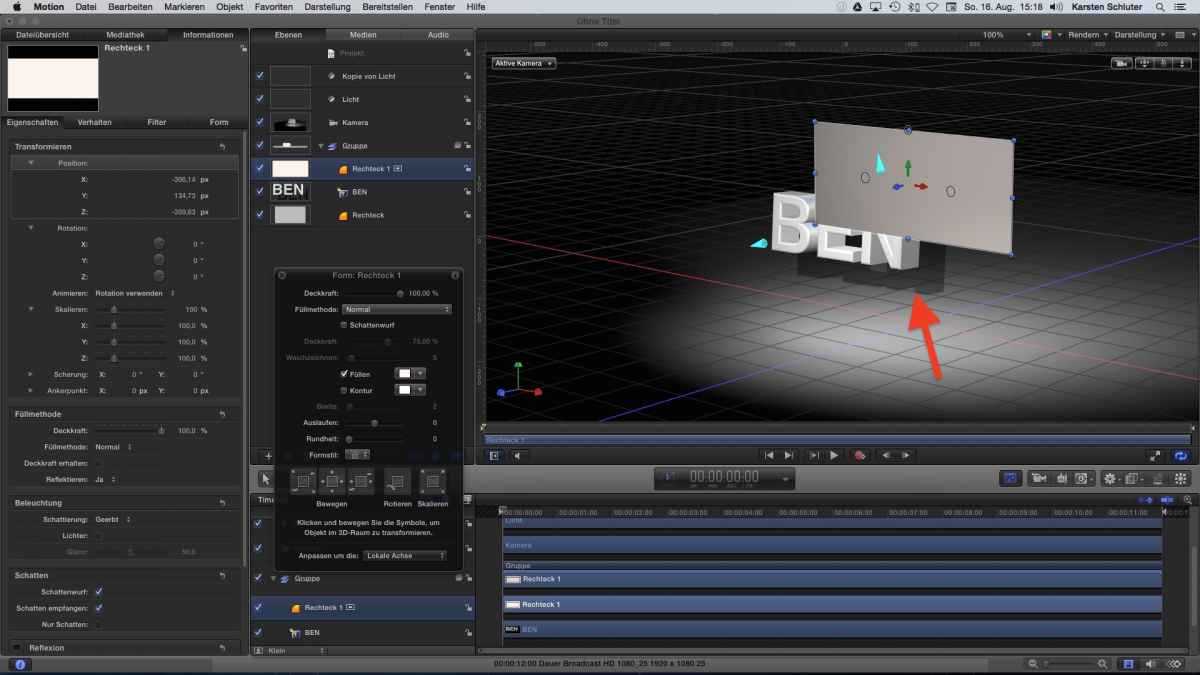
WhatI tried meanwhile is that:
I added a 'floor' to to the scene.
In my humble understanding of the arrangement of elements in that scenery, the floor right under the subject should show shadows - no, in the Active Camera perspective, it isn't under the word but above!
I have to lower it under the J, to get it 'under' the word...
... Aspirin please.....
To make things worse:
added a 'wall' and a second, frontal light - no shadows. And to make things finally gaga: by coordinates, the 'wall' is behind the 3D text (z-axis), but 'by view' before it.
When I switch ON the enviroment light settings in the 3D text editor/info pane, then there is some sort of shadow (red arrow ... somewhere....
fun fact: I do! :silly:
And there, something 'above' or 'under' something IS above or under ... let alone shadows where shadows should be ...
Another observation: the light beam in my OP DOES follow the curve of the J, it's not a circle, but correctly 'distorted' in 3D space....<sigh>
I dare to say:
3D titles are excellent - as 3D titles.
.... it was ne of those rainy sunday afternoon idea of mine, but now... real life asks for doing something else.
PS:
the shadow in your example is wrong: light from that direction should produce 'boxes' not letters ...
Thanks for your set and time!
WhatI tried meanwhile is that:
I added a 'floor' to to the scene.
In my humble understanding of the arrangement of elements in that scenery, the floor right under the subject should show shadows - no, in the Active Camera perspective, it isn't under the word but above!
I have to lower it under the J, to get it 'under' the word...
... Aspirin please.....
To make things worse:
added a 'wall' and a second, frontal light - no shadows. And to make things finally gaga: by coordinates, the 'wall' is behind the 3D text (z-axis), but 'by view' before it.
When I switch ON the enviroment light settings in the 3D text editor/info pane, then there is some sort of shadow (red arrow ... somewhere....
doing this with mObject, it works fine, text in that will cast/receive shadows. This is one of many reasons why I preach owning mObject
fun fact: I do! :silly:
And there, something 'above' or 'under' something IS above or under ... let alone shadows where shadows should be ...
Another observation: the light beam in my OP DOES follow the curve of the J, it's not a circle, but correctly 'distorted' in 3D space....<sigh>
I dare to say:
3D titles are excellent - as 3D titles.
.... it was ne of those rainy sunday afternoon idea of mine, but now... real life asks for doing something else.
PS:
the shadow in your example is wrong: light from that direction should produce 'boxes' not letters ...
Thanks for your set and time!
Please Log in to join the conversation.
- Karsten Schlüter
-
Topic Author
- Offline
- Moderator
-
Less
More
- Posts: 3790
- Thank you received: 718
16 Aug 2015 13:42 #67497
by Karsten Schlüter
We should more frequently sent them ... away.
Gives us more time for the 'important things' in life... LOL
Please post your findings here or on your website ... I assume, you will find some funny facts ...
Replied by Karsten Schlüter on topic Get no shadows /weird idea: my studio is a J
... Wife and kids going fishing for the day, I may take some time to play around with this ...
We should more frequently sent them ... away.
Gives us more time for the 'important things' in life... LOL
Please post your findings here or on your website ... I assume, you will find some funny facts ...
Please Log in to join the conversation.
16 Aug 2015 14:26 - 16 Aug 2015 14:37 #67498
by BenB
Replied by BenB on topic Get no shadows /weird idea: my studio is a J
I did find that switching my floor rectangle on and off made the J 3D letter itself, and the lighting, take on different characteristics. When I switch on both, I have two light spots lit up in the scene, but with only one spot light source. More on this in a moment.
"the shadow in your example is wrong: light from that direction should produce 'boxes' not letters ..."
No, the shadow should be the shape of the object, just like real world shadows. They are in fact correct. Moving the light changes the shape/perspective of the shadows as it should. The letter A should give me a shadow that looks like light blocked from an A shape, not a square. Bare in mind I have that spot light at an angle, it isn't perfectly straight down on the letters. Even if it was, the beams of light all come from one source "spot", they're not parallel, thus they will be angled anyway, and should in fact look as they do.
"The light beam in my OP DOES follow the curve of the J, it's not a circle, but correctly 'distorted' in 3D space...."
Yes, the light does follow correctly, but the shadows are not being received with the light. With a smaller, more "normal" sized letter, I don't see the spot light lighting it up very well, or properly. Again, my conclusion about the 3D render engine in Motion in a moment.
"The light beam in my OP DOES follow the curve of the J, it's not a circle, but correctly 'distorted' in 3D space...."
Correct, you have to position things, they don't magically appear where you want them. And act strongly when 3D titles are introduced to the 3D Group.
After much experimenting this morning, I've concluded that when you introduce 3D titles, into a 3D Group, alignment of objects act differently than in a Group without 3D titles does. Very odd, but seems some sort of programming thing. I'd "speculate" that the 3D modeling engine the 3D titles use is not yet complete, and we may see more 3D object implementation in Motion. Well, one could hope, but I'm not holding my breath...
"the shadow in your example is wrong: light from that direction should produce 'boxes' not letters ..."
No, the shadow should be the shape of the object, just like real world shadows. They are in fact correct. Moving the light changes the shape/perspective of the shadows as it should. The letter A should give me a shadow that looks like light blocked from an A shape, not a square. Bare in mind I have that spot light at an angle, it isn't perfectly straight down on the letters. Even if it was, the beams of light all come from one source "spot", they're not parallel, thus they will be angled anyway, and should in fact look as they do.
"The light beam in my OP DOES follow the curve of the J, it's not a circle, but correctly 'distorted' in 3D space...."
Yes, the light does follow correctly, but the shadows are not being received with the light. With a smaller, more "normal" sized letter, I don't see the spot light lighting it up very well, or properly. Again, my conclusion about the 3D render engine in Motion in a moment.
"The light beam in my OP DOES follow the curve of the J, it's not a circle, but correctly 'distorted' in 3D space...."
Correct, you have to position things, they don't magically appear where you want them. And act strongly when 3D titles are introduced to the 3D Group.
After much experimenting this morning, I've concluded that when you introduce 3D titles, into a 3D Group, alignment of objects act differently than in a Group without 3D titles does. Very odd, but seems some sort of programming thing. I'd "speculate" that the 3D modeling engine the 3D titles use is not yet complete, and we may see more 3D object implementation in Motion. Well, one could hope, but I'm not holding my breath...
Last edit: 16 Aug 2015 14:37 by BenB.
Please Log in to join the conversation.
- Karsten Schlüter
-
Topic Author
- Offline
- Moderator
-
Less
More
- Posts: 3790
- Thank you received: 718
16 Aug 2015 17:56 - 16 Aug 2015 18:17 #67501
by Karsten Schlüter
No, not in my world, have a look:
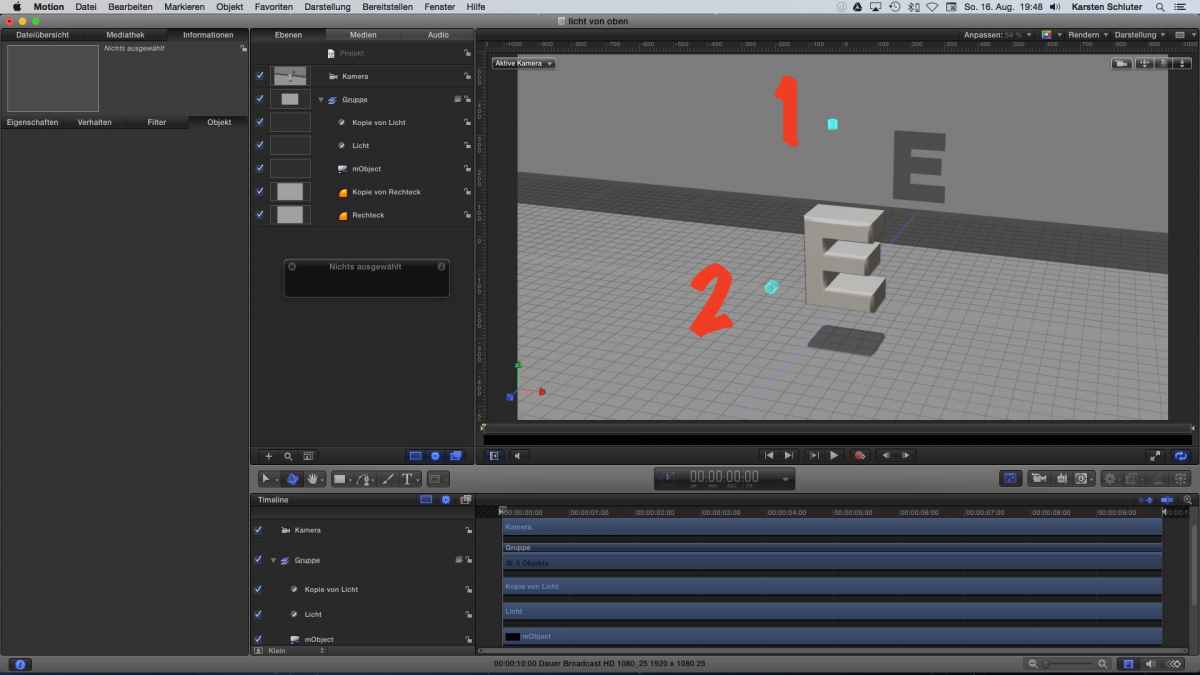
The top-light beams down, a new front-light in z-space:
The z-light #2 creates a copy of the letter, correct.
But the light from top #1 can only produce a square ...
so, in my original set-up, I expected a black 'bar', somethin' ...
3D done in mObject ....
Done in a minute ... much esaier then abusing single letters ... crazy idea of mine!!
addendum
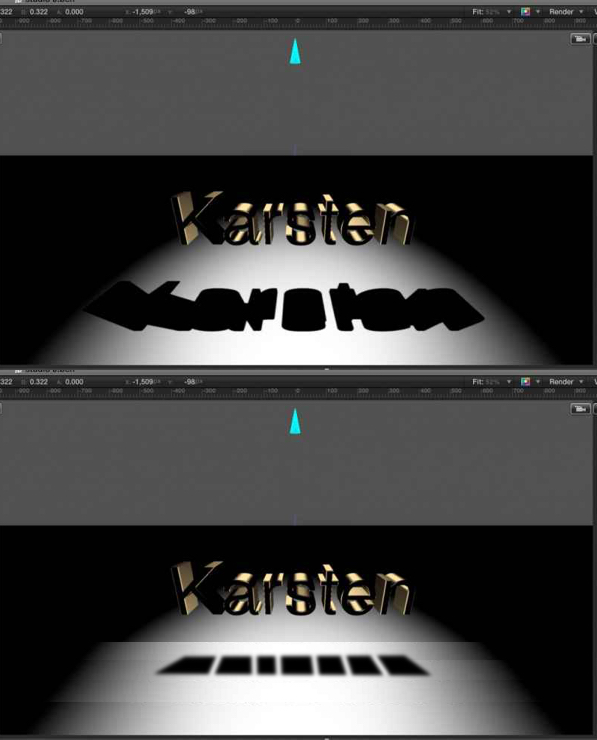
a toplight doesn't produce a copy of the lletters ...
Replied by Karsten Schlüter on topic Get no shadows /weird idea: my studio is a J
No, the shadow should be the shape of the object, just like real world shadows. They are in fact correct.
No, not in my world, have a look:
The top-light beams down, a new front-light in z-space:
The z-light #2 creates a copy of the letter, correct.
But the light from top #1 can only produce a square ...
so, in my original set-up, I expected a black 'bar', somethin' ...
3D done in mObject ....
Done in a minute ... much esaier then abusing single letters ... crazy idea of mine!!
addendum
a toplight doesn't produce a copy of the lletters ...
Last edit: 16 Aug 2015 18:17 by Karsten Schlüter.
Please Log in to join the conversation.
16 Aug 2015 18:55 - 16 Aug 2015 20:30 #67503
by BenB
Replied by BenB on topic Get no shadows /weird idea: my studio is a J
Did you read where I said my spot light was angled?
Plus, in your final image, there are not perfect squares, each letter's shadow is shaped differently due to spot light beams hitting them at angles. "Angles", there's no perfect square. Yes, you can force it with a single square shaped letter, but not with a whole word or when you angle the spot light. Besides, square shadows are boring, angle your light to give some character to the effect.
Yep, mObject is still very much needed in a motion graphics arsenal.
Plus, in your final image, there are not perfect squares, each letter's shadow is shaped differently due to spot light beams hitting them at angles. "Angles", there's no perfect square. Yes, you can force it with a single square shaped letter, but not with a whole word or when you angle the spot light. Besides, square shadows are boring, angle your light to give some character to the effect.
Yep, mObject is still very much needed in a motion graphics arsenal.
Last edit: 16 Aug 2015 20:30 by BenB.
Please Log in to join the conversation.
