


- Posts: 37
- Thank you received: 1
3 Post Moderation Rule for New Boarders (25 Jan 2021)
New boarders will have their posts moderated - Don't worry if you cannot see your post immediately.
simulate glass on a screen
23 Feb 2015 20:06 #60307
by Xan
simulate glass on a screen was created by Xan
Could you advise me how to simulate glass reflection on a screen in Motion?
Thanks
Thanks
Please Log in to join the conversation.

23 Feb 2015 21:14 #60309
by BenB
Replied by BenB on topic simulate glass on a screen
Not to difficult at all. This free article may help as a good starting point.
www.macprovideo.com/hub/motion/floor-ref...ns-in-apple-motion-5
www.macprovideo.com/hub/motion/floor-ref...ns-in-apple-motion-5
Please Log in to join the conversation.
24 Feb 2015 10:52 #60327
by Xan
Replied by Xan on topic simulate glass on a screen
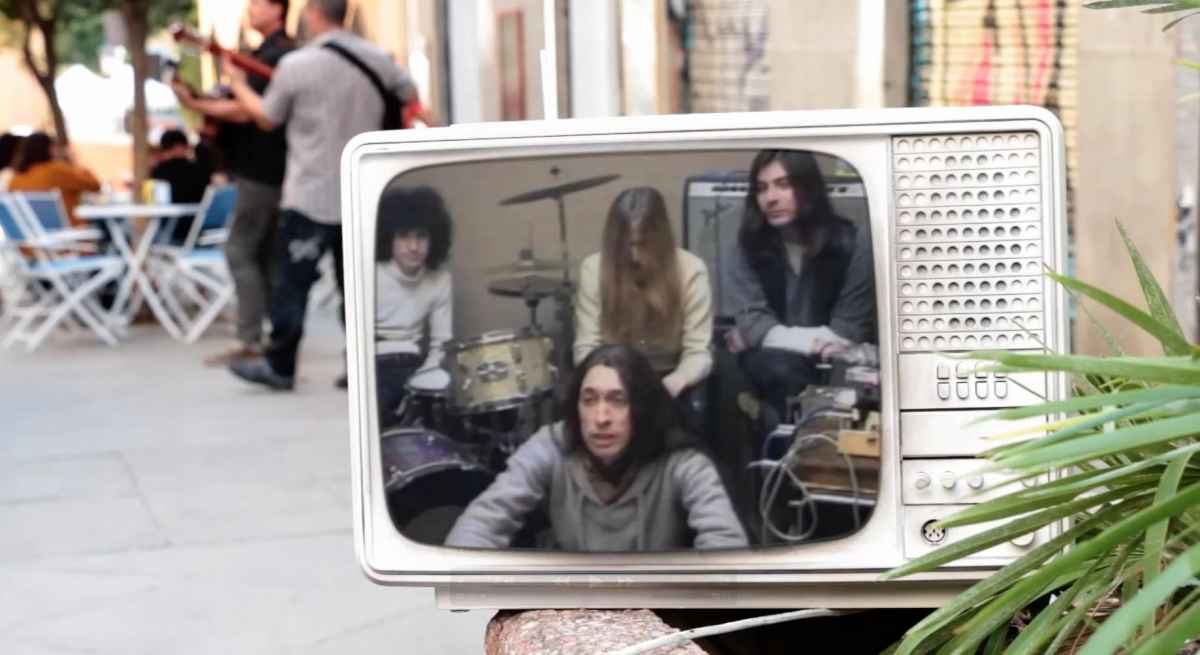
Thanks BenB, but I did a screen tv replacement and I want to give more realism to the effect, I wondered if i could make sparks or reflections from the image that I´ve integrated on the tv. Do you know any tutorial that can help me
Thanks again
Thanks again
Please Log in to join the conversation.
24 Feb 2015 12:26 #60332
by BenB
Replied by BenB on topic simulate glass on a screen
Ah, ok, you want to make the fake image on the TV screen reflect like glass. Try taking that layer, in the Inspector, Properties, have you turned on Reflection? If so, what is there in the project to reflect off of it? You may want to create a light or two, to fake light reflections from the surrounding video.
Please Log in to join the conversation.
- Karsten Schlüter
-

- Offline
- Moderator
-

Less
More
- Posts: 3790
- Thank you received: 718
24 Feb 2015 15:17 #60354
by Karsten Schlüter
The glas of a screen doesn't reflect the content of it but the surrounding enviroment.
For our latest school project, kids asked for a "magic mirror" = we recorded with TWO cams simultaneously, later FCPX, 2nd cam cropped and transformed for illusion of perspective = done.
So, theoretically you would need the counter perspective. Or, old trick from the Masters from 16 th cent: 'reflect ' a window cross, play with comp modes and opacity.
Replied by Karsten Schlüter on topic simulate glass on a screen
Xan wrote: ?....did a screen tv replacement and I want to give more realism to the effect, I wondered if i could make sparks or reflections from the image that I´ve integrated on the tv. ...
The glas of a screen doesn't reflect the content of it but the surrounding enviroment.
For our latest school project, kids asked for a "magic mirror" = we recorded with TWO cams simultaneously, later FCPX, 2nd cam cropped and transformed for illusion of perspective = done.
So, theoretically you would need the counter perspective. Or, old trick from the Masters from 16 th cent: 'reflect ' a window cross, play with comp modes and opacity.
Please Log in to join the conversation.
- Karsten Schlüter
-
- Offline
- Moderator
-
Less
More
- Posts: 3790
- Thank you received: 718
24 Feb 2015 17:46 #60372
by Karsten Schlüter
Replied by Karsten Schlüter on topic simulate glass on a screen
Pic is way too crisp, has way too much contrasts.
Add a bit of gaussian, color correct, turn down contrasts and saturations, raise brightness
If you insist on reflexions you could add a very soft, hand painted 'stroke' of white upon it to simulate glare, turn down opacity of that layer, try the comp modes Multiply or Add or Luma ....
Just google some real life pics and get inspired.
A real surface would reflect pedastrians walking by - pretty sure, your second unit forgot that :blink:
Add a bit of gaussian, color correct, turn down contrasts and saturations, raise brightness
If you insist on reflexions
you could add a very soft, hand painted 'stroke' of white upon it to simulate glare, turn down opacity of that layer, try the comp modes Multiply or Add or Luma ....Just google some real life pics and get inspired.
A real surface would reflect pedastrians walking by - pretty sure, your second unit forgot that :blink:
Please Log in to join the conversation.
24 Feb 2015 17:58 #60376
by Xan
Replied by Xan on topic simulate glass on a screen
Thanks! It´s a very old video of a musical program. I´ll try!
Please Log in to join the conversation.
- Karsten Schlüter
-
- Offline
- Moderator
-
Less
More
- Posts: 3790
- Thank you received: 718
24 Feb 2015 18:03 #60379
by Karsten Schlüter
Apply the Bad Tv effectt to 'pronounce' its age!
And, as mentioned, play with the color corrections, has to be 'softer' on an old tube telly.
Replied by Karsten Schlüter on topic simulate glass on a screen
Xan wrote: Thanks! It´s a very old video of a musical program. I´ll try!
Apply the Bad Tv effectt to 'pronounce' its age!
And, as mentioned, play with the color corrections, has to be 'softer' on an old tube telly.
Please Log in to join the conversation.


19 Mar 2015 10:49 - 19 Mar 2015 10:52 #61563
by Deyson
Replied by Deyson on topic simulate glass on a screen
Hello and good day.
To add on to the previous comments. I would recommend to turn on reflection on the layer in the TV and then add an image of the background behind the Motion 3D camera. I would use the same image you have in the background and scale it and flip it. I would then blur the image or add blur on the reflection effect itself to hide the fact that it is the same image as the background and also to add some depth of field. The best would be if you shot some video of where the TV was facing to.
On the reflection layer itself I would adjust the blur amount and Blend Mode. I usually use Add Blend mode.
Here is a quick video showing how I added some reflection to the FCPX template I am working on:
quick.as/1lota6eq
In 3D programs we usually add an HDR image on the sky or environment. Since Motion does not have this capability ( that I know of ) this is a cheat of the same theory.
Also I would add some inner shadow on the edges of the screen to fake a little curve.
Please let me know if this helps. Have an amazing day!
To add on to the previous comments. I would recommend to turn on reflection on the layer in the TV and then add an image of the background behind the Motion 3D camera. I would use the same image you have in the background and scale it and flip it. I would then blur the image or add blur on the reflection effect itself to hide the fact that it is the same image as the background and also to add some depth of field. The best would be if you shot some video of where the TV was facing to.
On the reflection layer itself I would adjust the blur amount and Blend Mode. I usually use Add Blend mode.
Here is a quick video showing how I added some reflection to the FCPX template I am working on:
quick.as/1lota6eq
In 3D programs we usually add an HDR image on the sky or environment. Since Motion does not have this capability ( that I know of ) this is a cheat of the same theory.
Also I would add some inner shadow on the edges of the screen to fake a little curve.
Please let me know if this helps. Have an amazing day!
Last edit: 19 Mar 2015 10:52 by Deyson.
Please Log in to join the conversation.
20 Mar 2015 18:27 #61624
by Xan
Replied by Xan on topic simulate glass on a screen
Amazing tip!! Thanks!!
Please Log in to join the conversation.
20 Mar 2015 18:57 - 20 Mar 2015 19:03 #61628
by BenB
Replied by BenB on topic simulate glass on a screen
Nice tip! I'm going to experiment with using lights in Motion, through a gobo created with shapes inside of Motion. Similar to this, but for the purpose of creating the illusion of reflection.
www.macprovideo.com/hub/motion/faking-li...-video-with-motion-5
But nice tip putting reflection on the Group with an image created for this.
I think, if you used mObject, you could do actually do this in the traditional 3D environment modeling tools. I've not tried it, but I will soon.
Deyson, what is that file you used as the source image to be reflected?
www.macprovideo.com/hub/motion/faking-li...-video-with-motion-5
But nice tip putting reflection on the Group with an image created for this.
I think, if you used mObject, you could do actually do this in the traditional 3D environment modeling tools. I've not tried it, but I will soon.
Deyson, what is that file you used as the source image to be reflected?
Last edit: 20 Mar 2015 19:03 by BenB.
Please Log in to join the conversation.
20 Mar 2015 20:39 #61635
by Deyson
Replied by Deyson on topic simulate glass on a screen
You are very welcome!
Please Log in to join the conversation.
20 Mar 2015 20:46 #61636
by Deyson
Replied by Deyson on topic simulate glass on a screen
Thank you Ben B. I would love to see what results you get.
I do not remember where I got that exact file. You could create your own in Motion as I have done before. Create some simple shapes and place them in different place in 3D facing your object.
Or google search and download one that looks familiar. There are free ones and paid ones. Just make sure it is big, at least over 3000px, to reduce resolution loss on the reflection itself since the HDR image needs to be placed at a distance and scaled up.
Here is the search I would do:
www.google.com/search?q=hdr+image&client...age&revid=1388184014
I do not remember where I got that exact file. You could create your own in Motion as I have done before. Create some simple shapes and place them in different place in 3D facing your object.
Or google search and download one that looks familiar. There are free ones and paid ones. Just make sure it is big, at least over 3000px, to reduce resolution loss on the reflection itself since the HDR image needs to be placed at a distance and scaled up.
Here is the search I would do:
www.google.com/search?q=hdr+image&client...age&revid=1388184014
Please Log in to join the conversation.
