


- Posts: 265
- Thank you received: 7
3 Post Moderation Rule for New Boarders (25 Jan 2021)
New boarders will have their posts moderated - Don't worry if you cannot see your post immediately.
Any reason my tracks on the timeline don't match up with the tracks on the left panel?
- bradywurtz
-
 Topic Author
- Offline
- Elite Member
-

Less
More
09 Jan 2015 12:24 #58222
by bradywurtz
Any reason my tracks on the timeline don't match up with the tracks on the left panel? was created by bradywurtz
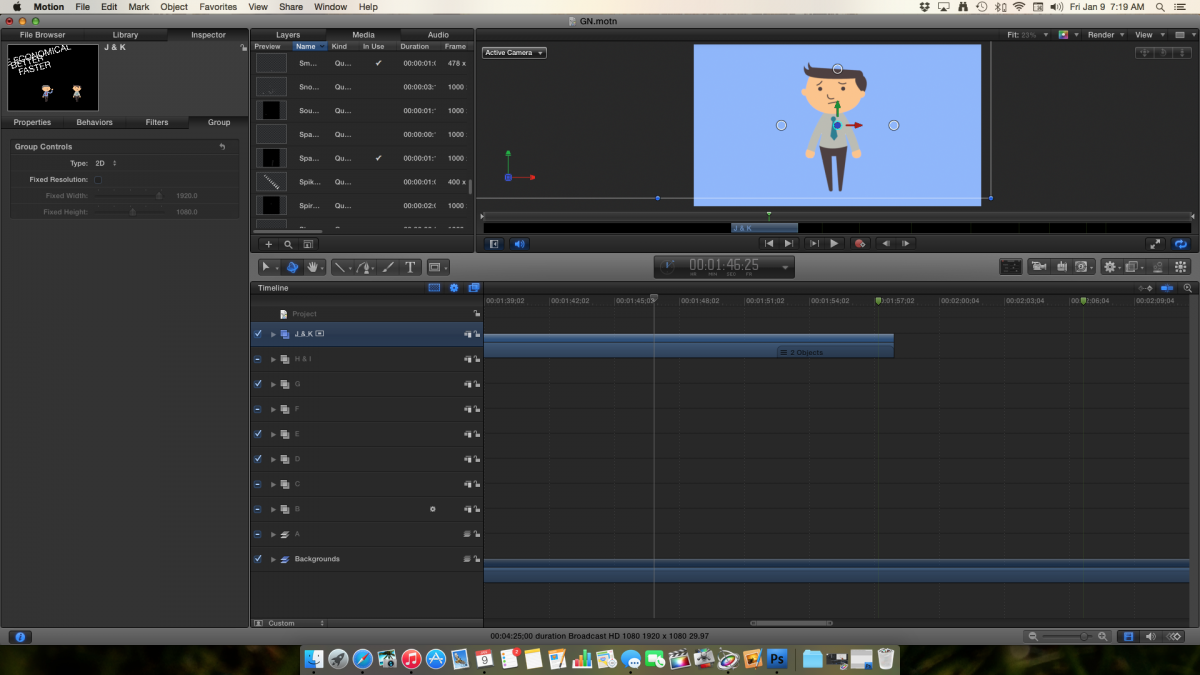
I don't know if this is how it always is, or if someone my Motion got corrupt and started doing this to me. But basically on the bottom right of the window where we have the timeline, my tracks don't line up with the labels of the tracks to the left of them. I have an image to display what i'm talking about. You can see that group 'J&K' is highlighted and you can see group 'J&K' represented on the timeline to the right of it. but you'll notice it's like offset half way off of it. not sure what i did but can someone help me fix this? it started off as just annoying aesthetically, but now i'm accidentally clicking on wrong tracks to make adjustments and i'm getting all turned around!
Please Log in to join the conversation.
- bradywurtz
-
Topic Author
- Offline
- Elite Member
-
Less
More
- Posts: 265
- Thank you received: 7
09 Jan 2015 12:24 #58223
by bradywurtz
Replied by bradywurtz on topic Any reason my tracks on the timeline don't match up with the tracks on the left panel?
it would help if i attach the photo. here ya go
Please Log in to join the conversation.

11 Jan 2015 04:11 #58305
by BenB
Replied by BenB on topic Any reason my tracks on the timeline don't match up with the tracks on the left panel?
That is odd. I've noticed it only once on the latest version of Motion, just the other day. No clue, some GUI bug. I filled out the feedback form to report the bug. I just saved, quit, relaunched and the interface was cleaned up again.
Please Log in to join the conversation.
- bradywurtz
-
Topic Author
- Offline
- Elite Member
-
Less
More
- Posts: 265
- Thank you received: 7
13 Jan 2015 21:13 #58402
by bradywurtz
Replied by bradywurtz on topic Any reason my tracks on the timeline don't match up with the tracks on the left panel?
I'm filling out a feedback form as well. I've saved, quit and relaunched the interface as well but it's just the same. I even tried resetting the preferences in Motion, and it still hasn't fixed the issue. The only thing i can think of is just uninstalling and installing it back from the App store. But i might wait until I'm finished with my current project before doing that just to be safe.
Please Log in to join the conversation.
