


- Posts: 582
- Thank you received: 5
3 Post Moderation Rule for New Boarders (25 Jan 2021)
New boarders will have their posts moderated - Don't worry if you cannot see your post immediately.
Motion track track point moving out of picture
04 Dec 2014 18:09 #56936
by Neguah
Motion track track point moving out of picture was created by Neguah
I open a door, and inside I want to put a image. When opening the door I want the image inside to reveal as I open the door. I tried to motion track the door opening so I could get the mask to follow the edge of the door. Unfortunately the door moves out of the picture, leaving the motion tracking insufficient. I tried moving the mask manually, but that didn't work at all. The mask couldn't follow the movement of the door. Also the door is white, so I don't have much contrast to point the tracker on.
Any suggestions?
Any suggestions?
Please Log in to join the conversation.

04 Dec 2014 18:29 #56938
by BenB
Replied by BenB on topic Motion track track point moving out of picture
Is this opening door an object you animated, or a video clip of a door opening?
Please Log in to join the conversation.
04 Dec 2014 18:40 #56939
by Neguah
Replied by Neguah on topic Motion track track point moving out of picture
It's a video clip.
Please Log in to join the conversation.
04 Dec 2014 21:02 #56942
by Overturf
Replied by Overturf on topic Motion track track point moving out of picture
Can you post the clip, Neguah? A look might help.
You could probably put the stuff you want to reveal as a connected clip on top and then crop it and keyframe the crop? Or for more control apply a four or eight point mask?
Even better: next time just put some green cloth behind the door that you can then key out easily in FCPX!
Good luck
You could probably put the stuff you want to reveal as a connected clip on top and then crop it and keyframe the crop? Or for more control apply a four or eight point mask?
Even better: next time just put some green cloth behind the door that you can then key out easily in FCPX!
Good luck
Please Log in to join the conversation.
04 Dec 2014 21:23 #56946
by Neguah
Replied by Neguah on topic Motion track track point moving out of picture
Both clips are uploading as I'm writing. This is a film for work(kindergarten). I want to put a person inside a heating cabinet. I filmed the person I wanted to put inside in front of a blue wall. I put the clip inside the cabinet, keyed it and made the clip with the person inside and the clip with no person inside as a compound clip. The problem with keyframing the crop is that it won't stick to the movement of the edge of the door. It's all wobbling.
As for the waving girl, I'm going to put her in the ocean. Just need to find some of my summer clips...
Upload complete:
vimeo.com/113648165
vimeo.com/113647578
Password: Hide
As for the waving girl, I'm going to put her in the ocean. Just need to find some of my summer clips...
Upload complete:
vimeo.com/113648165
vimeo.com/113647578
Password: Hide
Please Log in to join the conversation.
05 Dec 2014 02:59 - 05 Dec 2014 03:00 #56954
by BenB
Replied by BenB on topic Motion track track point moving out of picture
OK, I'd take a green or blue sheet and tack it up inside that closet, again the back wall, or half way back. Then re-film it. Chromo-key it.
That's going to be a TON of keyframing work. Keyframe every half second. Then keyframe in between that. Then in-between those, until you get it right. Man, that's going to be tough to do keyframes.
That's going to be a TON of keyframing work. Keyframe every half second. Then keyframe in between that. Then in-between those, until you get it right. Man, that's going to be tough to do keyframes.
Last edit: 05 Dec 2014 03:00 by BenB.
Please Log in to join the conversation.
- Karsten Schlüter
-

- Offline
- Moderator
-

Less
More
- Posts: 3790
- Thank you received: 718
05 Dec 2014 06:05 - 05 Dec 2014 06:11 #56962
by Karsten Schlüter
maybe I'm missing your point but ... :
the movement of the door is so fast, and so blurred, I don't see the need of a nano-inch-precision ... :woohoo:
or, do you want to apply the graphic on the door?
besides: What is MY son doing in YOUR closet?? :lol: :lol:
Replied by Karsten Schlüter on topic Motion track track point moving out of picture
Neguah wrote: I open a door, and inside I want to put a image. When opening the door I want the image inside to reveal as I open the door. …
maybe I'm missing your point but ... :
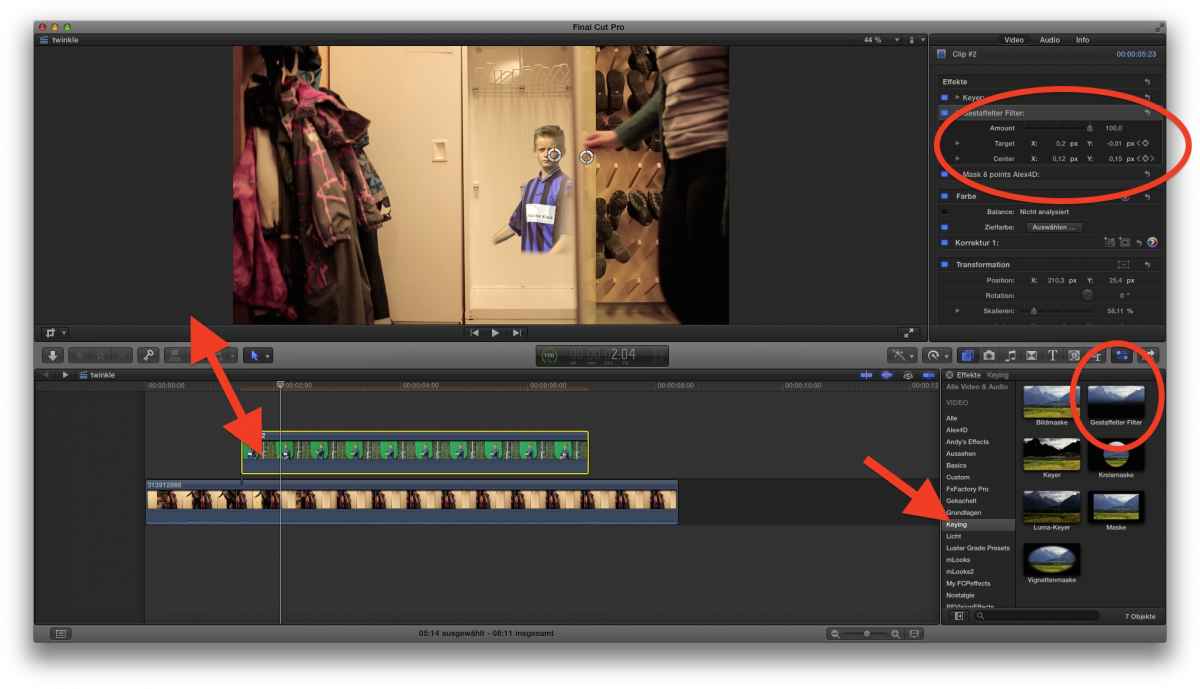
- green-screen (my rough source needs a 8point-dirt-mask ... ) + keying
- adding the Gradient-Mask
- key-framing position of Gradient mask ...
the movement of the door is so fast, and so blurred, I don't see the need of a nano-inch-precision ... :woohoo:
or, do you want to apply the graphic on the door?
besides: What is MY son doing in YOUR closet?? :lol: :lol:
Last edit: 05 Dec 2014 06:11 by Karsten Schlüter.
Please Log in to join the conversation.
05 Dec 2014 08:28 #56971
by Neguah
Replied by Neguah on topic Motion track track point moving out of picture
Many thanks for you advice, Ben and Karsten!
Filming again is not an option for different reasons, so I'll just have to work with what I've got.
I can try doing it again, without the nano-inch-precision
Graphic on the door?
I tried tracking the motion of the door in Motion. But the tracker wouldn't stick to the door. And doing it manually...well, that was impossible. At least I don't know how. I tried, but it was difficult.
Hehe, well, your son helped me out
Filming again is not an option for different reasons, so I'll just have to work with what I've got.
I can try doing it again, without the nano-inch-precision
Graphic on the door?
I tried tracking the motion of the door in Motion. But the tracker wouldn't stick to the door. And doing it manually...well, that was impossible. At least I don't know how. I tried, but it was difficult.
Hehe, well, your son helped me out
Please Log in to join the conversation.
- Karsten Schlüter
-
- Offline
- Moderator
-
Less
More
- Posts: 3790
- Thank you received: 718
05 Dec 2014 08:44 #56972
by Karsten Schlüter
Well, my example, is just two keyframes, start/end.
The movement of the door is so fast, no 'tracking' needed, the inside is shown with farmes..
The problem for the tracker is the blurriness of you recording.-
.. which is, for masking it with the Gradient Mask, an advantage!
(you've seen my attached screenshot, nto the yt.video only?)
Replied by Karsten Schlüter on topic Motion track track point moving out of picture
Neguah wrote: .... But the tracker wouldn't stick to the door. And doing it manually...well, that was impossible. ...
Well, my example, is just two keyframes, start/end.
The movement of the door is so fast, no 'tracking' needed, the inside is shown with farmes..
The problem for the tracker is the blurriness of you recording.-
.. which is, for masking it with the Gradient Mask, an advantage!
(you've seen my attached screenshot, nto the yt.video only?)
Please Log in to join the conversation.
05 Dec 2014 08:49 #56973
by Neguah
Ahh, I get it.. no I didn't see your attached screenshot. Was checking on my phone. But can see it now. Will for sure do that. It doesn't have to be perfect, it's only for the kids and their parents. The problem is, I care I better plan the shot better next time
Replied by Neguah on topic Motion track track point moving out of picture
Karsten Schlüter wrote:
Well, my example, is just two keyframes, start/end.
The movement of the door is so fast, no 'tracking' needed, the inside is shown with farmes..
The problem for the tracker is the blurriness of you recording.-
.. which is, for masking it with the Gradient Mask, an advantage!
(you've seen my attached screenshot, nto the yt.video only?)
Ahh, I get it.. no I didn't see your attached screenshot. Was checking on my phone. But can see it now. Will for sure do that. It doesn't have to be perfect, it's only for the kids and their parents. The problem is, I care
I better plan the shot better next time Please Log in to join the conversation.
05 Dec 2014 19:25 - 05 Dec 2014 19:27 #57009
by Neguah
Replied by Neguah on topic Another tracking point moves out of picture
Have another one:
vimeo.com/113739614
I want to stick my text to the tree on the left side and just disappear when I move the camera. I'm sticking the motion tracker to the text on the white wall on the left side. When the guy closing up on the tracker I stop, click "offset track" and then move the motion tracker to another point. But when the guy are passing the tracker on the text on the white wall the whole thing just stops.
How do I do that?
vimeo.com/113739614
I want to stick my text to the tree on the left side and just disappear when I move the camera. I'm sticking the motion tracker to the text on the white wall on the left side. When the guy closing up on the tracker I stop, click "offset track" and then move the motion tracker to another point. But when the guy are passing the tracker on the text on the white wall the whole thing just stops.
How do I do that?
Last edit: 05 Dec 2014 19:27 by Neguah. Reason: Forgot the link...
Please Log in to join the conversation.
- Karsten Schlüter
-
- Offline
- Moderator
-
Less
More
- Posts: 3790
- Thank you received: 718
06 Dec 2014 05:39 #57020
by Karsten Schlüter
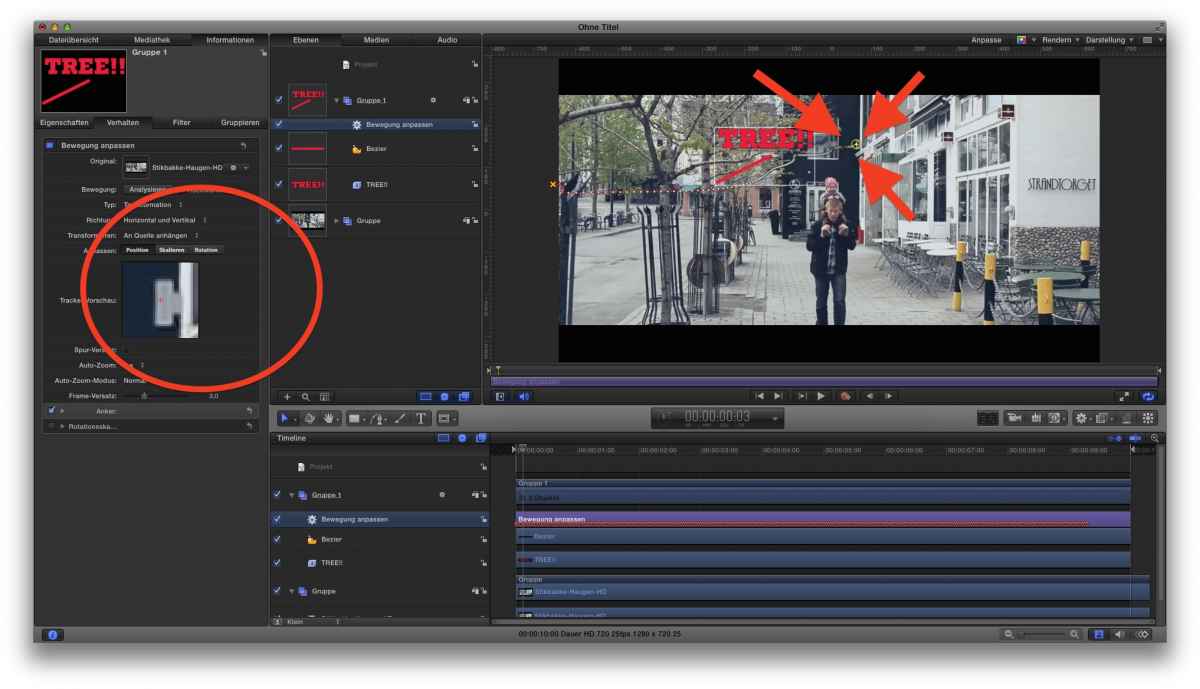
like that?
In this case a no-brainer: Don't track the tree, but something near-by!
See my attached screen-shot
Replied by Karsten Schlüter on topic Another tracking point moves out of picture
Neguah wrote: Have another one:… How do I do that?
like that?
In this case a no-brainer: Don't track the tree, but something near-by!
See my attached screen-shot
Please Log in to join the conversation.
06 Dec 2014 08:39 #57024
by Neguah
Replied by Neguah on topic Another tracking point moves out of picture
It's all about finding the right spot to track... That will work for me.
Feeling so dumb... thank you very much!
Feeling so dumb... thank you very much!
Please Log in to join the conversation.
- Karsten Schlüter
-
- Offline
- Moderator
-
Less
More
- Posts: 3790
- Thank you received: 718
06 Dec 2014 13:15 #57032
by Karsten Schlüter
You're welcome…
Some solutions are TOO obvious .......
Replied by Karsten Schlüter on topic Another tracking point moves out of picture
Neguah wrote: … Feeling so dumb... thank you very much!
You're welcome…
Some solutions are TOO obvious .......
Please Log in to join the conversation.
