


- Posts: 2
- Thank you received: 0
3 Post Moderation Rule for New Boarders (25 Jan 2021)
New boarders will have their posts moderated - Don't worry if you cannot see your post immediately.
Fading transparent box with some text
- rbfigueira
-
 Topic Author
- Offline
- New Member
-

Less
More
14 Aug 2014 10:37 #51289
by rbfigueira
Fading transparent box with some text was created by rbfigueira
Hi,
I am new here and also very green on final cut pro.
What I am trying to do is this simple fading transparent box with some text.
Please see this video (the animation is in beginning at 00:02 - 00:05):
vimeo.com/83478484
I don’t know if I have also to buy the Motion 5 to build this.
Can anyone help me achieve this goal? Can anyone share the solution (sample template)?
Thanks for all
I am new here and also very green on final cut pro.
What I am trying to do is this simple fading transparent box with some text.
Please see this video (the animation is in beginning at 00:02 - 00:05):
vimeo.com/83478484
I don’t know if I have also to buy the Motion 5 to build this.
Can anyone help me achieve this goal? Can anyone share the solution (sample template)?
Thanks for all
Please Log in to join the conversation.

14 Aug 2014 12:49 - 14 Aug 2014 13:01 #51298
by BenB
Replied by BenB on topic Fading transparent box with some text
Would be very easy to do in Motion as a title template.
It could be done in FCPX alone, but not saved as a template, but could be saved as a Compound Clip. Here's how I'd do it in FCPX:
In the Generators, in the Solids group, use the Whites generator, set to Ivory. In the Inspector, Transform section, set Scale X to 70%, Scale Y to 25% (just starting points, tweak as desired), and set Opacity to 15%. Then move it down to the lower left of the frame as you wish.
Use the Basic title template, try out Ariel Hebrew as a starting place with your font, and set it up to look like you wish.
I'd be cautions about what clips you use this on, as it is pure white, and if you place it on a light clip, it may not show up very well. Although enabling the Drop Shadow on the text would help, and I personally prefer it in this situation. It makes the text pop out a bit. But for a more subtle, softer look, leave the Drop Shadow turned off. Applying the Drop Shadow effect to the shape wouldn't' do much, as the opacity is so low already, it won't show up to any useful degree.
And if you wanted to reuse this over and over in that particular production, but don't have Motion, Select the title clip and generator clip, make them a Compound Clip.
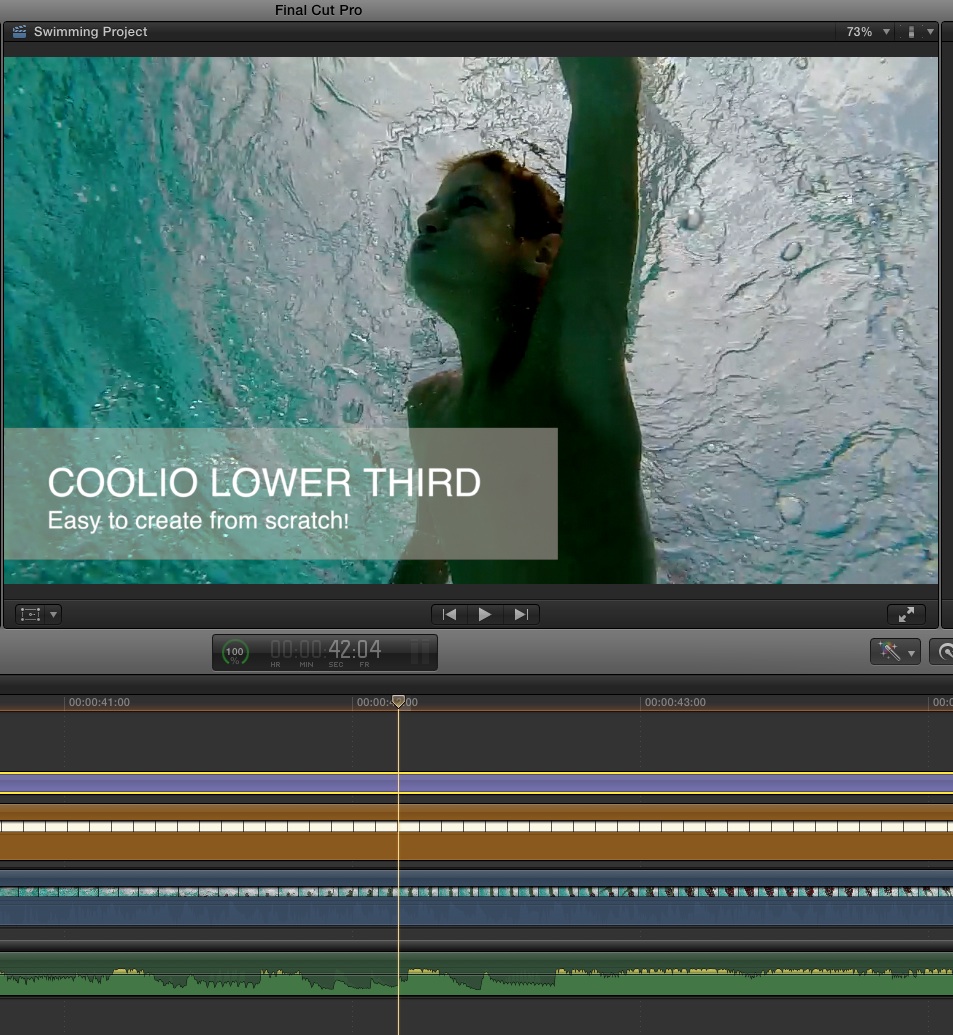
It could be done in FCPX alone, but not saved as a template, but could be saved as a Compound Clip. Here's how I'd do it in FCPX:
In the Generators, in the Solids group, use the Whites generator, set to Ivory. In the Inspector, Transform section, set Scale X to 70%, Scale Y to 25% (just starting points, tweak as desired), and set Opacity to 15%. Then move it down to the lower left of the frame as you wish.
Use the Basic title template, try out Ariel Hebrew as a starting place with your font, and set it up to look like you wish.
I'd be cautions about what clips you use this on, as it is pure white, and if you place it on a light clip, it may not show up very well. Although enabling the Drop Shadow on the text would help, and I personally prefer it in this situation. It makes the text pop out a bit. But for a more subtle, softer look, leave the Drop Shadow turned off. Applying the Drop Shadow effect to the shape wouldn't' do much, as the opacity is so low already, it won't show up to any useful degree.
And if you wanted to reuse this over and over in that particular production, but don't have Motion, Select the title clip and generator clip, make them a Compound Clip.
Last edit: 14 Aug 2014 13:01 by BenB.
Please Log in to join the conversation.
