


- Posts: 213
- Thank you received: 19
3 Post Moderation Rule for New Boarders (25 Jan 2021)
New boarders will have their posts moderated - Don't worry if you cannot see your post immediately.
Masking objects in a graphic
07 Jan 2014 18:04 - 07 Jan 2014 18:05 #38325
by bobmax48
Masking objects in a graphic was created by bobmax48
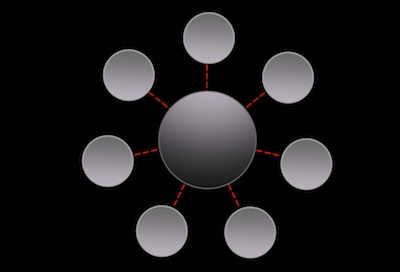
I have created this graphic that consist of 7 replicated circles and one larger circle in the center of the seven circles. There is also type both around the perimeter of each circle and over the circle. I have not shown the type in the photo posted here. This will be over some green screened footage with a background gradient. The circles will be over the lighter part of the gradient. Here is my problem. I originally just made a mask for each circle so that only one circle is highlighted at a time. So six circles will have an opacity of about 10% with one circle at 100%. This transformation will happen seven times, once for each circle. The problem is when I have the footage over the green screened footage with the lighter background then you see the mask's outline. The way the graphic is created in Motion, all of the type is in one group and the seven replicated circles are in another group. What would be a better method of masking the circles other then reducing the opacity of each element so only one circle and its associated type show at 100%. Thank you for any help.
Last edit: 07 Jan 2014 18:05 by bobmax48.
Please Log in to join the conversation.
10 Jan 2014 15:34 #38667
by bobmax48
Replied by bobmax48 on topic Masking objects in a graphic
So no one has a idea of how to do this?
Please Log in to join the conversation.
