


- Posts: 32
- Thank you received: 1
3 Post Moderation Rule for New Boarders (25 Jan 2021)
New boarders will have their posts moderated - Don't worry if you cannot see your post immediately.
Image get cut in motion 5.0.4
01 Oct 2013 12:25 #31847
by namu5583
Image get cut in motion 5.0.4 was created by namu5583
So I build this project using motion 5.0.4, basically it's just a simple crop-opacity-transform animation on a number of elements (type, image, shape). But something weird is happening. One of the images that I animated, became crop in the final export movie. Why is that? I have already change the image dozens of times, but still it happens.
I really need the help to solve this problem. Thank you.
I really need the help to solve this problem. Thank you.

Please Log in to join the conversation.

01 Oct 2013 16:27 #31858
by BenB
Replied by BenB on topic Image get cut in motion 5.0.4
What exactly is being cropped? Do you mean the image inside the red square?
Please Log in to join the conversation.
02 Oct 2013 00:47 #31902
by namu5583
Replied by namu5583 on topic Image get cut in motion 5.0.4
Yes, the image on the red square always get cropped (when exported). thank you.
Please Log in to join the conversation.
02 Oct 2013 05:26 #31914
by BenB
Replied by BenB on topic Image get cut in motion 5.0.4
OK, is that crop moving, as in, is it an animated cropping?
Select that layer, go to the Inspector, to Properties, and watch the sliders in the Crop section. I bet you see them correspond to that crop. My guess is you have some unintentional keyframes set there. It happens to us all from time to time. Look for the gray/yellow keyframe diamonds. Use the arrows to each side to jump through them left and right.
You can also check for unintentional keyframes by selecting that layer, and opening what I call the Keyframe Timeline, or Keyframe Editor. You can open that with the button at the very bottom right of the Motion screen.
The menu at the top left should be set to "Animated" to see only the parameters that have keyframes. Verify nothing is keyframed accidentally or incorrectly.
And make sure the Group that image is in is not cropped, which will carry over to every layer inside the Group.
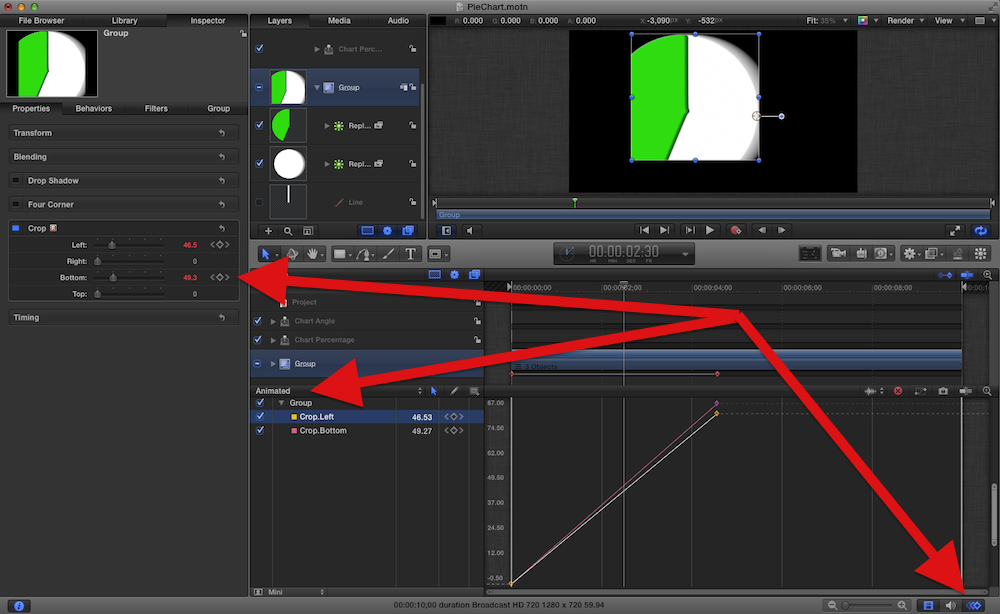
Select that layer, go to the Inspector, to Properties, and watch the sliders in the Crop section. I bet you see them correspond to that crop. My guess is you have some unintentional keyframes set there. It happens to us all from time to time. Look for the gray/yellow keyframe diamonds. Use the arrows to each side to jump through them left and right.
You can also check for unintentional keyframes by selecting that layer, and opening what I call the Keyframe Timeline, or Keyframe Editor. You can open that with the button at the very bottom right of the Motion screen.
The menu at the top left should be set to "Animated" to see only the parameters that have keyframes. Verify nothing is keyframed accidentally or incorrectly.
And make sure the Group that image is in is not cropped, which will carry over to every layer inside the Group.
Please Log in to join the conversation.
02 Oct 2013 07:39 #31920
by namu5583
Replied by namu5583 on topic Image get cut in motion 5.0.4
BenB, thank you for the reply.
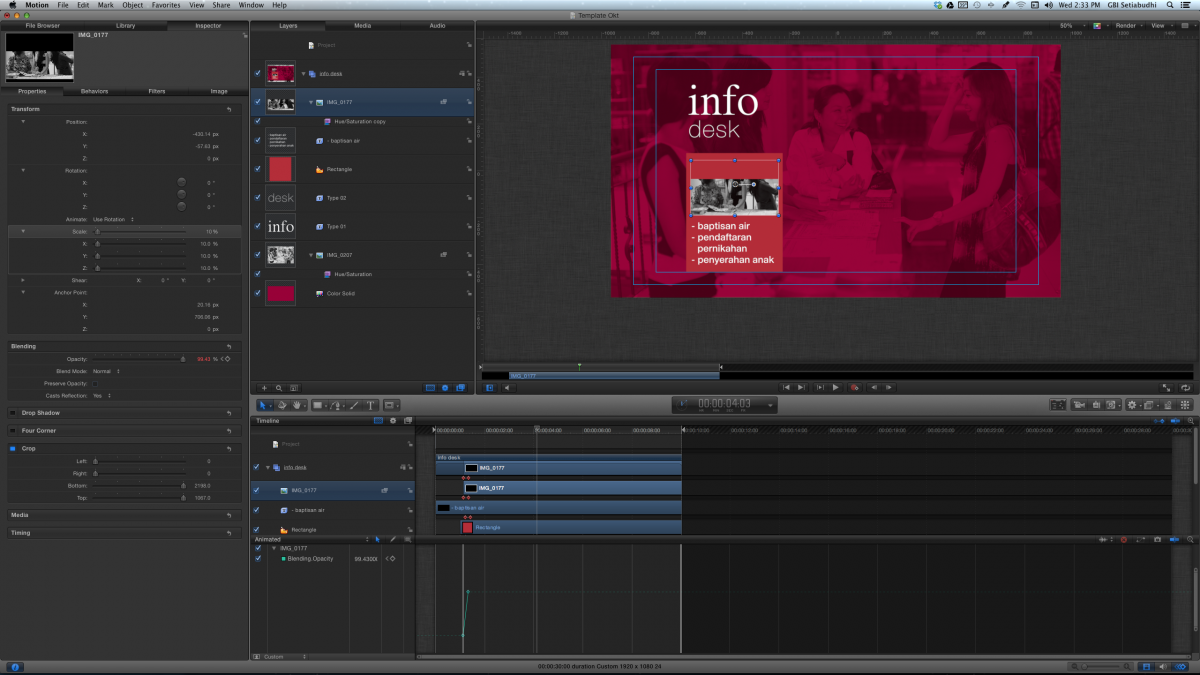
I'm afraid that's not the issue. As you can see on my screen shoot everything looks normal. And I forgot to mention, if I played the project on Motion, everything look normal, but once it is stop (by itself or manually with the space bar key) the image will crop.
I'm afraid that's not the issue. As you can see on my screen shoot everything looks normal. And I forgot to mention, if I played the project on Motion, everything look normal, but once it is stop (by itself or manually with the space bar key) the image will crop.
Please Log in to join the conversation.
02 Oct 2013 08:08 #31923
by namu5583
Replied by namu5583 on topic Image get cut in motion 5.0.4
BenB, I just found the solution. I try to duplicate/copy the group and .... everything went normal. I used to duplicate/copy the image, now I duplicate the whole group. Maybe it's just a glitch. Thanks for the help.
Please Log in to join the conversation.
