




- Posts: 16
- Thank you received: 0
3 Post Moderation Rule for New Boarders (25 Jan 2021)
New boarders will have their posts moderated - Don't worry if you cannot see your post immediately.
Keep a text always centered "on" an object
24 Jul 2013 17:08 #29037
by droeder
Keep a text always centered "on" an object was created by droeder
Dear forum,
last time I posted, I got such a super great help, that I ll try it again right away. I assume it's a walk in the park for you guys, but I'm a newbie to Motion 5.
Task at hand: create a title with a moving object
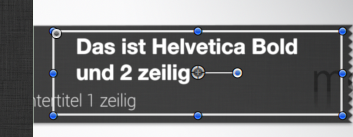
As you can see the greyish block moves from the left corner towards the middle of the screen. On top of that slider - let's call it that way - actually two type of texts will be displayed. The content of the text will be changed in FCPX - edited.
Since they are not always identical in length, the space on the left and right side will always differ.
Question: How do I "center" the text toward the object?
I thought to use a rectangle (which one can see with white outlines - so the text could be centered within the rectangle. Maybe that's a complete foolish approach, but actually I have no clue.
Does anybody know a solution?
last time I posted, I got such a super great help, that I ll try it again right away. I assume it's a walk in the park for you guys, but I'm a newbie to Motion 5.
Task at hand: create a title with a moving object
As you can see the greyish block moves from the left corner towards the middle of the screen. On top of that slider - let's call it that way - actually two type of texts will be displayed. The content of the text will be changed in FCPX - edited.
Since they are not always identical in length, the space on the left and right side will always differ.
Question: How do I "center" the text toward the object?
I thought to use a rectangle (which one can see with white outlines - so the text could be centered within the rectangle. Maybe that's a complete foolish approach, but actually I have no clue.
Does anybody know a solution?
Please Log in to join the conversation.
- Simon Ubsdell
-

- Offline
- Platinum Member
-

Less
More
- Posts: 350
- Thank you received: 337
24 Jul 2013 17:38 - 24 Jul 2013 17:39 #29038
by Simon Ubsdell
Replied by Simon Ubsdell on topic Keep a text always centered "on" an object
You simply need to make sure that you set up the margins for your text to match the area inside the box that you want the text to take up.
And also obviously make sure your text alignment is set to Centred.
Put the text and the box into a group of their own, not the same group as the Title Background, and animate that group so they both move together.
Hope that makes some sort of sense!
And also obviously make sure your text alignment is set to Centred.
Put the text and the box into a group of their own, not the same group as the Title Background, and animate that group so they both move together.
Hope that makes some sort of sense!
Last edit: 24 Jul 2013 17:39 by Simon Ubsdell.
Please Log in to join the conversation.
28 Jul 2013 06:57 #29137
by droeder
Replied by droeder on topic Thanks Simon,
thanks Simon,
I'm not quite sure I fully understood your suggestion. But it's alright, created a workaround
I'm not quite sure I fully understood your suggestion. But it's alright, created a workaround
Please Log in to join the conversation.
