


- Posts: 222
- Thank you received: 3
3 Post Moderation Rule for New Boarders (25 Jan 2021)
New boarders will have their posts moderated - Don't worry if you cannot see your post immediately.
Picture is cropping itself without any settings changed
22 Oct 2012 19:58 - 22 Oct 2012 20:08 #15379
by Rbelfi
Picture is cropping itself without any settings changed was created by Rbelfi
Hey Everyone,
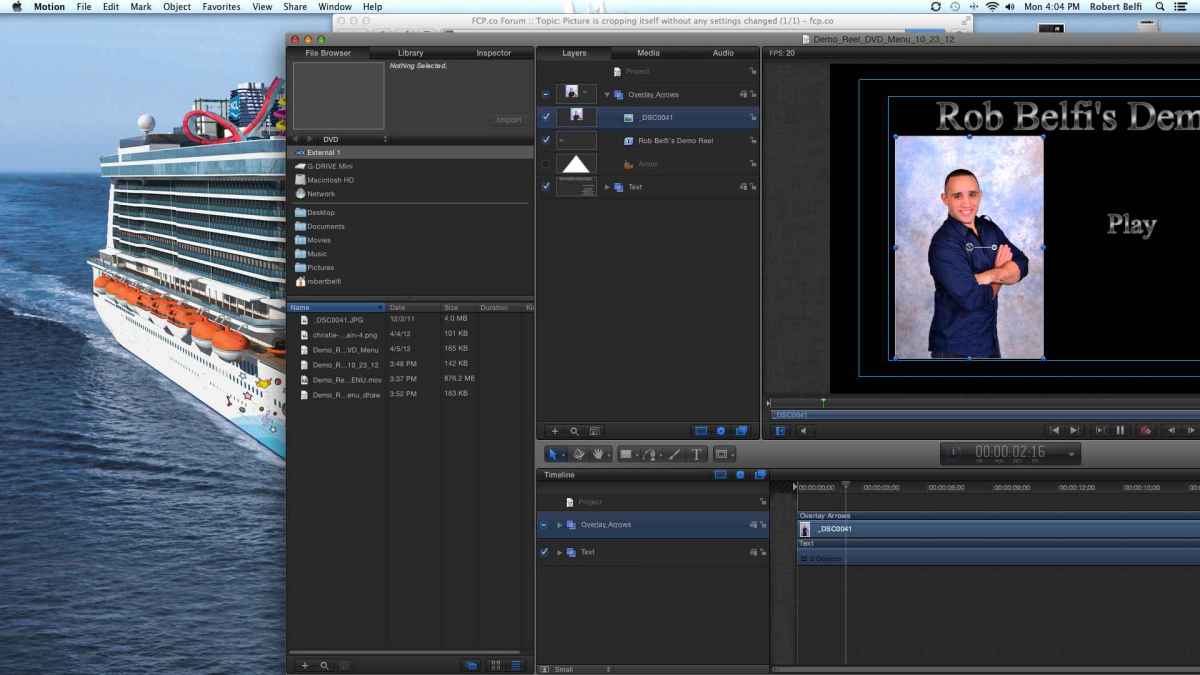
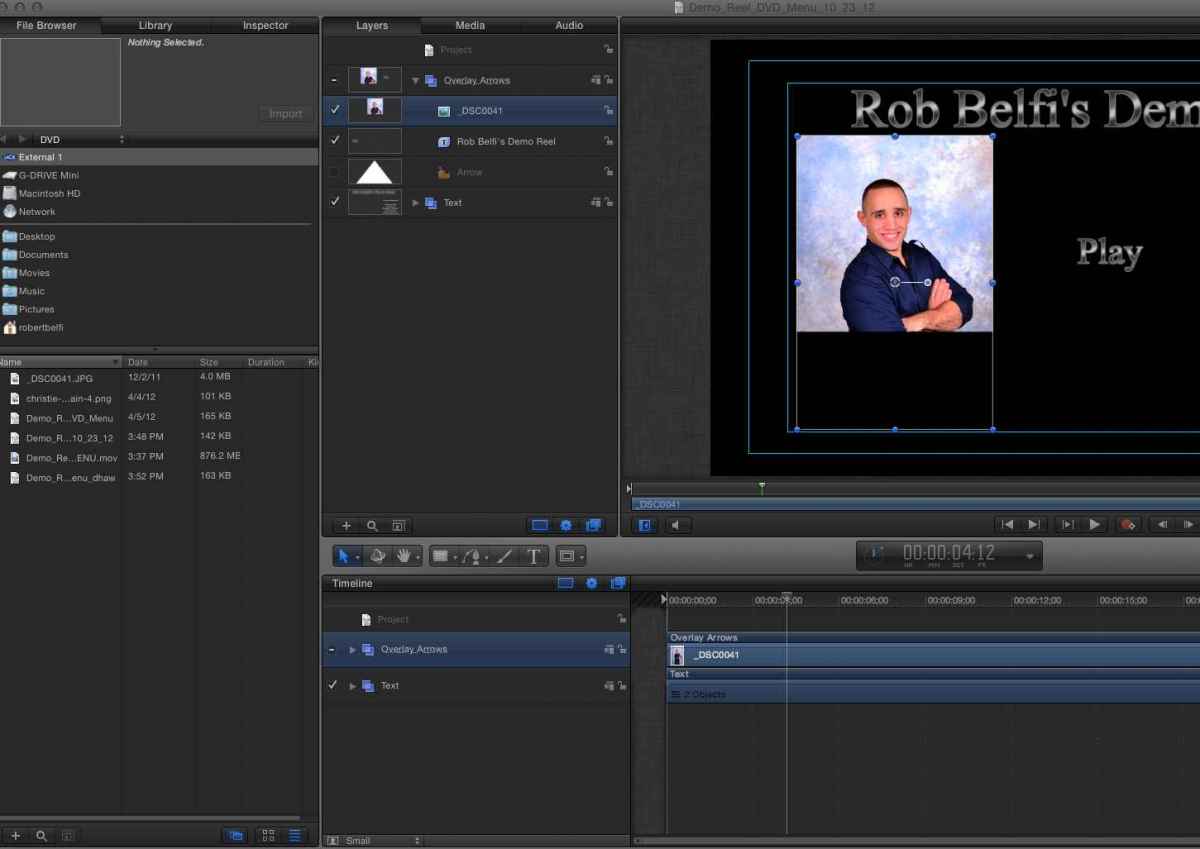
I'm trying to create a DVD in Motion 5 and was editing without any problems until all of a sudden a picture I was using cropped itself. The overlay box still shows the size the picture should be, but the picture is cut in half. I've tried making new projects, re-importing the picture, nothing works. The picture looks fine anywhere else I open it, expect for Motion.
When I play my project it looks fine as well, but not when I'm editing it. I tried exporting to see what it would look like and it exported cropped.
Has anyone run into this problem before or have any ideas for what I could do?
I've attached screen grabs
Thanks,
Rob
I'm trying to create a DVD in Motion 5 and was editing without any problems until all of a sudden a picture I was using cropped itself. The overlay box still shows the size the picture should be, but the picture is cut in half. I've tried making new projects, re-importing the picture, nothing works. The picture looks fine anywhere else I open it, expect for Motion.
When I play my project it looks fine as well, but not when I'm editing it. I tried exporting to see what it would look like and it exported cropped.
Has anyone run into this problem before or have any ideas for what I could do?
I've attached screen grabs
Thanks,
Rob
Last edit: 22 Oct 2012 20:08 by Rbelfi.
Please Log in to join the conversation.

23 Oct 2012 01:10 #15395
by BenB
Replied by BenB on topic Picture is cropping itself without any settings changed
System specs? Version numbers?
Please Log in to join the conversation.
23 Oct 2012 01:12 #15396
by Rbelfi
Replied by Rbelfi on topic Picture is cropping itself without any settings changed
10.8.2
3.06 GHz Intel Core 2 Duo
4 GB Ram
Motion 5.0.4
I think I figured out a fix. I changed the file type from jpeg to psd and so far it hasn't changed yet...
3.06 GHz Intel Core 2 Duo
4 GB Ram
Motion 5.0.4
I think I figured out a fix. I changed the file type from jpeg to psd and so far it hasn't changed yet...
Please Log in to join the conversation.


23 Oct 2012 03:00 #15397
by dgwvideo
Creating history....one edit at a time !
Replied by dgwvideo on topic Picture is cropping itself without any settings changed
Something else is wrong. If it worked for a while with a jpeg and then suddenly cropped itself the actual filetype would not be the cause. It also looks scaled up in the bottom picture. Is it possible there is a behavior accidentally applied to the image?
Creating history....one edit at a time !
Please Log in to join the conversation.
23 Oct 2012 12:17 #15422
by Rbelfi
Replied by Rbelfi on topic Picture is cropping itself without any settings changed
It's not scaled, it's just the way I took the screen grab. I had to move it to not show some personal information on the screen.
Also, I have drop shadows on all the text and on the picture, but when I export they don't show up.
Also, I have drop shadows on all the text and on the picture, but when I export they don't show up.
Please Log in to join the conversation.
23 Oct 2012 12:42 #15423
by dgwvideo
Creating history....one edit at a time !
Replied by dgwvideo on topic Picture is cropping itself without any settings changed
That is odd. Are you using any image masks? The reason I ask is because I applied a 4 point mask to a clip recently (not sure which one, I'll have to check) and I noticed a scale down (or maybe crop) of the image. I went to the inspector and removed the mask and the image restored to its normal size. It was stacked within a few layers of graphics. I never did figure out if it was a bug in FCPX or more likely just a bad mask plugin.
Creating history....one edit at a time !
Please Log in to join the conversation.
23 Oct 2012 12:54 #15424
by Rbelfi
Replied by Rbelfi on topic Picture is cropping itself without any settings changed
No masks, just a simple drop shadow. No matter how many times I export the final product doesn't have the same effects published as my project file.
Please Log in to join the conversation.
23 Oct 2012 13:30 #15426
by BenB
Replied by BenB on topic Picture is cropping itself without any settings changed
What drop shadow, exactly?
Please Log in to join the conversation.
23 Oct 2012 17:50 #15444
by Rbelfi
Replied by Rbelfi on topic Picture is cropping itself without any settings changed
The one in the inspector.
I figured it out...kinda. I changed the jpeg to a psd and exported as Pro Ress 422...the only export setting that exports exactly as the project should look, everything else eliminates all my drop shadows.
I figured it out...kinda. I changed the jpeg to a psd and exported as Pro Ress 422...the only export setting that exports exactly as the project should look, everything else eliminates all my drop shadows.
Please Log in to join the conversation.
