


3 Post Moderation Rule for New Boarders (25 Jan 2021)
New boarders will have their posts moderated - Don't worry if you cannot see your post immediately.
Checking durations in Event.

23 May 2012 09:28 #8756
by Seanus
Sean Lander - Editing since 1982 - AVID 1991 - FCP 1999 - FCPX 2011
Checking durations in Event. was created by Seanus
Couldn't find any mention of this in my searches. Seems a little basic but I'm stumped.
Going through and marking up all my footage and want to know what durations that I'm favouriting as there's no point in marking it up if it's under 3 seconds.
Can't for the life of me figure out how much my IN OUT duration is.
Am I missing something here?
Going through and marking up all my footage and want to know what durations that I'm favouriting as there's no point in marking it up if it's under 3 seconds.
Can't for the life of me figure out how much my IN OUT duration is.
Am I missing something here?
Sean Lander - Editing since 1982 - AVID 1991 - FCP 1999 - FCPX 2011
Please Log in to join the conversation.
23 May 2012 12:08 #8757
by Seanus
Sean Lander - Editing since 1982 - AVID 1991 - FCP 1999 - FCPX 2011
Replied by Seanus on topic Re: Checking durations in Event.
Figured it out. It shows up in the status bar at the bottom of the browser. What was catching me out. (And I've reported this bug) is that if you have moved the viewer to the second display and are showing the events on the second display (with menubar) then the duration doesn't show up or let you edit it in the dashboard.
Sean Lander - Editing since 1982 - AVID 1991 - FCP 1999 - FCPX 2011
Please Log in to join the conversation.

23 May 2012 18:43 #8763
by BenB
Replied by BenB on topic Re: Checking durations in Event.
I found this very interesting since I've edited with a dual monitor setup for months now. So I tried to replicate what you described.
When I show Viewer on second display, I see everything in every pane.
When I show Event Browser on second display, I see everything in every pane.
Any of the three window configurations allow me to with the Dashboard.
When I mark Favorites, I can see the duration in the Duration column (I put it right next to Name, as I use it the most in the Browser), and at the bottom of the Browser pane when in any of the 3 window configurations.
How are you getting both Viewer and Events into the second display at the same time?
When I show Viewer on second display, I see everything in every pane.
When I show Event Browser on second display, I see everything in every pane.
Any of the three window configurations allow me to with the Dashboard.
When I mark Favorites, I can see the duration in the Duration column (I put it right next to Name, as I use it the most in the Browser), and at the bottom of the Browser pane when in any of the 3 window configurations.
How are you getting both Viewer and Events into the second display at the same time?
Please Log in to join the conversation.
24 May 2012 00:50 - 24 May 2012 00:54 #8779
by Seanus
Sean Lander - Editing since 1982 - AVID 1991 - FCP 1999 - FCPX 2011
Replied by Seanus on topic Re: Checking durations in Event.
Yes it's definitely my odd configuration. But I love it!
I first off have FCP X set to one window which I then drag to the second display and fill the screen with.
Then I switch to 2 monitors sending the event to second display (but it's really the primary display.
This way I get the menubar over the events and the viewer and timeline on their own display. Just like I use in Avid, FCP 7 etc.
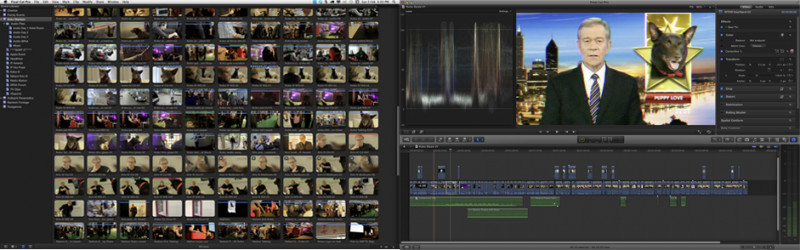
I first off have FCP X set to one window which I then drag to the second display and fill the screen with.
Then I switch to 2 monitors sending the event to second display (but it's really the primary display.
This way I get the menubar over the events and the viewer and timeline on their own display. Just like I use in Avid, FCP 7 etc.
Sean Lander - Editing since 1982 - AVID 1991 - FCP 1999 - FCPX 2011
Last edit: 24 May 2012 00:54 by Seanus.
Please Log in to join the conversation.
24 May 2012 00:59 - 24 May 2012 01:02 #8780
by BenB
Replied by BenB on topic Re: Checking durations in Event.
I'm doing the same thing, following your setup exactly, and I still have all my durations showing, just as your screen shots are showing. I can still edit with the Dashboard, etc. So I'm not sure what's missing when you configure this setup.
Last edit: 24 May 2012 01:02 by BenB.
Please Log in to join the conversation.
24 May 2012 01:12 #8784
by Seanus
Sean Lander - Editing since 1982 - AVID 1991 - FCP 1999 - FCPX 2011
Replied by Seanus on topic Re: Checking durations in Event.
Hmm. Interesting. Must be something unique about my system then.
If I click on a clip in the event browser and then double click the dashboard to modify duration nothing happens.
Also if I have a clip selected and I try to view the info properties it says "nothing selected" even though there is.
All works perfectly if I restore to a conventional layout. I'll tinker some more and see if I can get to the bottom of it.
If I click on a clip in the event browser and then double click the dashboard to modify duration nothing happens.
Also if I have a clip selected and I try to view the info properties it says "nothing selected" even though there is.
All works perfectly if I restore to a conventional layout. I'll tinker some more and see if I can get to the bottom of it.
Sean Lander - Editing since 1982 - AVID 1991 - FCP 1999 - FCPX 2011
Please Log in to join the conversation.
24 May 2012 01:42 #8786
by BenB
Replied by BenB on topic Re: Checking durations in Event.
Ah, yes, you can't set ranges in the Browser when the two panes are on different monitors. It's always been like that. I'm sure it'll be tweaked in some update. Fill out the feedback page.
As for the Inspector, I've no problems with that in any configuration.
As for the Inspector, I've no problems with that in any configuration.
Please Log in to join the conversation.
- Scrubelicious
-

- Offline
- Platinum Member
-

Less
More
- Posts: 1228
- Thank you received: 114
24 May 2012 02:45 #8787
by Scrubelicious
Replied by Scrubelicious on topic Re: Checking durations in Event.
I get this issue sometimes working with the default layout having the Event Browser on Second Display. But only when the Project Library visible.Seanus wrote:
Also if I have a clip selected and I try to view the info properties it says "nothing selected" even though there is.
Please Log in to join the conversation.
24 May 2012 03:27 #8790
by Seanus
Sean Lander - Editing since 1982 - AVID 1991 - FCP 1999 - FCPX 2011
Replied by Seanus on topic Re: Checking durations in Event.
Well you made be try it with the project library visible and now it works.
Load a project and it goes back to disabled. It's like when you click on info it thinks you want info on the project.
And now I've discovered something else. If you have something selected in the timeline and then click on a clip in the event browser it works!
So thats a pretty easy work around.
Thanks for the help.
Load a project and it goes back to disabled. It's like when you click on info it thinks you want info on the project.
And now I've discovered something else. If you have something selected in the timeline and then click on a clip in the event browser it works!
So thats a pretty easy work around.
Thanks for the help.
Sean Lander - Editing since 1982 - AVID 1991 - FCP 1999 - FCPX 2011
Please Log in to join the conversation.
