




- Posts: 11
- Thank you received: 1
3 Post Moderation Rule for New Boarders (25 Jan 2021)
New boarders will have their posts moderated - Don't worry if you cannot see your post immediately.
Narrowing the story line
23 May 2012 09:16 #8755
by andersu
Narrowing the story line was created by andersu
I think I've seen something written about this somewhere, but I don't remember where.
My question if there is a way to narrow the time line down? After creating a multi cam clip, I sometimes end up with some stray clips. The story line stays "streched-out" after a re-position these stray clips (which might be clips with the wrong time code or no time code at all).
I'm scrolling/zooming or using shift-Z to get all the clips in the story line at the same time. I'm working in the angle editor but the story line length is reflected in the story line where the collapsed multi cam clip resides as well.
Basically I would like to easily shorten the story line and blade off the beginning and end portions.
I really enjoy this forum and I hope I can contribute more as I learn more and more about FCP X.
Thanks everyone
Anders
Chicago, IL
My question if there is a way to narrow the time line down? After creating a multi cam clip, I sometimes end up with some stray clips. The story line stays "streched-out" after a re-position these stray clips (which might be clips with the wrong time code or no time code at all).
I'm scrolling/zooming or using shift-Z to get all the clips in the story line at the same time. I'm working in the angle editor but the story line length is reflected in the story line where the collapsed multi cam clip resides as well.
Basically I would like to easily shorten the story line and blade off the beginning and end portions.
I really enjoy this forum and I hope I can contribute more as I learn more and more about FCP X.
Thanks everyone
Anders
Chicago, IL
Please Log in to join the conversation.


23 May 2012 17:36 #8761
by BenB
Replied by BenB on topic Re: Narrowing the story line
Not sure I'm following you, but in the bottom right of the Timeline pane is the Timeline appearance window. Looks like a light switch. You can adjust clip height there, as well as other parameters that effect how clips appear in the Timeline.
Please Log in to join the conversation.
23 May 2012 21:08 #8766
by andersu
Replied by andersu on topic Re: Narrowing the story line
Thanks for your response,
I should have been clearer and should have mentioned that I'm looking to slice/blade/chop off the left and right side of the storyline. That way, it will be become narrower horizontally and easier to work with. Sorry for the confusing.
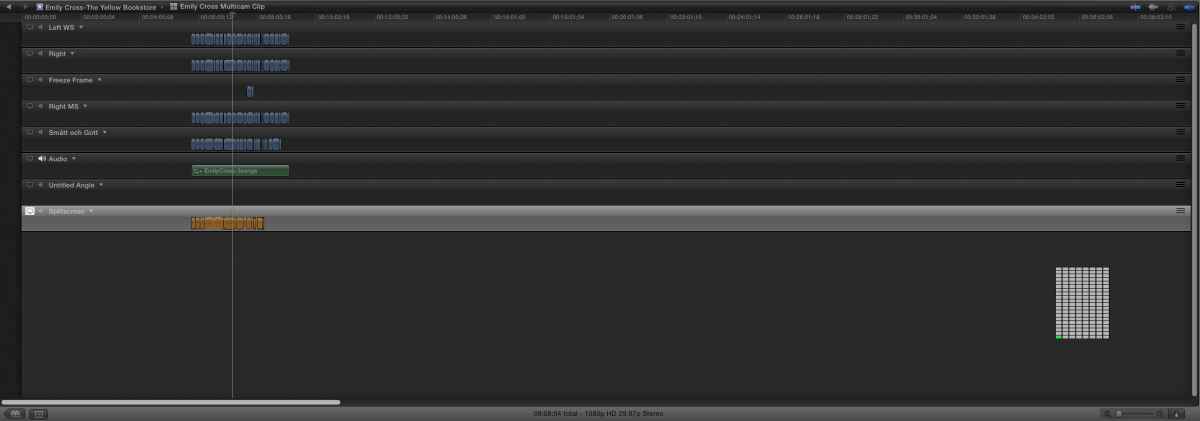
The attached file shows my story line in the Angle Editor. The actual footage is about 9 min. long while the total length of the time line is well over an hour.
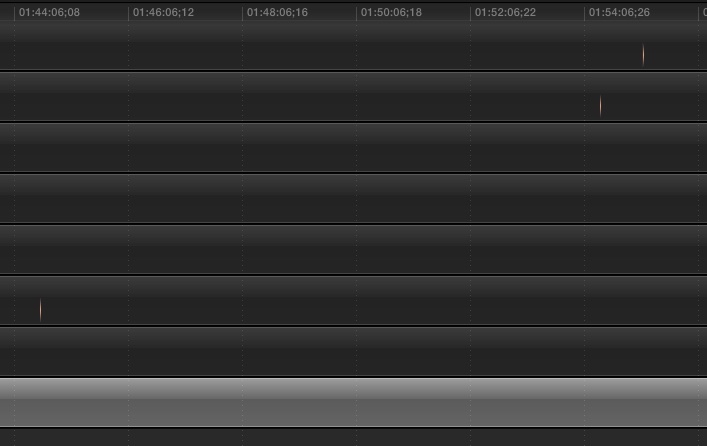
While testing to see if I had overlooked something using the "light switch" and command -/+ to zoom, I came across some stray single vertical lines in orange. I thought I had solved my problem. But, I can't grab them and delete them. They seem to only show up when I zoom in closely, otherwise they are not visible. I have attached an image of that as well.
I hope you can see the details in my screen grabs.
Thanks
I should have been clearer and should have mentioned that I'm looking to slice/blade/chop off the left and right side of the storyline. That way, it will be become narrower horizontally and easier to work with. Sorry for the confusing.
The attached file shows my story line in the Angle Editor. The actual footage is about 9 min. long while the total length of the time line is well over an hour.
While testing to see if I had overlooked something using the "light switch" and command -/+ to zoom, I came across some stray single vertical lines in orange. I thought I had solved my problem. But, I can't grab them and delete them. They seem to only show up when I zoom in closely, otherwise they are not visible. I have attached an image of that as well.
I hope you can see the details in my screen grabs.
Thanks
Please Log in to join the conversation.
23 May 2012 21:41 #8768
by BenB
Replied by BenB on topic Re: Narrowing the story line
You have some single frame orphans out there. You may need to zoom in all the way completely to select them.
If you can't, I'd document all of this "very clearly", and send it to the FCP X feedback page. They've been personally contacting the most extreme bug cases.
If you can't, I'd document all of this "very clearly", and send it to the FCP X feedback page. They've been personally contacting the most extreme bug cases.
Please Log in to join the conversation.
23 May 2012 22:04 #8772
by andersu
Replied by andersu on topic Re: Narrowing the story line
Thanks Ben, I'll write to FCP X tonight after trying to select them again.
Please Log in to join the conversation.


28 May 2012 03:59 #8905
by dgwvideo
Creating history....one edit at a time !
Replied by dgwvideo on topic Re: Narrowing the story line
I have seen frame orphans appear on occasion and usually related to the application of a transition on a clip without sufficient handles. It usually places those 1 or 2 frame clips at the beginning and at the end of the specific clip the transition was applied to. Sometimes they can get scattered about the timeline. I have communicated this to Apple via the feedback page more than once.
But, to select them for deletion, Ben is correct. Use the zoom on the timeline to make them large enough to select and delete them. With timelines an hour long, it's a good idea to zoom in real close and scroll along from start to finish before your final export to ensure there are no hidden gems like these that will cause a flicker or glitch when played back in real time.
But, to select them for deletion, Ben is correct. Use the zoom on the timeline to make them large enough to select and delete them. With timelines an hour long, it's a good idea to zoom in real close and scroll along from start to finish before your final export to ensure there are no hidden gems like these that will cause a flicker or glitch when played back in real time.
Creating history....one edit at a time !
Please Log in to join the conversation.
