


- Posts: 25
- Thank you received: 0
3 Post Moderation Rule for New Boarders (25 Jan 2021)
New boarders will have their posts moderated - Don't worry if you cannot see your post immediately.
Editing questions
- Eunderstand
-
 Topic Author
- Offline
- Junior Member
-

Less
More
19 May 2012 04:50 - 22 May 2012 21:20 #8616
by Eunderstand
Editing questions was created by Eunderstand
This summer I will be interning at a camp to make videos for them, I am amateur by every means but I want to grow in my skill and craft in every way. As far as filming I feel confident in getting great shots, one of my main concerns is editing. Could anyone please offer some suggestions in editing (tips and tricks). Maybe some effects to use? Whatever else maybe helpful is greatly appreciative. Thank you for your time.
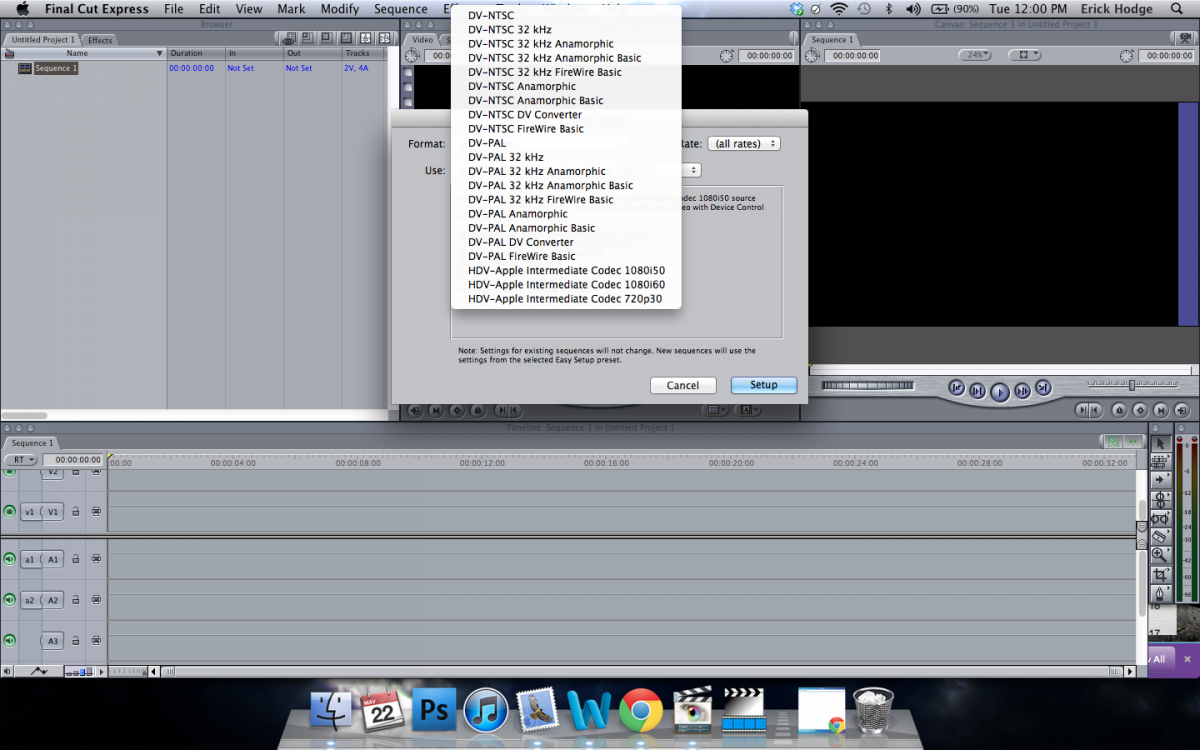
Last edit: 22 May 2012 21:20 by Eunderstand.
Please Log in to join the conversation.


19 May 2012 08:11 #8626
by dgwvideo
Creating history....one edit at a time !
Replied by dgwvideo on topic Re: Editing questions
That's a really difficult broad based question to get any useful answers to. A lot of your editing style will be based on your familiarity with NLE's and which one you choose (assume either FCPX or FCP7). The look and feel you want for your finished product would play a large role in determining effect types, transitions, titles, etc.
Your best best is to watch some tutorial videos (many on this forum) about basic editing, color grading, sound mixing, etc. and also read enough of the user manuals to understand how to approach the basic editing tasks involved in producing a simple video.
One you have secured that basic knowledge you will probably be able to ask more specific questions here relative to your actual project.
Your best best is to watch some tutorial videos (many on this forum) about basic editing, color grading, sound mixing, etc. and also read enough of the user manuals to understand how to approach the basic editing tasks involved in producing a simple video.
One you have secured that basic knowledge you will probably be able to ask more specific questions here relative to your actual project.
Creating history....one edit at a time !
Please Log in to join the conversation.

19 May 2012 08:59 #8634
by BenB
Replied by BenB on topic Re: Editing questions
There is an out of print book that is worth getting if you can find a copy. "Apple Pro Training Series: The Craft Of Editing".
Please Log in to join the conversation.
- Eunderstand
-
Topic Author
- Offline
- Junior Member
-
Less
More
- Posts: 25
- Thank you received: 0
19 May 2012 22:26 #8652
by Eunderstand
Replied by Eunderstand on topic Re: Editing questions
dgwvideo
Could please provide some possible links in the basic editing, color grading?
Most of my videos will be footage played over a sound track. Here is a sample video from last year the videographer did. I am trying to step it up. I know one thing to be sure of is to get close ups! lots of them!
Could please provide some possible links in the basic editing, color grading?
Most of my videos will be footage played over a sound track. Here is a sample video from last year the videographer did. I am trying to step it up. I know one thing to be sure of is to get close ups! lots of them!
Please Log in to join the conversation.
20 May 2012 00:24 #8654
by BenB
Replied by BenB on topic Re: Editing questions
Another resource you may want is "The Color Correction Handbook" by Alexis Van Hurkman. This is the colorist bible, pretty much. It was the best selling book at NAB Show this year, and last year. Everyone who ever even just thought about color grading should have this book. Your visuals will improve with the information in that book.
Please Log in to join the conversation.
20 May 2012 00:50 - 20 May 2012 00:53 #8655
by dgwvideo
Creating history....one edit at a time !
Replied by dgwvideo on topic Re: Editing questions
@ Eunderstand
Watch several of the tutorials on editing and color grading here:
fcp.co/final-cut-pro/tutorials
And here's a basic 3 point editing tutorial:
fcp.co/final-cut-pro/tutorials/690-the-b...tin-and-mark-spencer
Watch several of the tutorials on editing and color grading here:
fcp.co/final-cut-pro/tutorials
And here's a basic 3 point editing tutorial:
fcp.co/final-cut-pro/tutorials/690-the-b...tin-and-mark-spencer
Creating history....one edit at a time !
Last edit: 20 May 2012 00:53 by dgwvideo.
Please Log in to join the conversation.
20 May 2012 08:48 #8662
by cgbier
Replied by cgbier on topic Re: Editing questions
Besides this esteemed forum, also check the multitude of tutorials on the
Holy Cow
.
The MacBreak Studio podcasts are linked here, but you can subscribe to them via iTunes. There were some interesting discussions on editing in general a couple of years ago.
Denver Riddle has put together a 15-part Color Grading tutorial on FCP X.
....and there is, of course, always the courses from Rippletraining.
... and check MacBreak Studio Live on the Pixelcorps YouTube channel.... They have some great discussions.
Hope that'll give you a start.
The MacBreak Studio podcasts are linked here, but you can subscribe to them via iTunes. There were some interesting discussions on editing in general a couple of years ago.
Denver Riddle has put together a 15-part Color Grading tutorial on FCP X.
....and there is, of course, always the courses from Rippletraining.
... and check MacBreak Studio Live on the Pixelcorps YouTube channel.... They have some great discussions.
Hope that'll give you a start.
Please Log in to join the conversation.
20 May 2012 12:55 #8663
by cgbier
Replied by cgbier on topic Re: Editing questions
Hmm, my post didn't appear? I hope I didn't break any forum rules.
The content in short: I linked to several resources on editing in general and FCP X, the Creative Cow Library, Pixelcorps' YT channel (the live videos are great), Color Grading Central (a 15 part tutorial on color grading), Ripple Training, the possibility to subscribe to MacBreak Studio Podcasts via iTunes (they had some great discussions about editing a few years ago), and I forgot the rest.
Important though: If you cut your video to music, cut it to the beat. That was lacking in the sample you provided. Rippletraining's Advanced FCP Tutorial shows how it's done (or check YouTube sources).
A warning to YouTube tutorials: A lot of them are done by teenagers with more allowance than real knowledge. While there are some good ones, most of them are sending you down the wrong track. What they show you might work out somehow, but it not always the best way to do things (that leads back the language/software debate a few days ago).
The content in short: I linked to several resources on editing in general and FCP X, the Creative Cow Library, Pixelcorps' YT channel (the live videos are great), Color Grading Central (a 15 part tutorial on color grading), Ripple Training, the possibility to subscribe to MacBreak Studio Podcasts via iTunes (they had some great discussions about editing a few years ago), and I forgot the rest.
Important though: If you cut your video to music, cut it to the beat. That was lacking in the sample you provided. Rippletraining's Advanced FCP Tutorial shows how it's done (or check YouTube sources).
A warning to YouTube tutorials: A lot of them are done by teenagers with more allowance than real knowledge. While there are some good ones, most of them are sending you down the wrong track. What they show you might work out somehow, but it not always the best way to do things (that leads back the language/software debate a few days ago).
Please Log in to join the conversation.
20 May 2012 18:41 - 20 May 2012 18:45 #8664
by Seanus
Sean Lander - Editing since 1982 - AVID 1991 - FCP 1999 - FCPX 2011
Replied by Seanus on topic Re: Editing questions
Here's the thing. Everyone cuts differently. Find your style, there is no right or wrong way to cut. Please DON'T cut to the beat, by all means use it, but don't be a slave to it. Pick your moments you'll know when they come up. Trust your instincts.
Sean Lander - Editing since 1982 - AVID 1991 - FCP 1999 - FCPX 2011
Last edit: 20 May 2012 18:45 by Seanus.
Please Log in to join the conversation.
20 May 2012 18:43 - 21 May 2012 08:42 #8665
by Seanus
Sean Lander - Editing since 1982 - AVID 1991 - FCP 1999 - FCPX 2011
Replied by Seanus on topic Re: Editing questions
Also where you currently are cutting between shots that are pretty much the same try to either cut away or use slo mo. But only where the shots deserve it.
The soundtrack will work well with this technique.
The soundtrack will work well with this technique.
Sean Lander - Editing since 1982 - AVID 1991 - FCP 1999 - FCPX 2011
Last edit: 21 May 2012 08:42 by Seanus.
Please Log in to join the conversation.
22 May 2012 09:04 #8689
by dgwvideo
You didn't break any rules...this is an ongoing issue with new forum software having been installed due to some hacking on the site. Still not quite right. If you click quote on your blank post you'll see all you typed is actually there, just didn't make it to the post. I got your original post to my smartphone without problems...just doesn't show up here.
Creating history....one edit at a time !
Replied by dgwvideo on topic Re: Editing questions
cgbier wrote: Hmm, my post didn't appear? I hope I didn't break any forum rules.
You didn't break any rules...this is an ongoing issue with new forum software having been installed due to some hacking on the site. Still not quite right. If you click quote on your blank post you'll see all you typed is actually there, just didn't make it to the post. I got your original post to my smartphone without problems...just doesn't show up here.
Creating history....one edit at a time !
Please Log in to join the conversation.
- Eunderstand
-
Topic Author
- Offline
- Junior Member
-
Less
More
- Posts: 25
- Thank you received: 0
22 May 2012 19:21 #8711
by Eunderstand
Replied by Eunderstand on topic Re: Editing questions
Thank to everyone for your advice, links, and support. We shall see how this goes.
Thoughts on Final Cut Express 4?
Thoughts on Final Cut Express 4?
Please Log in to join the conversation.
22 May 2012 19:35 #8714
by BenB
Replied by BenB on topic Re: Editing questions
Final Cut Express is no longer sold. I'd just go straight to Final Cut Pro X.
Please Log in to join the conversation.
- Tom Wolsky
-

- Offline
- Moderator
-

22 May 2012 19:35 #8715
by Tom Wolsky
Replied by Tom Wolsky on topic Re: Editing questions
It's an obsolete application that uses a largely obsolete codec in HD.
Please Log in to join the conversation.
- Eunderstand
-
Topic Author
- Offline
- Junior Member
-
Less
More
- Posts: 25
- Thank you received: 0
22 May 2012 21:16 - 22 May 2012 21:24 #8732
by Eunderstand
Replied by Eunderstand on topic Re: Editing questions
Is it possible to get 7D footage uploaded to Final Cut Pro X? I am attempting to do with final cut express 4 with MPEG Stream Clip and it is not working and I also tried with the canon plug in...still not working. I dont think Final cut express 4 can handle footage from my 7D of 1920X1080.
Maybe its the settings I am using? Here are the formats to edit in. Is that the problem...if so what format should I use?
I took a snap shot of it which is posted in my original post at the top.
Also as far as settings for MPEG Clip I have very few compression options as well. Might that be a problem...like no DVCPRO HD 720 etc...and Pro Res and neither are those formats are available in Final Pro Cut express 4 in the snap shot above.
Maybe its the settings I am using? Here are the formats to edit in. Is that the problem...if so what format should I use?
I took a snap shot of it which is posted in my original post at the top.
Also as far as settings for MPEG Clip I have very few compression options as well. Might that be a problem...like no DVCPRO HD 720 etc...and Pro Res and neither are those formats are available in Final Pro Cut express 4 in the snap shot above.
Last edit: 22 May 2012 21:24 by Eunderstand.
Please Log in to join the conversation.
22 May 2012 21:34 - 22 May 2012 21:36 #8735
by BenB
Replied by BenB on topic Re: Editing questions
7D records QuickTime H.264 movie files. You have no need for MPEGStreamClip at all. That's a huge waste of time.
In FCP X, Import File, select the ".mov" clips on the card you need, or just Select All.
File > Import > Files (Shift-Command-i)
Simple as that.
Depending on your hardware and workflow, you may or may not want to Optimize it or create proxies.
Forget all about FCE...
In FCP X, Import File, select the ".mov" clips on the card you need, or just Select All.
File > Import > Files (Shift-Command-i)
Simple as that.
Depending on your hardware and workflow, you may or may not want to Optimize it or create proxies.
Forget all about FCE...
Last edit: 22 May 2012 21:36 by BenB.
Please Log in to join the conversation.
- Eunderstand
-
Topic Author
- Offline
- Junior Member
-
Less
More
- Posts: 25
- Thank you received: 0
22 May 2012 23:11 #8747
by Eunderstand
Replied by Eunderstand on topic Re: Editing questions
So the format of H.264 will maintain the quality of 7D footage while exporting and importing in FCP X??
Also please explain more about not wanting to optimizing or creating proxies?
BenB you are always helpful
Also please explain more about not wanting to optimizing or creating proxies?
BenB you are always helpful
Please Log in to join the conversation.
23 May 2012 00:05 #8748
by BenB
Replied by BenB on topic Re: Editing questions
H.264 is what the 7D records. We use one here in my studio. It records QuickTime movie files that are in the H.264 codec. If you have the hardware to handle it, you can edit that natively, never needing to transcode to anything.
If you're on a laptop or something with a slower drive or not very powerful GPU or something, Optimized (ProRes 422) files will let FCP X work a bit more smoothly. If that's too much, you can make proxie files. These are 1/4 quality files that are small so your hardware can get through the edits quickly. You'd also want the original and/or Optimized files to switch back to before Exporting, so you get a full rez export.
If you're on a laptop or something with a slower drive or not very powerful GPU or something, Optimized (ProRes 422) files will let FCP X work a bit more smoothly. If that's too much, you can make proxie files. These are 1/4 quality files that are small so your hardware can get through the edits quickly. You'd also want the original and/or Optimized files to switch back to before Exporting, so you get a full rez export.
Please Log in to join the conversation.
